







What is Asset Infinity?
Asset Infinity provides asset tracking and asset management software to organizations around the world. It lets you manage your assets and handle inventory stock without trouble, from a web browser or a phone.
Beyond asset tracking and asset management, Asset Infinity software offers depreciation tracking, maintenance management, inventory and complaint management, utility monitoring, audit reports, and other Asset Infinity features. The software keeps all the information in one place, which makes data easy to collect and helps you make well-informed business decisions. Each area is described below.
Also Read: IT Asset Management Software
Asset Infinity Features for Asset Management & Tracking
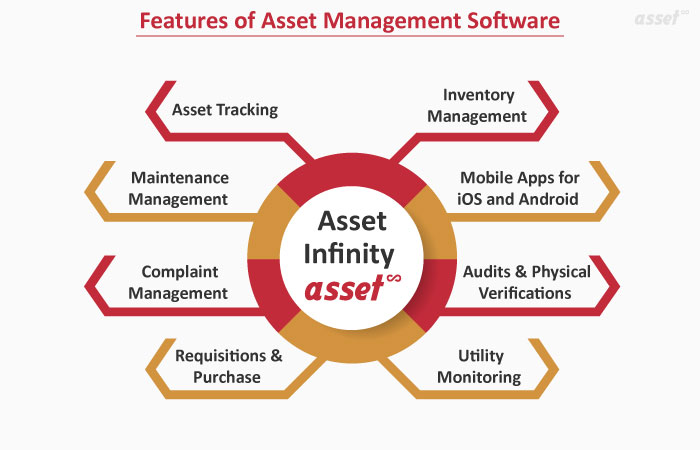
1. Asset Tracking
- Asset Tagging: Asset tagging is the starting point of asset management. It uses asset tracking techniques such as RFID, barcodes, QR codes and GPS. Once an asset tag is scanned, it retrieves the asset’s information, maintenance log and much more.
- Document check-in and check-out: When an asset is checked in or out, the software records the details of that asset, along with any documents, in an organized way.
- Location, department and employee tracking: Asset tracking tells you where an asset is, using whichever of the tracking techniques you have in place. You can also track assets by department to improve productivity, and record which employee has each asset as its custodian.
- Movement history of assets: Movement reports keep track of every move of a particular asset, whether it goes from one location to another or moves internally.
- Discarding assets: Asset disposal removes an asset from the company’s accounting records. You can dispose of an asset in the application when it is fully depreciated or no longer required, with the reason recorded.
2. Maintenance Management
- Defining preventive maintenance schedules: Based on questions like “How often are your assets working?” and “How much maintenance do they need?”, you can set maintenance schedules for assets to keep them efficient and avoid waiting time after a breakdown.
- Assigning maintenance activities: You can set and assign the maintenance cycle for an asset according to the organization’s requirements or guidelines.
- Monitoring maintenance activities: Once a task is assigned to an employee, you can see the status of the maintenance activity.
- Reminders and alerts: You receive reminders by email and mobile notification for maintenance activities, so you do not have to remember them yourself. The software notifies you according to the schedule.
3. Complaint Management
- Tickets for reporting faults, breakdowns or complaints: You can raise a ticket against any fault or breakdown in equipment or an asset in our complaint ticketing system, so it goes to the right team for maintenance.
- Allocating tickets and tracking open tickets: A raised ticket is assigned to the responsible, authorized person, and you can track its status until it is closed.
- Capturing ticket types, priority and user groups: Tickets are assigned according to the type of complaint, its priority and its user group.
- Breakdown records and history: You can always check the history of raised tickets, the total number of tickets, and how many are resolved or pending in our helpdesk ticketing system.
4. Requisitions & Purchase
- Purchase requisitions for assets or items: Employees start a purchase requisition for the inventory they need.
- Approval workflows for new asset purchases or allotment of existing assets: Once a purchase requisition has all the required fields filled in, it goes through the approval workflow, where it can be approved, rejected or sent back for changes.
- Receiving goods against purchase orders (POs) and creating GRNs: The application creates POs for approved requisitions of assets, inventory items, catalog items and other material, covering the purchase requisition, the purchase order (PO) and the goods received note (GRN).
Also Read: 8 Evergreen Asset Tracking Software Benefits That Help Businesses
5. Inventory Management
- Maintaining a list of inventory: If you need to know how many consumables or spare parts are left in stock, inventory tracking software keeps the list of inventory and all the related information.
- Defining reorder levels for each item: You can set a reorder level for each item separately, so items that run out quickly can be reordered sooner. The system notifies the person responsible for that item’s stock when the count reaches the minimum level.
- Adding, moving or drawing inventory between locations: If one facility has too much stock and another has too little, you can transfer inventory from one place to another and keep a record of each move.
6. Audits & Physical Verifications
- Self and assisted audits: Verification rounds can be run by an audit team or as self-verification by the people who hold the assets, with the results feeding management reports.
- Mobile-based scanning of assets: You can scan the unique asset tags on assets and equipment with your mobile phone.
- Geo-location capture: Smartphones have built-in GPS, and an asset’s record can hold its geo-coordinates, so you know where a particular asset was found.
- Quick verification with barcode, QR or RFID tags: You can carry out physical equipment and asset verification by scanning the barcode tags, QR codes or RFID tags on the assets.
7. Utility Monitoring
- Tracking usage of utilities by asset or location: For utilities such as electricity, water and gas, the utility monitoring system collects consumption information for the utilities serving your facility.
- Recording meter readings: You decide how often meters are read, whether daily, weekly or monthly.
- Consumption reports: Questions like “How much has each facility consumed?” are answered by the records the system keeps, and you can build reports to suit your needs.
- Spotting overuse: Consumption records show when a facility uses more than expected, so you can act on it.
8. Mobile Apps for iOS and Android
- Managing assets on phones or tablets: The mobile application lets you manage and track your assets on your smartphone.
- Adding or updating asset details: You can add new assets with our mobile inventory app and update the information on existing ones.
- Scanning barcodes and QR codes with your phone’s camera: The mobile app scans the barcode and QR code on an asset using your smartphone’s camera.
- Viewing pending activities and tickets: You can raise tickets and view the status of tickets or complaints raised by internal or external users.
Also Read: Why Use Mobile Applications for Cloud-Based Asset Management Software?
The Features That Matter Most
These are the most important features to have in a cloud-based asset management system, and they let you manage your assets from anywhere. Asset Infinity’s web and mobile applications are easy to use and built with businesses and their users in mind.
Together, all the features mentioned above help you track assets efficiently within Asset Infinity. They help eliminate costly mismanagement of assets and focus critical resources where they are most needed. Asset Infinity’s software and apps are flexible and easy to use, and they add value to your organization.
Asset Infinity offers a 14-day free trial, and you can also schedule a demo with us.