






Asset register software that every team can trust
Asset register software with one record per asset, saying what it is, where it is, who answers for it and who is holding it. Maintenance, finance and IT all work from the same row.
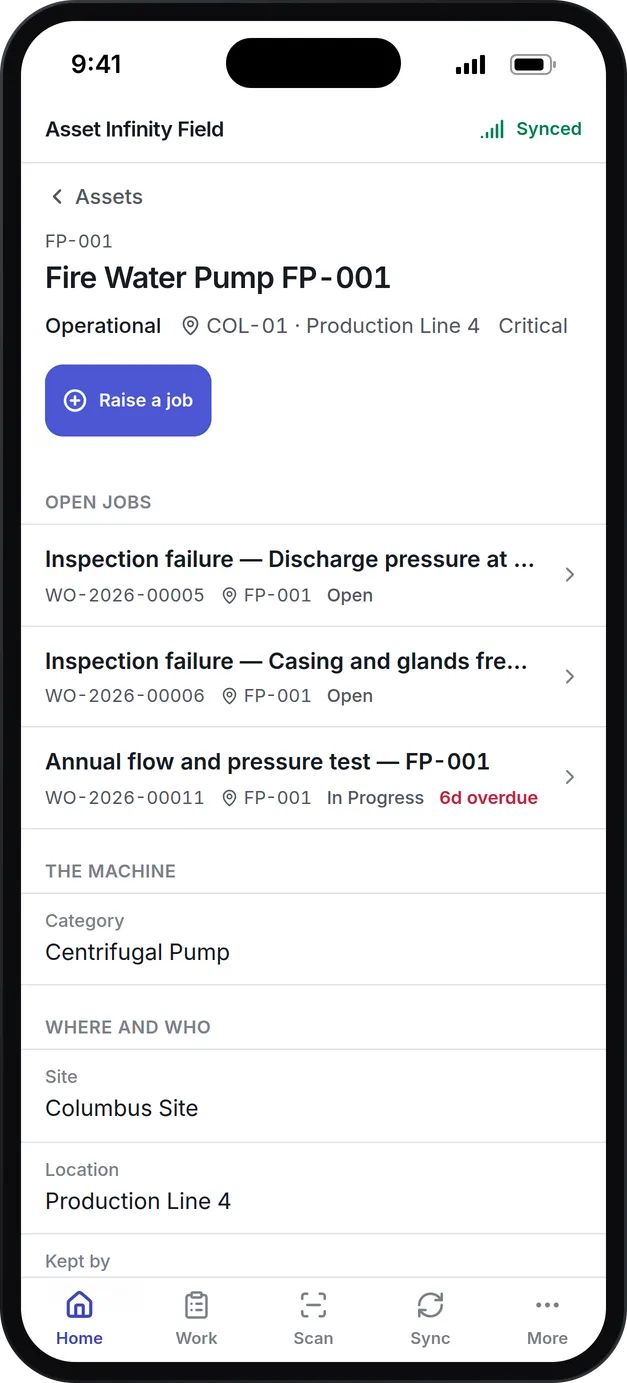
What our asset register software keeps on every asset
Sites, locations, parents
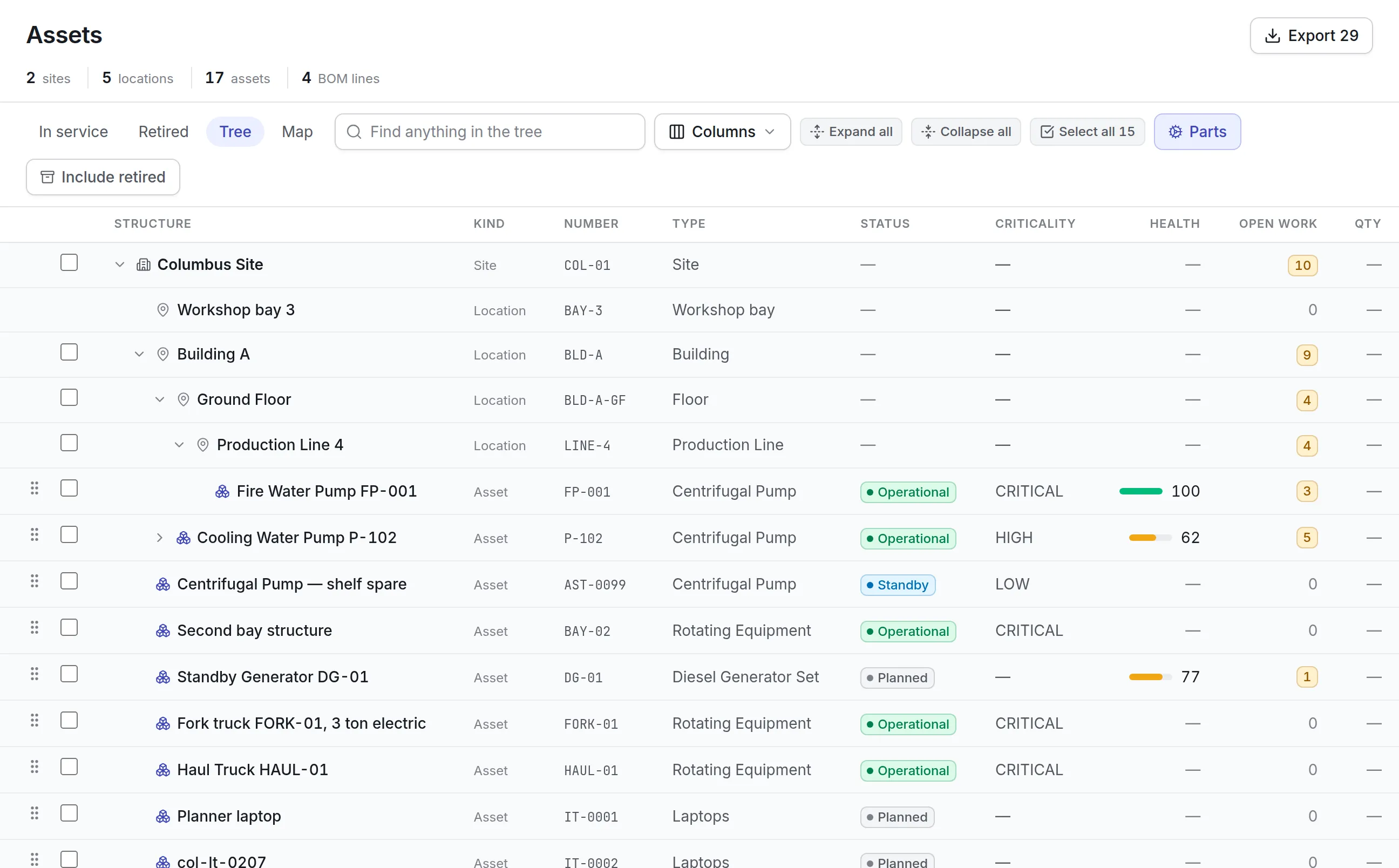
Assets sit under sites and locations, and an asset can have components of its own. The tree view shows open work and health at every level.
Owner and holder
The owning department answers for an asset and carries its cost center. The custodian is whoever has it, even a contractor with no login.
Status and criticality
Every asset has a status, such as Operational, Standby or Planned, and a criticality that drives how urgently its work is treated.
Your own fields
Add custom fields per category, choose your columns and save views for the lists each team uses every day.
Import and export
Bring an existing register in from a spreadsheet and export any filtered list back out.
Moves and disposals on record
Moving, retiring and disposing of an asset are recorded steps, so the history says when it went where and why.
What is asset register software?
Asset register software keeps one record for every asset an organization owns or looks after: what it is, where it is, who answers for it, who is holding it, what state it is in and everything that has happened to it. It replaces the spreadsheet that starts drifting out of date the week after the last audit.
Maintenance usually keeps one list, finance another for depreciation and IT a third, and each is wrong about something the others got right. Good asset register software gives every team the same row, and records each move, status change and disposal when it happens instead of at year end.
How the asset register works in Asset Infinity
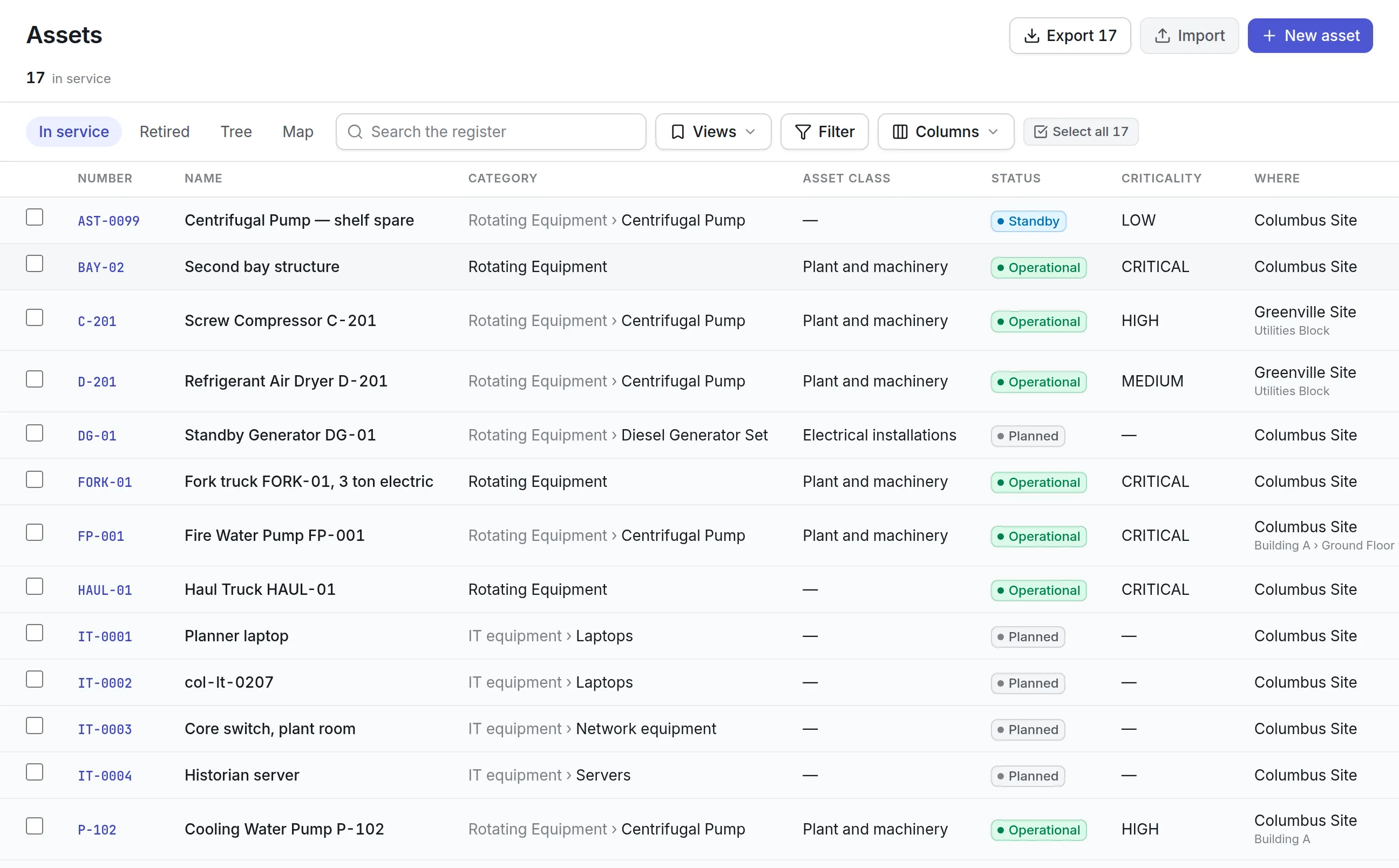
The register opens on the In service view, which lists everything you look after now. Retired and disposed assets leave that list automatically and keep their whole history. This is how a plant or a facilities team builds and runs it.
- Load what you already have.The Import button opens the import tool already set up for assets. It matches your spreadsheet columns to fields, shows each row’s problems in place so you can fix the row or leave it out, and writes nothing until you press import. A committed import can be undone for a limited time.
- Describe each asset once.The New asset form asks for identity, where the asset is, who answers for it, who is holding it, the nameplate, key dates and money. Your administrator can rename, hide or add questions, and a custom field can appear only for some categories.
- Give it a status.A new organization starts with Planned, Standby, Operational, Under Maintenance, Breakdown, Retired and Disposed, and you can rename them or add your own. Under Maintenance and Breakdown count as downtime, and an Operational asset must have a custodian.
- Record every move.An asset is never moved by editing its site. Move records where it went, who took it on, why and the status it arrived in, and it can print a handover note or a gate pass.
- Retire it with a reason.Retiring and disposing need approval by default. Retiring cancels the asset’s open work orders and scheduled rounds with a reason, so the backlog does not fill with jobs on scrapped machines, and the record and its history stay on file.
The New asset form covers:
- Asset number (or the next number from your numbering scheme), name, category, asset type and photographs
- Site, location, parent assembly and map coordinates for equipment that stands outdoors
- Criticality, owning department and cost center
- A custodian with an account, or a name and email for a contractor, with custody and due-back dates
- Manufacturer, model, serial number, manuals, certificates and your own custom fields
- Purchase, installation and commissioning dates, warranty expiry, expected life, purchase cost and replacement value
Where the AI copilot is switched on, a photo of the nameplate fills the form for you to check before you save.
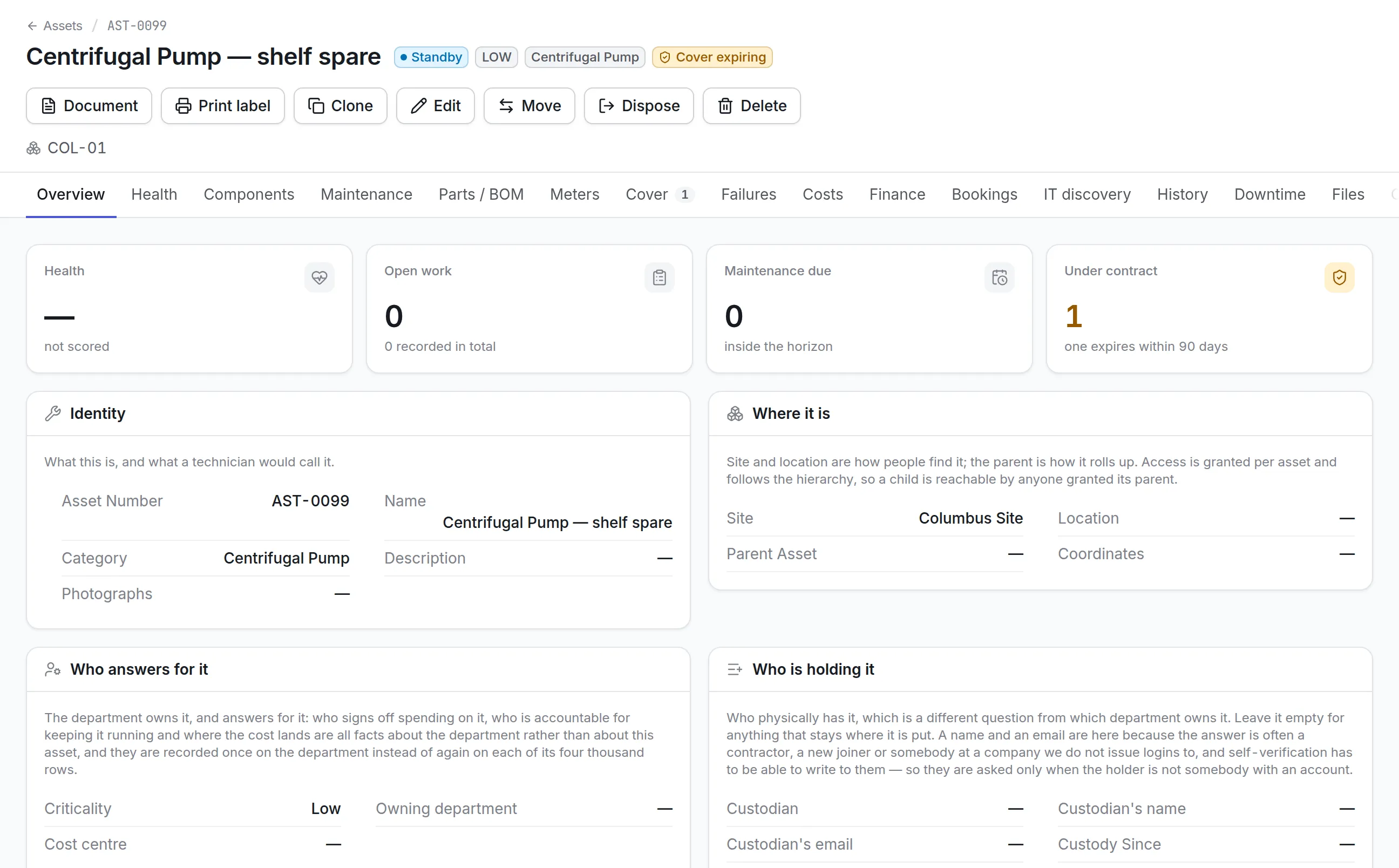
Four views of one asset register
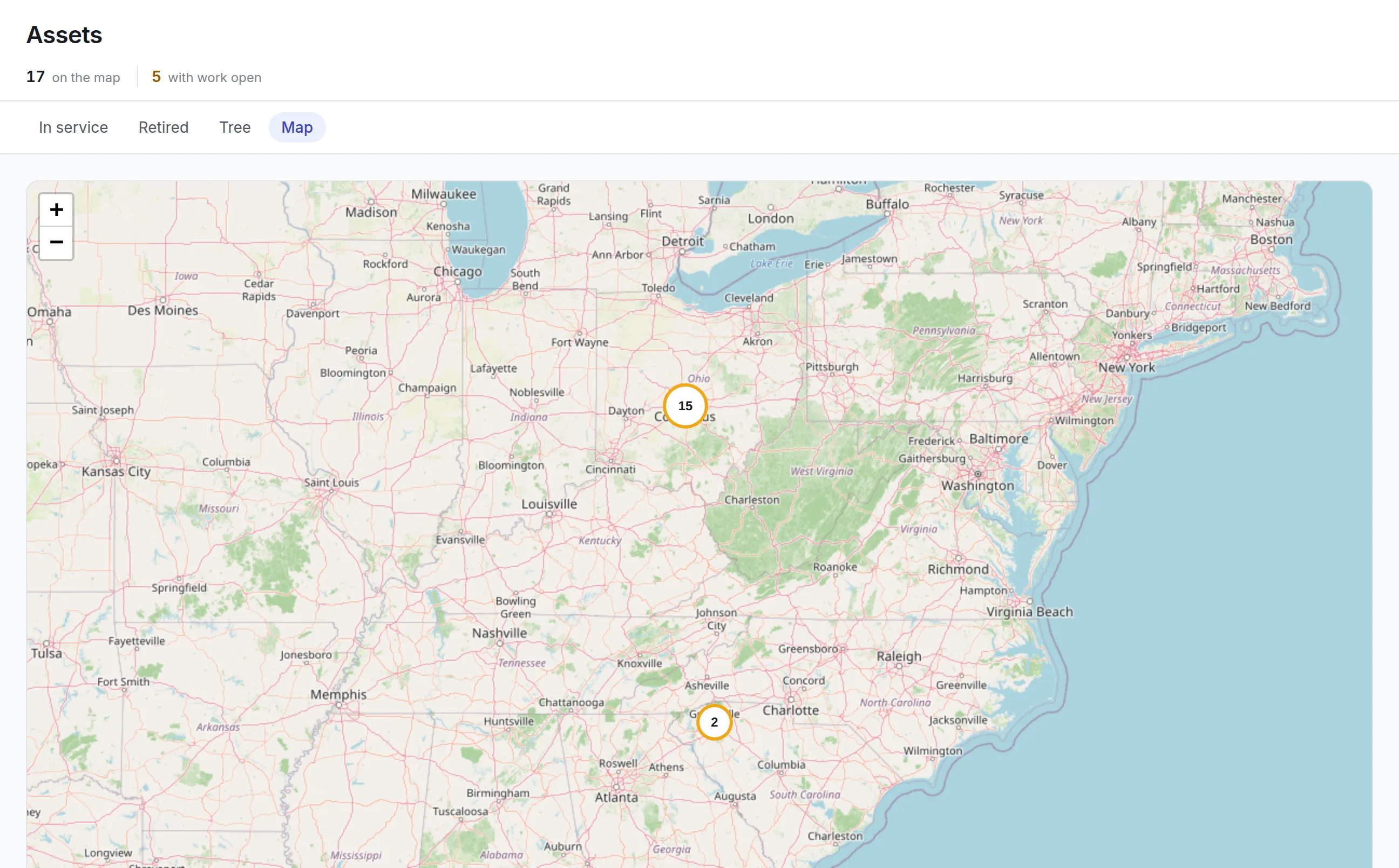
The same register reads differently for a planner, a site manager and an auditor, so it has four views, each with its own address you can bookmark or share.
More detail
Search covers asset numbers, names, serial numbers, models, custodians and custom fields, so a serial copied off a nameplate finds the record even when nobody remembers the asset number. Bulk actions move, update, clone, book or print labels for hundreds of assets at once, and Edit in a grid opens a selection as a spreadsheet you can undo.
What to look for in asset register software
| Capability | Why it matters | In Asset Infinity |
|---|---|---|
| Sites, locations and parent assets | A motor inside a skid inside a plant room needs every level for cost and access to roll up | Nested locations and parent assets, drawn in the Tree view |
| Owner kept apart from custodian | The department that pays and the person holding the asset are often different | Owning department and cost center, plus a custodian with or without an account |
| Statuses in your own words | Lifecycle names should match how your team talks | Default statuses you can rename, with allowed moves, reasons and approvals |
| Recorded moves and disposals | Auditors ask when an asset left and on whose say-so | Movement, transfer and disposal records on the History tab |
| Bulk changes with a safety net | Fixing 300 rows one at a time is how registers decay | Bulk move and update, plus grid editing that can be undone |
| Import and export | You will start from a file, and finance will want one back | Reviewed imports with undo, and export of any filtered list |
| Physical verification | A register is only as good as its last count | Rounds walked with a phone, or confirmed by custodians by email |
| Maintenance and cost on the record | The register should be where work and money land | Work orders, plans, meters, contracts, costs and depreciation on the same asset |
See it on your own assets, or price it in two minutes.
Asset register examples by industry
A manufacturing plant
The plant sets up each production line as a location and fits motors and gearboxes under each machine as child assets. Criticality on each machine sets the default response time for its work, and the Tree view shows open work rolled up by line. See how this fits asset management in manufacturing.
A hospital
Biomedical engineering records each infusion pump and monitor with its serial number, warranty expiry and the ward that holds it. A warranty date already past shows in red, which tells the team whether a repair goes back to the manufacturer or stays in-house.
A school district or campus
Facilities and IT share one register: boilers and rooftop units under each building, laptops and projectors held by named staff. A self-verification round emails each custodian the list of what they hold, and they confirm it from the email without signing in.
A finance team
Finance reads the same rows with the asset class beside the engineering category. Where you run depreciation, disposing of an asset records the sale in every book that carries it. The fixed asset management software page covers the finance side.
One register under maintenance, IT and tracking
Each asset page carries tabs for health, maintenance plans, parts, meters, warranty and contract cover, failures, costs, history, downtime and files. The rest of the product reads and writes the same record:
- Every closed job from work order software adds to the asset’s cost and failure history.
- Asset tags print for any selection, with a QR code that opens the record.
- Asset inventory software proves the floor still matches the register.
- Laptops and servers found by IT asset discovery link to the same records.
- Asset tracking software covers locating equipment with RFID, GPS and Bluetooth tags.
More detail
The product documentation lists every field on the asset form.
What asset register software costs with Asset Infinity
The asset register is priced by the number of assets, with unlimited users, so everyone who needs to look something up can. It starts at $130 a month for up to 500 assets and includes label printing and verification rounds. Maintenance, stock, purchasing and finance modules are added per user per month. Build a quote to see the price for your asset count.
Getting started
In the first week most teams set up sites, locations and categories, import their existing spreadsheet, and print labels for the assets they will count first. Walking one verification round on one site then shows what the old list missed. After that the asset register software stays current, because every move, job and disposal is recorded where it happens.
Common questions
What is asset register software?
Asset register software keeps a single list of everything an organization owns or looks after, with each asset's identity, location, owner, status and history. It replaces spreadsheets that drift out of date.
Can we import our existing asset list?
Yes. The import tool reads a spreadsheet or a whole workbook, shows each row's problems before anything is written, and lets you undo a committed import for a limited time.
What is the difference between an asset register and a fixed asset register?
An asset register tracks equipment for the people who run and maintain it, while a fixed asset register tracks its cost and depreciation for finance. In Asset Infinity both read the same record, with the finance asset class shown beside the engineering category.
Can we see assets by building and floor?
Yes. The tree view lays assets out under each site and location, and the map view places them by their coordinates.
How do we keep the asset register accurate?
Moves, custody changes and disposals are recorded as they happen, and verification rounds check the register against the floor. Auditors walk a round with a phone, or custodians confirm what they hold from an email.
Who can see which assets?
Access is granted per site and per asset, and it follows the hierarchy, so a child asset is visible to anyone granted its parent.
See it with your own assets
A demo run on an example from your industry. Or start the trial and look around on your own.