






Purchase order software that follows a part from request to delivery
Purchase order software that keeps requests, quotes, approvals, orders, deliveries and supplier invoices on one trail. You can see what was bought, why, and whether it arrived.
What our purchase order software handles from request to invoice
Requests with a reason
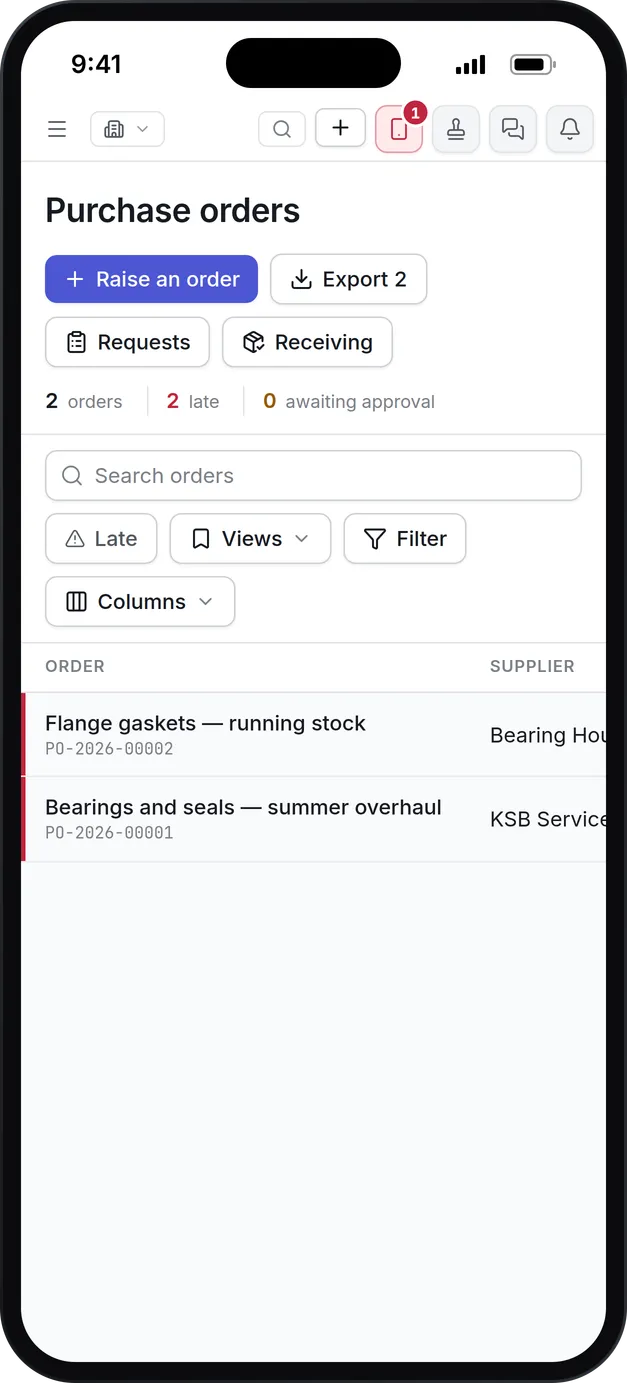
A purchase request is raised from a reorder recommendation, a work order, a maintenance plan or by hand. Its origin stays on it all the way to the invoice.
Approvals by value
Approval chains are set by the value of the request, so a small order needs one signature and a large one goes up the ladder. Approvers can decide from the email.
Quotes side by side
Send one RFQ to several vendors, record each quote, and award the best. Choosing anything but the cheapest asks why, and the answer is kept.
Orders that know where they stand
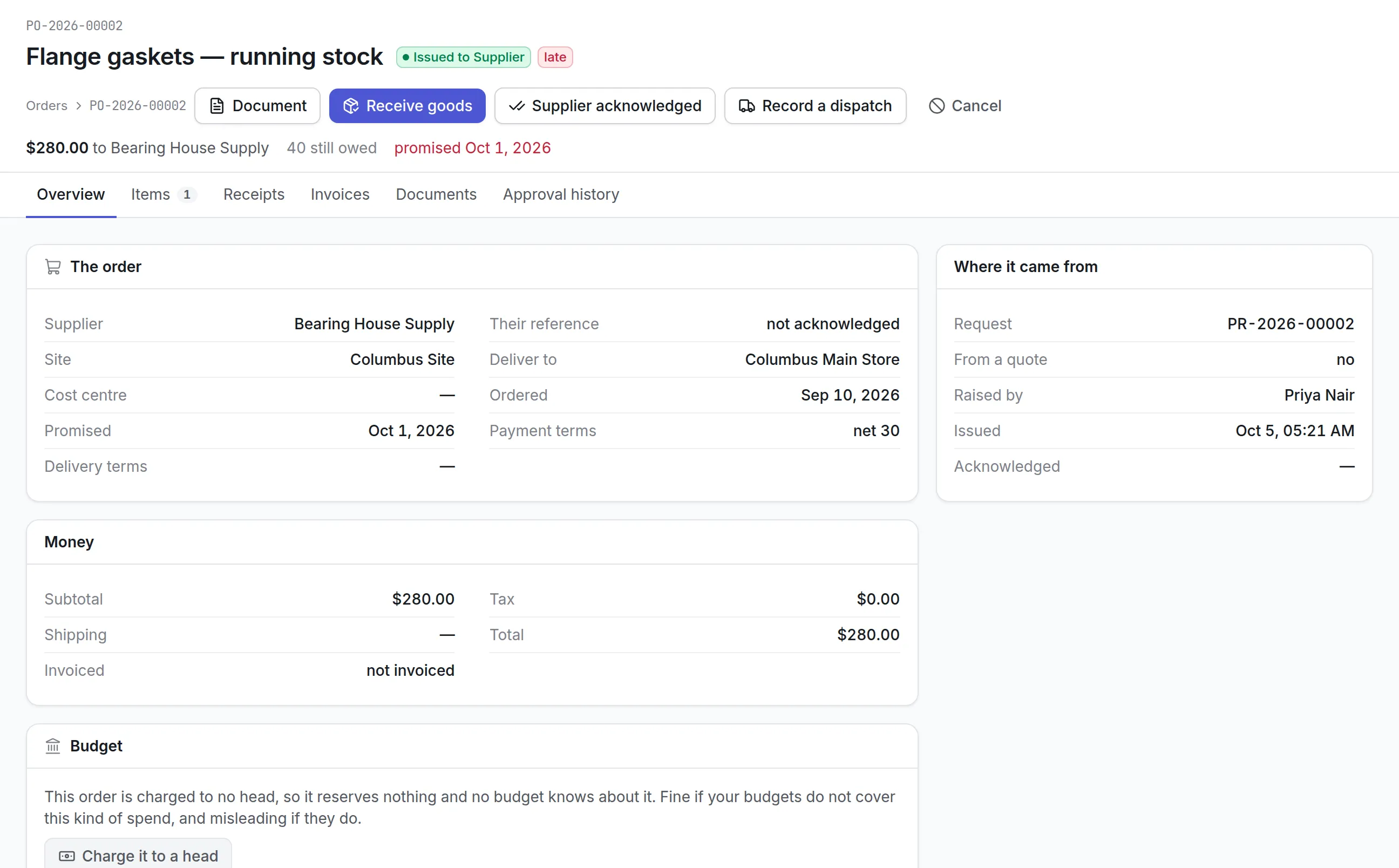
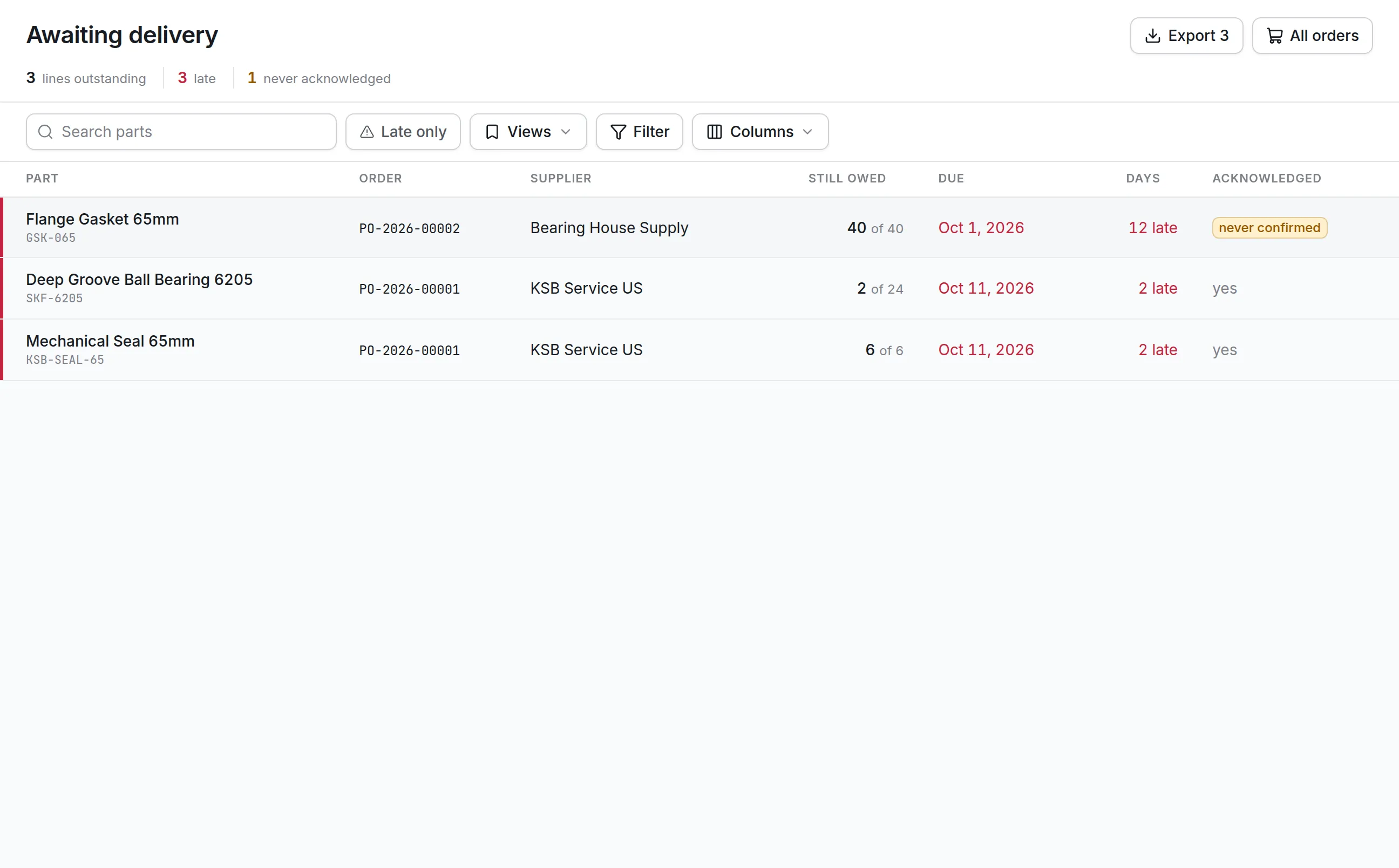
Each order shows whether the supplier acknowledged it, what has been dispatched, what has arrived and what is late. Awaiting Delivery lists every line still owed.
Receiving that moves stock
Receiving goods puts them into the store they were ordered for. Partial deliveries are normal, and the order stays open for the rest.
Three-way match
A supplier invoice is checked against the order and the delivery, and price or quantity differences are flagged before anyone approves payment.
What is purchase order software?
Purchase order software records what an organization has agreed to buy, from which supplier, at what price and by when, and then tracks that order through approval, delivery and the supplier’s invoice. For a maintenance team it also keeps the reason for every purchase: the job, the asset or the stock level that asked for it.
Teams buy it when spend is scattered across email, phone orders and a spreadsheet nobody trusts. Nobody can say what is on order, which deliveries are late or whether the invoice that arrived matches what was received. A purchase order system answers those questions from one record.
How purchase order software works in Asset Infinity
Every purchase moves through five screens, each with its own register: Purchase requests, Sourcing, RFQs, Purchase orders and Awaiting Delivery. A request below every approval threshold goes straight through; a large one waits for its signatures.
- Someone asks for it.A purchase request says what is needed, for which site and store, by when, and why. Its origin is recorded: raised by hand, a job needs it, a maintenance plan needs it, stock hit its reorder point, the forecast, a shutdown or tool hire. A justification is required before it can be submitted.
- The right people approve it.The approval chain is built at submission from the request’s value against your approval rules, so it might need one signature or several levels. Approvers can decide on the Approvals screen or from the approval email, and a rejection carries its reason back.
- Sourcing checks the shelf first.Approved lines appear on Sourcing beside what your stores already hold. A line can be answered from stock, given a spare asset you own, or sent on to be bought.
- Vendors quote.An RFQ invites several vendors and compares price, lead time, warranty, rating, SLA and payment terms, with an overall score out of 100. Awarding anything but the cheapest quote requires a reason.
- The order is raised and issued.The purchase order carries lines, tax, freight and currency, and goes through its own approval before it is issued to the supplier.
- Goods arrive and are booked in.Receiving records what arrived and what was rejected, posts accepted parts into stock and moves the order to Partially Received or Received.
- The invoice is matched and paid.The supplier’s invoice is matched against the order and the receipts before it can be passed for payment.
Quotes from several vendors before you commit
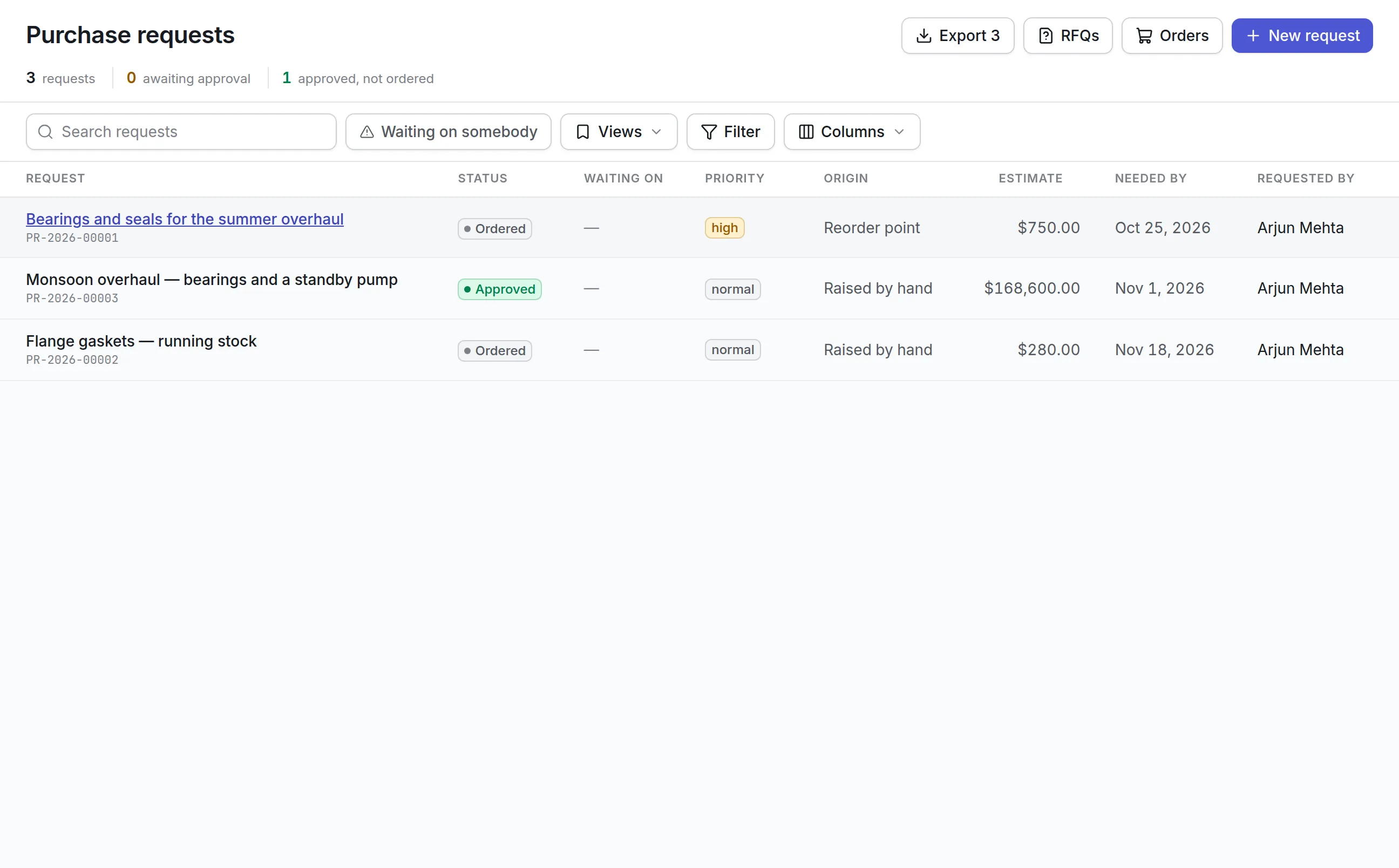
An RFQ copies an approved request’s lines, invites the vendors you choose and records what each one quotes, line by line or as a single total. The register shows how many vendors have answered and which windows closed with no answer, so a buyer knows whom to chase.
More detail
The comparison marks the cheapest quote and the best overall, which are often different. The score weighs price, lead time, vendor rating and warranty, and a vendor who leaves a factor out is not penalized for it. Raise the order from the award and the lines arrive at the quoted prices.
Orders and deliveries you can follow
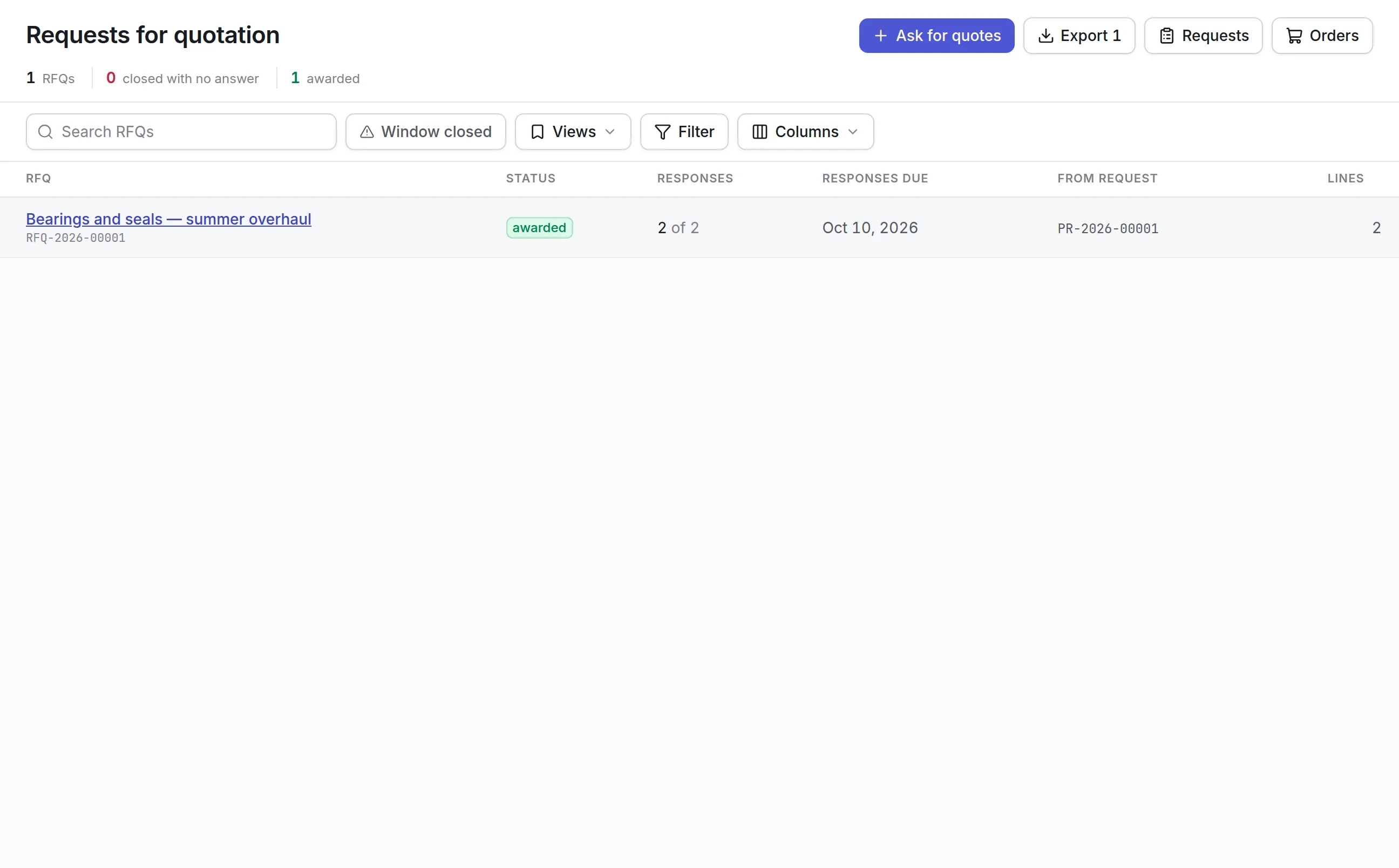
Purchase orders can be raised from an approved request, an awarded RFQ, ticked lines on Sourcing, or typed directly for an urgent buy. Several requests to one supplier can share one order, and part of a request can be ordered now and the rest later.
More detail
An order’s status tells you where it stands: Draft, Pending Approval, Approved, Issued to Supplier, Acknowledged, Partially Received, Received, Closed or Cancelled. Recording the supplier’s acknowledgement captures their reference and promised date, and a dispatch notice records the carrier and waybill. Awaiting Delivery is the stores team’s morning list of every line still owed, with how many days late each is and which suppliers never confirmed.
When a box arrives, the goods receipt records the delivery note, what arrived and how many were rejected with a reason. Each receipt gets a goods receipt number, and the order stays open for the rest.
What to look for when choosing purchase order software
| Capability | Why it matters | In Asset Infinity |
|---|---|---|
| Requests tied to jobs and stock | Spend should trace to the asset it was for | Origin, work order and cost center stay on the request |
| Approval by value | Small buys should not wait for a director | Chains built from value thresholds, with levels |
| Competitive quotes | Cheapest is not always best | RFQ comparison with a weighted score and award reason |
| Partial deliveries | Most orders arrive in more than one shipment | Partially Received and close short |
| Three-way match | Paying for goods never received is common | Match verdicts per invoice and per line |
| Budget control | Overspend is found too late at month end | Orders commit money when submitted |
| Supplier self-service | Confirmations by phone get lost | Vendor portal for confirmations, dispatches and invoices |
See it on your own assets, or price it in two minutes.
Purchase order software for maintenance, facilities and plants
A manufacturing plant
The stores team turns reorder recommendations into requests with one click, and the buyer quotes the big overhaul list through an RFQ. Orders name the asset, so the cost of a pump includes what was bought for it. More on maintenance software for manufacturing.
A facilities team across many buildings
Requests carry the site and the store to deliver to. Approval thresholds keep routine buys moving while larger ones go to the regional manager, and Awaiting Delivery shows what each building is still waiting for.
A finance-led organization
Every order is charged to a budget head and reserves its value when submitted, so nobody else can spend the same money while it waits for a signature. Capital buys charge heads opened from your capital planning software.
A team that relies on contractors
Parts and goods go through purchase orders. Contractor bills for work on a job are checked against rate cards under maintenance contract management software.
Three-way matching and payment
An invoice is matched against what was ordered and what was received as it is recorded. Each one gets a verdict, and a buyer cannot pay against an invoice until it has been passed for payment.
More detail
Payments are recorded against the invoice as unpaid, part paid or paid in full, with a reason required for any short payment.
Purchase order software pricing
Asset Infinity starts with the asset register at $130 a month for up to 500 assets, with unlimited users. Purchasing, which covers requests, purchase orders, vendors and contracts, is $25 per user per month. Quoting (RFQ) is a $100 monthly add-on and receiving is $75 a month, each for the whole organization. Stock that orders replenish is managed with parts inventory management. Build a quote for your team.
Getting started with purchasing
Start by importing your vendors and approving the ones you buy from, then set approval thresholds and the stores goods arrive at. Raise the first requests from open jobs in your work order software, and invite your most frequent suppliers to the portal once orders are flowing. Within a few weeks, the purchase order software has the history behind reports such as purchase spend by vendor and supplier invoices outstanding. To see how buying and stock fit together, read about inventory and purchasing software.
More in Supply
Common questions
What is purchase order software?
Purchase order software records what a business has agreed to buy from a supplier, at what price and by when. It tracks the order through approval, delivery and the supplier's invoice.
What is the difference between a purchase request and a purchase order?
A purchase request asks for something to be bought and says why. A purchase order is the commitment to one supplier at agreed prices and terms, raised once the request is approved.
Can a technician request parts from a work order?
Yes. A purchase request can name the open work order it is for, so the order that follows is tied to the job and the asset it is for.
Does it support three-way matching?
Yes. Each supplier invoice is matched against its purchase order and what was received, and differences in price or quantity are flagged before it can be passed for payment.
Can orders be charged to a budget?
Yes. An order charged to a budget head reserves that money as committed when it is submitted, and a head can be set to warn or to refuse spending past what it has left.
Can suppliers confirm orders and send invoices themselves?
Yes. A supplier contact can be given a portal login that shows only their own orders and jobs. They can confirm an order, advise a dispatch and submit an invoice, and nothing touches your stock or payables until your team accepts it.
See it with your own assets
A demo run on an example from your industry. Or start the trial and look around on your own.