





An asset management platform that fits the way your organization already works
Asset Infinity is an asset management platform that runs on phones in the field, signs people in through your own directory and talks to your other systems. It runs in our cloud or on your servers.
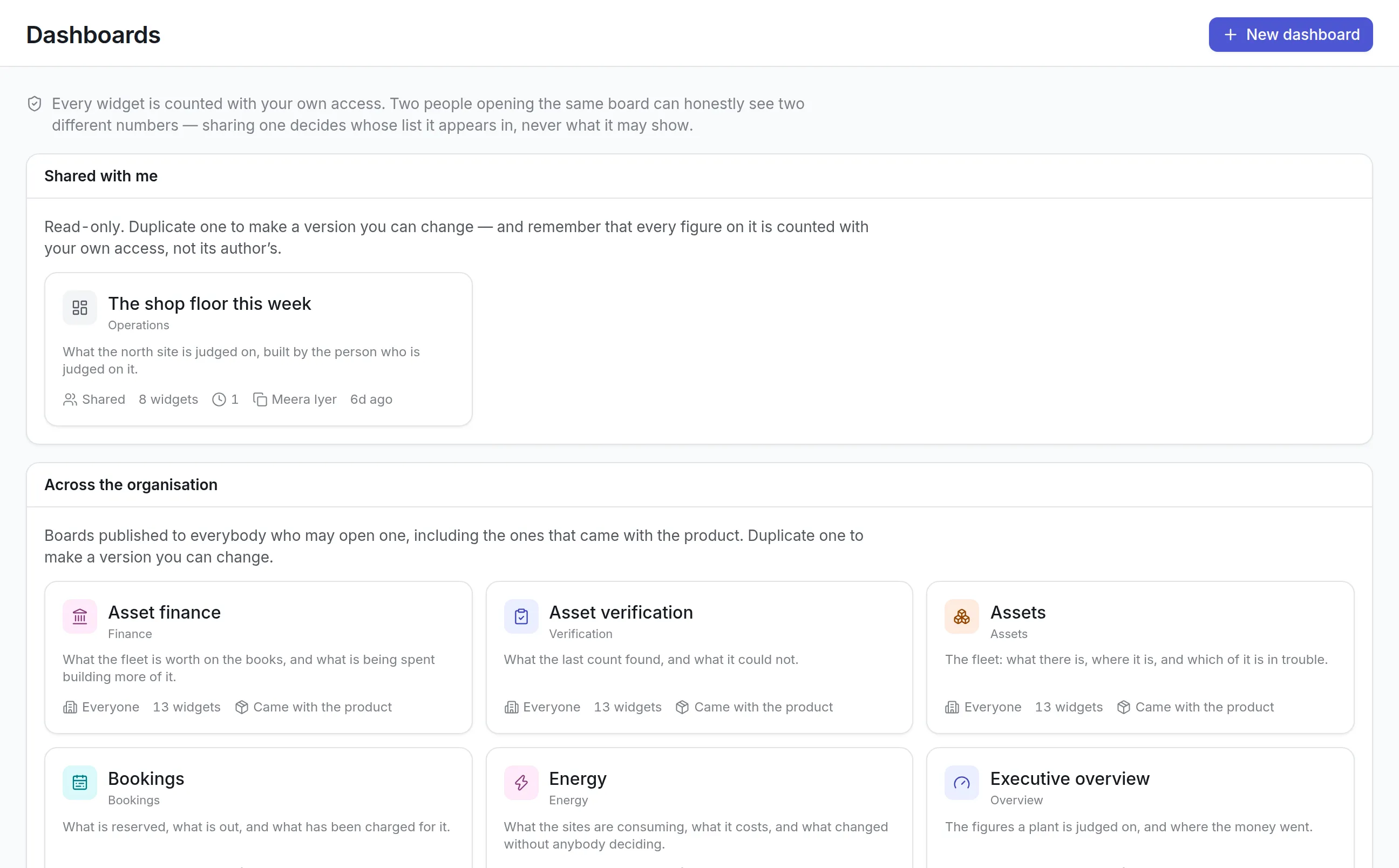
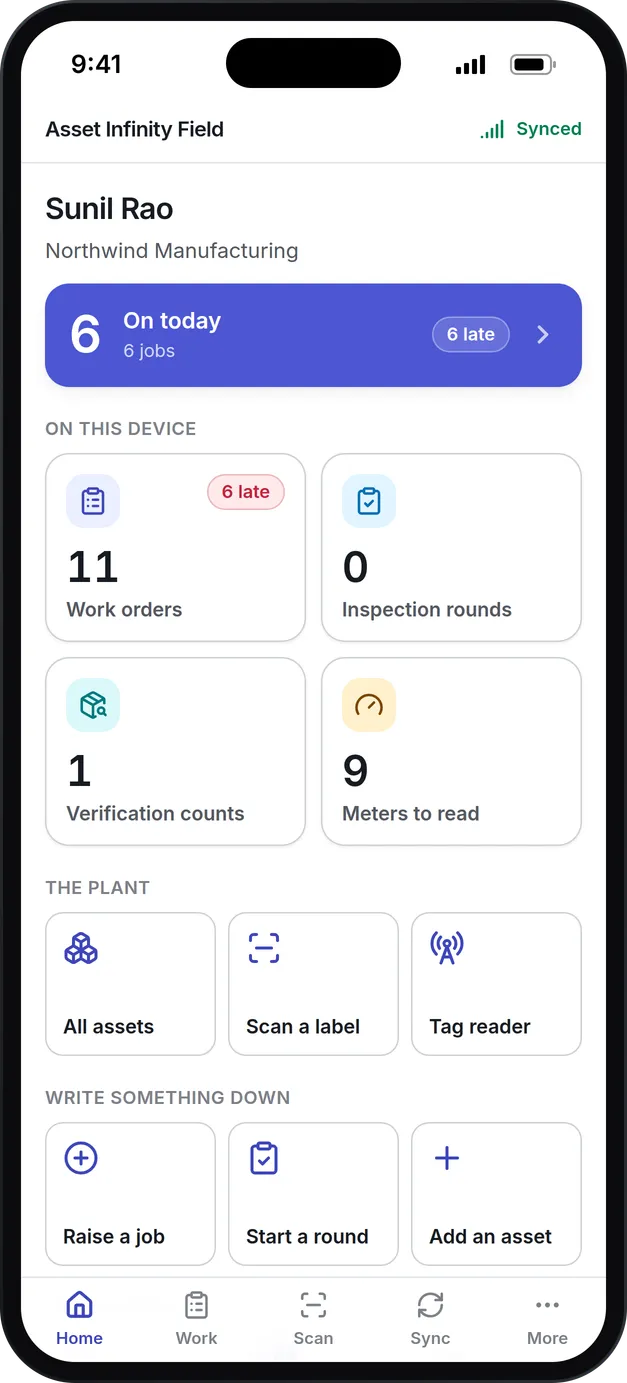
What the Asset Infinity asset management platform includes
Mobile app
Technicians and auditors work on iOS and Android, with jobs, checklists, photos, signatures and scanning that keep working with no signal.
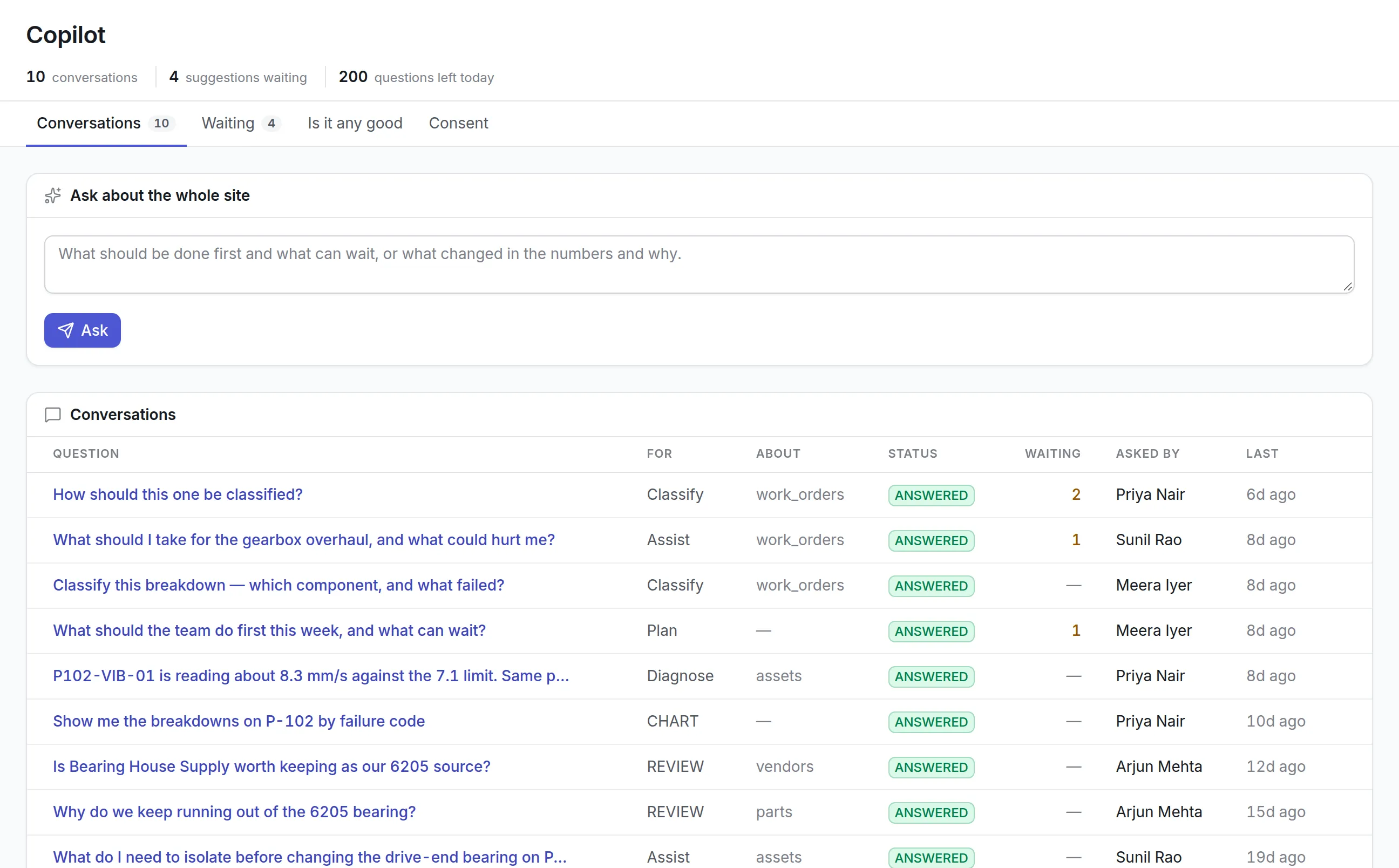
Copilot
An optional assistant that classifies breakdowns, suggests what a job needs and drafts charts, with every suggestion accepted or rejected by a person.
API and webhooks
A REST API with keys you issue and narrow, and signed webhooks for events such as a job being raised.
Single sign-on
Sign in through SAML, OpenID Connect, LDAP, Google or Microsoft, with accounts created and removed by your directory.
AI assistants over MCP
People can connect Claude or ChatGPT to ask about open work and raise requests, limited to what that person may already do.
Cloud or on-premise
The same product in our cloud or on your own servers, including sites with no route to the internet.
What is an asset management platform?
An asset management platform is the shared base that holds an organization’s asset records and the services every team uses around them: sign-in and permissions, mobile apps, reports and dashboards, an API and integrations, and settings such as custom fields and approval workflows. Maintenance, IT, stores and finance all read and write the same records through it.
Teams look for a platform when separate tools for maintenance, IT and finance each hold their own copy of the asset list, and none of them agree.
One record, many teams
Asset Infinity is built as one asset management platform with modules on top. Sites, locations and assets are entered once. Maintenance raises work orders against them, IT tracks hardware and software, stores issue parts to them, and finance depreciates them. An administrator switches modules on or off under Administration → Modules, so a team starts with what it needs and adds the rest later without moving data.
More detail
Because every module shares the record, one screen can answer questions that would otherwise need three systems. A work order shows the asset it is for, the parts it reserved, the purchase request it raised, the warranty that may cover it, its costs and its audit history. The computerized maintenance management system and the fixed asset management software pages describe two of those modules in depth.
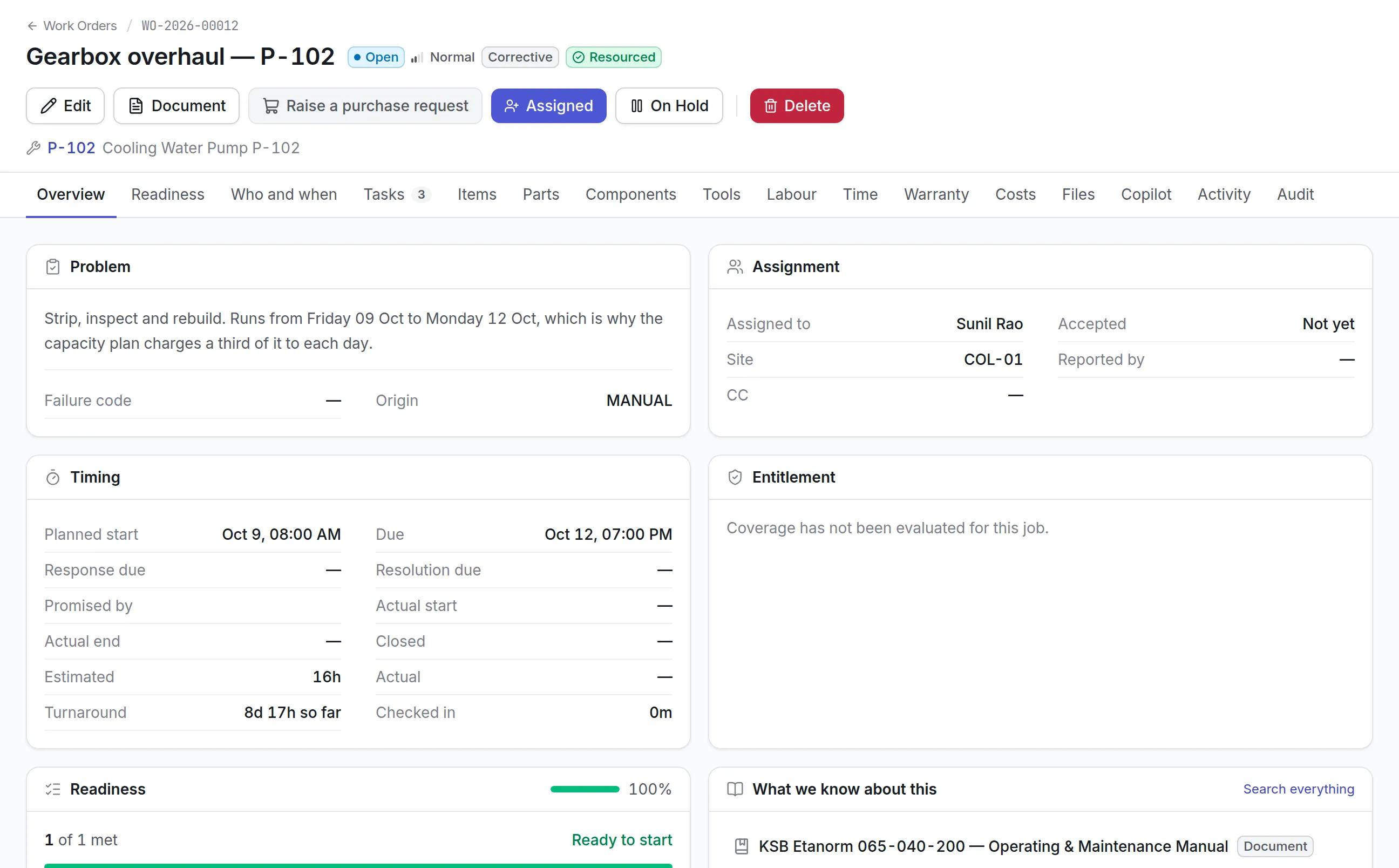
How the asset management platform works in Asset Infinity
Here is what an organization sets up, in the order most do it. The product documentation has a checklist for each step.
- Create sites and bring in assets.Sites, locations and assets come in through the Import Studio in three steps (upload, review, import), with columns matched for you and the whole run undoable for a limited time.
- Connect sign-in.People sign in with Google, Microsoft or your own identity provider over SAML 2.0, OpenID Connect or LDAP, and SCIM 2.0 keeps the user list in step with your directory.
- Set roles and site access.Roles decide what a person can do, and site and asset grants decide how far it reaches. The same limits apply on the web, the phone, the API, a shared dashboard and an AI assistant.
- Shape it to your vocabulary.Statuses and transitions, approval workflows, rules, numbering and custom fields in Form Studio are all set by an administrator, with no code. Localization can rename a work order into a job or an asset into equipment.
- Put the app on technicians’ phones.The field app on iOS and Android keeps an encrypted copy of each person’s work, opens with a device passcode and works with no signal.
- Connect your other systems.Issue API keys to service identities, subscribe endpoints to webhooks, and let people connect AI assistants over MCP.
- Share reports and dashboards.Ready-made boards and reports are there on the first day, and every figure is counted with the viewer’s own access.
What you can change without writing code
Every organization names its work differently and approves it differently. Administrators shape the asset management platform from the Administration screens, and the changes apply to the web app, the phone app and the API at once:
More detail
A change to a status or a field does not need a release, a consultant or a support ticket, and the same configuration travels with the product when it runs on your own servers.
What to look for when choosing an asset management platform
These are the platform questions that decide whether a product fits your IT, security and field teams, whichever modules you buy.
| Capability | Why it matters | In Asset Infinity |
|---|---|---|
| One shared asset record | Separate lists drift apart | Every module reads and writes the same sites, locations and assets |
| Permissions enforced everywhere | A report or API call should not see more than its user | Roles and site grants enforced in the database for every channel |
| Offline mobile app | Plant rooms and basements have no signal | iOS and Android app with an encrypted local copy and a sync queue |
| Single sign-on and provisioning | Leavers must lose access the day they leave | SAML 2.0, OpenID Connect, LDAP, Google, Microsoft and SCIM 2.0 |
| API with narrow keys | Integrations should hold only what they need | Keys on service identities, narrowed by permission, with an expiry |
| Signed webhooks | Your systems should trust only real calls | Signed HTTPS calls with retries and a delivery log you can resend from |
| Configuration without code | Every organization names things differently | Statuses, workflows, rules, custom fields, numbering and terms |
| Languages | Crews do not all read English | Nine languages, including Arabic with a right-to-left layout |
| AI with consent | Data should not leave without a decision | Copilot is off until someone agrees, and runs on your own provider key |
| Cloud or your servers | Some sites cannot send data out | The same release in our cloud or on premises |
See it on your own assets, or price it in two minutes.
Integrations, AI and notifications
An integration acts as a service identity that holds roles and site access like a person. Its API key can only be narrowed, never widened, and it trades the key for a session token that lasts fifteen minutes, so the same limits and audit trail apply to an integration as to a person. Webhooks turn events into signed HTTPS calls, retried until they arrive, and the delivery log shows every call. The integrations page lists what connects.
- Claude, in the desktop app or on the web
- ChatGPT, as a connector in developer mode
- Microsoft Copilot, through Copilot Studio
- Cursor, VS Code and Claude Code
More detail
Copilot is off until someone in your organization agrees to switch it on, and it runs on your own AI provider key. Its suggestions wait for a person to accept or reject them. People can also connect assistants over MCP with their own sign-in:
More detail
Every question an assistant asks is logged for administrators. Notifications go out by email, push, SMS, WhatsApp, Microsoft Teams and Telegram, and email sent to your maintenance address can become a work request. More on the AI in the CMMS page.
The asset management platform by team
The same platform looks different to each team that uses it.
Maintenance and reliability
Planners raise and schedule work orders, technicians close them on the phone with photos and signatures, and supervisors watch backlog and SLA breaches on the Today screen. The CMMS mobile app works in plant rooms with no signal and syncs when it can.
IT
IT tracks laptops, servers and software against the same register maintenance uses, so a workstation on a production line is one record for both teams. It signs people in through the company directory, lets SCIM remove leavers, and connects its service desk or automation tools through the API and webhooks instead of exporting spreadsheets.
Finance
Controllers depreciate the assets maintenance looks after, hold purchase orders to budgets and send journals to the general ledger. Reports run as whoever opens them, so a shared finance report never shows someone a site they cannot see. A disposal recorded by finance and a breakdown recorded by a technician land on the same asset record.
Security and compliance
Security teams connect the identity provider, require two-step sign-in for password users, stream the audit trail to their SIEM and review who is signed in. The details are on the asset management software security page.
What the asset management platform costs
Every plan starts with the asset register, from $130 a month for up to 500 assets with unlimited users. Modules are priced per user who needs them, such as $25 a month for maintenance and $10 a month for reports and dashboards. Copilot is a flat $50 a month, using your own AI provider key. Running on your own servers is twice the cloud price, with a minimum of $18,000 a year plus $5,000 for installation; the on premise CMMS page explains how that works. You can build a quote with only the modules you need.
Getting started in the first week
A first week on the platform usually looks like this:
Common questions
What is an asset management platform?
An asset management platform is the software base that holds an organization's asset records and the tools around them, such as mobile apps, reporting, integrations and sign-in, so every team works from the same data.
Does Asset Infinity have an API?
Yes. It has a REST API for reading and writing records, with API keys you can narrow to specific permissions, and webhooks that notify your systems when something happens.
Which sign-in methods are supported?
Email and password with an authenticator app, Google, Microsoft, and your own identity provider over SAML, OpenID Connect or LDAP. SCIM provisioning creates and deactivates accounts from your directory.
Can we connect ChatGPT or Claude to our asset data?
Yes. People can connect Claude, ChatGPT, Microsoft Copilot and other MCP clients with their own sign-in. The assistant can only see and do what that person already may, and every question it asks is logged.
Which languages does the product support?
English, Arabic (with a right-to-left layout), German, Spanish, French, Brazilian Portuguese, Russian, Uzbek and Simplified Chinese. Administrators can also rename terms, for example calling a work order a job.
Can we brand the mobile app?
On-premise customers can have their own build of the technician app with their own name, installed as its own app on their phones.
See it with your own assets
A demo run on an example from your industry. Or start the trial and look around on your own.