





Capital planning software that turns approved schemes into budgets you can spend against
Capital planning software where sites build next year's capex plan scheme by scheme, checked before anyone sends it. Once approved, the money becomes budget heads, and every order and project charged to them shows what is committed, spent and left.
What our capital planning software does from request to spend
Plans built from schemes
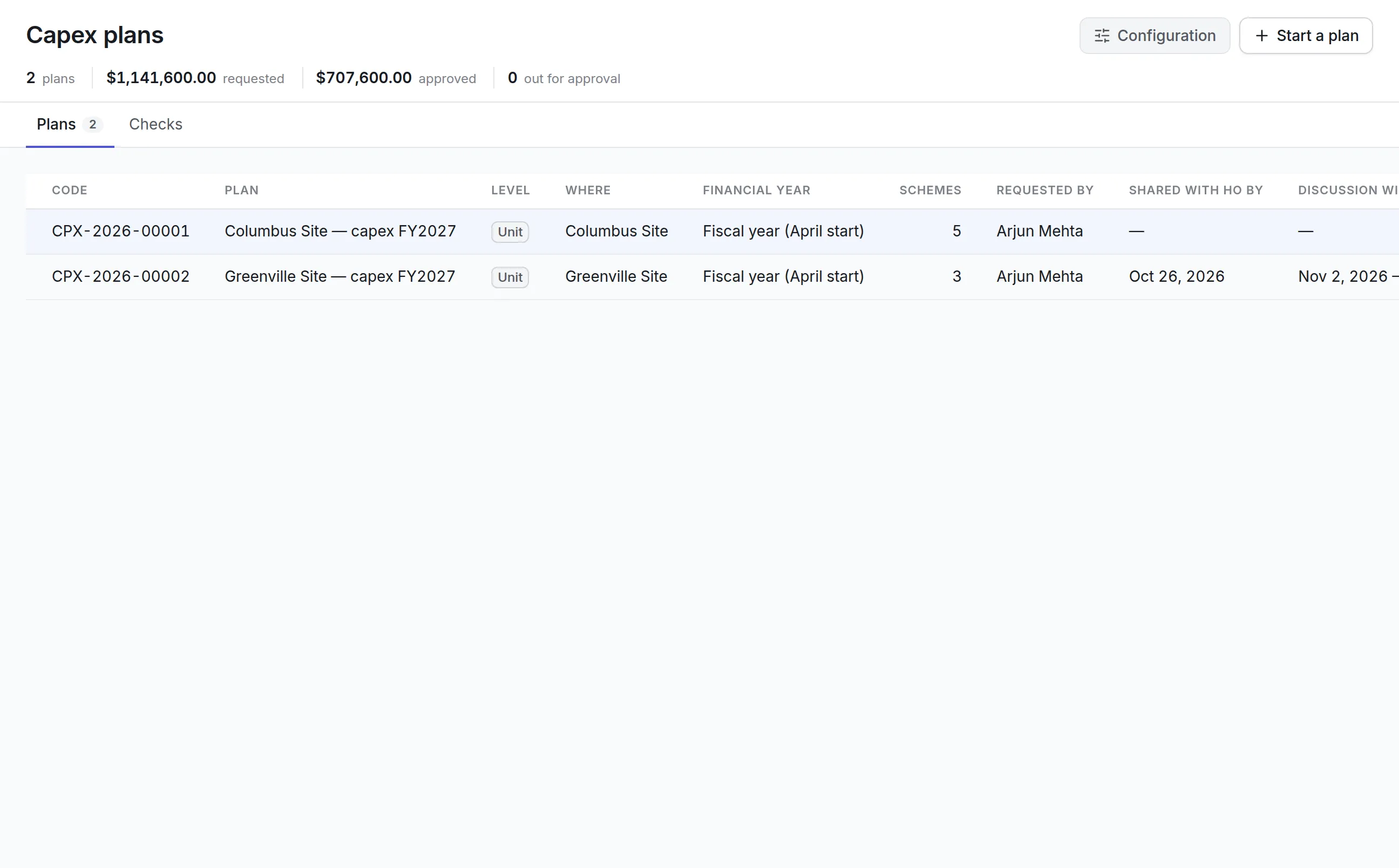
Each site or department lists its schemes with value, quantity, nature of investment and justification. Division plans consolidate the unit plans beneath them.
Phased by period
Spend is phased across the plan year's periods and up to four years beyond, so the cash flow is part of the request.
Checked before it is sent
Blocking checks run while the plan is still a draft, so a plan that would be refused says so before the deadline day. A plan that passes every check says that too.
Approval with a calendar
Set the dates proposals are shared with head office, discussed and shortlisted, and route each plan through its approvers. A reviewer can approve a smaller amount than was asked.
Budgets that hold
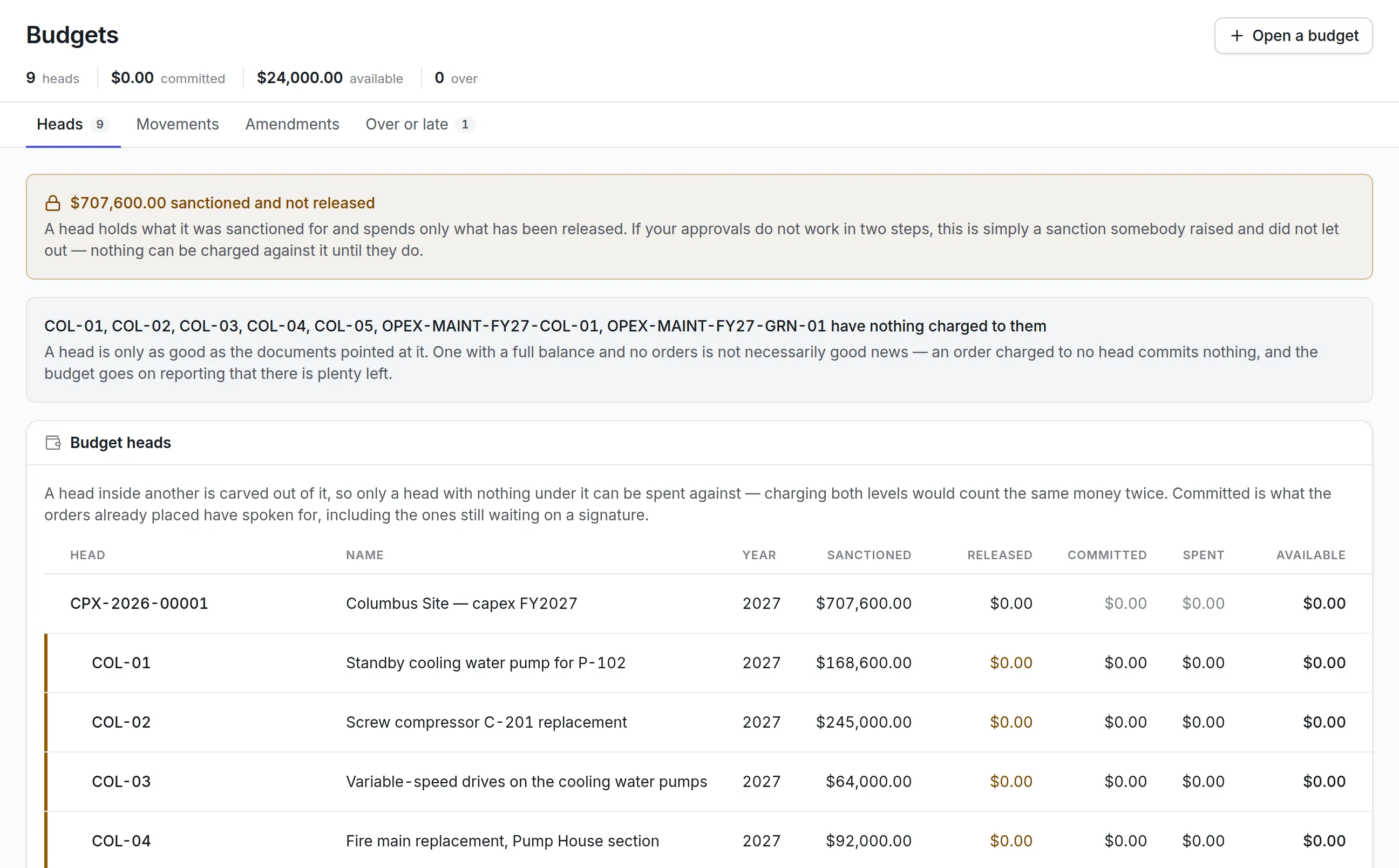
Approved schemes become budget heads. Money is sanctioned, then released, and orders charged to a head commit it before it is spent.
Changes on the record
Increases, decreases and transfers between heads are documents with their own approval. An overrun is approved before it is carried out.
What is capital planning software?
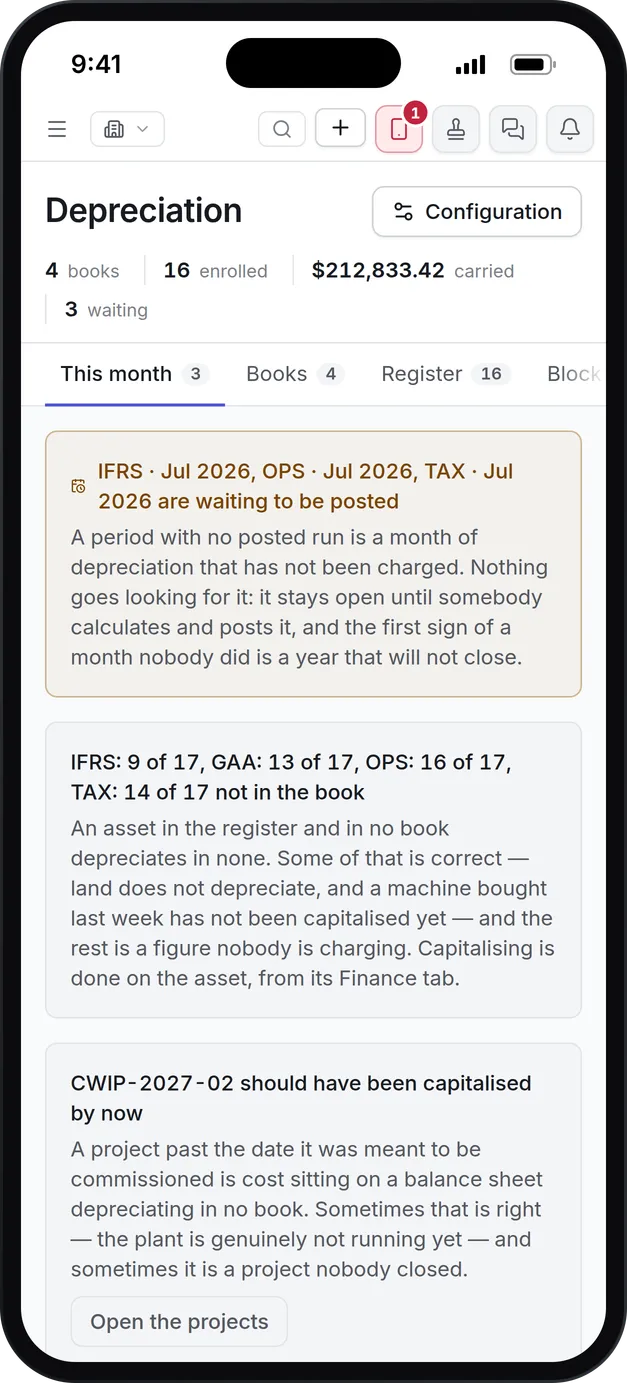
Capital planning software collects the investments an organization wants to make in the coming fiscal year, prices and phases them, routes them for approval and then tracks what was approved against what is actually spent. Maintenance and finance teams use capital planning software to replace the spreadsheet round that ends the day the plan is signed.
The usual round runs on workbooks emailed between sites and head office. Versions multiply, a scheme with no cash flow behind it is found on the deadline day, and once approval comes nobody can tell whether purchase orders are being charged to the money that was granted.
How capital planning works in Asset Infinity
Each department or site builds a unit plan for the coming fiscal year, a division consolidates the approved unit plans beneath it, and approvers decide scheme by scheme. What is approved is opened as budget heads that orders and projects are charged against.
- Start the plan with its calendar.Name the plan, the level (unit or division), the site, the fiscal calendar and the year. Set the dates proposals go to head office, the discussion window and when the shortlist comes back. Starting the plan mails that timeline to the roles you choose, with the supporting files attached.
- Add schemes.Each scheme records what is wanted, the specification, quantity, the fresh money asked for this year, any approved carryover, priority, nature of investment, budget category, project coordinator, location, cost center and asset class. A justification is written in a full document editor with tables and pictures.
- Phase the spend.A grid for cash flow, capitalization, book depreciation and tax depreciation, month by month for the plan year and then the next four years.
- Let the checks run.Blocking checks refuse a scheme with a value and no cash flow, or one in another currency. Warnings flag a scheme with no category or a carry forward that points at nothing.
- Submit and approve.Approvers decide each scheme as a line and can approve less than was asked. Requested and approved stay separate figures everywhere.
- Open the money.Open budget heads on the approved plan, and each scheme shows the head it can be charged to.
Categories, windows and spreadsheets
A scheme’s category is worked out, not chosen. It is the scheme value divided by its quantity, read against value bands that finance sets per division, which decides the approval chain it goes to. Only an approver can mark a scheme Flexible, and that mark is recorded with who and when.
More detail
Planning rounds have rules your finance team sets once:
Budgets that hold orders to the money released
Budgets are a tree of heads for a fiscal year, each either capital or operating spend, and each scoped to a site and cost center if you need it. Every head shows five figures: sanctioned, released, committed, spent and available. Money is let out of a sanction in a deliberate second step, so the controller decides when it can be spent.
More detail
A purchase order charged to a head commits its value when it is submitted for approval, so nobody else can spend the same money while it waits for a signature. Capital projects funded from a head add each cost as spend, and when a project is commissioned it becomes assets in your fixed asset management software. A head can be set to block, warn or report only, and the register flags heads that nothing has been charged to, because an order charged to no head leaves the budget looking healthier than it is.
Changes are documents with reasons. An amendment moves money between heads, increases a head, surrenders part of one or replaces one created in error, and waits for its own approval where a chain is configured. Heads spent past their release and projects past their budget or commissioning date are listed for an overrun request.

What to look for when choosing capital planning software
| Capability | Why it matters | In Asset Infinity |
|---|---|---|
| Unit and division plans | Head office needs one view of many sites | Division plans consolidate approved unit plans |
| Phasing by period | Approval without cash flow is a promise without a date | Monthly grid plus four further years |
| Checks before submission | Errors found on the deadline day cost a cycle | Blocking checks and warnings on the draft |
| Approval per scheme | Plans are rarely approved whole | Line-by-line decisions with cut amounts |
| Spreadsheet in and out | Sites already work in Excel | Template download and checked upload |
| Plan to budget in one step | A signed plan with no budget is not funded | Open budget heads from approved schemes |
| Commitments at submission | Spend is found too late at month end | Orders reserve money when submitted |
| Audited changes | Moving money should leave a trail | Amendments and overrun requests with reasons |
See it on your own assets, or price it in two minutes.
Capital planning software by industry
Manufacturing
Each plant submits a unit plan for line upgrades, compressors and drives, and the division consolidates them. Orders for approved schemes are charged to their heads through your purchase order software. See maintenance software for manufacturing.
Water and wastewater utilities
Pump station and treatment upgrades are phased over several years so the cash flow sits beside the request. Capital and operating heads are kept apart, and finance releases money in stages. More on water utility maintenance software.
Facilities and real estate teams
Building systems that are reaching end of life, such as chillers, roofs and elevators, become schemes with a justification, quotes and photographs attached. Each scheme names the building or floor it equips. Contractor spend for routine work is forecast separately in maintenance contract management software, so the capital plan stays about investment.
Your first capital planning round
- Set up the fiscal calendar.Every plan and budget head is counted on one, which also fixes the currency.
- Agree the value bands.Finance sets which value per unit puts a scheme in each category, per division where the ladders differ.
- Open a planning window.Give units the days they may enter plans, and set the reminders.
- Start the unit plans.Sites add schemes in the product or upload last year’s workbook against the template.
- Approve and open heads.Approvers decide each scheme, and finance opens budget heads from what was approved and releases the money.
The capital planning software then shows every order and project against the money granted for the rest of the year.
Capital planning software pricing
Asset Infinity starts with the asset register at $130 a month for up to 500 assets, with unlimited users. Capital planning is a $200 monthly add-on, and budgets, which turn approved schemes into heads you spend against, are $150 a month. Both are flat prices for the whole organization. Build a quote, and see the figures together in your maintenance reporting.
Common questions
What is capital planning software?
Capital planning software collects, prices and approves the investments an organization plans to make, usually for the coming fiscal year. It helps compare requests, phase the spending and track what was approved against what is spent.
What is the difference between capex planning and budgeting?
Capex planning decides which investments get money and when it will be spent. Budgeting holds the approved money and tracks what orders and projects commit and spend against it. In Asset Infinity an approved plan opens budget heads, so one leads into the other.
Can a budget stop an order that would overspend it?
Yes. Each budget head can be set to warn or to block. A head set to block refuses a charge larger than what it has left, and one set to warn accepts it and shows the overspend.
How do approved capex plans become budgets?
Each approved scheme becomes a budget head under the plan. The register flags approved plans that have no heads yet, so a signed plan does not sit with nothing to charge against.
Can schemes carry over into next year?
Yes. An approved plan can be carried forward to next year's plan, and what is left of each scheme becomes its approved carryover amount, with no fresh sanction until it is approved again.
Can we build a capex plan from a spreadsheet?
Yes. Download a template with your plan's own columns, fill in one row per scheme and upload it. The file is checked row by row and written in one go only when every row passes.
See it with your own assets
A demo run on an example from your industry. Or start the trial and look around on your own.