





Work order software that follows a job from fault to fix
Our work order software gives every job its SLA, parts, permit and checklist. Planners see what is late and why, and technicians close work on their phones with time, parts and cause recorded.
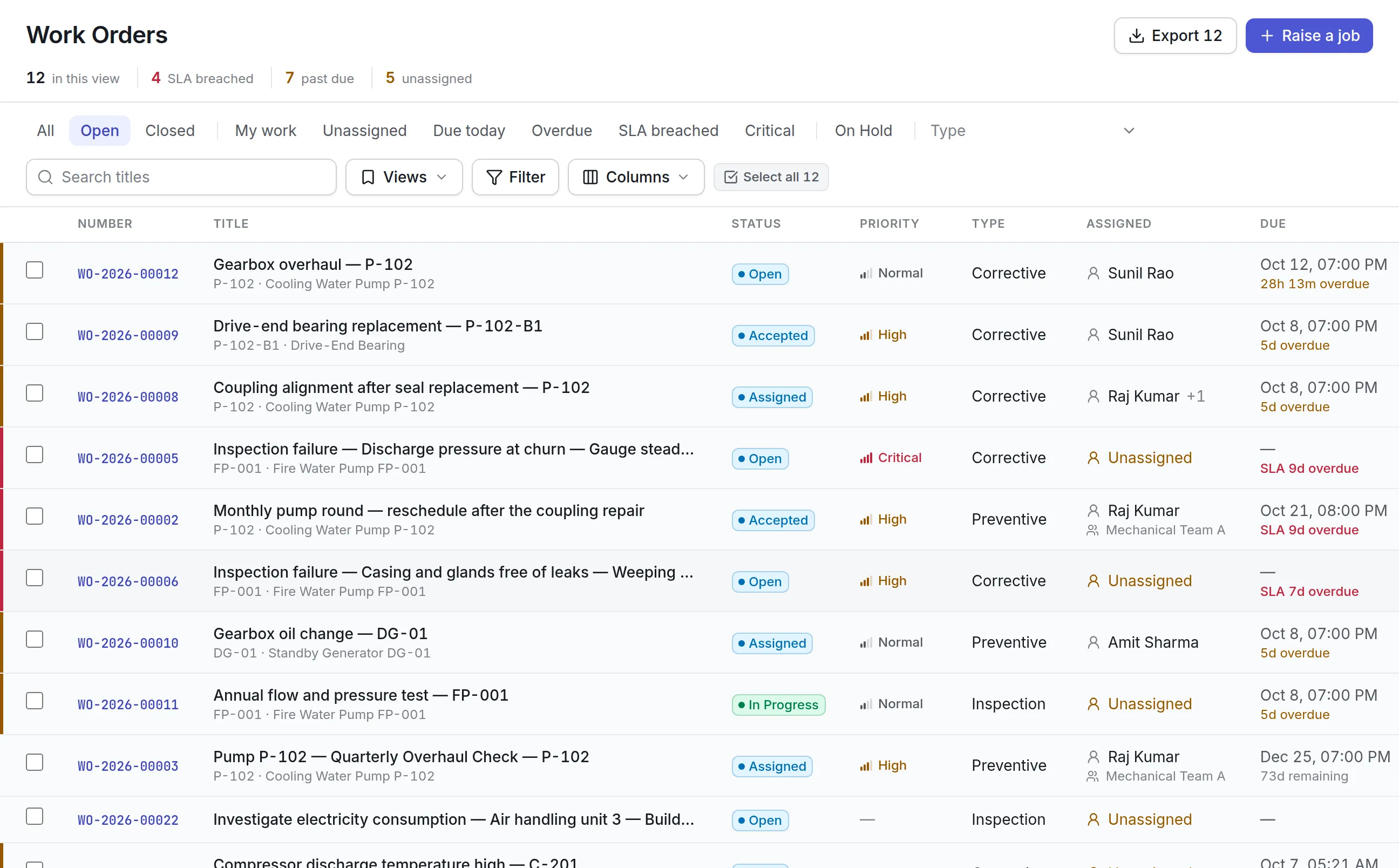
What our work order software does for your team
SLAs that escalate
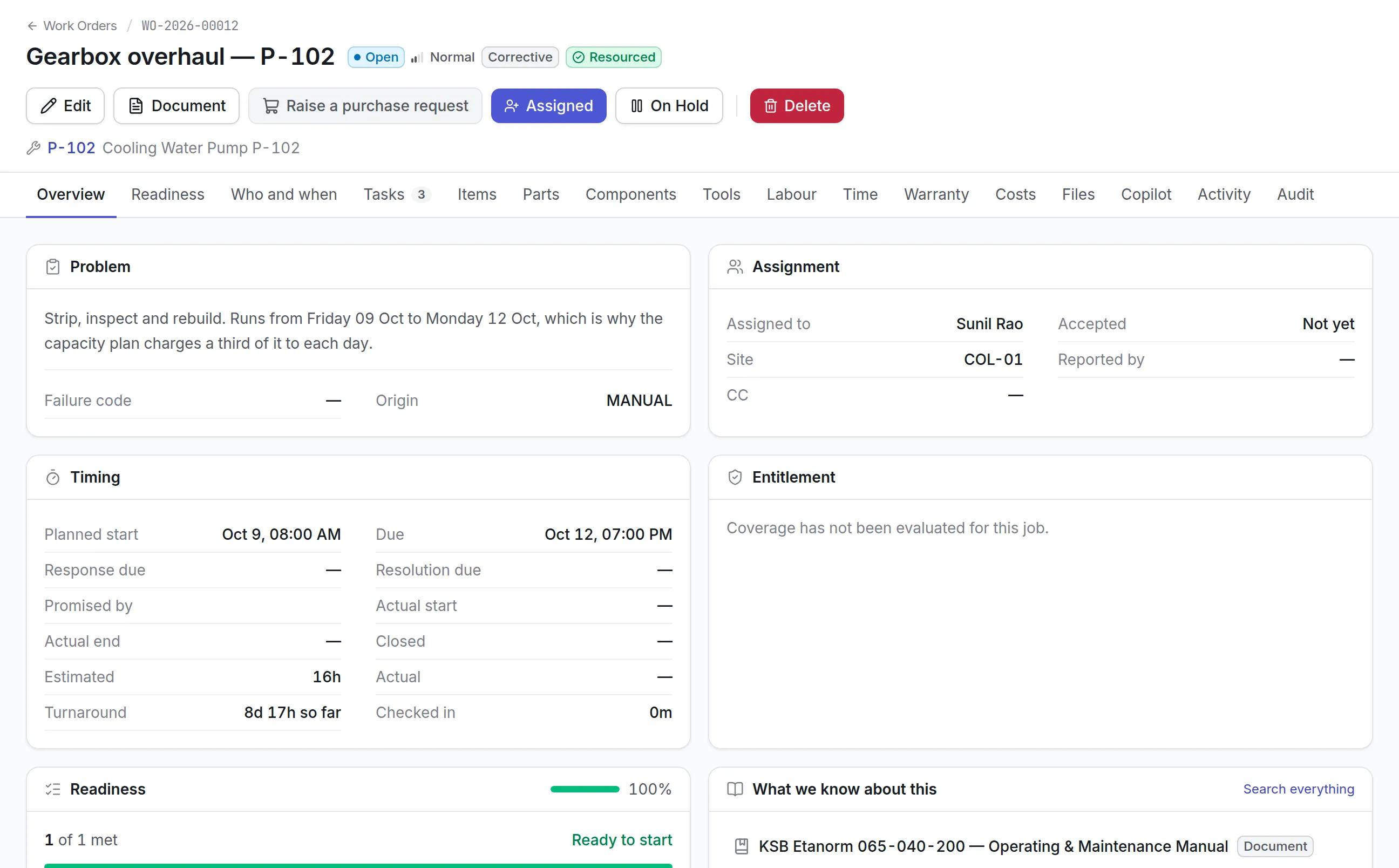
Response and resolution times come from the priority, the contract or the vendor. An escalation ladder warns people as a job gets later, and on-hold states can pause the clock.
Waiting is a real state
On hold for parts, a vendor or access is a state of its own, and asking for more time takes a reason. The backlog shows why a job stopped.
Ready before it starts
Each job lists what it needs, including parts, tools, documents and permits, and shows a readiness score before anyone is sent.
Your statuses, your words
Statuses, priorities and job types are configurable per organization, and the buttons on each job follow the workflow you set.
Closed on the phone
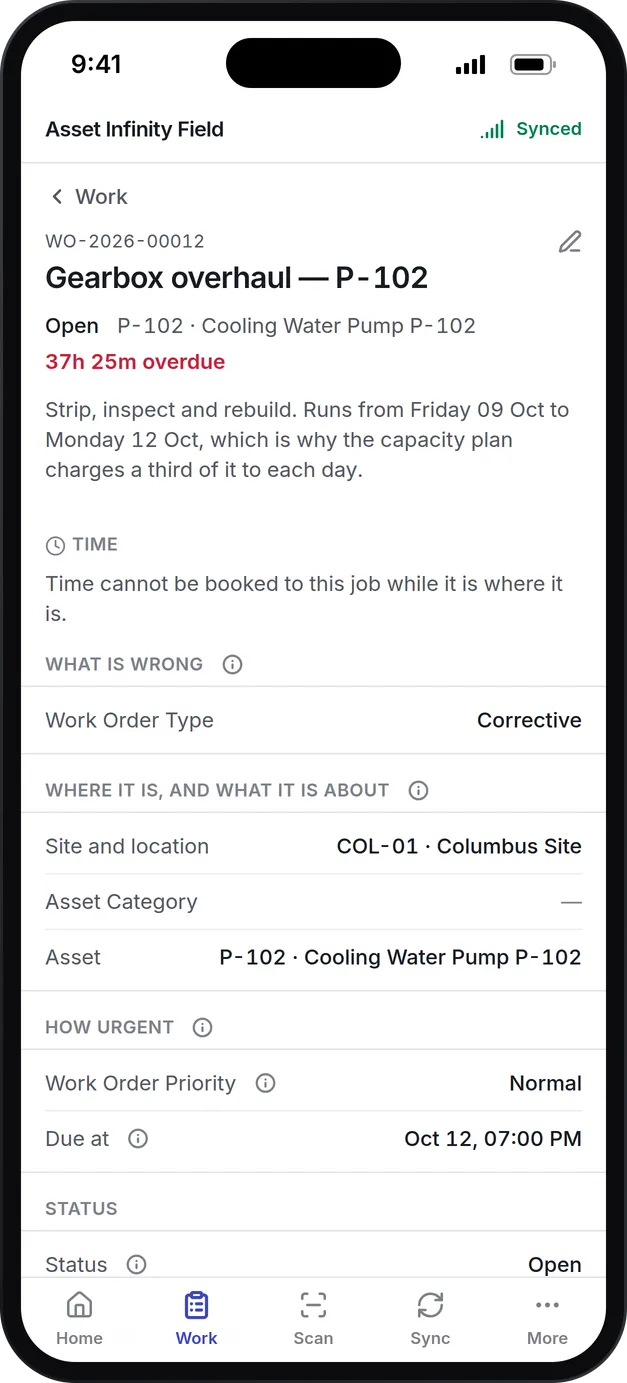
Technicians record time, parts, checklist answers, photos and signatures in the iOS and Android app, online or offline.
Cost and cause on the asset
Labor, parts and vendor cost add up on the job, and its failure code lands on the asset's history for the reliability screen.
What is work order software?
Work order software is a system that records every maintenance job from the moment it is raised until it is closed: what is wrong, which asset it concerns, how urgent it is, who has it, what it needs and what it cost. It replaces whiteboards, email threads and spreadsheets with one queue that the whole maintenance team reads from.
Teams buy it when the queue has outgrown anyone’s memory and nobody can say which jobs are late or why. It is also the base of a CMMS, whose preventive maintenance and reliability figures are all counted from work orders.
How a work order moves through Asset Infinity
Take a cooling water pump at a manufacturing plant. An operator hears grinding from the drive end and reports it. Here is the job from that moment to the signed-off record.
- The job is raised.Work orders arrive from requests, maintenance plans, failed inspections, sensor alerts, conditions, shutdowns, follow-ups to other jobs, or by hand. Each job records its origin in words. A technician at the pump can raise one in the field app with no signal.
- The priority sets the promise.Your priority ladder (Critical, High, Normal and Low by default) gives each rung a respond-within and a resolve-within time. Priority rules can fill in the priority by site, asset category or job type, and due times count the site’s working hours. A contract or a vendor’s own commitment on the asset wins over the rule.
- Readiness is checked.A job raised from a plan carries its requirements: parts, tools, skills, certifications, documents and permits. The Readiness tab shows a count such as “7 of 8 met, 1 blocking” and says in plain words what is missing.
- Someone is given the job.Assign it to a technician, a crew or an outside supplier. The “Who could do this” panel lists everyone who covers that site and kind of work, with how loaded each technician already is.
- The work is done.The technician accepts the job, starts work, checks in, works through the checklist, issues parts and attaches before and after photos. Readings outside their expected range fail on their own, and a failed step can raise a corrective job by itself.
- It is completed and closed.Mandatory steps must be done first. Completing can ask what failed and how it was put right. Closing can require a six-digit code texted to the person who reported the fault, and a supervisor can rate the finished work from one to five.
Statuses that match how your team talks
Every new organization starts with this lifecycle. Each status can be renamed, added or retired, and each belongs to a category, so reports keep counting correctly after a rename.
| Status | What it means | What it switches on |
|---|---|---|
| Open | Raised and waiting for somebody | Counts as open work |
| Assigned | A person, crew or supplier has it | Can be accepted offline |
| Accepted | The technician has taken it on | Technician may edit the job |
| In Progress | Work is under way | Parts can be issued and time booked |
| On Hold | Blocked on parts, a supplier, a decision or access | SLA clock pauses |
| Completed | The work is done | SLA clock stops; can be reopened |
| Closed | Signed off | Final |
You can run more than one lifecycle, for example a shorter one for a site that works from a simple queue. The full list of states and moves is in the work order lifecycle documentation.
Late work orders you can see coming
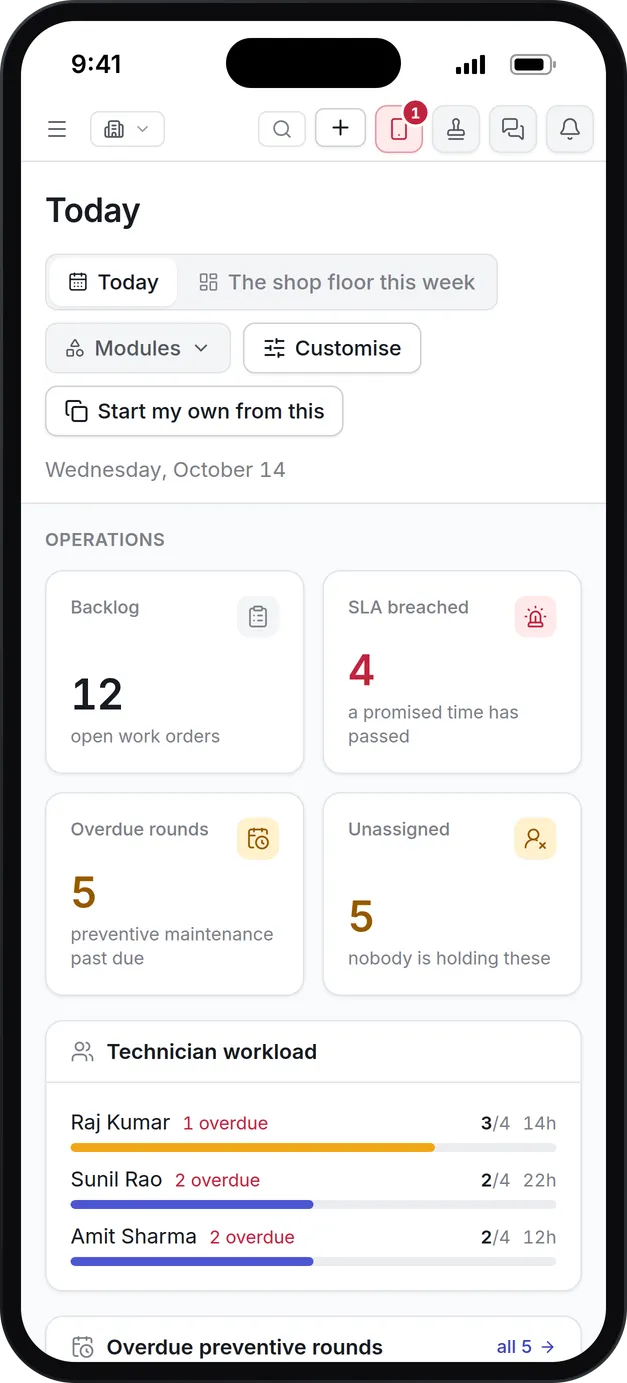
The work order list counts SLA breaches, past-due jobs and unassigned jobs across the whole view, and colors the edge of each late row. A job nobody picked up within its response time counts as breached even if it may still finish on time.
More detail
When work stops for a reason outside the team’s control, On Hold pauses the clock. The paused time is recorded, so a hold cannot hide a late job. Other ways the product keeps lateness honest:

Cost and history on every work order
A repair-or-replace decision needs the true cost of each job, and that cost has to come from what actually happened. Nothing on the cost tab is typed in by hand:
More detail
Close the job with a failure code and it feeds MTBF, downtime and the bad-actor ranking on the reliability screen. Good work order software keeps that history on the asset, so the next technician sent to the pump can read what was found last time before they leave the shop.
What to look for in work order software
Most products can create a ticket and close it. These are the questions that separate work order software a maintenance team keeps using from one it works around.
| Capability | Why it matters | In Asset Infinity |
|---|---|---|
| Configurable statuses | Your process should not bend to the vendor’s words | Rename, add or retire states; buttons and the board follow |
| SLA clocks that pause | A job waiting on a supplier should not count as your delay | On Hold pauses the clock; the paused time stays on record |
| Readiness before dispatch | Sending someone to a job with no parts wastes a trip | Parts, tools, skills, documents and permits checked per job |
| Permit gating | Hazardous work must not start without isolation | A job that needs a permit cannot start until one is in force |
| Mobile and offline | Plant rooms and basements have no signal | iOS and Android app queues work and syncs later |
| Real job costs | Repair or replace decisions need true cost | Labor, parts and vendor cost from their own lines |
| Failure coding | Repeat faults stay hidden in free text | Failure mode, cause and mechanism from your own lists |
| Supplier access | Contractors need the job, not your whole system | Suppliers see only their jobs, send prices and submit invoices |
| Bulk actions | Planners handle dozens of jobs at a time | Change status, priority, assignee or dates on many jobs at once |
See it on your own assets, or price it in two minutes.
Work order software compared with spreadsheets and email
Many teams run maintenance from a shared spreadsheet and an inbox for years, and it works while one person holds the whole picture. The gaps show up when that person is on vacation, when an auditor asks for history, or when the plant manager asks why a line was down.
| Question | Spreadsheet and email | Work order software |
|---|---|---|
| Which jobs are late right now? | Someone has to read every row | Counted live, with late rows marked |
| Why did this job stop? | Lost in a reply chain | On Hold with a reason, in the job’s history |
| Who changed the due date? | Unknown | Recorded with the reason and the approver |
| What did this pump cost us this year? | Rebuilt by hand from invoices | Labor, parts and vendor cost on each job |
| Can a technician update it at the asset? | Only with a laptop and a signal | Phone app, online or offline |
What changes is that everyone works from one record they trust. When technicians close work on the job itself, supervisors stop chasing updates and planners stop re-typing them.
Work order management for different teams
A manufacturing plant
A plant ties work orders to production losses. Set the type to Breakdown so completion asks what failed, add your own downtime fields to the form, and use sequencing so a coupling realignment waits for the motor change before it. The planned versus reactive split is counted from one flag on each work order type, so it stays right when you add types of your own.
A hospital
Response time matters most on a ward. Write a priority rule that raises any breakdown on critical clinical equipment as Critical with a 30-minute response, and turn on the closing code so the nurse who reported the fault confirms the fix. See how this fits maintenance in healthcare.
A multi-site facilities team
A team running offices or stores sends much of its work to contractors. Assign jobs to a supplier, let them send a price and an invoice through their own portal, and compare their committed response times. The site switcher covers a whole region at once, so one supervisor sees every building’s queue.
A utility or field crew
Crews work far from the office. They raise jobs at the asset, scan its label to find it, and close work with photos and signatures in the maintenance mobile app. Everything syncs when they are back in coverage, with any conflict held for the office to resolve.
Where work orders come from and go next
Work order software is the middle of the maintenance process. Each neighboring feature feeds it or draws on it.
- Reported faults come in through maintenance request software, so the backlog only holds work someone has checked.
- Routine jobs are raised by preventive maintenance software a set number of days before they fall due.
- Jobs are handed out on the dispatch board in maintenance scheduling software.
- The parts they consume are drawn from parts inventory management.
What work order software costs in Asset Infinity
The asset register starts at $130 a month for up to 500 assets, with unlimited users. Work orders come with the Maintenance module at $25 per user per month, which also covers preventive maintenance, inspections and the workforce. Maintenance requests and escalations are optional add-ons at $75 a month each for the whole organization. Build a quote to see your total.
Getting started
Most teams finish the setup in their first week:
More in Maintain
Common questions
What is work order software?
Work order software records maintenance jobs from the moment someone reports a problem until the job is closed. It tracks who is doing the work, what it needs, how long it took and what it cost.
What is work order management?
Work order management is the process of raising, prioritizing, assigning, tracking and closing maintenance jobs. Software keeps the queue visible so nothing is lost and late work is seen before it becomes a complaint.
What should a work order include?
A work order should say what is wrong, which asset and location it concerns, how urgent it is, who has it and what tasks, parts and safety steps it involves. When it closes, it should record the hours worked, the parts used, what failed and how it was put right.
Can we change the work order statuses?
Yes. Every status is configurable. You can rename, add or turn off states to match how your team works, and the dispatch board and buttons follow.
Can technicians work on jobs without a signal?
Yes. The iOS and Android field app keeps the technician's assigned work on the phone, so they can accept, start and complete jobs and add notes with no connection. Changes are sent when the signal returns.
Can a technician order parts from a work order?
Yes. A purchase request can be raised straight from the job, and the parts it needs are reserved from stores and shown in its readiness.
See it with your own assets
A demo run on an example from your industry. Or start the trial and look around on your own.