






Equipment checkout software that knows what is booked and what is still out
Equipment checkout software that reserves tools, equipment, people and rooms under one booking and signs each item out and back in. Anything past its return time is listed first.
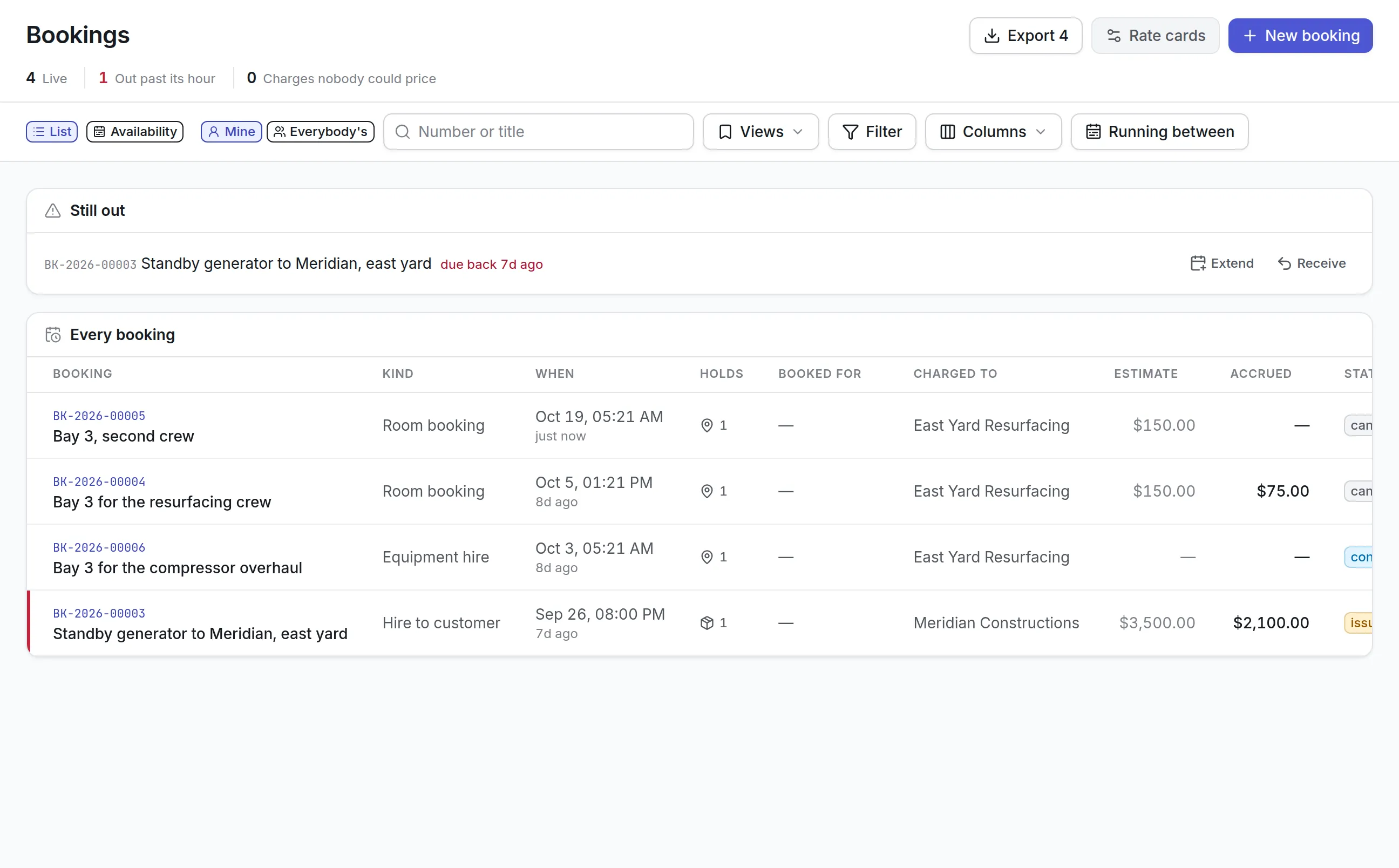
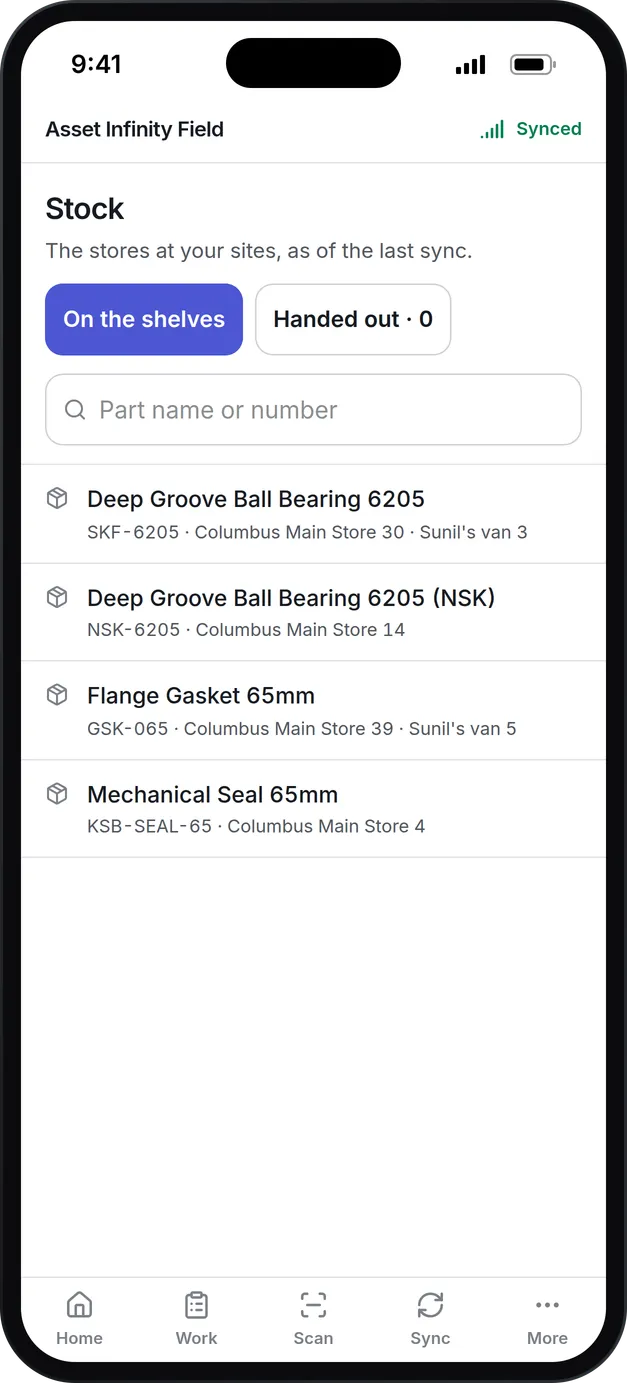
What our equipment checkout software keeps track of
One booking, many things
A single booking can hold tools, assets, people and rooms, each for its own window inside the booking's dates.
No double bookings
Only what is free over the window is offered, and extending a booking into days someone else holds is refused with their name.
Check-out and check-in
Record who took an item, which is often not who booked it, the meter reading where it is billed on one, and the condition it came back in.
Overdue at the top
Anything past its return time is listed first, with Extend and Receive buttons beside it.
Charges that add up
Rate cards price a booking, and charges accrue against a project, cost center, department, business unit or customer.
Damage leads to repair
Damage reported at check-in raises a work order for the item, and a deposit can be held against the booking.
What is equipment checkout software?
Equipment checkout software records who takes a piece of equipment, when it is due back and the condition it returns in. Most also handle reservations, so two people never plan on the same generator, and flag anything kept past its return time. It replaces the sign-out sheet on the storeroom door and the shared calendar nobody trusts.
The usual trigger is a job that stalls because the compressor someone booked is already out with another crew, or a hire that ran three weeks over and was never charged.
How equipment checkout works in Asset Infinity
Everything that is reserved goes through a booking. One booking can hold assets, tools, rooms or yards, people and parts, each for its own window inside the booking’s dates. Here is a three-day resurfacing job that needs a compressor, a workshop bay and two technicians.
- Find what is free.The availability calendar shows assets, tools, places or people by category, one day per cell, with all free, some out, few left and none free marked. Drag across the days you need and book from the selection.
- Raise the booking.Pick the kind of booking, say what it is for, who it is for and the window. Only items free over that window are offered, a scan of the label adds one, and if any line clashes nothing is held at all, so you never end up with half a booking.
- Confirm it.Confirm runs your approval workflow where one is published, so a manager can sign off on an expensive hire before it is promised.
- Issue it.Hand it over names the person taking the item, who is often not the person who booked it. A hire billed on the meter asks for the reading and cannot go out unread.
- Extend or take it back.Extend moves the end date later and refuses days someone else has booked, telling you who. Take it back records the closing reading, unused parts, and whether it came back damaged, which raises a corrective work order against the asset.
- Settle it.Settle closes the returned booking, and its charges go to Bills for your finance system.
Each kind of booking can keep turnaround time free before and after. A hire to a customer keeps an hour before and two hours after by default, so the next booking cannot start while the machine is still being checked.
A booking moves through these statuses:
- Awaiting approval, Booked or Confirmed while it is still a plan
- Out once something has been handed over
- Back when it has returned and is waiting to be settled
- Settled, Released (cancelled with a reason) or Never collected
Checking tools out against work orders
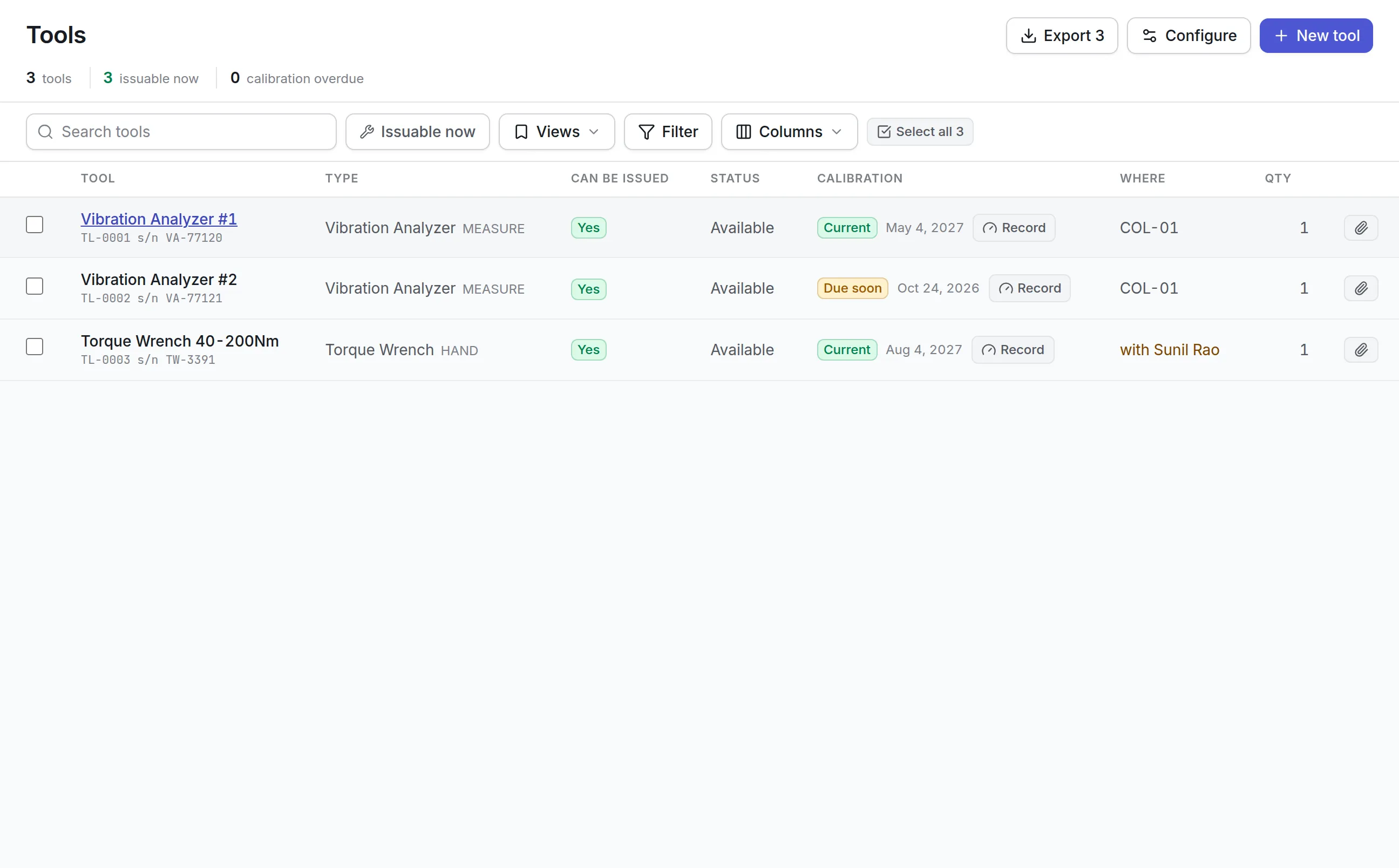
Hand tools and instruments have their own register, because whether a tool can go out depends on two things: its status says whether it is available, and its condition says whether it is safe to use. The register leads with the answer in a Can be issued column.
More detail
A job that needs an instrument carries it as a requirement, and the tool is reserved for the job’s window. The same tool cannot be booked to two jobs at once, and readiness warns when a tool is damaged or past its calibration date. In the field app a technician taps Take to check a tool out against the job and Put back to return it with its condition. A condition that blocks use keeps the tool on the shelf until someone deals with it. More on calibration and the tool crib is in tool tracking software.
What to look for in equipment checkout software
| Capability | Why it matters | In Asset Infinity |
|---|---|---|
| Clash prevention | A double booking is found at the worst moment, on site | Only free items are offered, and a clash holds nothing |
| Turnaround time | Equipment needs cleaning and checking between users | Time kept free before and after, per kind of booking |
| Who actually took it | The booker and the collector are often different people | Issue names the person taking it, every time |
| Condition in and out | Damage needs an owner and a date | Condition recorded on return, with damage raising a work order |
| Overdue list | Late returns hide in long lists | Out past its hour counted in the header and listed first |
| Availability calendar | Planners need to see a month, not a row | Calendar by category, company and site, bookable by dragging |
| Charging | Shared equipment is used more carefully when it costs something | Rate cards, per-line billing and payers from cost center to customer |
| Scan to book | Typing asset numbers is slow and error-prone | Scan a label into any booking line |
See it on your own assets, or price it in two minutes.
Charging for equipment use
Rate cards price each booking line by the hour, day or meter unit, and each line can be billed on its own rhythm: daily, weekly, monthly, quarterly, every so many days or once when it comes back. Each booking names who pays: nobody, a cost center, a department, a business unit, a project or a customer.
- A machine can carry its own default rate card and say whether its bookings are chargeable.
- A deposit can be held against a booking, then given back or kept with a reason.
- A charge no rate card could price is held with no amount and flagged, never recorded as zero.
- Bills move from valid to sent and closed in your ERP. Asset Infinity does not send invoices.
Equipment checkout examples by team
Plant and equipment hire
An oil and gas service company hires generators and pumps to customers. Each booking uses the customer rate card, billed weekly, with a deposit held and meter readings at issue and return. See oil and gas asset management.
A manufacturing tool crib
Torque wrenches and vibration analyzers are booked to work orders. An overdue calibration is flagged, and the job’s readiness check shows the planner which instrument is missing before the technician arrives.
A school district
AV carts, laptops and meeting rooms are booked by staff for a lesson or an event, with no charge. The calendar shows which rooms are free next week. See asset management for education.
A facilities team
Shared vans and access equipment are booked against cost centers, so each department sees what its use cost at month end.
A history on every asset and tool
Good equipment checkout software leaves a record you can use later, not just a list of what is out today. Every line Asset Infinity holds lands on the item’s own page:
Pricing for equipment checkout software
Bookings and reservations is an add-on at $150 a month for your organization, and tools and calibration is $75 a month. Both sit on the asset register, which starts at $130 a month for up to 500 assets with unlimited users. Build a quote to see your total.
Getting started
Set up the kinds of booking you need and one rate card per price, mark which assets are chargeable, and print asset tags so each item can be scanned onto a booking. The documentation walks through every field on a booking. Damage found on return flows into work order software, and the equipment checkout software keeps the record of who had what.
More in Track
Common questions
What is equipment checkout software?
Equipment checkout software records who takes a piece of equipment, when it is due back and what condition it comes back in. Most also handle reservations so two people do not plan on the same item.
How do we stop two people booking the same equipment?
A booking only offers assets, tools and places that are free over its window, including the turnaround time kept before and after. If any line on a booking clashes, nothing is held, and an extension into someone else's days is refused with who holds it.
Can we book rooms and people as well as equipment?
Yes. A booking can reserve tools, assets, rooms and people, so a job's compressor, crew and workshop bay are held together.
Can we charge internal teams or customers for equipment use?
Yes. Rate cards price each booking line, and charges accrue to a cost center, department, business unit, project or customer. Bills are exported to your finance system; Asset Infinity does not send invoices.
Can staff check equipment out on a phone?
Yes. Technicians take tools out against a job and put them back in the iOS and Android field app, which also works offline where your organization allows tool checkout without a connection.
Is there a calendar view?
Yes. The availability calendar shows what is free and what is taken by day, and you can drag across days to book from it.
See it with your own assets
A demo run on an example from your industry. Or start the trial and look around on your own.