






IT asset discovery that finds every device and matches it to your register
IT asset discovery that sweeps your networks with a collector, hears from an agent on each machine, and reads Intune and your cloud accounts. Each device is matched to an asset or put in front of a person to decide.
What our IT asset discovery finds and fixes
Network sweeps
A collector inside your network sweeps the ranges someone authorized, reading devices over WMI, WinRM, SSH and SNMP with credentials that stay on the collector.
Agents on each machine
A small agent for Windows, macOS and Linux, and an app for Android, reports hardware, operating system and installed software.
Intune and cloud connectors
Connectors read managed devices from Microsoft Intune and resources from AWS, Azure and Google Cloud, or import an export from your network management tool.
Matched to the register
Each device is scored against existing assets by serial, MAC address and other identifiers. A strong match links, and anything uncertain goes to review with its reasons.
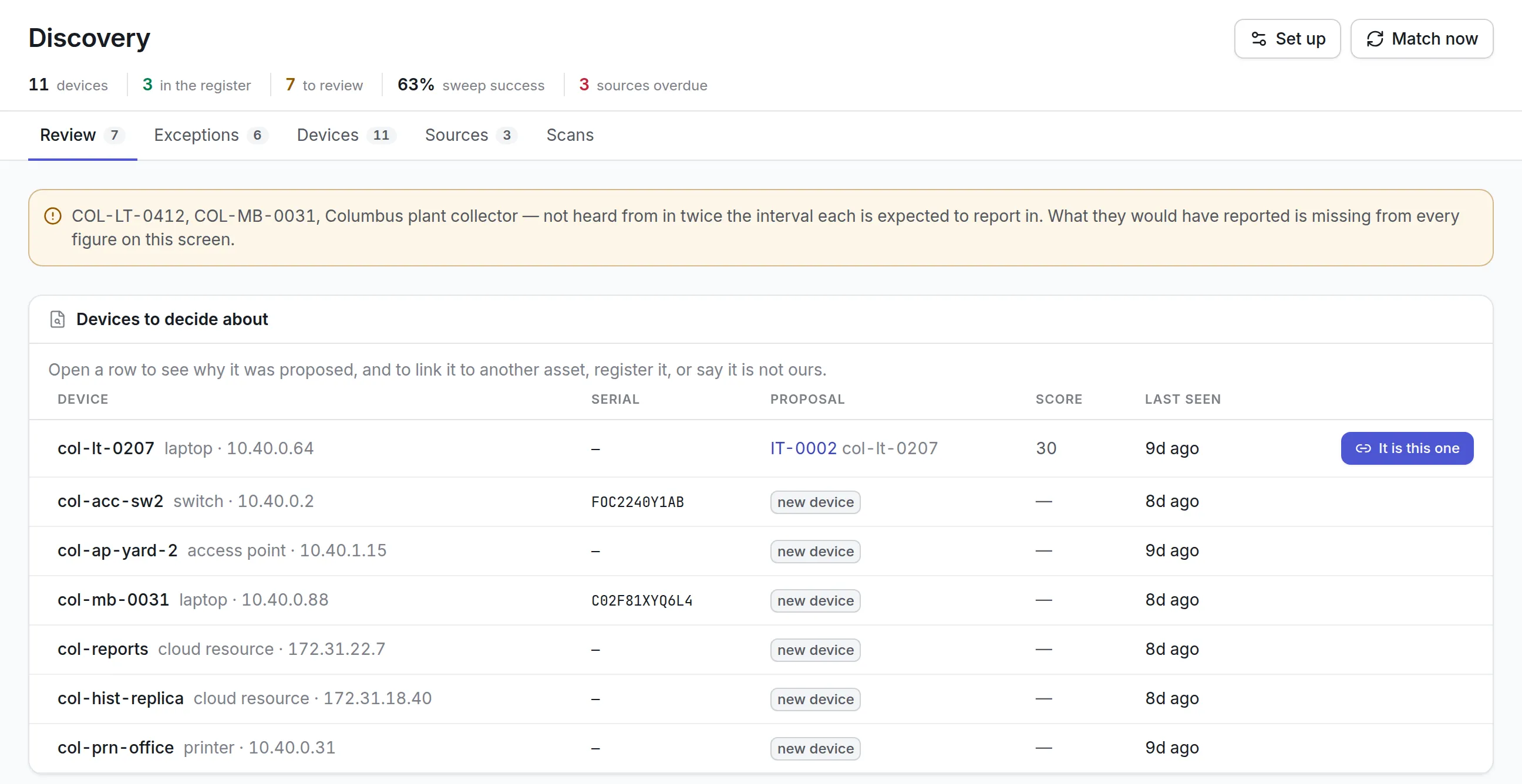
A review queue
For each device, link it to an asset, register it as a new one, or dismiss it with a reason such as a personal device or one that should not be on the network.
Exceptions worth chasing
See devices no agent manages, devices not seen for too long, assets with no custodian, duplicates and blocked software.
What is IT asset discovery?
IT asset discovery finds the computers, servers, network equipment, phones and cloud resources on your estate automatically, using agents on each machine, network sweeps and connectors to systems that already know about devices. Each device found is matched to your inventory, so the register includes the machines nobody entered by hand.
Teams buy it because a hand-kept IT inventory is wrong the day after it is finished. Laptops change hands, switches get replaced over a weekend, and a cloud server someone started for a test is still running a year later.
How IT asset discovery works in Asset Infinity
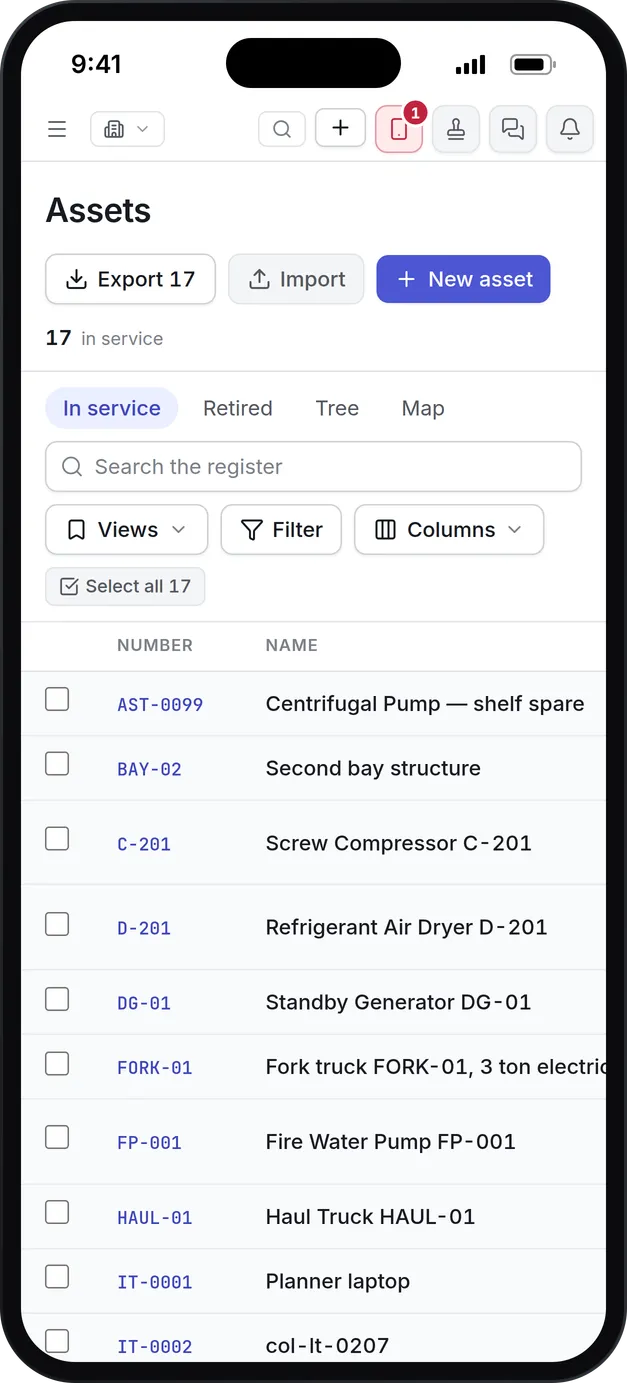
Discovery does not build a second register. A laptop found on the network links to the same asset record as the forklift in the yard, with the same custodian, site, costs and history. Discovery adds the evidence: which source reported the device, when, and what it said.
- Enroll agents.Create an enrollment key, then install the agent on Windows, macOS or Linux, or the app on Android. Each installer asks for the server address and the key, with no command line needed, and machines your device management installs are configured by it.
- Authorize a network sweep.Draft a scan authorization naming the address ranges (no wider than a /16), the protocols, the period and the authority it rests on, such as a change ticket. Someone with the grant permission puts their name to it. A granted authorization cannot be edited.
- Schedule the sweeps.A collector inside your network sweeps under that authorization, nightly or continuously, trying the scanning credentials you list in order. Exclusions are removed first, so a controller that cannot tolerate polling is never touched.
- Add connectors.Connectors read AWS instances, Azure virtual machines, Google Cloud instances, Microsoft Intune managed devices, or an export from your network management system.
- Let the matcher score each device.A minute after a scan arrives, every device is scored against the register by serial number, MAC address, host name, hardware UUID and other identities. By default a score of 80 links without asking, and from 25 it goes to review.
- Decide what is left.On the Review tab, It is this one accepts the proposal. Another asset links it elsewhere with a reason, Register it creates a new asset, and Not ours dismisses it.
Every source calls out to the platform with its own key. Nothing reaches into your network from outside, and the collector keeps its credentials locally or reads them from HashiCorp Vault, CyberArk or Windows Credential Manager.
Agent, network sweep or connector?
Most estates need more than one source. Each sees something the others miss.
| Source | What it reports | Best for | Limits |
|---|---|---|---|
| Agent | Hardware, operating system and installed software of its own machine | Laptops and desktops that leave the office | Has to be installed on each machine |
| Network sweep | Every address that answers, read over SNMP, SSH, WMI or WinRM where a credential reaches it | Switches, printers, access points and anything no agent runs on | Reports no installed software; hosts with no credential get a guessed type |
| Intune connector | Managed devices with serial, model, operating system and primary user, and optionally installed apps | Organizations that already manage devices in Intune | Sees only what Intune manages |
| Cloud connector | Instances in AWS, Azure and Google Cloud | Servers that never touch your office network | Reads the accounts and regions you name |
| Network management export | The device list another tool already keeps | Estates with an NMS or EMS in place | Only as current as the export |
See it on your own assets, or price it in two minutes.
What to look for in IT asset discovery tools
| Capability | Why it matters | In Asset Infinity |
|---|---|---|
| One register for IT and everything else | Two registers disagree, and someone has to reconcile them | Discovered devices link to the same asset records as all other equipment |
| Explainable matching | You need to know why a device was linked | Each proposal shows which identities agreed and which disagreed |
| Scanning with recorded permission | Security teams ask who allowed a sweep | Scan authorizations with ranges, protocols, period and authority |
| Credentials that stay with you | Network passwords should not sit in a vendor’s cloud | Only where to find each credential is stored |
| No inbound ports | Opening a firewall for an inventory tool is a hard sell | Agents and collectors only ever call out |
| Exceptions routed to a person | A report nobody owns is not acted on | Each exception goes to the person answerable for the asset |
| Stale and silent sources | A collector that stopped reporting makes every figure wrong | Sources overdue are named in the header |
Exceptions, and the network behind them
An hourly sweep raises what somebody has to answer for and routes it to the person answerable for the asset, or to the IT asset team when nobody is.
More detail
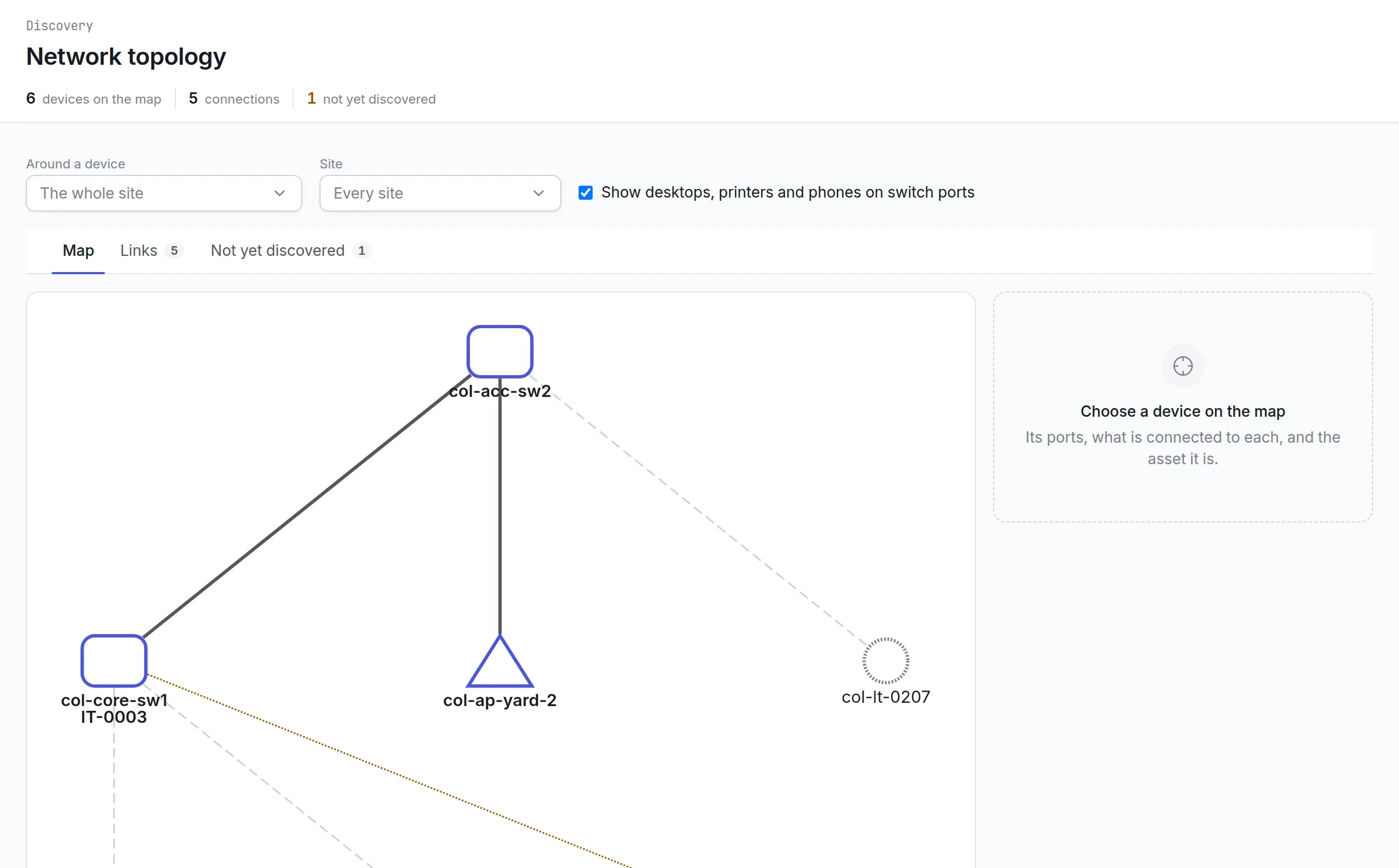
The Network topology screen draws the physical network from what switches report about their neighbors and ports, so you can see what is plugged in behind each switch and which neighbors have not been discovered yet.
Installed software and licenses
Agents and Intune report installed software, which feeds software license management. A network sweep alone does not report software.
More detail
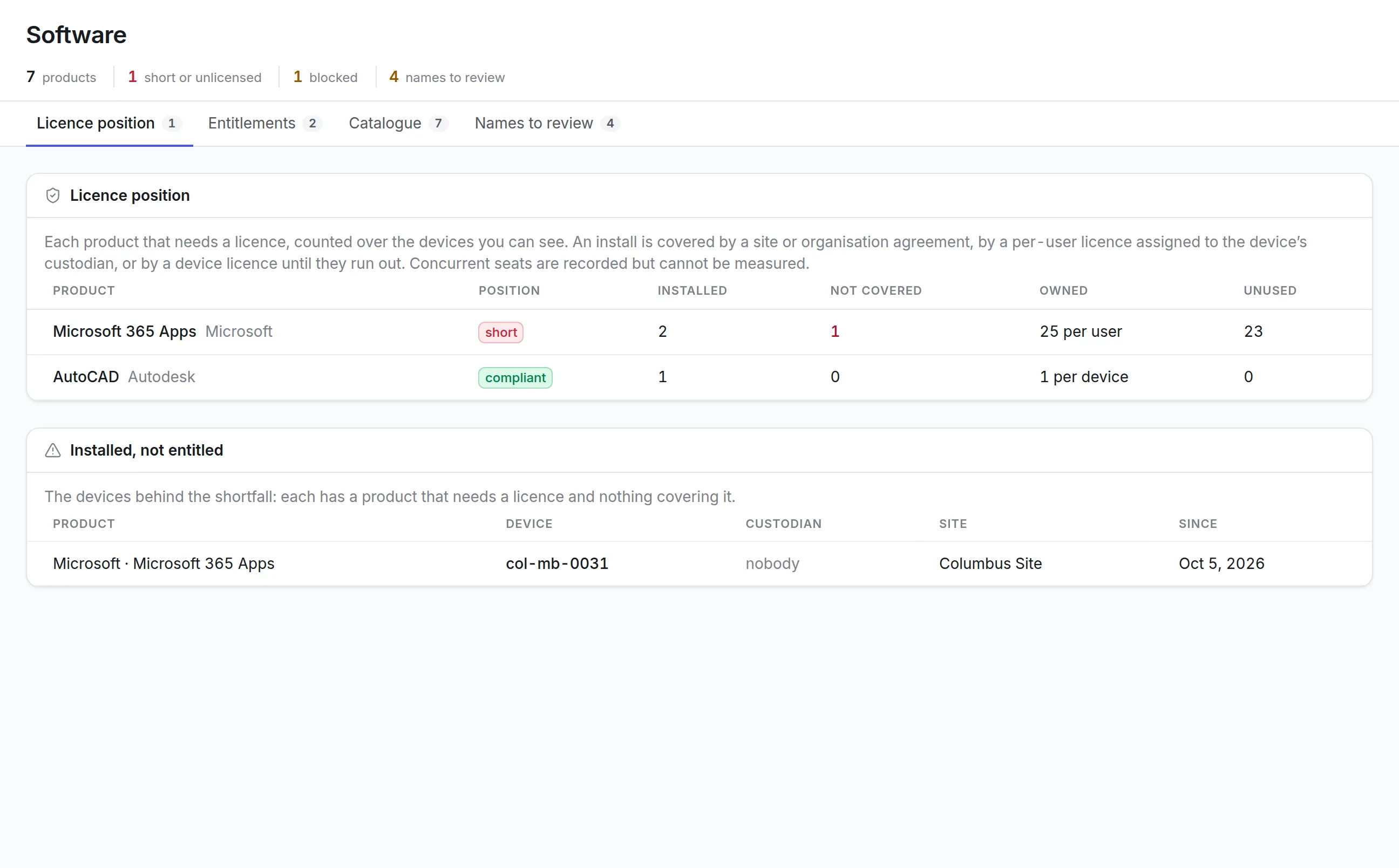
The license position compares what is installed with what you bought and names each device behind a shortfall, with its custodian and site. Assigning a custodian to a laptop is often what settles its per-user license.
IT asset discovery examples by team
A manufacturer’s IT team
Office networks are swept nightly, while the ranges holding production controllers are added as exclusions so no collector polls them. Laptops carry the agent, and anything found on the plant network without one shows as Unmanaged. See IT asset management software.
A hospital
Clinical engineering equipment that belongs to a vendor is excluded or dismissed as belonging to somebody else, which keeps it out of the counts. Devices dismissed as not allowed on the network raise an exception each time they reappear. See healthcare asset management.
A school district
Staff laptops and Android tablets carry the agent, so a device that left with a former employee shows as Stale. A self-verification round then asks the last custodian whether they still have it.
A security-minded IT department
Scan authorizations are drafted by the asset team and granted by security, each tied to a change ticket. See how the platform handles access and data on the security page.
Pricing and getting started
Every device discovery finds lands in the asset register, which is priced by asset count with unlimited users and starts at $130 a month for up to 500 assets. Build a quote or book a demo to plan IT asset discovery for your estate. The documentation covers every discovery setting. In the first week most teams enroll agents on one office’s laptops, authorize one subnet, and work through the first review queue.
Common questions
What is IT asset discovery?
IT asset discovery finds the computers, network equipment, phones and cloud resources on your estate automatically, so your inventory includes devices nobody entered by hand.
What is the difference between agent-based and agentless discovery?
An agent runs on each machine and reports its hardware and installed software from the inside, even off the office network. Agentless discovery sweeps network ranges and reads whatever answers, which finds switches, printers and other devices no agent can run on. Asset Infinity uses both.
Does discovery work with Microsoft Intune?
Yes. An Intune connector reads managed devices with their serial numbers, models, operating systems and primary users, and matches them to the register like any other source.
Do our network passwords leave our network?
No. The collector keeps its credentials locally or reads them from your own vault, such as HashiCorp Vault, CyberArk or Windows Credential Manager. The platform stores only where to find them.
Does the collector need an inbound firewall port?
No. The collector and agents only ever call out, so they work behind your firewall.
Is a discovered device a separate record from the asset?
No. A discovered device links to the same asset that holds its custodian, site, maintenance and costs. Discovery adds the evidence of who reported it and when.
See it with your own assets
A demo run on an example from your industry. Or start the trial and look around on your own.