






Lockout tagout software that will not let a job start unprotected
Lockout tagout software that ties every isolation, precaution and crew member to a permit to work and the job it covers. A work order that needs a permit cannot start until a live one is in place.
What our lockout tagout software records
A permit gates the job
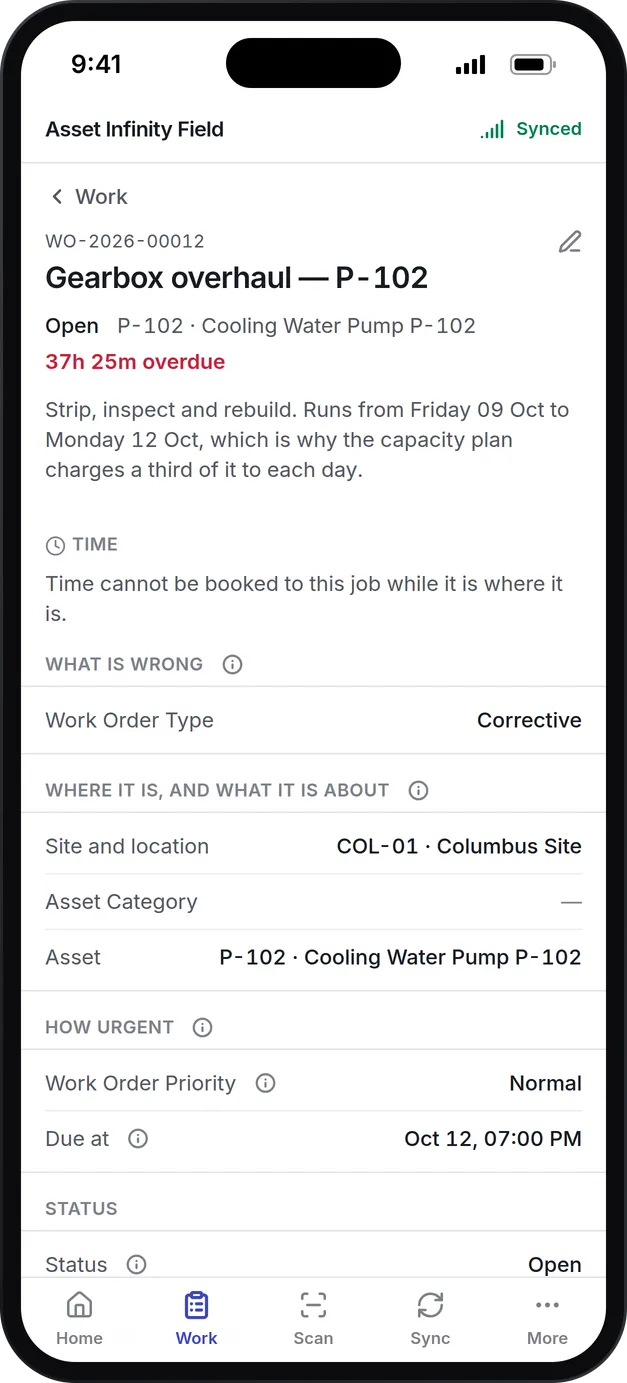
When a job needs a permit, the work order cannot be started until a permit of that kind is live and in date.
Every lock recorded
Each isolation records its point, its method (lock, tag, blank, valve, earth, fuse removed and others), who applied it and who removed it.
Issued, accepted, closed
A permit is drafted, issued by someone authorized, accepted by the person doing the work, suspended when the alarm sounds and closed by someone who has been back to check.
Precautions and crew
The permit cannot be issued until its required precautions are confirmed, and every worker on the permit is named, contractors included.
Ten kinds of permit
Hot work, confined space, work at height, electrical, LOTO, excavation, lifting, chemical, radiation and general.
Planned shutdowns
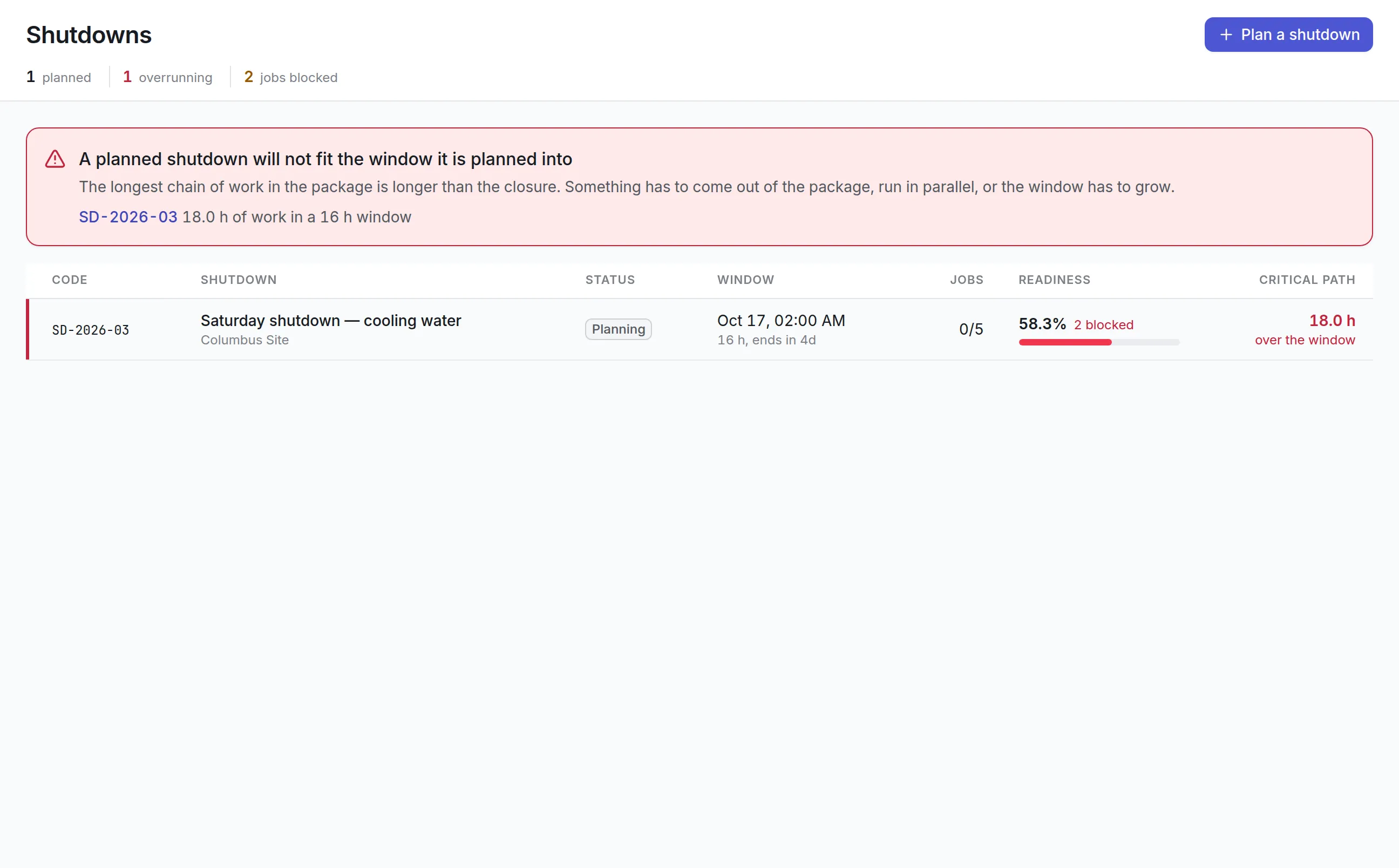
Group a shutdown's work orders into one package. It shows the critical path against the closure window and how many jobs are not ready.
What is lockout tagout software?
Lockout tagout software records how equipment is isolated from its energy sources before maintenance: which points were locked or tagged, by what method, who applied each lock and who removed it. It ties those isolations to a permit to work and to the job they protect, so the job cannot start until the protection is in place.
In the US, OSHA’s standard for the control of hazardous energy (29 CFR 1910.147) expects written procedures, trained people and periodic checks. Paper permits make that hard to prove after the fact, which is why teams move the record into software.
How a permit to work runs in Asset Infinity
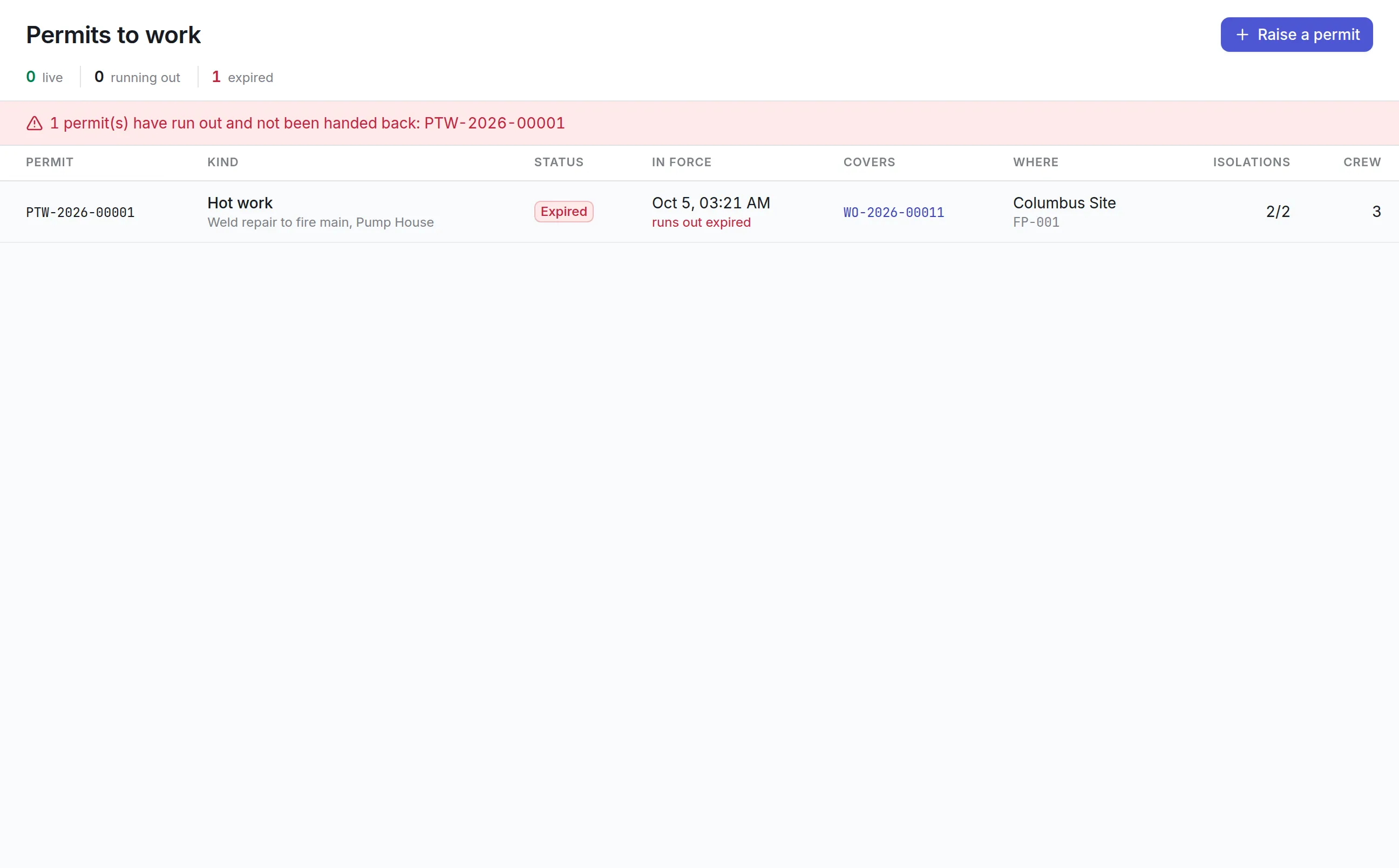
Take a weld repair on the fire main in a pump house. Hot work near a live pump needs two people to sign, two isolations and a crew named before anyone strikes an arc.
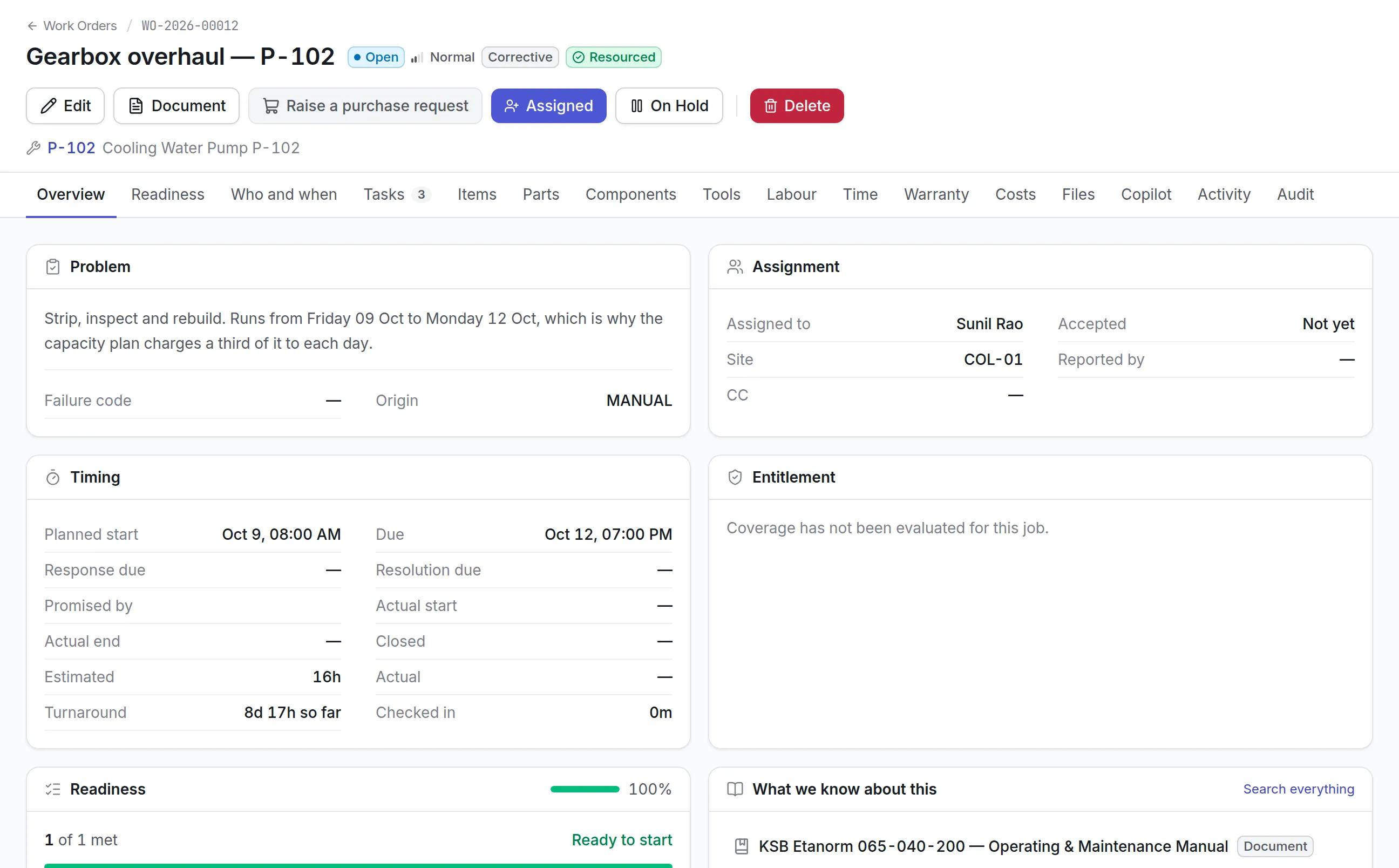
- The job is marked as needing a permit.The work order is flagged Needs a permit, either by the maintenance plan that raised it or by hand. A red banner on the job says why it may not start, and Start work is refused with the same sentence.
- A permit is raised from the job.Raise a permit opens the form with the job already chosen. The planner picks the kind (Hot work), describes the work in plain words, records the hazards from the risk assessment and sets the window it is in force for, with an end time.
- Isolations are listed and applied.The pump’s breaker is locked out and the suction valve closed and tagged. Each isolation records what is isolated, how, and the lock or tag number, then who put it on and when.
- Precautions are confirmed.Each condition is written so it is true or false, such as “gas tested below 10% LEL”, with the reading taken and who checked it. Required precautions left unconfirmed hold up issue.
- The crew is named.Every person on the permit is listed with their role, such as person in charge, welder or fire watch, including contractors with their company.
- Two signatures make it live.An authorized issuer signs it over, and the person in charge of the work accepts it. Only then is the permit Active, and only then can the job start.
- It is handed back.When the work is done, each isolation is recorded as removed by a named person, and the permit is handed back with the state the area was left in.
The custody chain on every permit
A permit is never edited into a different status. Each step is its own button, because the point of a permit is that two people, at two moments, each signed for something real.
| Status | What it means |
|---|---|
| Draft | Being prepared; the only status in which the permit can be edited |
| Issued | Signed by the issuer, waiting for the person in charge to accept it |
| Active | Accepted, and in force within its window |
| Expired | Past its end time; the clock always overrides the status word |
| Suspended | Stood down, for example when the site fire alarm sounds; isolations stay on |
| Closed | Handed back, with the state the area was left in |
| Cancelled | Called off before anyone worked under it, with a reason |
The register leads with what is live and how long each permit has left. Permits with two hours or less are flagged as running out, and a red banner names any permit that has expired without being handed back, so a supervisor goes and closes it.
See it on your own assets, or price it in two minutes.
Ten kinds of permit, one record
Lockout tagout is one kind of permit among the hazardous work a site controls. The same register handles all of them:
More detail
Isolation methods cover lock, tag, blank, spade, valve, earth applied, fuse removed, disconnected and other. Handing back a permit with isolations still on is flagged in the dialog, so the last lock is not forgotten. A printable permit can be produced from your own template for the technician to carry to the job.
Shutdowns that fit their window
Some work can only be done while a system is off. A shutdown gathers that work into one package and answers two questions months ahead: will the parts, permits and people be ready, and does the work fit the window?
What to look for in lockout tagout software
| Capability | Why it matters | In Asset Infinity |
|---|---|---|
| Permit gates the job | A permit nobody checks protects nobody | Start work is refused until a permit of the right kind is in force |
| Lock and tag numbers | The tag on the steelwork must match the record | Each isolation records its lock or tag number |
| Named application and removal | An investigation asks who and when | On by and off by, each with a name and time |
| Two-person sign-off | Issuer and acceptor carry different duties | Separate Issue and Accept steps |
| Expiry that cannot be ignored | Standing permits become permanent permission | Expired permits flagged until handed back |
| Contractors on the permit | Outside workers face the same hazards | Contractors named with their company |
| Suspension | An alarm should stop work without losing isolations | Stand it down, then resume |
| Waivers on record | Exceptions must be owned | Waiving a permit needs a reason, recorded against a name |
Lockout tagout software by industry
Oil and gas
Hot work and confined space permits dominate. Precautions carry gas test readings and are checked again after a break, a single permit covers every job in a turnaround package, and the shutdown’s critical path shows whether the work fits the closure. See oil and gas maintenance.
Manufacturing
Electrical and lockout permits protect line maintenance. The work order is flagged by its plan, so every PM on a guarded machine asks for a permit without anyone remembering to, and the plan’s checklist can open with the isolation steps in order. See maintenance in manufacturing.
Water and wastewater
Confined space entries into wet wells and chambers need atmospheric readings and a named attendant. Crews of your own staff and contractors are listed on the same permit, and a permit can be stood down without losing its isolations when conditions change. See water utility maintenance.
Facilities and campuses
Roof work, electrical panels and boiler rooms call for working at height, electrical and lockout permits. Contractors appear on the crew with their company name, and the permit document prints from your own template for the contractor to carry.
How permits connect to maintenance
Permits are recorded against work order software jobs, and the dispatch board in maintenance scheduling software shows a job as short of something until its permit is live. The capacity plan flags days with a permit outstanding.
What lockout tagout software costs in Asset Infinity
The asset register starts at $130 a month for up to 500 assets, with unlimited users. Work orders come with the Maintenance module at $25 per user per month. Permits to work are an add-on at $100 a month for the whole organization. Build a quote to see your total.
Getting started with lockout tagout software
Most sites move from paper permits in stages:
Common questions
What is lockout tagout software?
Lockout tagout software records how equipment is isolated from its energy sources before maintenance, who applied each lock or tag, and who removed it. It ties those isolations to the permit and the job they protect.
Can a technician start a job without a permit?
Not when the job needs one. The work order checks for a live permit of the right kind before it can be started, and an expired permit does not count.
Can one permit cover several jobs?
Yes. A permit can name a shutdown instead of a single job, so one confined space permit can cover every job inside that turnaround.
What does the shutdown planner show?
For each planned shutdown it shows the window, the jobs in it, how many are ready, and the longest chain of dependent work. When that chain is longer than the window, the screen says so before the day.
What is a permit to work?
A permit to work is a signed record that hazardous work may go ahead, for a set time, once named isolations and precautions are in place. It names the work, the hazards, the crew and the person who issued and accepted it.
Does lockout tagout software make us OSHA compliant?
No software makes a site compliant on its own. Asset Infinity keeps the records a lockout program relies on, such as who applied and removed each lock, which precautions were checked and when the permit was handed back, while your written procedures and training stay your responsibility.
See it with your own assets
A demo run on an example from your industry. Or start the trial and look around on your own.