






Tool tracking software that knows who has each tool and if it is fit to use
Asset Infinity is tool tracking software where every tool has a number, a calibration date and a place. Check it out against a job, book it ahead, and see at a glance whether it can be issued today.
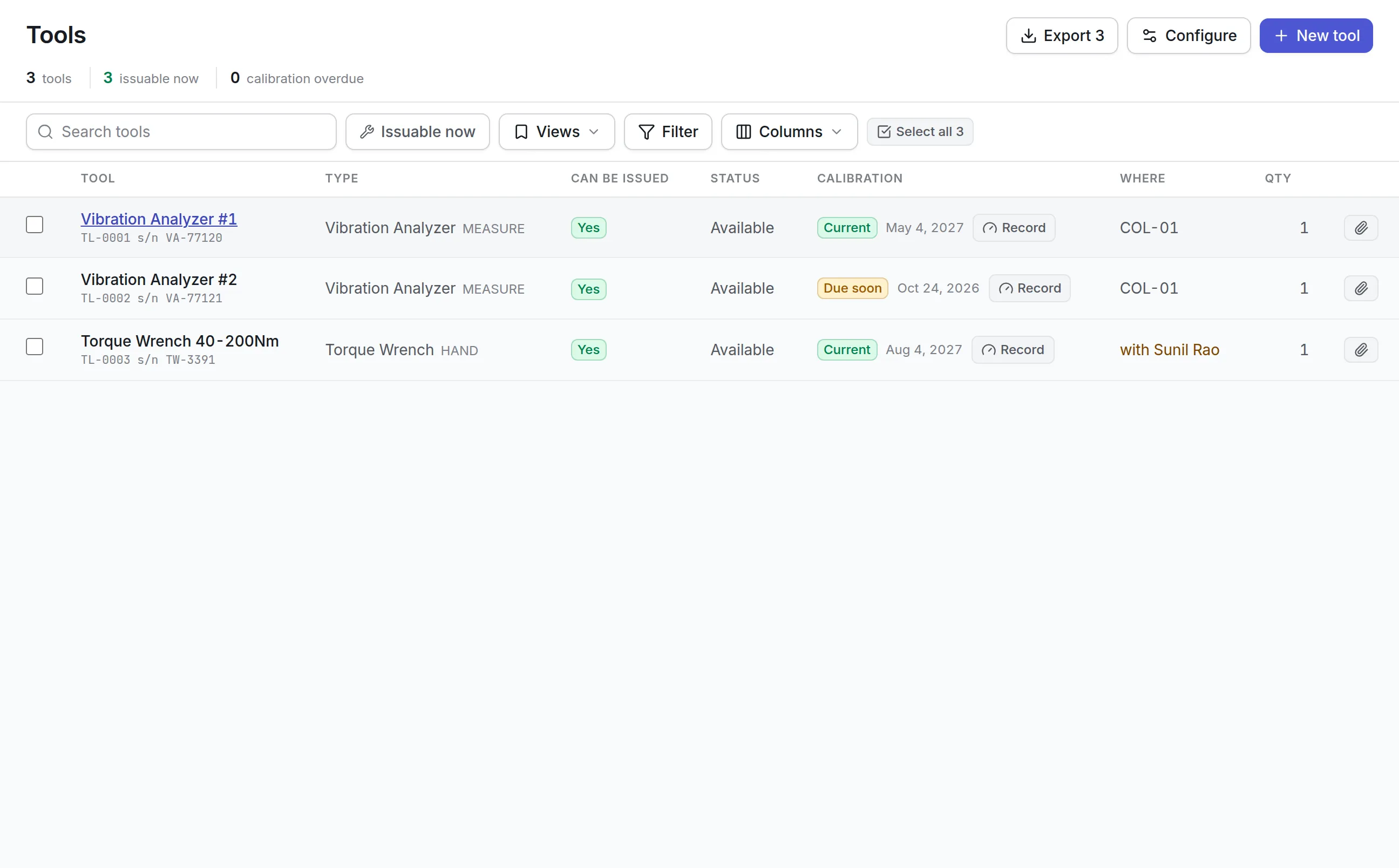
What our tool tracking software does for the tool crib
A register for tools
Tools have their own register with types, categories, serial numbers, condition and cost, separate from plant assets but on the same platform.
Check-out and return
Record who signed for a tool, when it is due back and its condition out and in. A quick check-out needs no booking behind it.
Bookings without clashes
Reserve a tool for a job or a date range. The system refuses a double booking and tells you who holds the tool and until when.
Calibration on the record
Set a calibration interval, record each result with its certificate, and see what is due soon or overdue.
Fit to issue
A tool whose calibration has failed goes out of service, and the register says why a tool cannot be issued.
Approved substitutes
Name the tools or tool types that can stand in for one another, so a clash can offer an alternative.
What is tool tracking software?
Tool tracking software keeps a register of every tool and instrument a team owns and records who has each one, where it is, when it is due back and whether it is fit to use. It replaces sign-out sheets and spreadsheets with one list that answers “can this go out today?” for every tool.
Teams buy it when tools go missing, jobs stall waiting for the one torque wrench, or an auditor asks which gauge was used on a job and whether it was in calibration that day.
Two answers decide whether a tool can be issued
A tool crib runs on two questions: is the tool free, and is it safe to use. Asset Infinity keeps them as two separate settings and combines them for you, so the register leads with one column, Can be issued, instead of leaving people to work it out.
More detail
Your administrator can rename and add statuses and conditions, and decide which ones block issue.
How tool tracking software works in Asset Infinity
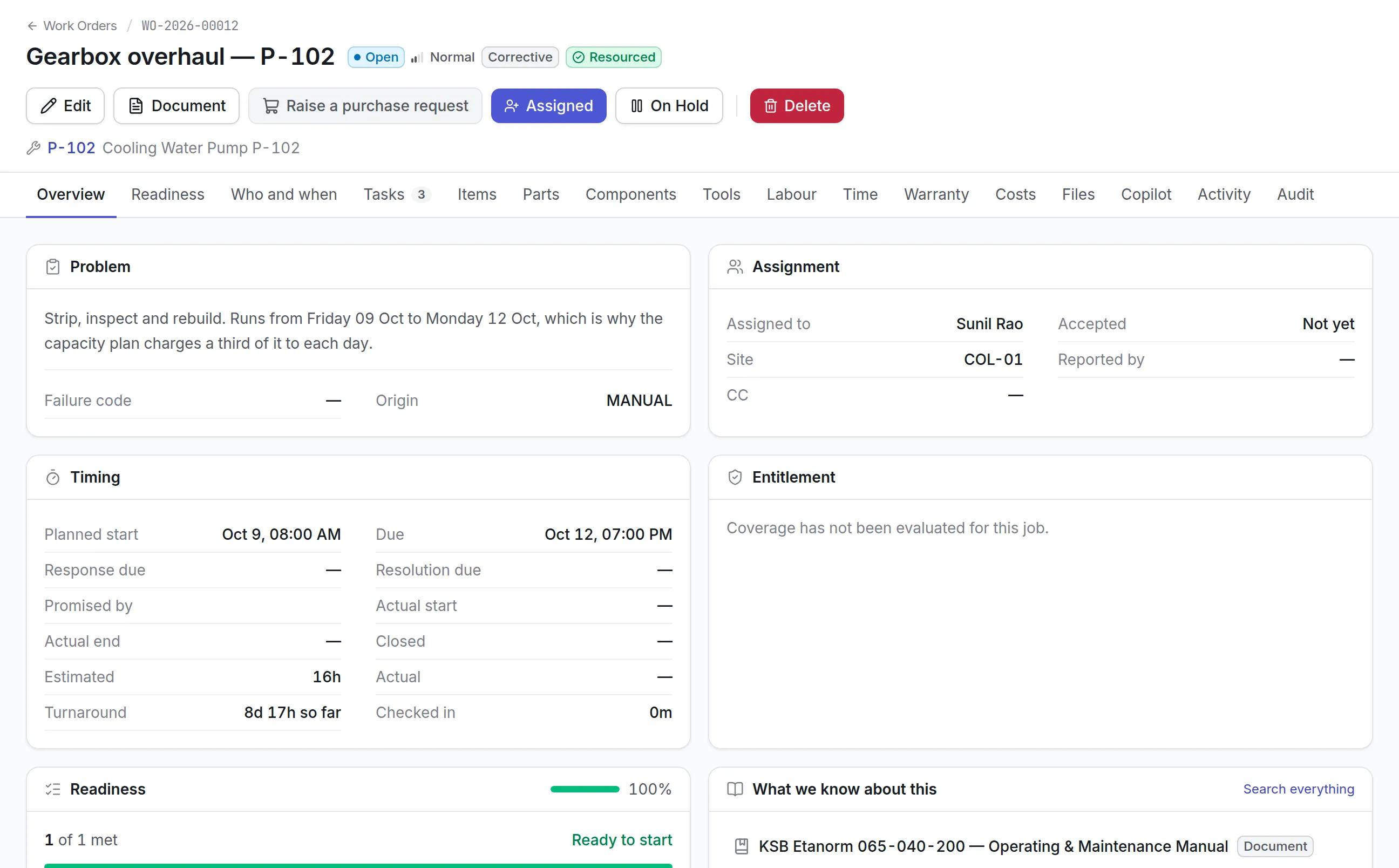
Tools go out against work. A job that needs an instrument carries it as a requirement, and the same tool cannot be promised to two jobs at once.
- Add the tool.New tool asks for a tool number, a name a technician would ask for, and a Tool type. Add the site, the Tool room location it belongs on, serial number, cost and photos. A row can cover several identical units with Quantity.
- Set the calibration regime.Turn on Requires calibration and give an interval in months. A tool type can make this the default, so an instrument cannot be added without it.
- Require it on the job.A maintenance plan or work order names a specific tool or any tool of a type. The requirement shows on the job’s readiness.
- Book it.The tool is reserved for the job’s window. Readiness and the dispatch board warn when it is unavailable, damaged or out of calibration.
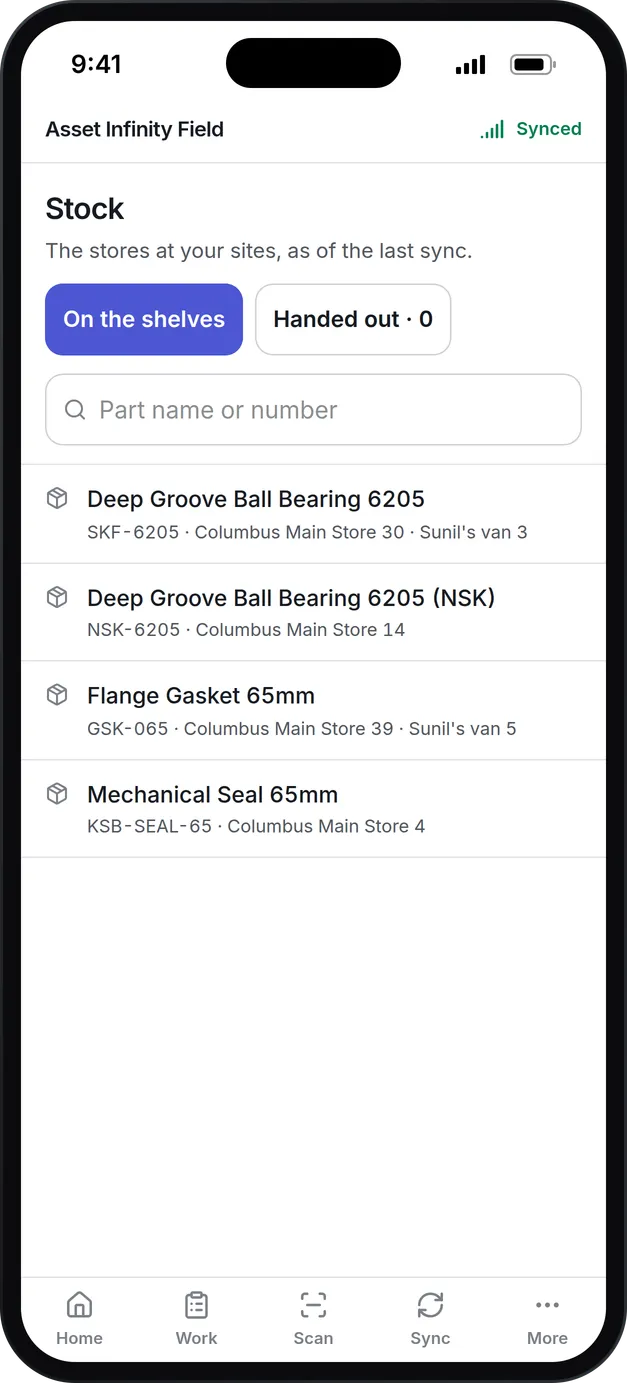
- Check it out.The technician collects it from the Tools panel of the work order or in the field app. The tool shows as out, with whom and since when.
- Return it.It comes back with the condition it came back in. A blocking condition keeps it off the shelf until someone deals with it.
Because the booking, the check-out and the return all hang off the job, the work order shows which instrument was used on it, and the instrument’s history shows every job it went out for and who signed for it. That link in both directions is what answers an auditor’s question about one gauge.
Calibration you can show an auditor
An instrument whose calibration has lapsed still gives a reading. What it stops producing is evidence, which puts in question the work already signed off with it. Calibration management is part of the tool record, so the evidence and the check-out history sit together.
Everything about one tool on one screen
Good tool tracking software should answer an auditor, a planner and a crib attendant from the same record. Click any tool in the register and its screen opens with four tiles: Right now (free, out and with whom, or what blocks it), Booked, Calibration and Times issued. The tabs behind them hold the rest:
| Tab | What it answers |
|---|---|
| Bookings | Every reservation, for which job, by whom, and whether it is still out |
| Checkout history | Every time it went out and came back, with the condition it came back in |
| Calibration | Every calibration with result, certificate, as found and as left, and next due |
| Maintenance | Repairs and servicing on the tool itself, with cost, so a tool repaired past its replacement cost stands out |
| Certificates | Load and pressure tests with issue and expiry dates |
| Alternatives | What else will do when this one is booked |
The header carries Print label, Record calibration and Document, which produces the tool’s record as a document from your own templates.
See it on your own assets, or price it in two minutes.
Bookings, substitutes and hired-in tools
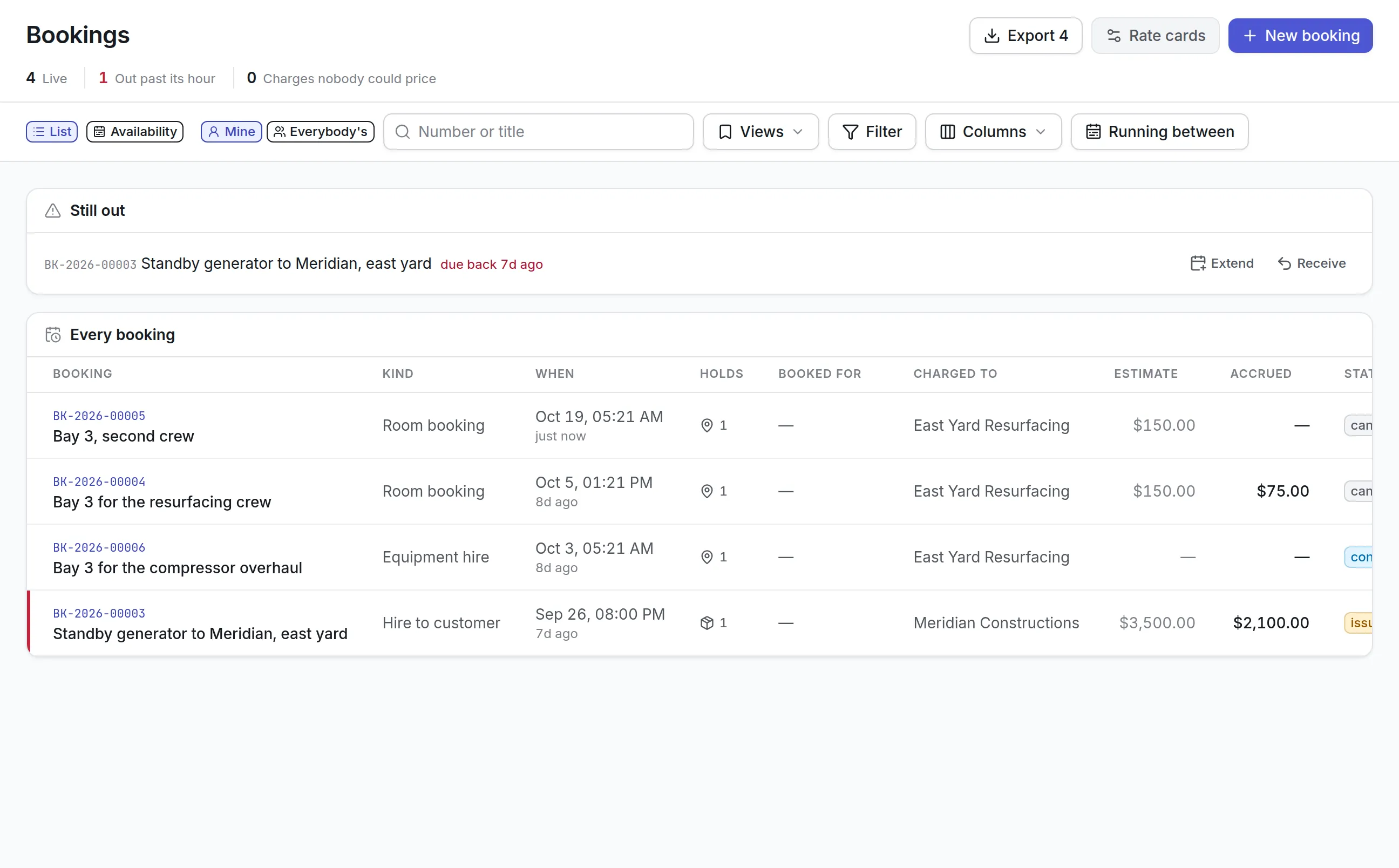
Not every tool goes out against a work order. Projects, contractors and other departments borrow equipment too, and those loans should hit the same checks.
- Bookings reserve a tool for a window outside any job, raised the same way as a job’s tool booking, so calibration and condition are checked the same way.
- Out past its hour lists anything that should have come back, with Extend or Receive.
- The Alternatives tab names substitutes, one tool or any of a type, with whether each is free now, so a clash can offer a swap instead of only a later date.
- A tool type can require a certification, so only workers holding it can be issued one. See technician management.
- A tool type can be marked as one that may be hired from a vendor when your own are all booked.
More detail
For larger equipment, rooms and plant, see equipment checkout software.
What to look for when choosing tool tracking software
| Capability | Why it matters | In Asset Infinity |
|---|---|---|
| A single “can it be issued” answer | People should not combine status, condition and calibration in their heads | Can be issued column with the reason when it is no |
| Calibration with results | An auditor asks for the certificate and the outcome, not just a date | Calibration history with result, certificate, by whom, as found and as left |
| Out-of-tolerance handling | Readings taken with a bad instrument need to be found | The history flags readings since the previous calibration as suspect |
| Tools tied to work | You need to know which tool was used on which job | Tool requirements, bookings, check-out and return on the work order |
| Conflict checks | Two jobs promised the same tool is a missed start | The same tool cannot be booked twice; readiness warns |
| Substitutes | A clash should offer an alternative | Named alternatives by tool or by type |
| Labels | Tools need numbers people can scan | QR, barcode and RFID labels printed from the tool register |
| Repair history | A tool repaired too often should be replaced | A Maintenance tab with cost per repair |
Tool tracking by industry
Manufacturing and maintenance shops
A plant’s tool crib holds torque wrenches, micrometers, alignment kits and thermal cameras. Torque wrenches carry a 12-month calibration interval, and preventive plans require “any torque wrench” so a job is never blocked by one tool being out. Readiness flags a job whose only suitable wrench is overdue for calibration, and the checkout history shows which wrench went out on which job. See maintenance software for manufacturing.
Utilities and field crews
Gas detectors, insulated tools and test sets go out with crews for days at a time. Gas detectors carry a certification requirement on their type, so only trained crew members can be issued one, and a failed calibration takes the detector out of service until it passes again. Bookings keep a detector reserved for a job that runs several days.
Aviation and precision work
Where every reading must be traceable, an out-of-tolerance result flags the readings taken since the last good calibration. Each gauge takes its calibration interval from its tool type, and the Certificates tab holds load tests for lifting gear with their expiry dates. The calibration history, with certificate numbers and as-found values, is the record an auditor asks for.
Facilities and campuses
Ladders, lifts, drain cameras and meters are shared between trades and buildings. Bookings hold them for a job or a date range, Out past its hour shows what has not come back, and RFID readers on the crib doorway record movement. Identical items nobody needs to tell apart can share one row with a quantity. See RFID asset tracking.
What tool tracking software costs with Asset Infinity
The asset register starts at $130 a month for up to 500 assets, with unlimited users. Tools and calibration is a $75 a month add-on for the organization, and Bookings and reservations is $150 a month. Work orders come with the Maintenance bundle at $25 per user per month. Build a quote for your crib.
Getting started with tool tracking software
Most cribs are running in a week:
What it uses
Common questions
What is tool tracking software?
Tool tracking software records every tool a team owns, who has it, where it is and whether it is fit to use. It replaces sign-out sheets and spreadsheets with a register that shows availability and calibration.
Can we track calibration of measuring instruments?
Yes. Each tool can require calibration with an interval in months. You record the date, the result, who calibrated it and the certificate, and the next due date follows.
What happens when a tool fails calibration?
The tool goes out of service and cannot be issued. If it was found out of tolerance, the record flags that readings taken since the previous calibration are suspect.
Can technicians check tools out on their phones?
Yes. In the iOS and Android app, a technician takes a tool out against the job they are working, or scans its label to find it, and puts it back from the same screen. Your organization decides whether tools can be taken out without a connection.
Can we label tools?
Yes. Label designs can be made for tools as well as assets and parts, with QR, barcode or RFID.
What is tool crib management software?
Tool crib management software runs the room or cage where shared tools are kept. It records what is on the shelf, who has signed for what, what is booked and what is overdue back. In Asset Infinity that is the tool register with bookings, check-out and return.
See it with your own assets
A demo run on an example from your industry. Or start the trial and look around on your own.