





Facility management software that keeps every building running
Our facility management software puts every occupant request in one queue with its SLA running. Planned maintenance, contractors and compliance rounds for every building sit on the same register.
- OSHA 29 CFR 1910 (general industry)
- NFPA 25 (fire pump and sprinkler testing)
- NFPA 70B (electrical equipment maintenance)
- ASHRAE Standard 188 (Legionella water management)
What our facility management software does for your buildings
One front door
Occupants, tenants and front-desk staff report faults from the web or by email, and your service desk triages every request in one queue. Technicians scan an asset's label to raise a job on the spot.
SLAs per trade and priority
Each request carries response and resolution targets. Jobs that are about to miss them escalate, and the dashboard shows which buildings broke their clock.
A PPM schedule that runs itself
Generators, fire pumps, booster pumps and HVAC fall due by date, run hours or readings, whichever comes first. Each plan raises its own work order.
Contractors on the record
Subcontractor agreements hold their scope, visits and response times. Covered work is flagged on the job, so you claim what the contract already pays for.
Rounds that prove it
Daily technical rounds and monthly fire-extinguisher checks are recorded against limits. A failed critical item raises a corrective work order on its own.
Every building, one view
See open, overdue and late work across the portfolio or for a single building. Access follows the building, so a client or site lead sees only their part.
What is facility management software?
Facility management software is a system that records the buildings an organization looks after, the equipment inside them and every job done there. It takes requests from occupants, schedules planned maintenance, tracks contractors against their agreements and keeps the evidence a client, an insurer or a fire inspector asks to see. It is often sold as CAFM software.
Teams usually buy it when the shared inbox and the spreadsheet stop scaling. A manager with three buildings can remember which booster pump was serviced last month. One with thirty cannot, and neither can a client who wants proof that the contracted response times were met.
How facility management software works in Asset Infinity
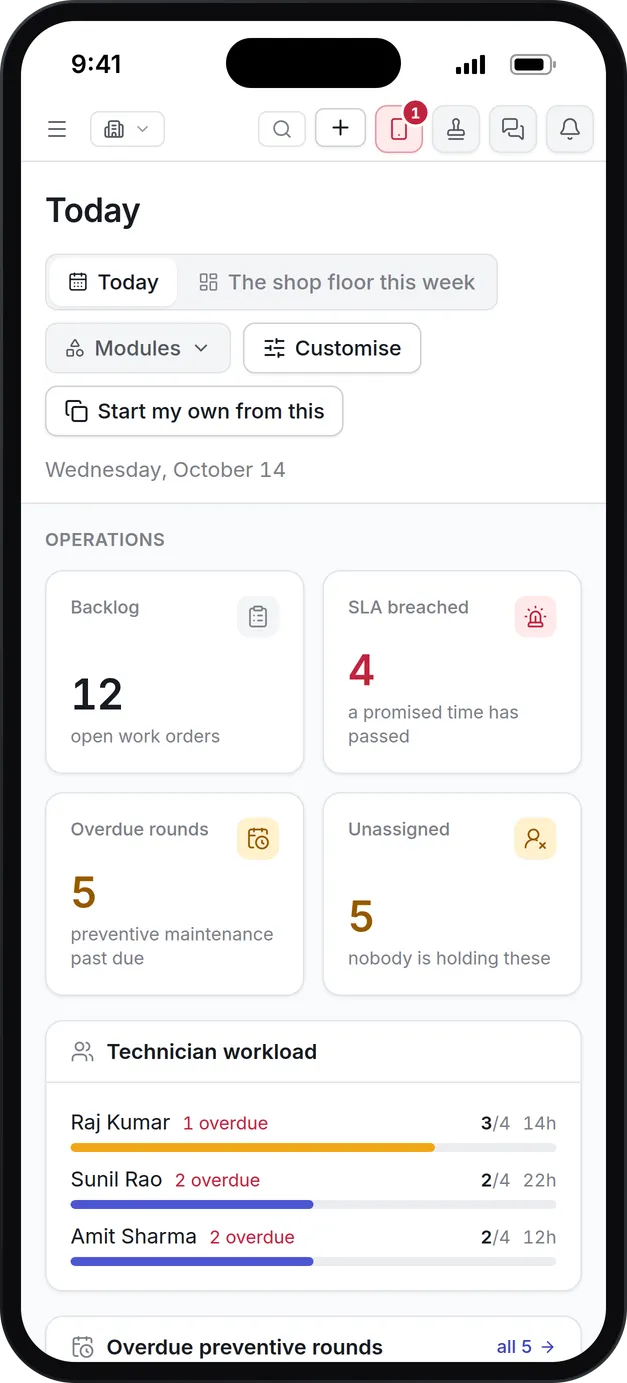
Asset Infinity keeps buildings, assets, people, parts and contractors on one register. The Today screen is where a facilities manager starts the morning: open work, jobs past their promised time, overdue planned maintenance and who is carrying what.
The work runs in six steps, from the first building on the system to the report a client reads at the end of the month.
- Set up clients, buildings and floors.Every building is a site with its own tree of floors, zones and rooms. An FM provider hangs several buildings from each client, so reports roll up by client as well as by building. The asset register imports from a spreadsheet.
- Take requests through one front door.Occupants and front-desk staff report a problem from the web portal or by email. The request keeps their words and photographs and lands in the inbox worst first, where a planner classifies it by trade and converts it, rejects it with a reason or marks it as a duplicate. The maintenance request software page covers intake in detail.
- Promise a response time.Each priority carries a response and a resolution target, and priority rules change the promise for one building, asset category or job type. The clock pauses while a job is on hold waiting for parts or access, and the paused time stays on record.
- Run the PPM schedule.Maintenance plans fall due by calendar, run hours, a condition on a reading or whichever comes first, and raise work orders with the checklist, parts and permit requirement on them. The preventive maintenance software page explains triggers, lead time and tolerance.
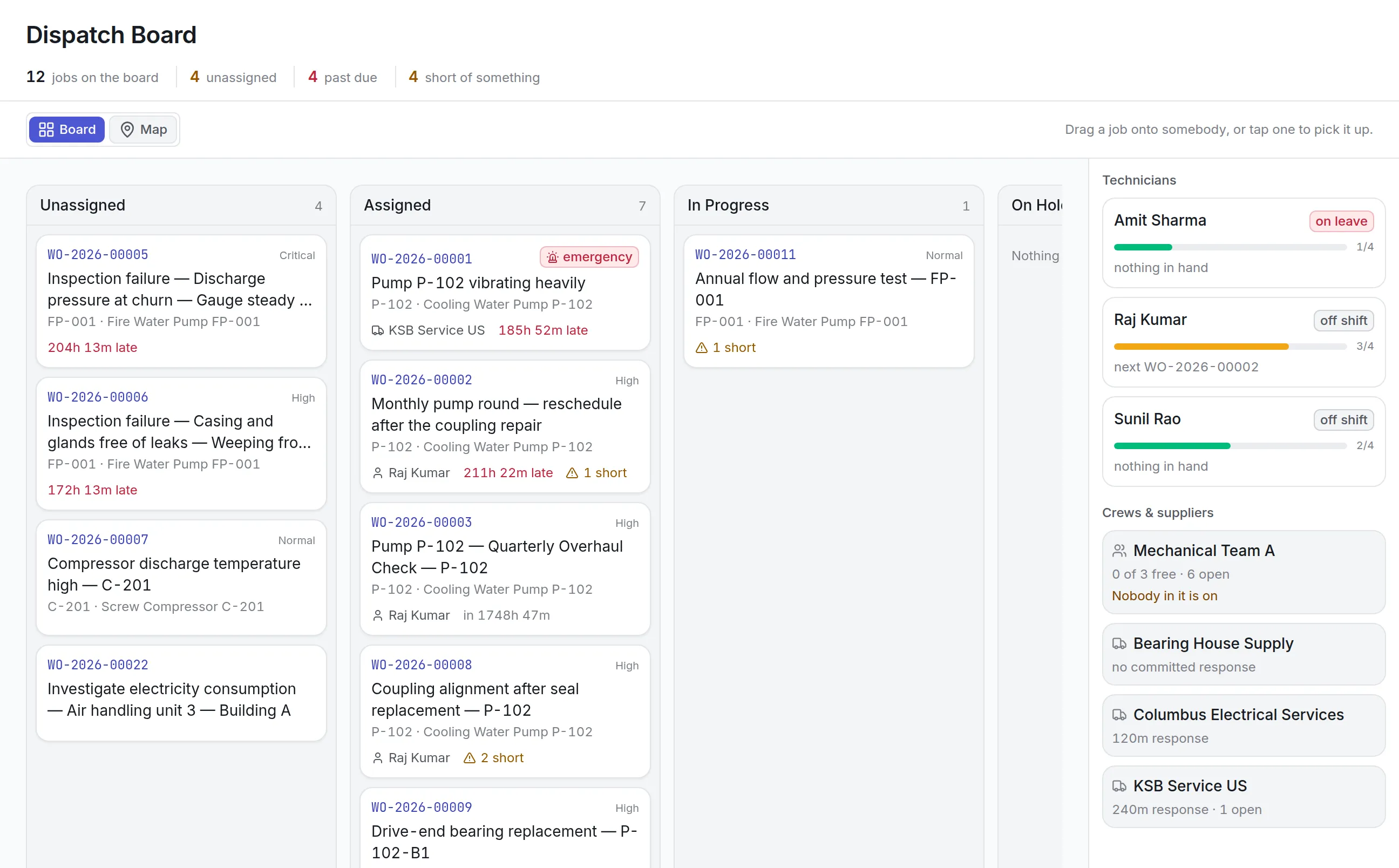
- Dispatch the work.The dispatch board shows what is unassigned, late or short of a part. Dropping a job on a technician first shows whether they are on shift, on leave or overloaded, and contractors sit on the same board with their committed response time.
- Escalate and report.A job that runs past its resolution target climbs an escalation ladder, each rung firing a set number of minutes past due. Reports show SLA performance, overdue PPM and cost by building or by client.
For job types where a client wants proof the fault is really fixed, closing can require a code. A six-digit code is texted to the person who raised the job, they read it back to the technician, and only then does the job close. It settles the “nobody ever came” argument with a record instead of a phone call.

Contractors and service agreements on the record
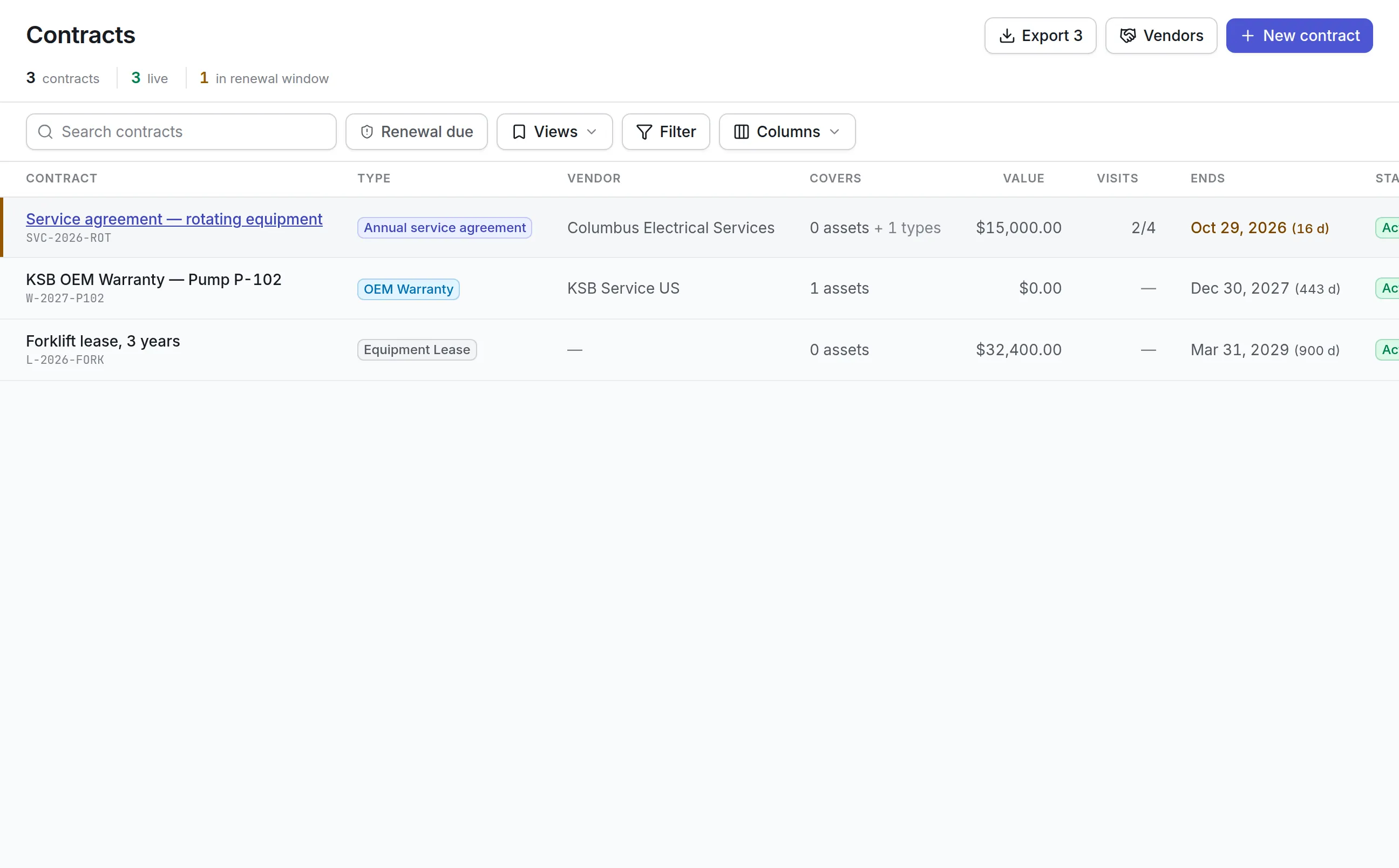
Subcontractors do much of the work in most buildings, and most of the billing. The contract register holds every warranty, service agreement and lease with what it covers, how many visits it includes and when its renewal notice period begins.
- Whether a contract covers parts, labor and travel, so call-out charges are no surprise
- Included visits used against visits owed
- Contracts inside their renewal window, before they roll over or lapse
- Work on a covered asset, flagged on the job so you claim what the agreement already pays for
- A vendor portal where a contractor’s own staff see only their own jobs and orders
More detail
With maintenance contract management you can track:
Rounds that prove the building is safe
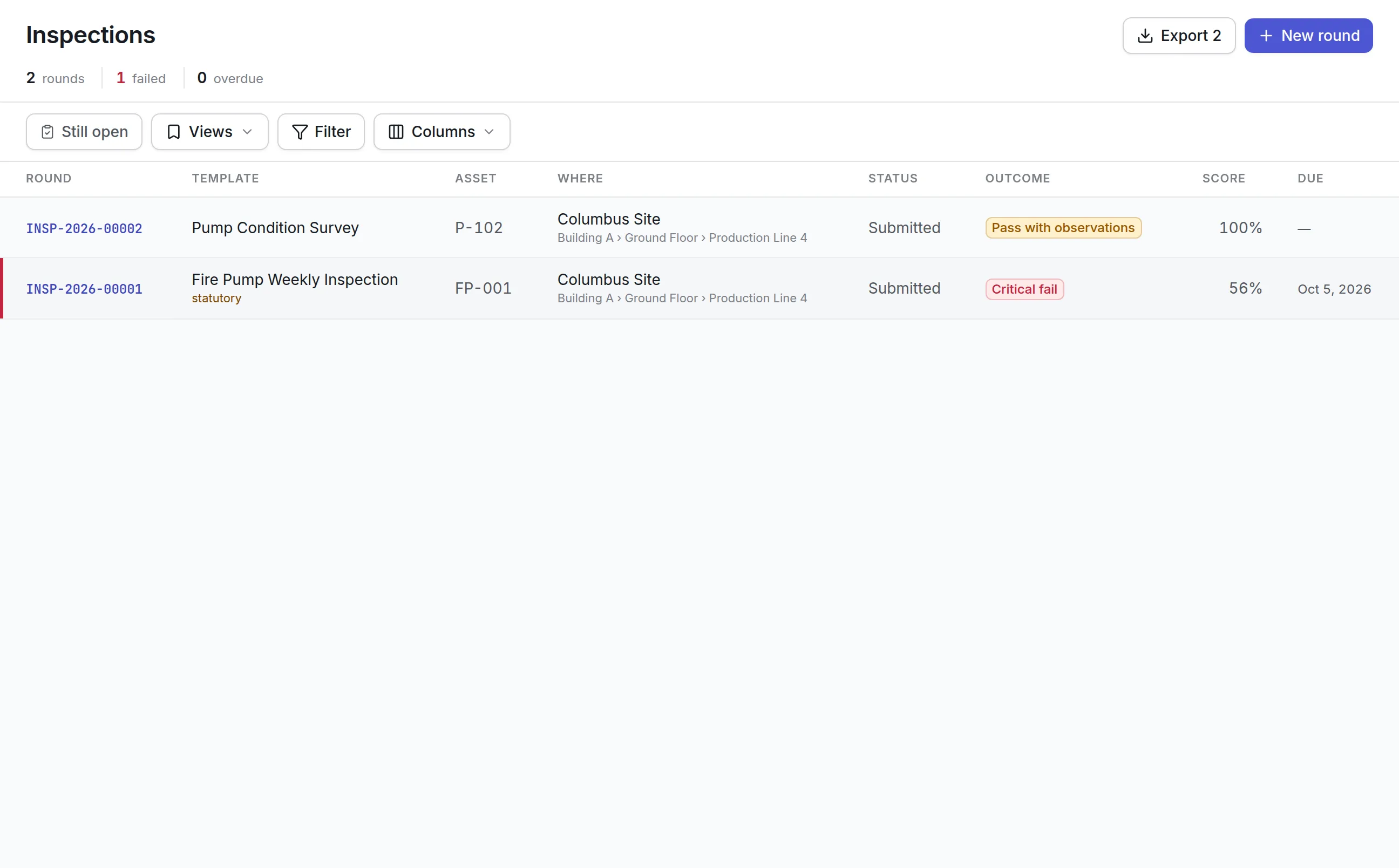
Daily technical rounds, monthly fire-extinguisher checks and quarterly client walk-throughs are inspection templates. Each check is graded against its expected answer or range, and the round gets a score and a verdict.
- Readings against limits, pass or fail answers, photos, notes and signatures
- A critical fail when any critical check fails, whatever the score
- A corrective work order raised by itself for each failed critical check
- A second person’s sign-off on statutory rounds, with their name and the time
- The template version the round was asked, so later edits never rewrite old evidence
More detail
What a round records:
More detail
These are the records an NFPA 25 fire pump test or an OSHA walk-through asks you to produce. Asset Infinity keeps them; it does not certify compliance.
What to look for when choosing facility management software
Most products in this category can raise a work order. The differences show up when there are many buildings, many requesters and many contractors at once.
| Capability | Why it matters | In Asset Infinity |
|---|---|---|
| Building and client hierarchy | Reports, access and SLAs have to follow the portfolio | Sites grouped by client or region, with floors, zones and rooms beneath |
| Request intake | Occupants will not install an app to report a leak | Web portal and email, with technicians scanning labels in the mobile app |
| SLA targets per priority and building | One promise does not fit a data hall and a parking garage | Response and resolution times per priority, overridden by site, category or job type |
| Escalation | A missed target should reach a manager before the client notices | An escalation ladder per priority, counted from the resolution deadline |
| Planned maintenance triggers | Generators run on hours, filters on dates | Calendar, meter, condition and asset-date triggers, combined as either or both |
| Contractor management | Subcontractors do much of the work | Contracts with coverage, included visits, renewal notice and a vendor portal |
| Inspections with evidence | Life safety checks have to be shown, not described | Graded rounds with photos, signatures and automatic corrective jobs |
| Room bookings and visitors | Meeting rooms and visitors are part of the same building | Bookable places and a visitor register, both optional modules |
| Offline mobile app | Plant rooms and basements have no signal | iOS and Android app that queues work and syncs when back in range |
| Access by building | A client should never see another client’s buildings | Site and place access per user |
See it on your own assets, or price it in two minutes.
Facility management software by team and building type
The same product is set up differently depending on who runs the buildings and what is in them.
In-house corporate facilities
A company running its own offices starts with the request queue and the PPM schedule. Employees report problems through the portal or by email, a coordinator triages them, and a few technicians work the jobs on their phones. Meeting rooms become bookable and the visitor register replaces the paper book at reception, so one dashboard covers every office.
FM service provider
A provider sets up each client with its own buildings and SLA targets per trade and priority, because every contract promises something different. Access is narrowed so a client’s site lead sees only that client’s buildings. Elevator, fire alarm and chiller subcontractors sit on the contract register, and the monthly report shows SLA compliance per building.
Shopping mall or mixed-use property
A mall carries heavy plant: chillers, escalators, a fire pump, generators and booster pumps. Generator run hours and electricity use are recorded as readings, and energy management software flags supply points using far more than their peers. Tenant requests arrive through the portal, and vertical transport visits are tracked against their agreements.
Residential portfolio
Residential blocks have fewer assets and more requests. Residents and the front desk report faults, a small team works them, and water tank cleaning, booster pump checks and fire alarm tests run on a fixed calendar. A property manager reads overdue work and cost per block on one screen. Residents can be given a requester sign-in to follow their own requests.
What facility management software costs with Asset Infinity
The asset register starts at $130 a month for up to 500 assets, with unlimited users. Maintenance, covering work orders, preventive maintenance, inspections and the workforce, is $25 per user per month. Building-focused add-ons are flat per organization, and you can build a quote for your own building count:
- Maintenance requests, $75 a month
- Escalations, $75 a month
- Contracts, $100 a month
- Job routing and dispatch, $150 a month
- Bookings and reservations, $150 a month
The facility management trial opens with three sample client buildings (an office tower, a mall and a residential block), a PPM schedule an FM contract is judged on, daily technical rounds and three subcontractors with their agreements already loaded.
Your first week
Most teams follow the same order, and the trial data shows what each step should look like when it is done:
If you would rather see it with your own buildings first, book a demo.
What teams in this industry use most
Common questions
What is facility management software?
Facility management software records the buildings you look after, the equipment in them and every job done there. It takes requests from occupants, schedules planned maintenance, tracks contractors and keeps the records an inspector or a client asks for.
Is Asset Infinity a CAFM system?
Yes. It covers the computer-aided facility management work most teams buy CAFM for, including requests, planned maintenance, space and room bookings, contractors and building records, with a mobile app for technicians.
Does it work for FM service providers with several clients?
Yes. Buildings can be grouped by client, each request type carries its own SLA, and access can be limited so each client or site lead sees only their buildings.
How do occupants report problems?
From a web form or by email, and each request arrives in the service desk queue with its SLA running. Technicians can also scan an asset's QR label in the mobile app and raise a job against it straight away.
What is the difference between facility management software and a CMMS?
A CMMS is built around maintaining equipment. Facility management software adds the building side, such as occupant requests, room bookings, visitors, contractor SLAs and portfolio reporting. Asset Infinity does both on one register.
How much does facility management software cost?
In Asset Infinity the asset register starts at $130 a month for up to 500 assets with unlimited users, and the maintenance modules are priced per user per month. The pricing page builds a full quote.
See it with your own assets
A demo run on an example from your industry. Or start the trial and look around on your own.