






Parts inventory management that reorders before a job has to wait
Parts inventory management for every storeroom, van and bin, with what is reserved for jobs. Reorder recommendations weigh planned maintenance, history and safety stock, and each one says why.
What our parts inventory management does for your storeroom
Every store, every bin
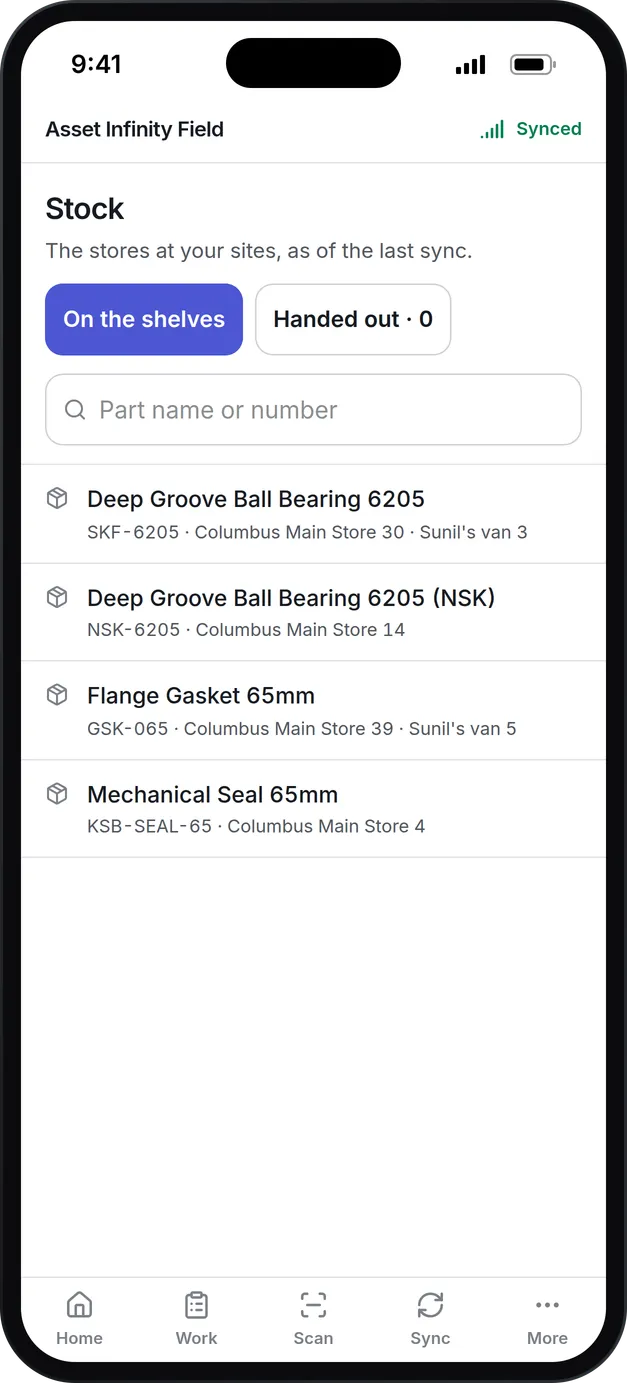
Main stores, satellite stores, vans, tool rooms and quarantine each hold their own stock, down to the zone, rack, shelf and bin. Bin labels print from the part.
Reserved means reserved
Parts a work order needs are reserved against it, so available stock is what is actually free. Issues, returns and parts used up are recorded against the job or asset.
Reorder points and safety stock
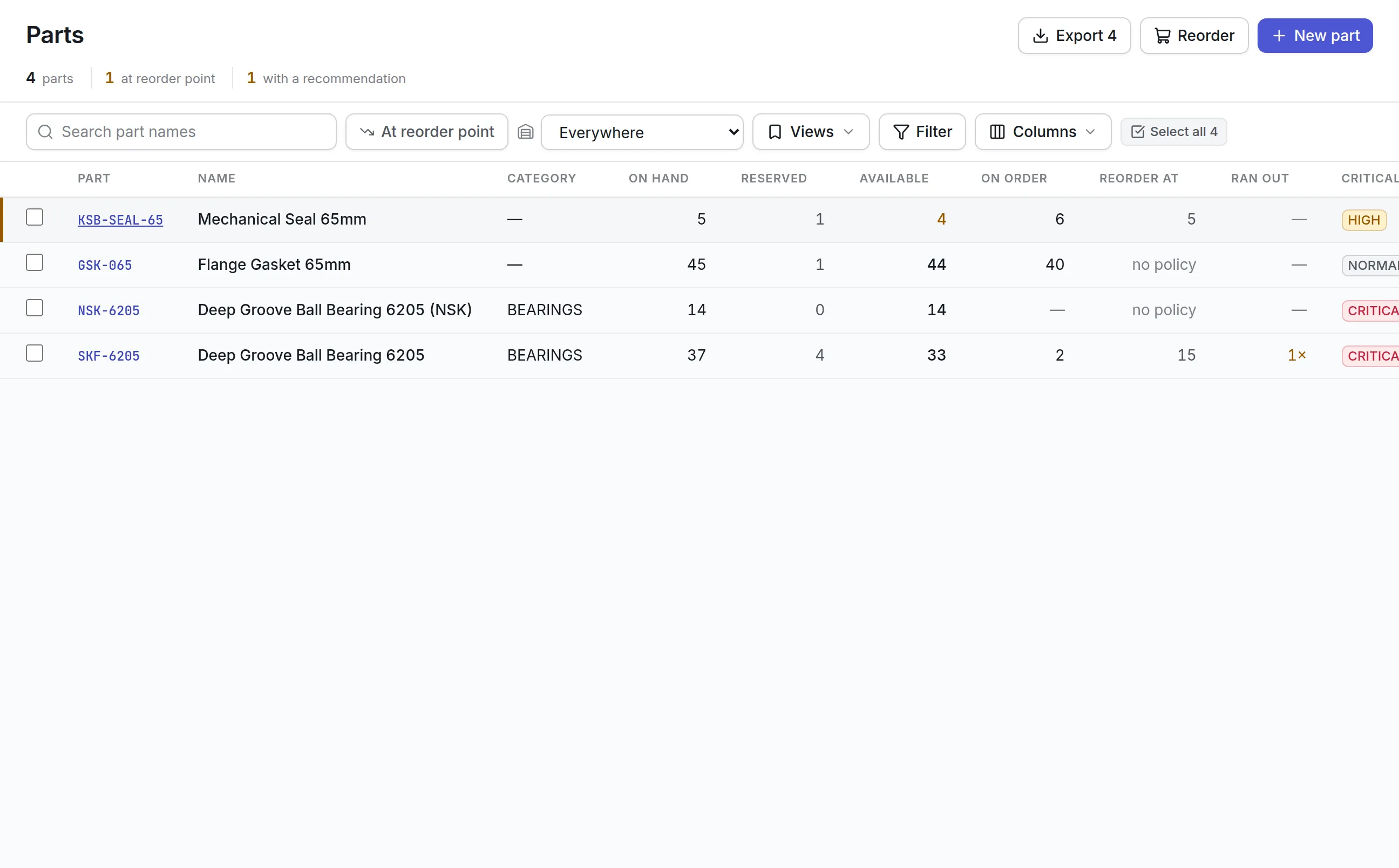
Set a minimum, a refill level and safety stock per part and store. The Parts list shows what is at its reorder point right now.
Recommendations that explain themselves
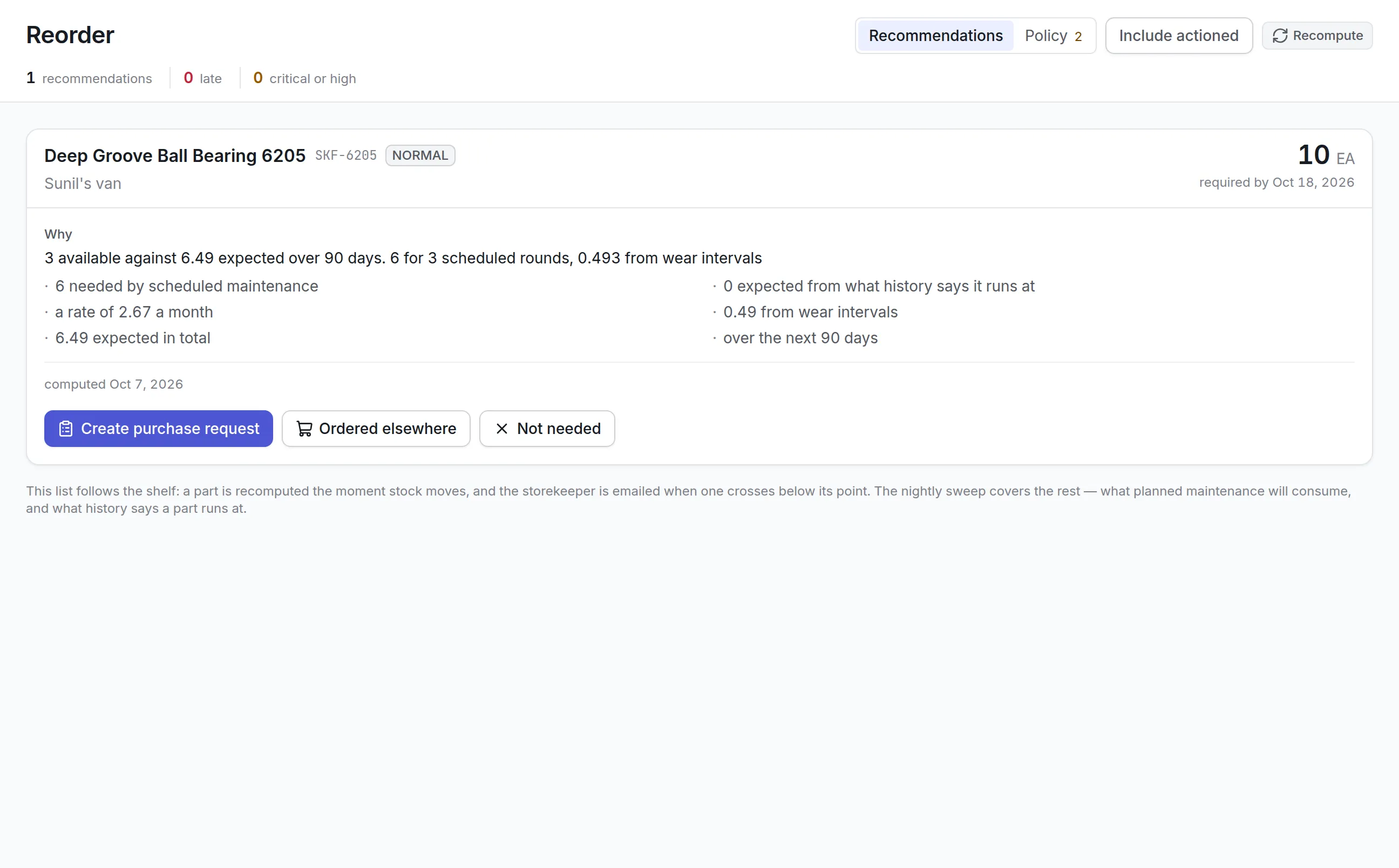
Each recommendation shows what planned maintenance will use, what history says the part runs at, wear intervals and lead time, and the date it is needed by.
Counts that find the gap
Record a count and see the difference against the record before it is adjusted. Every stock figure is the sum of movements you can open.
Alternatives and suppliers
Each part lists who sells it, at what price and lead time, and which parts can stand in for it when it runs out.
What is parts inventory management?
Parts inventory management is the practice of tracking the spare parts and consumables a maintenance team holds: how many are in each storeroom, which are promised to jobs, what they cost and when to buy more. Good spare parts inventory software keeps the part on the shelf when a job needs it, without filling shelves with stock nobody uses.
Maintenance teams buy it because two things go wrong without it. A technician drives to a pump with no seal in the van and the job stops, or finance finds a storeroom full of bearings for machines that were scrapped years ago. Both are visible in the numbers long before they happen, if the numbers are kept.
How parts inventory management works in Asset Infinity
The work follows a part from the moment it is set up to the moment it is used on a job. Every stock figure in the product is the sum of movements on a ledger, so when a number looks wrong you can open the receipts, issues, transfers and counts behind it.
- Set up stores and bins.A store is a main store, satellite store, van, tool room, quarantine area or consignment stock the vendor still owns. Inside it, bins nest from zone to aisle, rack, shelf and bin, each with its own barcode.
- Add each part with the facts a storeroom needs.Your part number, the OEM part number that goes on the order, a barcode, the unit it is counted in, a default lead time and a criticality of critical, high, normal or low. Mark it consumable, repairable or hazardous, and set a shelf life where it expires.
- Reserve, issue and return against the job.Parts a work order needs are reserved, so Available shows what is truly free. Issuing from the work order reduces stock, puts the cost on the job and builds the consumption history that forecasts demand.
- Count and correct without losing the trail.A count shows the difference against the record as you type. An adjustment needs a reason: damaged, lost, found, expired, scrapped or a data entry error.
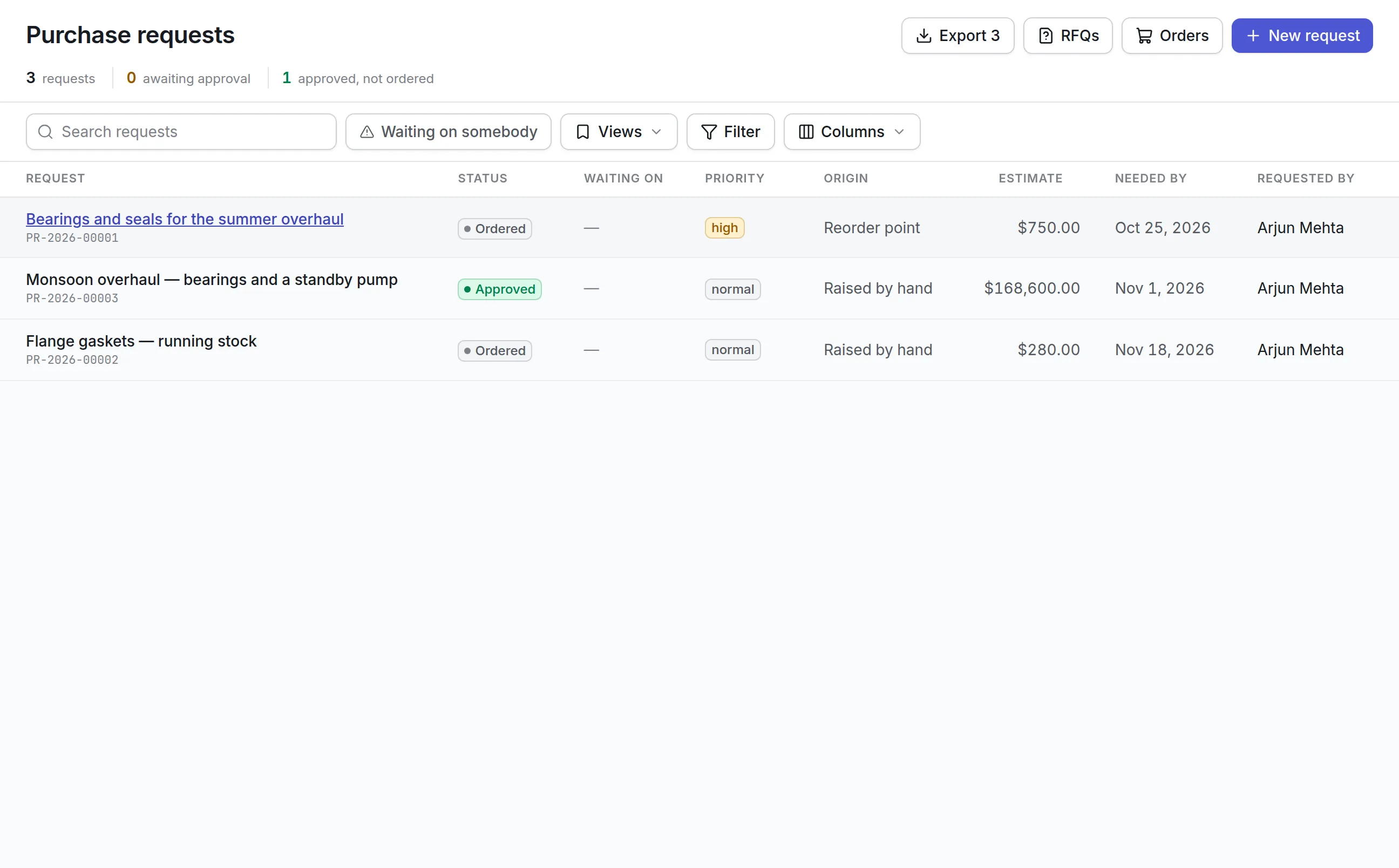
- Reorder before the shelf is empty.Recommendations name the part, the store, the quantity and the date it is needed by, with the evidence behind them. One click turns a recommendation into a purchase request.
Reorder recommendations that look ahead
A reorder point on its own only reacts to what has already been used. Asset Infinity also reads the rounds your preventive maintenance software will raise, the parts each round consumes, the rate history says a part runs at and the wear intervals on asset bills of materials. Stock movements trigger a recalculation straight away, and a nightly sweep covers the forecast.
More detail
Each part carries a reorder policy per store, with a fallback for wherever else it is stocked. You choose how it behaves:
More detail
A red banner names any critical or high part that is stocked with no policy, because it would never appear on the list. The request then continues through your purchase order software, and the full rules are in the reorder documentation.
Shortages, substitutes and deliveries
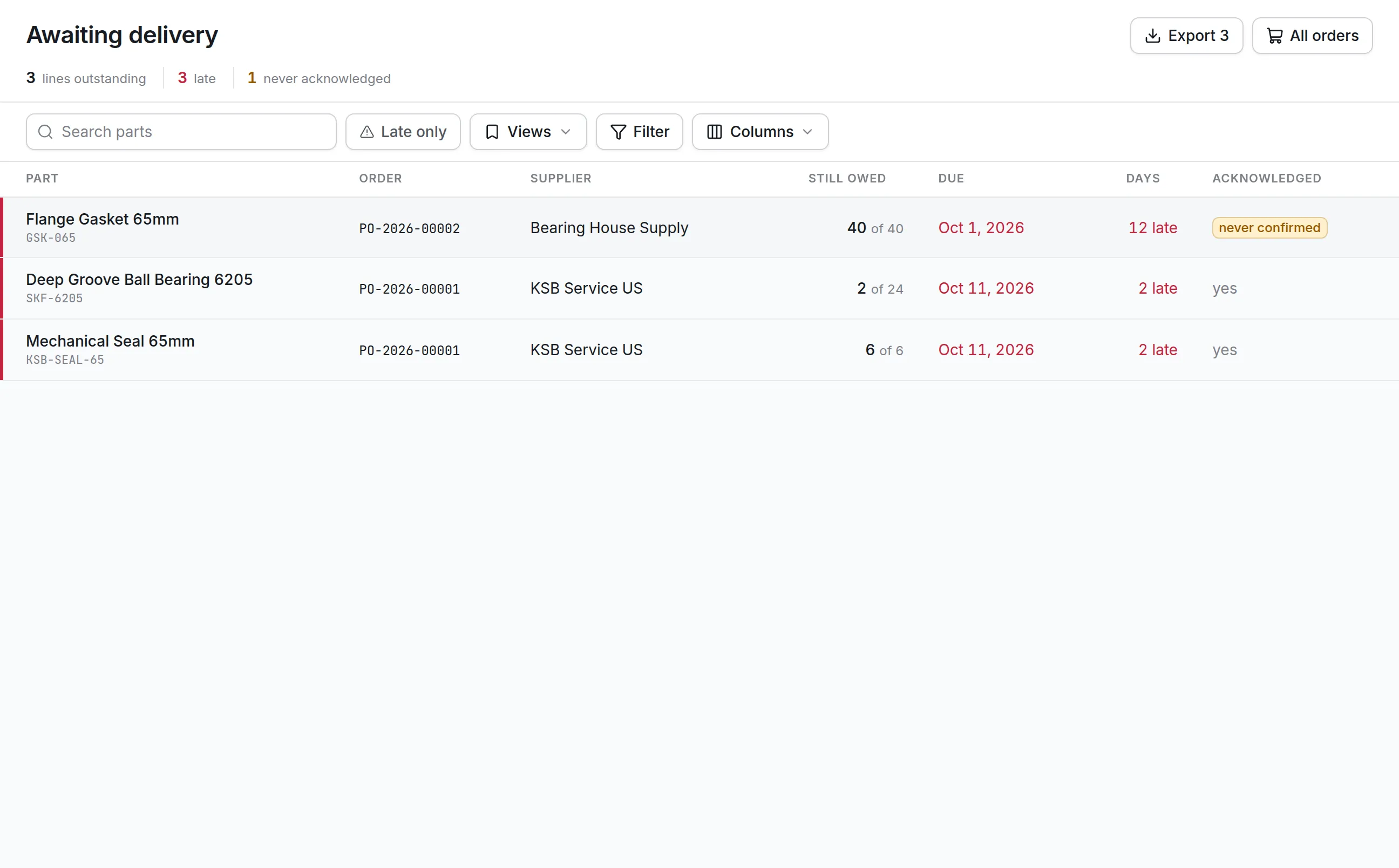
Holding stock has a cost you can see on the shelf. Not holding it has a cost that is usually lost, so each part keeps a record of every time it was needed and not there. A shortage records how many were missing, the hours lost and what it cost: no real effect, a delayed job, something else used instead, a stopped job or an asset that was down. The Ran out column on the catalogue counts them over the last 12 months, which is the evidence for raising a minimum.
More detail
Before buying, the part screen shows what else will do and who sells it:
What to look for when choosing parts inventory management software
| Capability | Why it matters | In Asset Infinity |
|---|---|---|
| Stock per store, not only in total | A full warehouse hides an empty van | “At reorder point” is judged store by store |
| Reservations against jobs | Stock promised to a job is not free stock | On hand, reserved and available on every part |
| Demand from planned maintenance | Reorder points alone miss next month’s PM | Recommendations count scheduled rounds and wear intervals |
| A reason on every recommendation | Approvers trust what they can check | Each card lists the figures it used |
| Shortage history | The cost of not having a part is invisible on a shelf | Shortages record whether a job was delayed or stopped |
| Alternatives and substitutes | A stockout should not always block a job | Approved swaps with a ratio and restrictions |
| Mobile and offline stock moves | Vans and basements have no signal | Hand out, count, transfer and receive on the handset |
See it on your own assets, or price it in two minutes.
Parts inventory management by industry
Manufacturing plants
A plant sets up a main store, line-side cabinets and a quarantine shelf for parts awaiting inspection. Critical spares for bottleneck machines get a forecast policy so planned overhauls are covered. See maintenance software for manufacturing.
- Bills of materials link bearings and seals to each machine
- Wear intervals feed the forecast
Facilities and field teams
A facilities team runs one store per building and a van per technician. Vans may allow negative stock, so a job is never refused at the curb, and counts catch the gap later. More in facility management software.
Hospitals and labs
Engineering stores mark hazardous items and set shelf life on filters and seals. Lot tracking asks for a batch on every receipt and issue, so the batch is on record wherever the part went.
Water and wastewater utilities
Remote pump stations hold small satellite stores. Technicians check from the maintenance mobile app whether a station has the part before driving out, and transfers between stores carry the stock’s value with them.
What parts inventory management costs
Asset Infinity starts with the asset register at $130 a month for up to 500 assets, with unlimited users. Parts and stock is $20 per user per month for the people who manage inventory, and reorder recommendations are a $75 monthly add-on for the whole organization. Purchasing, for requests and orders, is $25 per user per month. Build a quote with the modules you need.
Your first week with parts and stock
Most teams start by importing the part catalogue from a spreadsheet, then creating stores and bins and printing bin labels. Record opening balances with a count in each store. Then set reorder policies on the critical and high parts first, since the reorder screen flags those that have none. Connect parts to the work order software by issuing against jobs from day one, because that history is what makes the forecast worth reading.
More in Supply
Common questions
What is parts inventory management?
Parts inventory management keeps track of the spare parts a maintenance team holds, where they are, what is reserved for jobs and when to buy more. Its purpose is to have the part on the shelf when a job needs it without tying up money in stock nobody uses.
What is the difference between a reorder point and min/max?
A reorder point policy orders a fixed quantity when stock falls to a set level. A min/max policy refills stock up to a maximum once it reaches the minimum. Asset Infinity offers both, plus a forecast policy driven by planned work.
How does it decide what to reorder?
It compares what is available with each part's reorder point and safety stock, and adds what scheduled maintenance will use and what history says the part runs at. Each recommendation lists those figures so you can check it.
Does it warn us when stock runs low?
Yes. A part is recalculated the moment stock moves, and the storekeeper is emailed when one crosses below its reorder point.
Can technicians carry stock in their vans?
Yes. A van is a store of its own, so stock issued to it, used from it and transferred back is tracked like any other storeroom. Technicians can hand out, count and move stock from the mobile app, even with no signal.
Can we track parts by lot or serial number?
Yes. Each part is set to count quantity only, to ask for a lot on every receipt and issue, or to track each unit by serial number.
See it with your own assets
A demo run on an example from your industry. Or start the trial and look around on your own.