






Manufacturing maintenance software that keeps every line running
Our manufacturing maintenance software sends breakdowns to the right technician with a clock running, and plans fall due by calendar, run hours or condition. When the same machine keeps stopping, failure history and root cause analysis show why.
- OSHA 29 CFR 1910.147 (lockout/tagout)
- OSHA 29 CFR 1910.178 (powered industrial trucks)
- ISO 9001 (equipment and calibration records)
- ISO 55001 (asset management)
What our manufacturing maintenance software does on the plant floor
Breakdowns with a clock
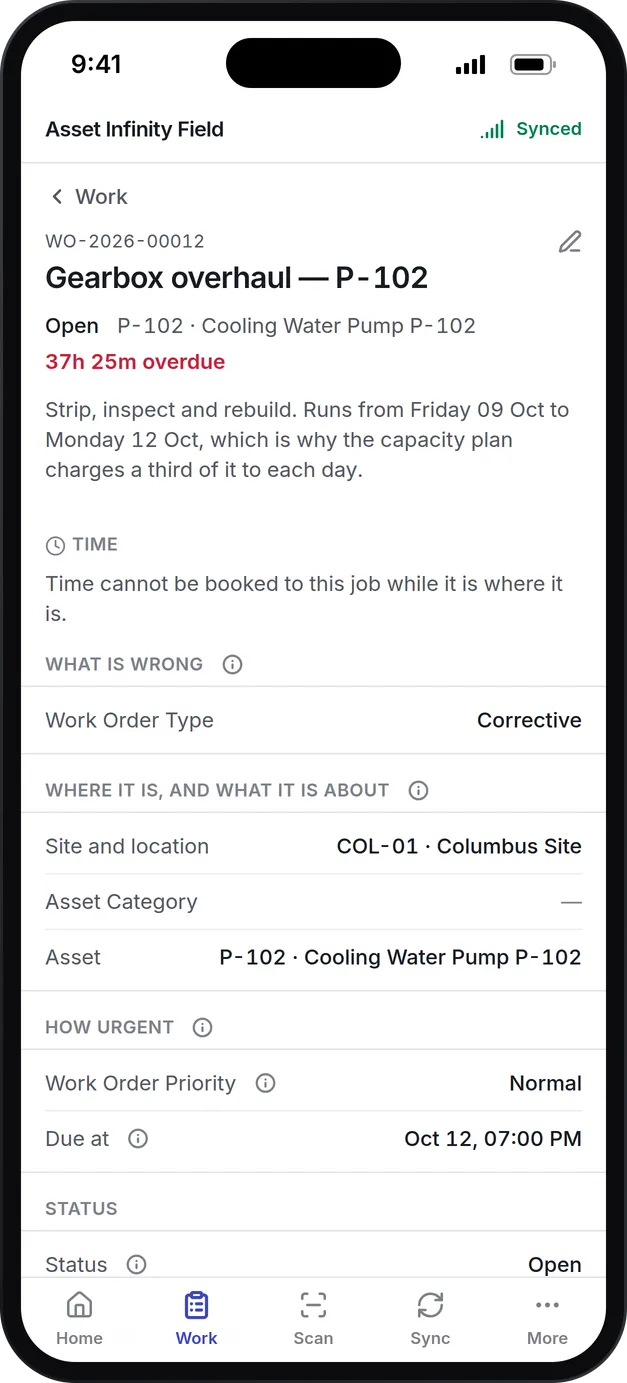
Operators report a fault from the web or by email, and technicians scan the machine's label in the app to raise a job on the spot. The job carries its failure code and SLA, and escalates before the promised time passes.
PM by hours or condition
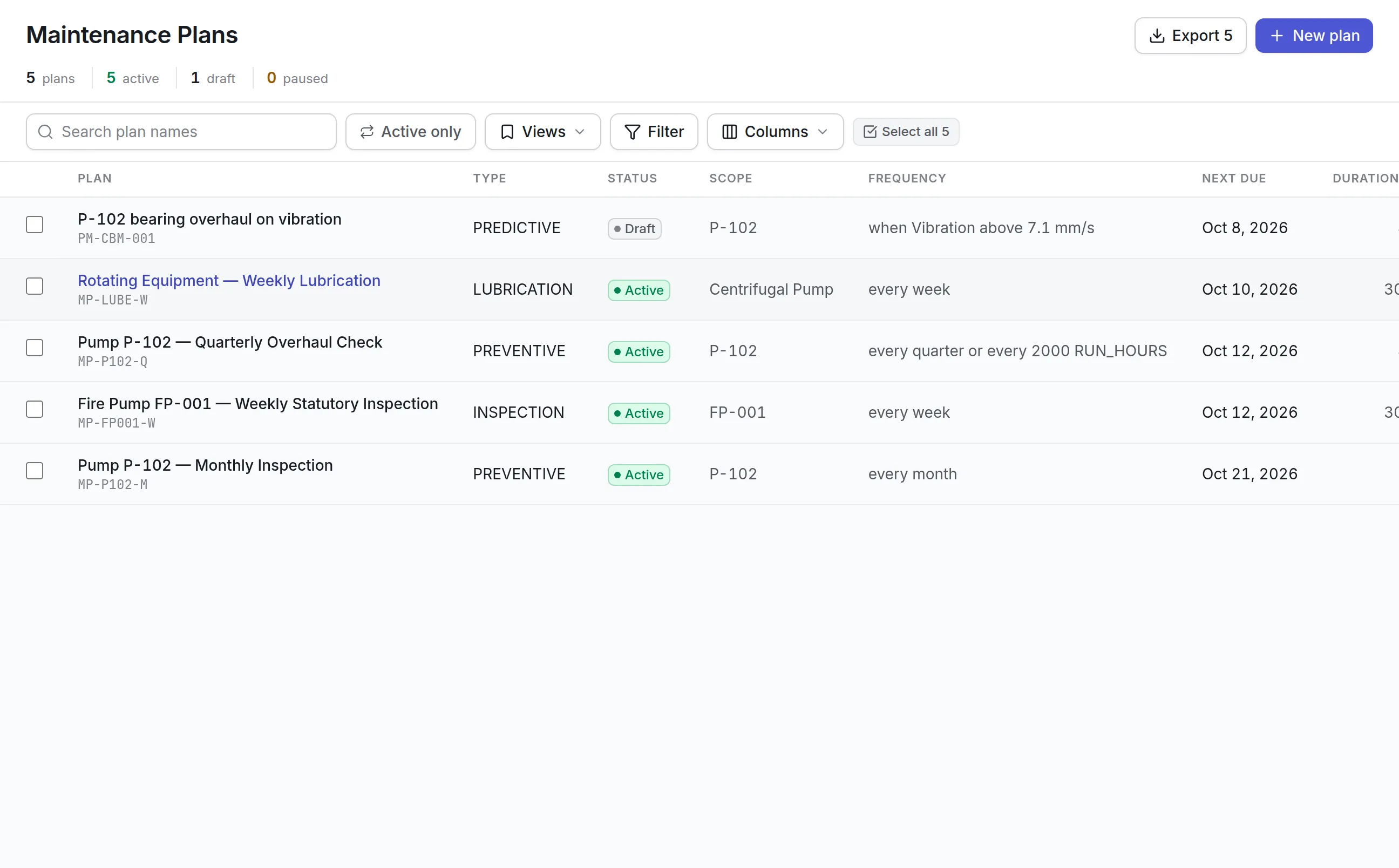
Plans fall due by date, run hours, cycle counts or a sensor limit, whichever comes first. Each one raises its own work order with its task list.
Why machines stop
Repeat failures are classified with your failure codes. Five-whys root cause analysis keeps the evidence and checks that each fix worked.
Reliability you can measure
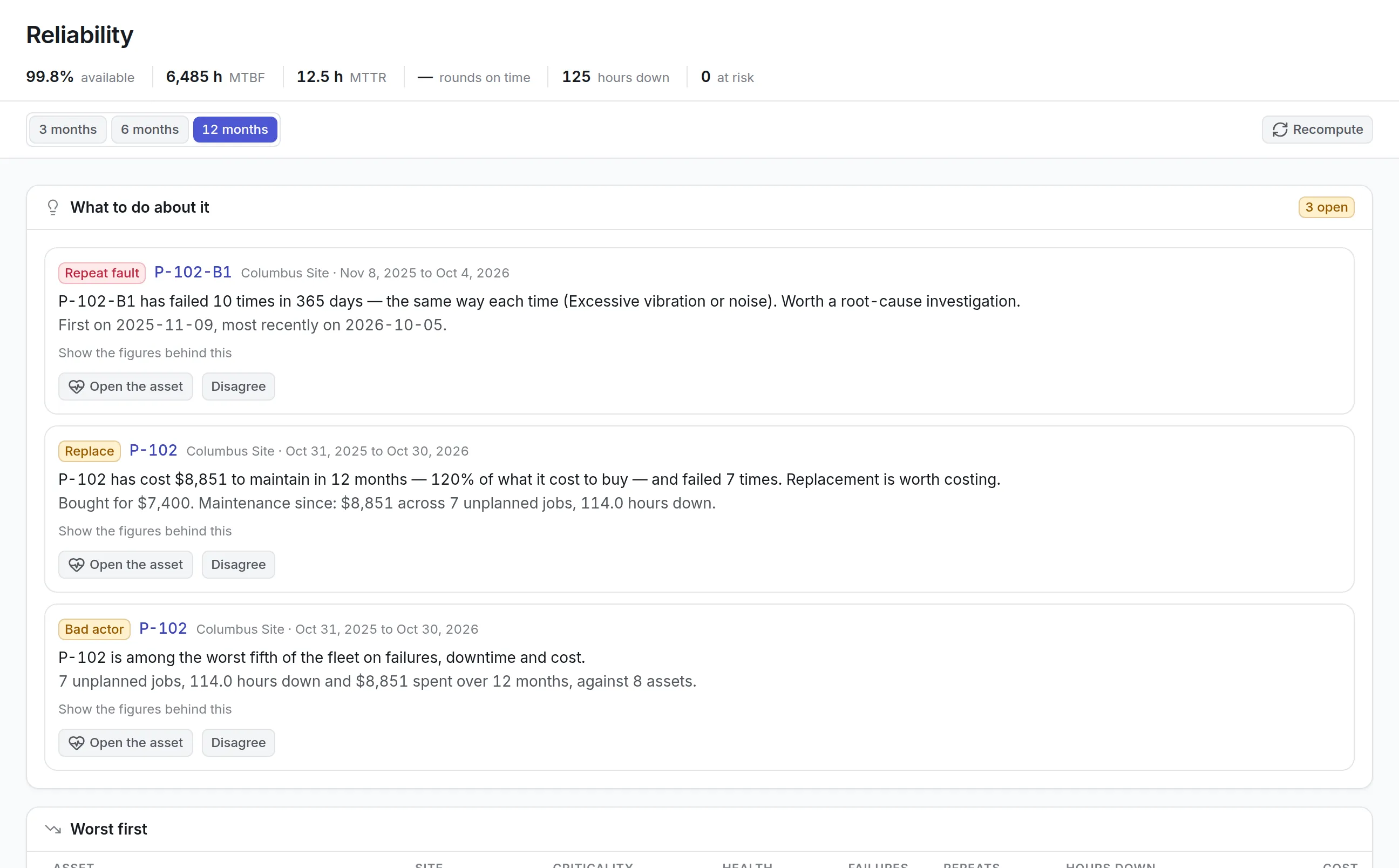
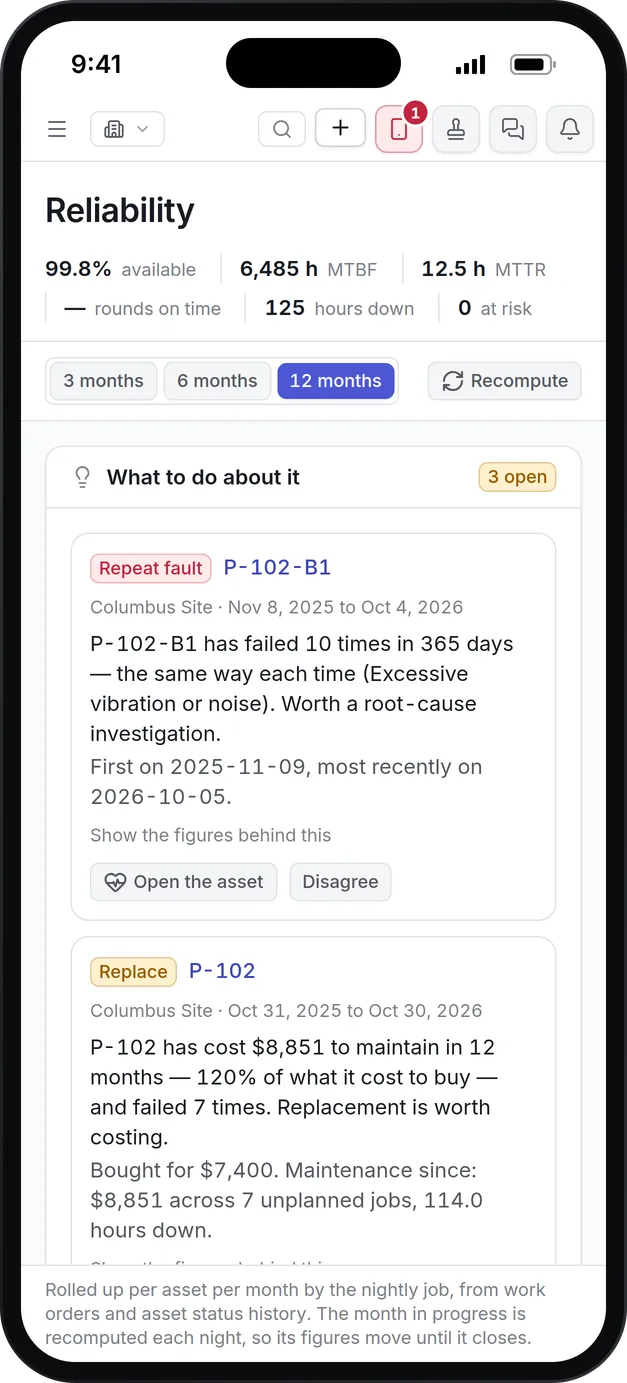
Availability, MTBF and MTTR are worked out for every asset, and the worst performers rise to the top of the list.
Spares on the shelf
Parts carry minimums, reorder points and the work that will use them. Shortfalls turn into purchase requests before a line waits for a bearing.
Lockout before work starts
Permits to work record each isolation and who signed it. A job that needs a permit cannot start until one is in force.
What is manufacturing maintenance software?
Manufacturing maintenance software is a system that plans, records and measures the maintenance of plant equipment such as presses, CNC machines, compressors, conveyors and boilers. It schedules preventive work, takes breakdown reports from the floor, keeps critical spares stocked and shows which machines cost the most downtime. Many buyers know it as a CMMS for manufacturing.
Plants buy it when downtime gets expensive enough that “we fixed it” is no longer an answer. A plant manager wants to know why the same compressor stopped three times this quarter, and whether the fix will hold.
How manufacturing maintenance software works in Asset Infinity
Every machine has one record that holds its jobs, parts, meters, failures and cost. The path from a fault on the line to a fix that lasts runs like this:
- Build the equipment tree.Each plant holds shops, lines and stations, with every machine, its make, model, serial number and warranty in the place it runs. A spreadsheet imports into the asset register without retyping.
- Report the fault.An operator reports it from the web or by email, or a technician scans the machine’s label in the mobile app and raises a breakdown on the spot, with no signal needed.
- Check the job is ready.Before anyone is sent, the job’s readiness shows whether its parts, tools, skills and permit are in hand, so a bearing job is not dispatched half-ready.
- Do the work and close it with a failure code.Job types that capture failures ask what failed and how it was put right, which gives reliability reporting something to count.
- Schedule the prevention.Plans fall due by calendar, run hours, cycle counts or a condition on a sensor reading, whichever comes first. See preventive maintenance software for triggers and lead times.
- Find what keeps failing.Each night the product rolls up availability, MTBF, MTTR and cost per machine, and flags repeat faults worth an investigation.
Reliability numbers that point at the worst machine
The Reliability screen answers three questions in order: what should be done, which machines are the problem, and whether the plant is getting better or worse. Its recommendations read as arguments you can agree with or dismiss.
More detail
What the screen gives a maintenance manager:
More detail
Condition data makes the numbers sharper. A vibration or temperature sensor bound to a meter writes its readings through, and a plan with a condition trigger raises the overhaul when a reading crosses its limit, once, until that job is finished. Predictive maintenance software explains how sensors, limits and alerts fit together, and what a plant needs to connect them.
Root cause analysis that checks the fix worked
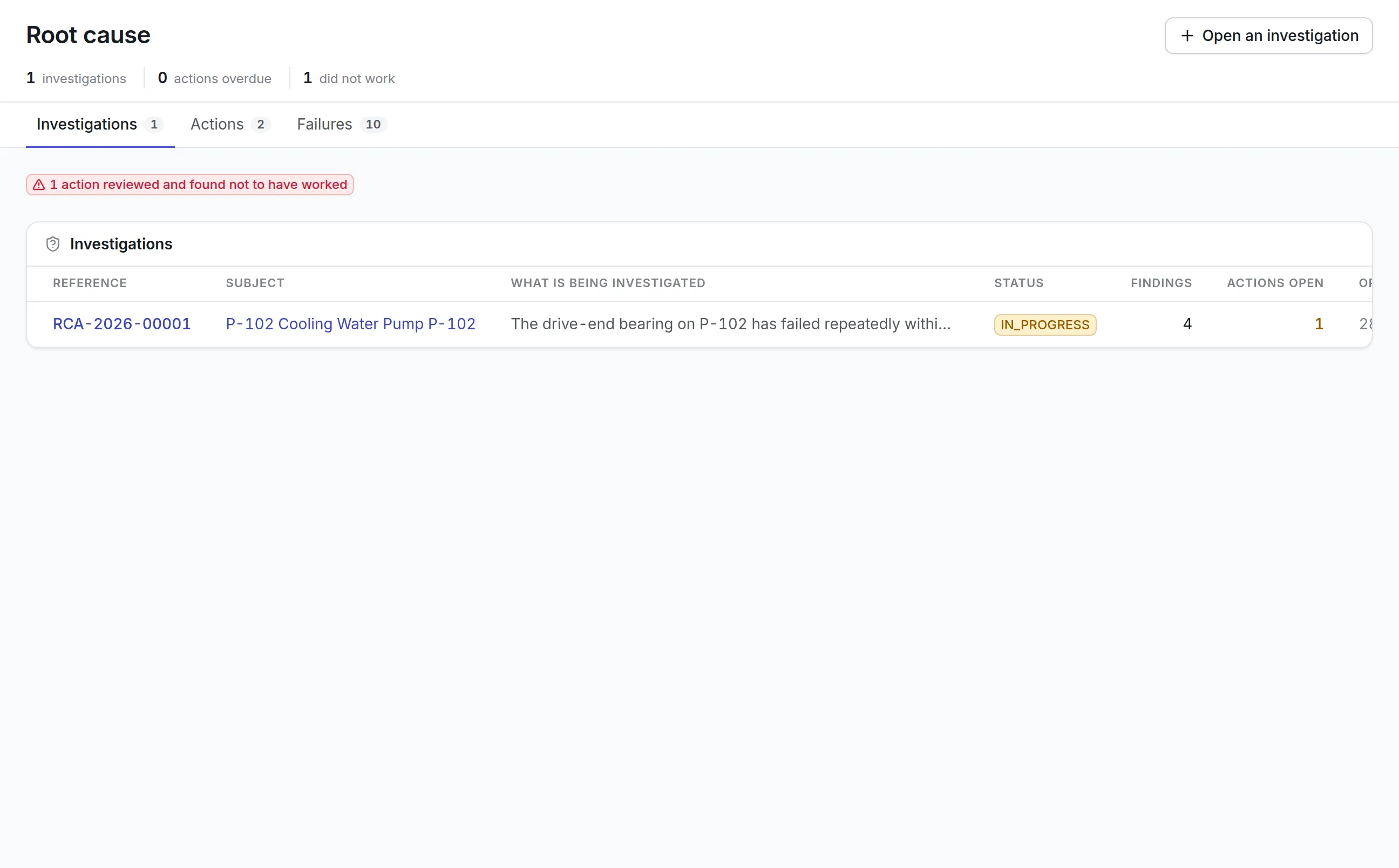
An investigation that finds a root cause changes nothing on its own. What changes something is an action that is done, verified and later found to have worked, which is why the root cause screen tracks actions as closely as investigations.
- Open an investigation from a repeat fault, with the asset’s earlier failures linked as evidence
- Work it as Five Whys, Fishbone, Fault tree or a method of your own
- Mark one or more findings as the root cause and assign corrective and preventive actions
- Verify each action, then review whether it worked, so a failed fix shows up in red
More detail
With root cause analysis software a reliability engineer can:
Spare parts and lockout before the job starts
Two things stop a planned job on the day: the part is not on the shelf, or the machine is not safely isolated. Both are handled on the same record as the work.
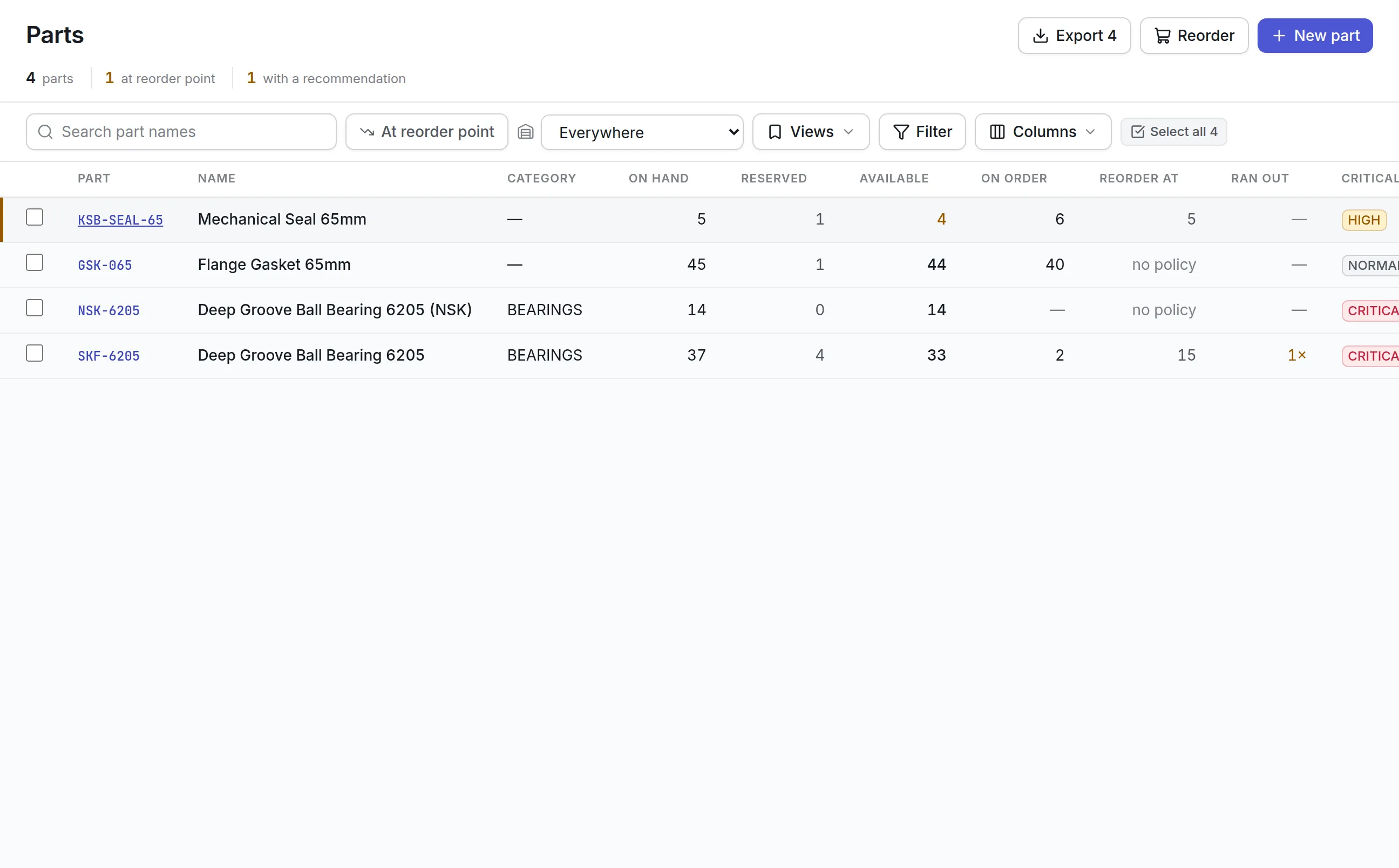
- Parts inventory management gives each part minimums, reorder points and criticality, with stock by storeroom and bin
- Reorder recommendations explain why and turn into purchase requests in one click
- Parts reserved for planned work are held back from what is shown as available
- Permits to work for lockout/tagout, hot work and confined space record each isolation and both signatures, and a job that needs one cannot start without it
- Lockout tagout software keeps the isolation records an OSHA 1910.147 audit looks for. Asset Infinity keeps the records; it does not certify compliance
What to look for when choosing manufacturing maintenance software
A plant needs more than a work order list. Use this table to compare products on the things that decide uptime.
| Capability | Why it matters | In Asset Infinity |
|---|---|---|
| Meter and condition triggers | Machines wear by hours and cycles, not by calendar | Run hours, cycles, sensor conditions and calendar, combined as whichever comes first |
| Failure codes on close-out | Without them, reliability reports have nothing to group by | Failure modes, mechanisms and causes required on job types you choose |
| MTBF, MTTR and availability | Shows whether the plant is improving | Computed nightly per asset, ranked across the fleet |
| Root cause analysis | Repeat failures cost more than one-off breakdowns | Investigations with actions that are verified and reviewed for effect |
| Job readiness | Half-ready jobs waste a technician’s shift | Parts, tools, skills, permits and vendors checked before dispatch |
| Spare parts and reordering | A missing bearing stops a line | Stock by store, reorder points and purchase requests |
| Permits and lockout | Isolation has to be proven, not assumed | Permits with isolations, signatures and a hard stop on the job |
| Shutdown planning | Planned stops have a fixed window | Work packages, readiness and critical path against the window |
| Sensors | Condition data should raise work by itself | Sensor limits raise alerts and feed meters that trigger plans |
| Offline mobile app | Plant floors have dead spots | iOS and Android app that syncs when back in range |
See it on your own assets, or price it in two minutes.
Manufacturing maintenance software by plant type
Each plant starts from the same product and switches on what its work needs.
Discrete and machining plant
A plant running CNC machines, injection molding presses and compressors starts with start-of-shift checks, hour-based compressor services and quarterly CNC PM. Failure codes go on breakdown jobs from day one, so in a few months the Reliability screen has enough history to rank the worst machines and suggest the first investigation. Operators who are not technicians can be given a requester sign-in, so they report faults and follow their own requests without seeing the whole work order list.
Automotive and assembly plant
Presses and welding robots run on cycle counts and run hours, torque tools are calibrated on a schedule, and line stops are planned as shutdowns with a work package and critical path. Readiness shows weeks ahead which parts, permits and people are still missing. Robot services at 5,000 hours and press daily checklists sit on the same schedule as the rest of the plant.
Plant utilities team
Boilers, cooling towers, compressed air and dust collectors keep every line running. Weekly boiler house checks and monthly cooling tower water treatment checks are graded rounds, and a failed critical check raises its own corrective job. Electricity and air flow can be tracked as readings. Each round keeps who took the reading and when.
Multi-plant group
Each plant can start on its own with its own stores and technicians. Group engineering sees uptime, backlog and spend for every plant on one dashboard once the others join, and reliability rankings compare machines across sites. Parts can be moved between plant storerooms, and access can be limited so each plant team sees its own site.
What manufacturing maintenance software costs with Asset Infinity
The asset register starts at $130 a month for up to 500 assets, with unlimited users. Maintenance is $25 per user per month and parts and stock is $20 per user per month. Plant add-ons are flat per organization:
- Reliability and root cause, $150 a month
- Permits to work, $100 a month
- Reordering, $75 a month
- Tools and calibration, $75 a month
- Sensors, $5 per connected sensor a month
Build a quote for your own plant. The manufacturing trial opens with compressors, boilers, cooling towers, CNC machines, injection molding machines and forklifts already loaded, plus a 2,000-hour compressor service, a 500-hour forklift service, weekly conveyor lubrication, start-of-shift checks and three service contracts.
Getting started on one line
Most plants pick one line or one area and go live there first:
After a month of breakdowns closed with failure codes, the Reliability screen has enough history to name the first machine worth an investigation.
Then add the next line. If you want to watch it with your own equipment first, book a demo.
What teams in this industry use most
Common questions
What is manufacturing maintenance software?
Manufacturing maintenance software plans and records the maintenance of plant equipment. It schedules preventive work, takes breakdown reports from the floor, tracks spare parts and shows which machines cost the most downtime.
Can maintenance be scheduled by machine hours?
Yes. A plan can fall due by run hours, cycles or distance read from a meter, by calendar, or by whichever comes first. Readings can be entered on the phone or sent in by sensors.
Does it support lockout/tagout?
Yes. A permit to work lists each isolation, who applied it and who removed it. A work order that needs a permit cannot move to in progress until a live permit covers it.
Can operators report problems?
Yes. Operators can report a fault from the web or by email, and the request lands in the planner's queue. Technicians can scan the label on a machine in the mobile app to raise a job against it on the spot.
Does it calculate MTBF and MTTR?
Yes. Availability, MTBF, MTTR, failures and maintenance cost are worked out for every asset each night from work orders and status history, and the Reliability screen ranks the worst machines across the plant.
Is it a CMMS for manufacturing?
Yes. Asset Infinity is a CMMS with work orders, preventive maintenance, inspections, spare parts and purchasing, plus reliability, root cause analysis, permits and shutdown planning for plant teams.
See it with your own assets
A demo run on an example from your industry. Or start the trial and look around on your own.