






Technician management software that shows who can do the work, and when
Technician management software that keeps every technician's skills, certifications, training, shifts and leave in one place. Planners see who is qualified, who is free and which days are already full before they assign a job.
What our technician management software tells a planner
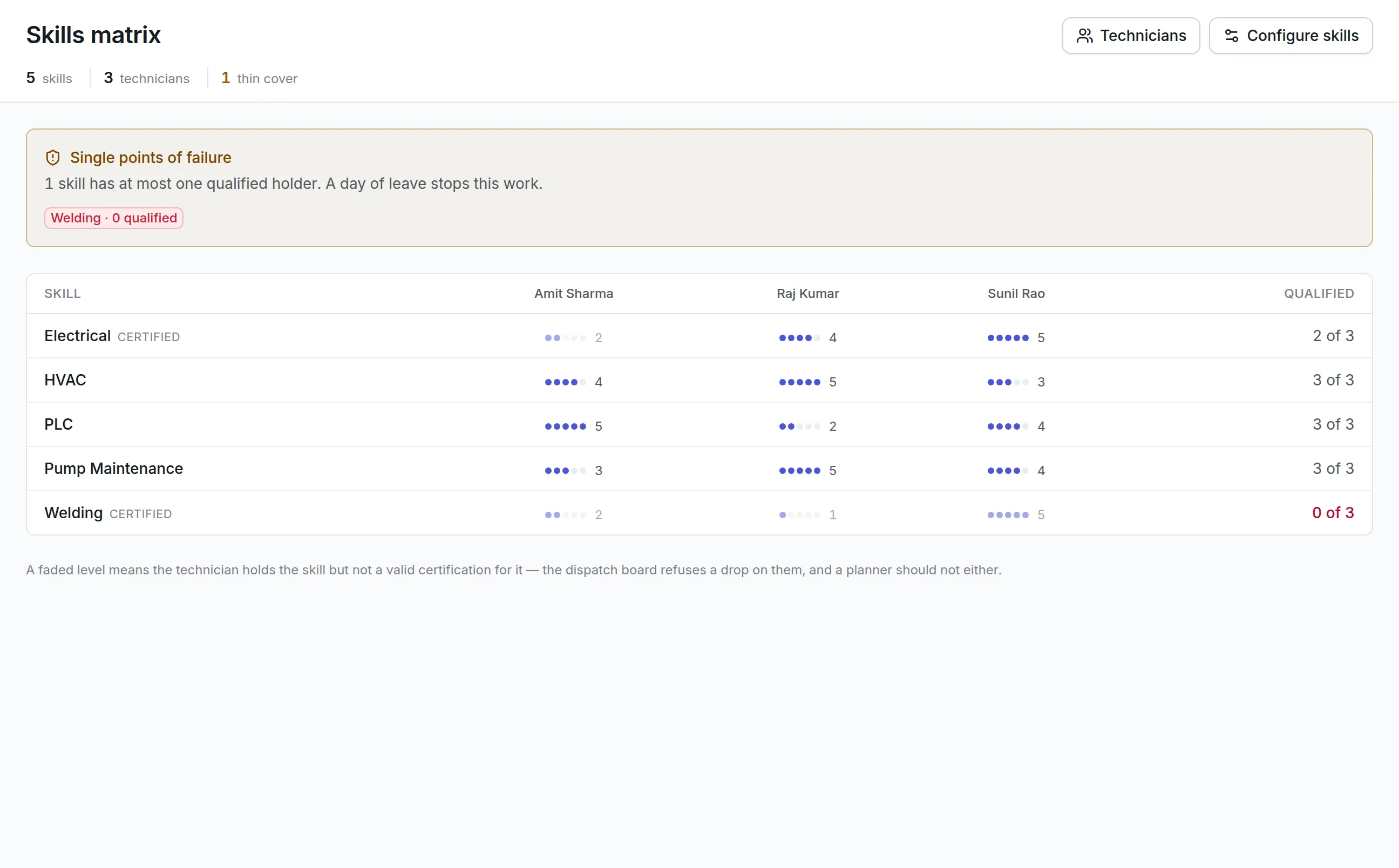
A skills matrix with teeth
Levels from 1 to 5 per skill and technician. A skill marked as certified only counts while the technician holds a valid certification for it.
Single points of failure
The matrix names every skill with one qualified holder or none, so you can train or hire before someone's leave stops the work.
Certifications and training
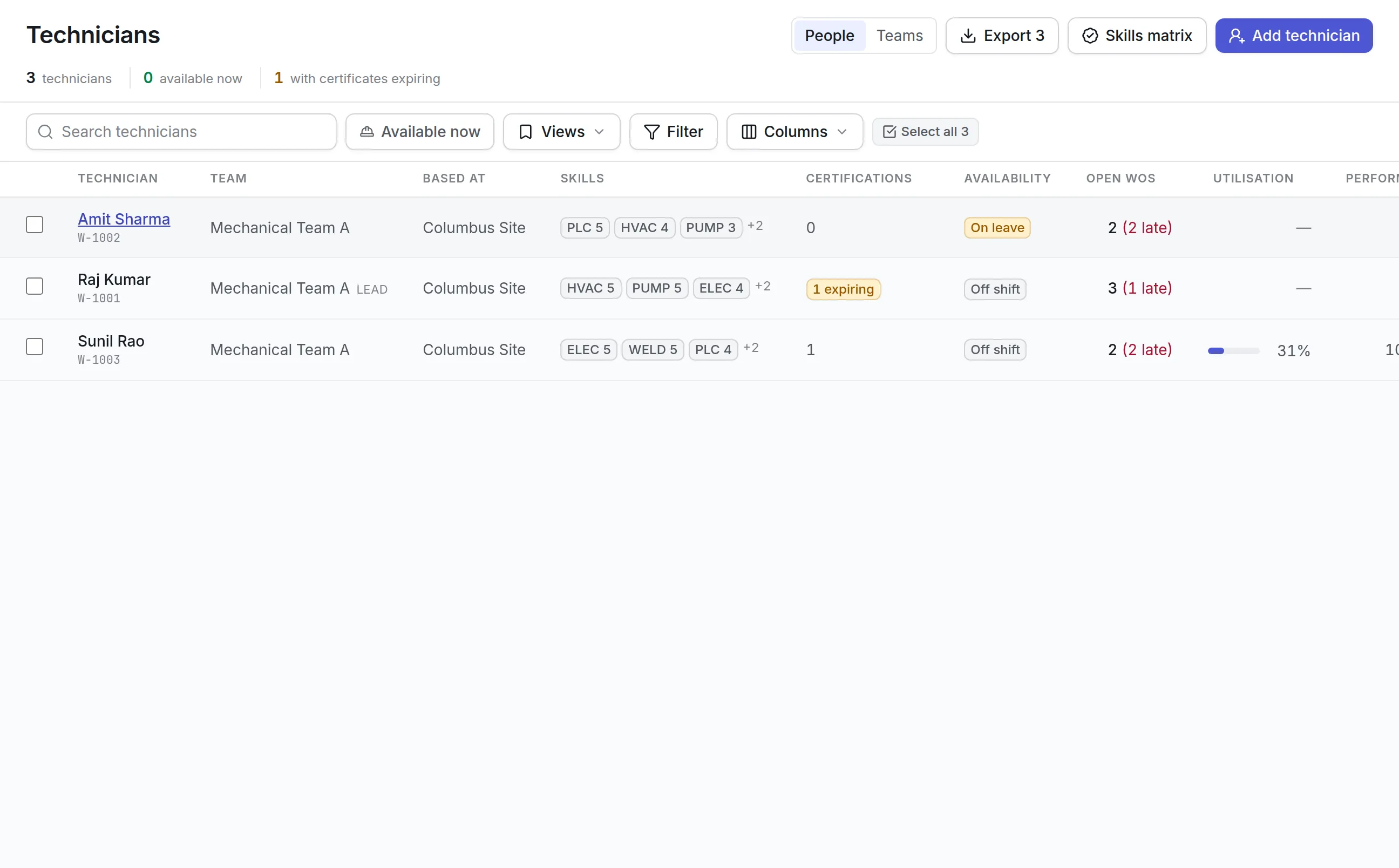
Certifications carry their expiry dates, and the Technicians list counts those about to lapse. Training records sit on each technician's profile.
Shifts, leave and availability
Rosters and leave decide who is available now. The Technicians list shows who is on shift, off shift or on leave.
Workload you can see
Each technician shows open and late work orders, utilization and performance, and teams group them by site with a lead.
A capacity plan
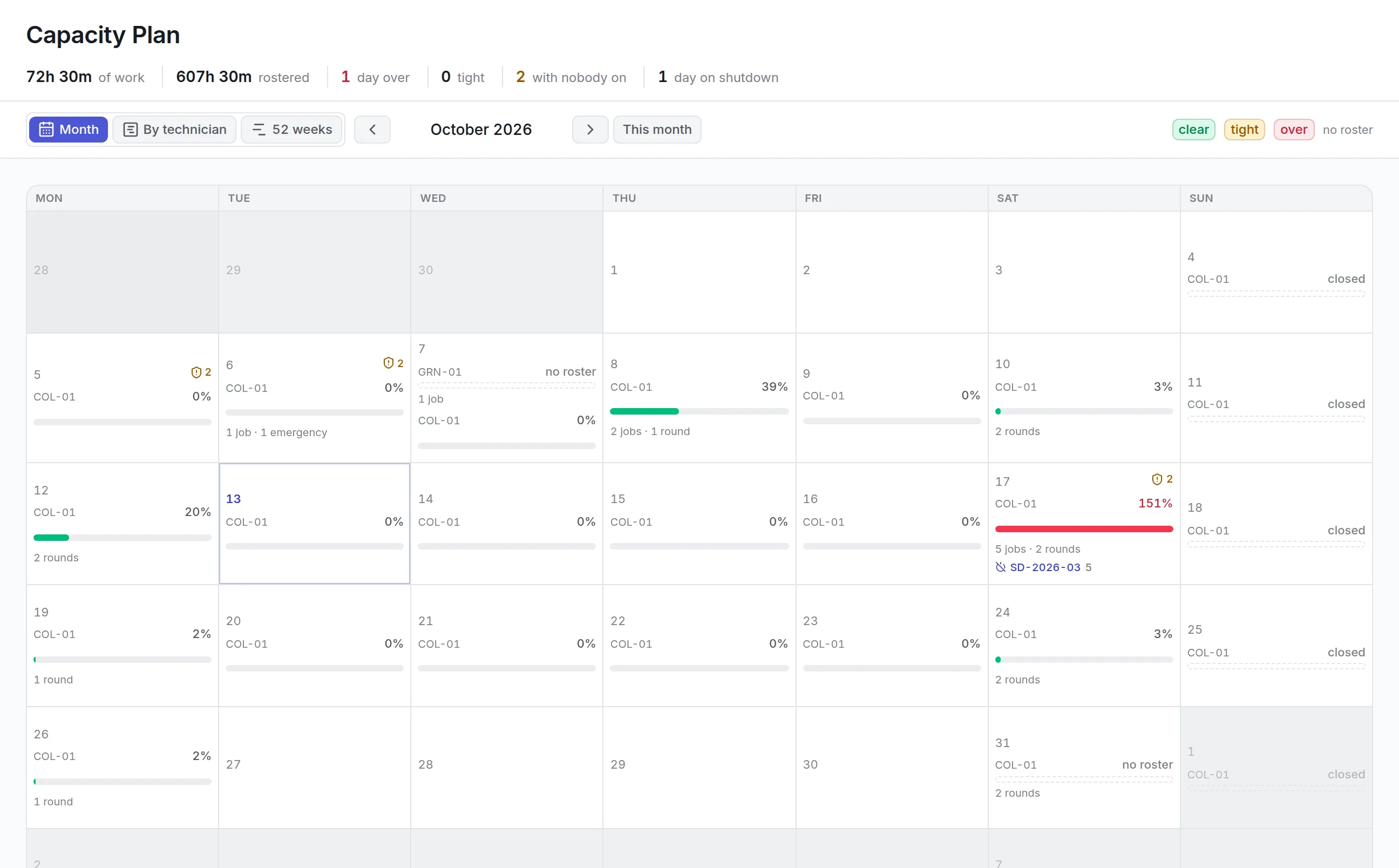
The capacity plan sets planned work in hours against the roster for each site and day, and shows which days are clear, tight or over.
What is technician management software?
Technician management software keeps the record of the people who do maintenance: their skills and levels, certifications and expiry dates, training, shifts, leave and current workload. Planners use it to give each job to someone qualified and free, and managers use it to find skill gaps and overloaded days before they cause missed work.
Most teams start with a spreadsheet of tickets and a whiteboard of who is in. That works until a certificate lapses unnoticed, the only welder goes on vacation, or a planner books thirty hours of work into a day that has sixteen.
How technician management software works in Asset Infinity
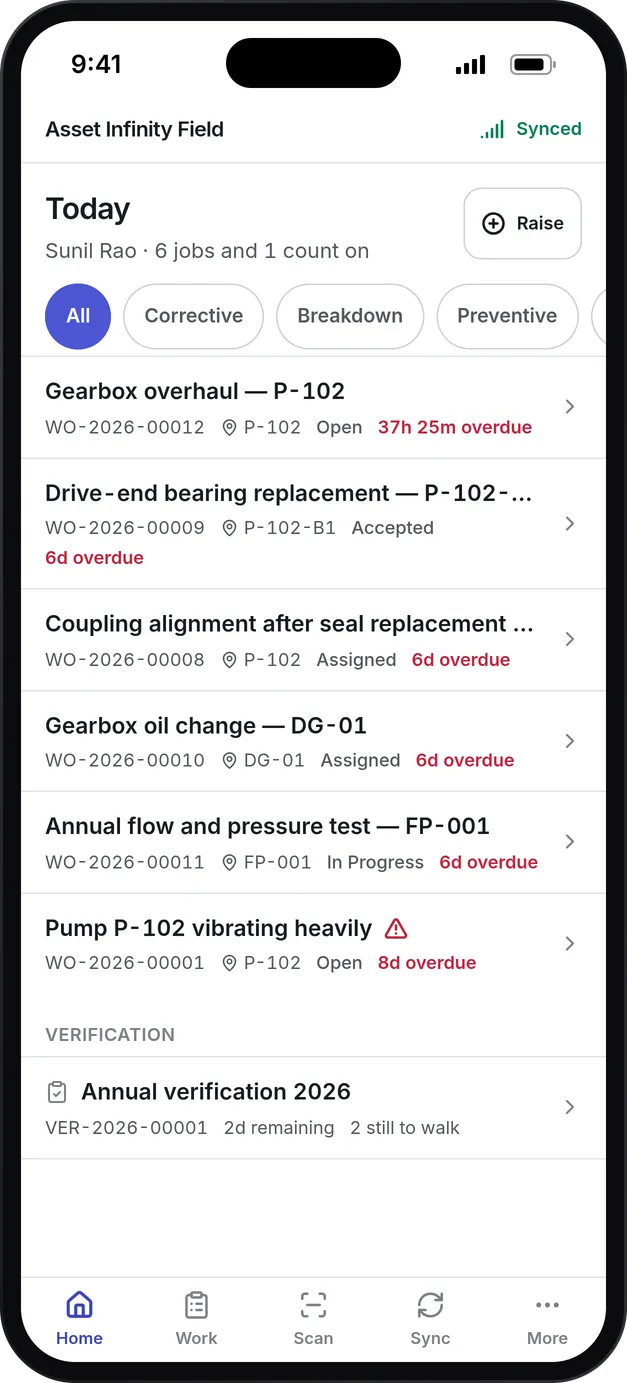
A technician is linked to a sign-in account, which is what lets the product know whose work “my work” means. Everything else is recorded on the technician’s own screen and read by planning, dispatch and the skills matrix.
- Add the technician.Choose the account, how they are engaged (employee, contractor or vendor technician), their payroll number, home site and crew.
- Set scheduling limits.Base location, whether they can travel to other sites and how far, and the maximum number of open work orders they can hold at once.
- Assess their skills.Each skill gets a level: 1 Aware, 2 Assisted, 3 Competent, 4 Advanced or 5 Expert, with the date it was assessed.
- Record certifications and training.A certification’s expiry is worked out from its validity period. A passed course can award a certification, turning attendance into proof of qualification.
- Roster shifts and record leave.Shifts set the hours someone is in. Availability windows record training days, on-call weeks and overtime.
- Read workload and performance.Open work against their limit, overdue jobs, planned hours outstanding and a monthly row of completed jobs, first-time fix, SLA met and utilization.
A skills matrix that finds the gap first
A per-person list answers what Raj can do. The skills matrix answers who else can do it when Raj is on leave, which decides whether a site can cover a shift. Skills run down the side and technicians across the top, with each person’s level in each cell.
More detail
A skill can be set to need a certification. A technician who holds the skill without a valid certificate shows a faded level and does not count as qualified. Workforce settings also flag any skill that needs a certificate no certification authorizes, because nobody could ever qualify for it. When the matrix shows a thin row, there are four things to do:
Assigning work with every check shown
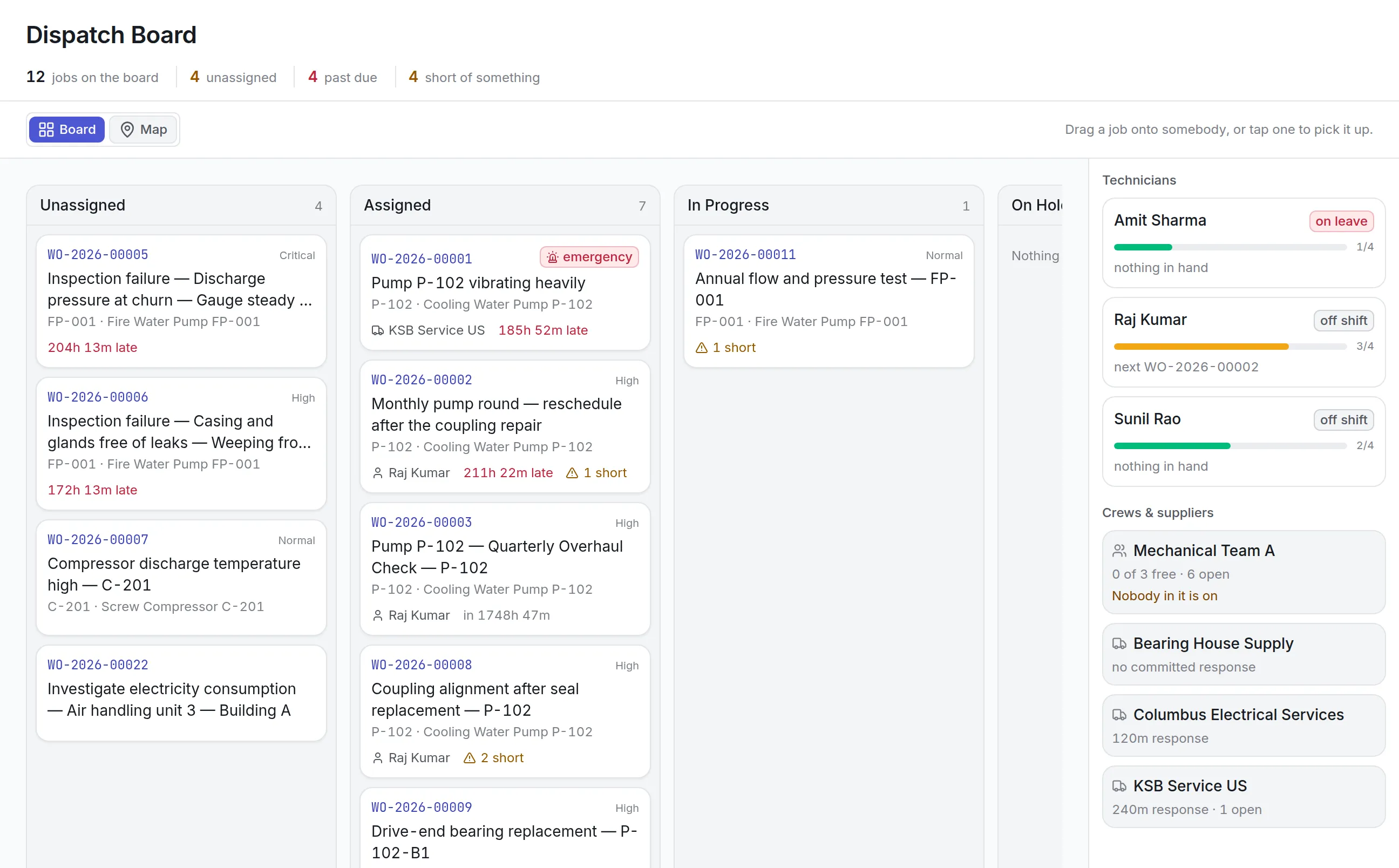
The dispatch board puts open jobs in columns and technicians, crews and suppliers in a rail on the right. Dropping a job on a person does not assign it. The board first previews what would happen and lists each check with a tick, a warning or a stop.
More detail
The checks cover travel distance and arrival time, travel radius, both SLA promises, skills, certification, parts in stock, tools free and calibrated, double booking, workload against the technician’s ceiling, and whether the site is working and the person is on shift. An expired certification is a stop, and going ahead anyway needs a written reason that is kept on the job. Day-to-day scheduling is covered on the maintenance scheduling software page.
Capacity planning by site and day
The capacity plan answers whether the days ahead can absorb the work that is due. It counts in hours against the roster, so a four-hour job for two fitters is eight hours of the day, and it never blends sites, because one site’s spare hours cannot cover another’s.
More detail
Each day reads clear, tight, over, no roster or closed. The By technician view lets a planner drag a job to a new time or onto another person, and the 52-week view projects the rounds your preventive maintenance software will raise. Filters narrow the plan by work order type, asset, location, frequency or assignee.
What to look for in technician management software
| Capability | Why it matters | In Asset Infinity |
|---|---|---|
| Skill levels, not just tags | “Can do it” and “can do it alone” differ | Levels 1 to 5, with assessment dates |
| Certifications that expire | Lapsed tickets are a compliance failure | Expiry from validity, warnings ahead of time |
| Single points of failure | One holiday can stop a whole trade | Thin cover banner on the matrix |
| One answer for availability | Two screens that disagree get ignored | Status, leave, windows, then roster |
| Checks before assignment | Bad assignments are found at the machine | Dispatch preview with stops and warnings |
| Capacity in hours by site | Headcount hides overloaded days | Clear, tight and over per site and day |
| Performance per month | Workload needs context | Completed, late, first-time fix, SLA and utilization |
See it on your own assets, or price it in two minutes.
Technician management software by team
Manufacturing maintenance crews
A plant scopes each crew to asset categories and work order types, so a mechanical team is not offered electrical jobs and the crew lead sees the whole crew’s queue. Skills such as confined space entry or pressure systems are set to need a certification, and the matrix shows which of them rest on one person. More in maintenance software for manufacturing.
Multi-site facilities teams
Each technician is based at one site with a travel radius, and can be marked as never leaving it. The dispatch board shows distance and arrival time before a job is handed over, and the capacity plan keeps each building’s hours separate, so one busy site is never hidden behind a quiet one. See facility management software.
Hospitals and regulated sites
Certifications that the law requires are marked regulatory, so an expired one reads as a compliance failure. Training records carry a refresh date, and a course that awards a certification turns attendance into proof. Competency evidence sits on each technician’s profile when an auditor asks. Read about healthcare maintenance software.
Teams that use contractors
Vendor technicians appear on the roster as a worker type of their own, supplied by a vendor and costed apart from your payroll staff. Their skills and certifications are checked on the dispatch board like anyone else’s, and the capacity plan counts supplier work separately because it runs on somebody else’s roster.
Your first weeks with technician management software
Pricing for technician management
Asset Infinity starts with the asset register at $130 a month for up to 500 assets, with unlimited users. The Maintenance module, which covers work orders, preventive maintenance, inspections and the workforce, is $25 per user per month. Job routing and dispatch, with the dispatch board’s assignment checks, is a $150 monthly add-on for the whole organization. Build a quote, and see how technicians receive their jobs in the maintenance mobile app and in your work order software.
More in Supply
Common questions
What is technician management software?
Technician management software keeps the record of a maintenance team's people, their skills, certifications and availability. Planners use it to give each job to someone qualified and free, and managers use it to see workload and gaps.
Does it stop a job going to someone who is not certified?
An expired certification is a stop on the dispatch board's assignment check. The planner can only go ahead by writing a reason, which is recorded against the job.
How does it decide who is available?
In one place and one order, employment status first, then approved leave, then any unavailable window, then the roster. The technician list, the dispatch board and routing all read the same answer.
Can we plan capacity before the month starts?
Yes. The capacity plan sets the hours planned work needs against the hours the roster provides, per site and day, so overloaded days show up in advance. A 52-week view projects the year from your maintenance plans.
Can we see where we depend on one person?
Yes. The skills matrix lists every skill with one qualified holder or none in a banner at the top, colored amber for one and red for none.
See it with your own assets
A demo run on an example from your industry. Or start the trial and look around on your own.