






What is the best CMMS software in 2026?
The best CMMS software for most teams runs work orders and preventive maintenance from a phone that works offline, keeps parts and purchasing on the same job, and loads from your existing spreadsheet in days. MaintainX, UpKeep, Fiix, Limble, eMaint, IBM Maximo and Asset Infinity all do the core; they differ in depth, scale and where they run.
We make Asset Infinity, so we are not neutral. Every claim about another product comes from that product’s own website as of October 2026, and where we could not confirm a feature we say so. This page compares features only; ask each vendor to quote on your own numbers.
CMMS software defined, and why teams buy it
A computerized maintenance management system (CMMS) is software that records your equipment, raises and tracks work orders, schedules preventive maintenance and keeps the spare parts that work consumes. Technicians use it on a phone at the machine. Planners and managers use it to see the backlog, what is overdue and what each asset costs to keep running.
More detail
Teams usually buy one when paper logs and spreadsheets stop answering simple questions:
A plant, a hospital, a school district and a property manager will weigh the criteria below differently, which is why “best” depends on your work.
How to choose the best CMMS software
Use these nine criteria on every product you look at, and ask each vendor to show them on your own data.
- Asset register depth.Every work order hangs off an asset. Check for a site and location tree, parent and child assets (a line, its machines, their components), meters, criticality, warranty dates and your own fields. A thin register means thin reports later.
- Work orders and preventive maintenance.Ask how a request becomes a job, what states a job moves through, and whether “waiting for parts” is a state of its own. Calendar PM is the minimum; meter readings and conditions matter for equipment that runs unevenly.
- Mobile and offline.Technicians judge the whole system by the app. Ask whether it works without a signal, and what happens when a technician and the office change the same job while the phone is offline.
- Inventory and purchasing.A job that reserves and issues its parts tells you why it is waiting. Check stock across storerooms, reorder points, purchase orders and receiving.
- IT assets.If the same team also looks after laptops, servers and software, ask whether devices can be found on the network automatically.
- Depreciation.A CMMS that carries depreciation books removes finance’s second register and a monthly reconciliation.
- Integrations and API.Look for spreadsheet import, a documented API, webhooks and single sign-on with your identity provider.
- Deployment options.Most CMMS products run only in the vendor’s cloud. If your policy calls for your own servers, check this first.
- Setup effort.Ask how the import reports bad rows, whether it can be undone, and who builds the first preventive maintenance plans.
CMMS software features compared
This table uses three answers. Yes means the vendor’s own website lists the capability. Partial means it lists a narrower version, or lists it only on some plans (the notes below say which). Not listed means we did not find it on the vendor’s site; the product may still offer it, so ask.
| Capability | MaintainX | UpKeep | Fiix | Limble | eMaint | IBM Maximo | Asset Infinity |
|---|---|---|---|---|---|---|---|
| Work orders | Yes | Yes | Yes | Yes | Yes | Yes | Yes |
| Meter or condition-based PM | Yes | Yes | Not listed | Yes | Yes | Yes | Yes |
| Mobile app that works offline | Not listed | Partial | Yes | Partial | Yes | Not listed | Yes |
| Parts inventory | Yes | Yes | Yes | Yes | Yes | Yes | Yes |
| Purchase orders | Yes | Yes | Yes | Yes | Not listed | Not listed | Yes |
| IT asset discovery | Not listed | Not listed | Not listed | Not listed | Not listed | Not listed | Yes |
| Depreciation | Not listed | Not listed | Not listed | Not listed | Not listed | Not listed | Yes |
| API or integration hub | Yes | Not listed | Yes | Yes | Partial | Not listed | Yes |
| Sensors and IoT | Yes | Yes | Not listed | Yes | Yes | Yes | Yes |
| Runs on your own servers | Not listed | Not listed | Not listed | Not listed | Not listed | Yes | Yes |
Notes on Partial: UpKeep lists offline mode on its Professional plan, and Limble on Premium+. eMaint lists APIs and ERP connectors on its Enterprise plan. Fiix lists nested preventive maintenance; we did not find meter triggers named on the pages we read.
See it on your own assets, or price it in two minutes.
Four CMMS software products for growing teams
MaintainX
MaintainX calls itself an AI-powered CMMS and enterprise asset management platform. Its site lists work orders across sites, preventive maintenance with condition-based triggers, parts with low-stock alerts and automatic reorders, purchase orders, real-time data from IoT sensors, an integrations marketplace and an open REST API. It also lists AI suggestions and parts prediction.
Suits best: teams that want a mobile-first CMMS they can start on quickly and extend across several sites.
UpKeep
UpKeep describes itself as an AI-native platform for CMMS, safety and asset operations. Its site lists a mobile app with offline mode on its Professional plan, usage-based preventive maintenance, parts and purchasing, IoT edge sensors that can open work orders, and its Nova AI assistant.
Suits best: single sites through multi-location operations in facilities, manufacturing, fleet and property that want maintenance and safety work in one place.
Fiix
Fiix is a Rockwell Automation company. Its site lists a mobile app that works offline, nested preventive maintenance, parts with cycle counts and a parts forecaster, purchasing and requests for quotation, an integration hub, and AI features named Fiix Foresight and Fiix MAX.
Suits best: manufacturing plants, especially those already running Rockwell equipment and wanting their maintenance software from the same family.
Limble
Limble focuses on preventive maintenance for production. Its site lists a mobile app with offline mode on its Premium+ plan, meter and threshold-based scheduling, spare parts with bills of materials and cycle counts, purchase orders, an open REST API with ERP and IoT integrations, and AI anomaly detection.
Suits best: production teams in manufacturing, food and beverage and similar industries that want strong PM and parts control with room to connect an ERP.
Two CMMS products for reliability programs and large enterprises
eMaint
eMaint is part of Fluke Reliability and describes itself as enterprise-grade CMMS and EAM software. Its site lists real-time condition monitoring with Fluke sensors, a mobile app with an offline work mode, condition-based triggers, inventory forecasting with reorders and cycle counts, calibration and e-signatures. Multi-site operations, single sign-on, APIs and ERP connectors are listed on its Enterprise plan.
Suits best: multi-site reliability programs that want sensors and software from one supplier.
IBM Maximo Application Suite
IBM Maximo is a long-standing choice for large, asset-intensive organizations in energy, utilities, oil and gas, transportation and government. IBM’s site lists maintenance planning and execution, condition-based maintenance from sensor and meter data, predictive asset performance management, AI-assisted inventory optimization and a mobile app for field teams. It can run as SaaS or on your own infrastructure.
Suits best: large enterprises with a reliability team and an IT department to run the rollout.
How Asset Infinity runs work orders as a CMMS
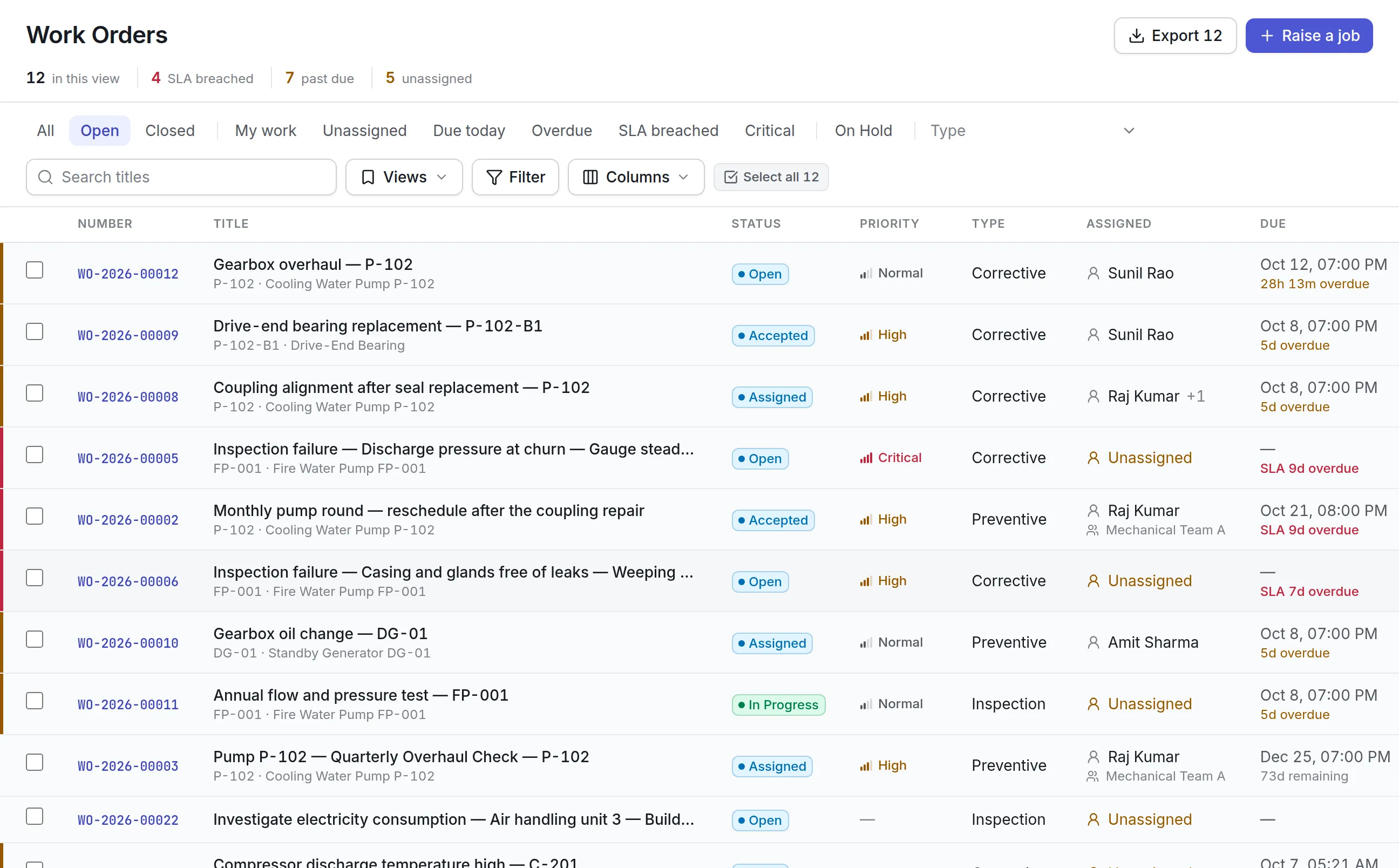
Asset Infinity is a CMMS and asset management system in one product. Work orders, preventive maintenance, inspections and technician scheduling sit on the same asset record as its labels, parts, purchasing, contracts and depreciation.
More detail
Suits best: mid-sized organizations that want maintenance and the asset register in one system. It is a weaker fit if you want sensors and software sold together by a hardware maker.
Preventive maintenance, parts and integrations in Asset Infinity
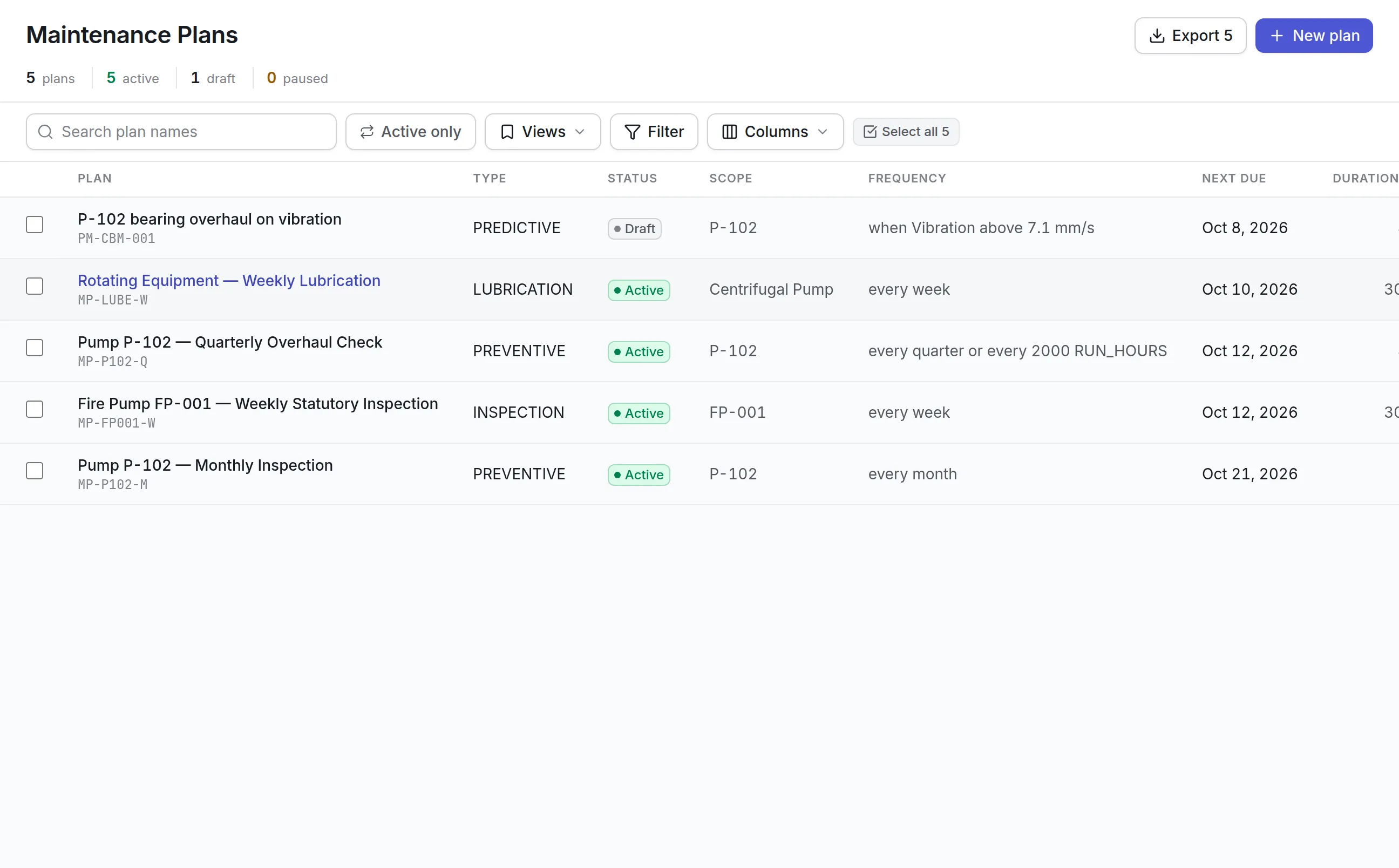
Maintenance plans raise preventive work and inspection rounds on their own, and a single plan can combine triggers.
How to run a fair CMMS software trial
Pick two or three products from the table, then run the same test in each.
- Load the same 50 assets.Import them from your spreadsheet and note how each product handled the rows it could not read.
- Build two real plans.One preventive maintenance plan on a calendar and one on a meter reading.
- Close real jobs on real phones.Have two technicians use their own phones for a week, including one job in a spot with no signal.
- Follow a missing part.Raise a job that needs a part you do not have and follow it through purchasing.
- Ask for the monthly report.Build the one report your manager wants every month.
The product your technicians complain about least, and whose report your manager trusts, is usually the right one.
What the best CMMS software looks like by team
A manufacturing plant
Plants care most about meter-based preventive maintenance, parts with bills of materials, and failure codes that show which machines fail most. Shutdown planning and permits to work matter if you run turnarounds, and a dispatch board helps when one crew covers several lines. Ask how a job waiting for a part shows up on the backlog. See maintenance software for manufacturing.
A facilities team
Facilities teams take many requests from people who are not technicians. A simple request form, clear priorities with service levels, and contractor management weigh more than deep reliability tools. Look for a request inbox that lets you turn down or merge duplicates with a reason the requester will read, and for contractor jobs that can be assigned to a supplier as easily as to your own crew. See facility management software.
A hospital or clinic
Healthcare engineering needs inspection records that stand up to an audit, calibration of test equipment, and a register of medical devices by location. Inspection rounds that grade each check and raise corrective work from a failed one save a lot of paperwork, and locating a device by RFID saves walking the wards. Contracts and warranties on each device help avoid paying for a repair the supplier owes you. See healthcare asset management.
Pricing context
Asset Infinity publishes its prices: the asset register starts at $130 a month for up to 500 assets with unlimited users, and maintenance, parts, purchasing and finance are added as bundles. You can build a quote for your own numbers or start a 14-day trial.
Read more about our CMMS software, preventive maintenance software, work order software and maintenance mobile app, or book a demo.