





What is the best asset management software in 2026?
The best asset management software is the one that matches what you track: a simple tag-and-scan tool for a few hundred items, an IT asset tool for devices and licenses, or a full register with maintenance and depreciation for equipment across sites. Asset Panda, Sortly, EZOfficeInventory, AssetTiger, Snipe-IT, Freshservice and Asset Infinity each fit one of those.
We make Asset Infinity, so we are not neutral. Every claim about another product comes from that product’s own website as of October 2026, and where we could not confirm a feature we say so. This page compares features only; ask each vendor to quote on your own numbers.
Asset management software defined, and why teams buy it
Asset management software is a register of the physical and IT assets an organization owns, linked to labels you can scan. It records where each asset is, who has it, what condition it is in, what has been done to it and, in many products, what it cost and what it is worth today.
More detail
Teams buy it when the spreadsheet stops being trusted:
The products on this page solve different parts of that problem, so start with what you are tracking and who will touch the records.
How to choose the best asset management software
- Asset register depth.A good register holds sites and a location tree, categories, parent and child assets, a named custodian, warranty dates and your own fields, with a history of every move and status change.
- Tags, scanning and location.Can you design and print your own barcode or QR labels and scan them with an ordinary phone? With many assets in one place, ask about RFID. For assets that move, ask about GPS trackers and Bluetooth (BLE) tags.
- Counts and custody.An audit should tell you what was found, what was somewhere else and what is missing. Tools and loaner equipment also need check-out, a due date and a record of who had them.
- Work orders and preventive maintenance.Some tools stop at a reminder date; others run full work orders and preventive maintenance. Decide which you need now and in two years.
- Mobile and offline.Counts happen in warehouses, basements and remote sites, so the app should keep working without a signal.
- Inventory and purchasing.Spare parts and consumables have quantities, reorder points and suppliers. Check for purchase orders and receiving.
- IT assets.If laptops and servers are in scope, network discovery and software license tracking save a lot of manual entry.
- Depreciation.Check which methods are supported and whether a book and a tax book can sit side by side.
- Integrations, deployment and setup effort.Look for spreadsheet import with error checks, an API, single sign-on, and whether the product can run on your own servers. Ask how long a team like yours took to go live.
Asset management software features compared
Yes means the vendor’s own website lists the capability. Partial means it lists a narrower version or an add-on (see the notes). Not listed means we did not find it on the vendor’s site; it may still exist, so ask.
| Capability | Asset Panda | Sortly | EZOfficeInventory | AssetTiger | Snipe-IT | Freshservice | Asset Infinity |
|---|---|---|---|---|---|---|---|
| Barcode or QR labels and scanning | Yes | Yes | Yes | Yes | Yes | Not listed | Yes |
| RFID | Not listed | Not listed | Yes | Not listed | Not listed | Not listed | Yes |
| GPS | Partial | Not listed | Yes | Not listed | Not listed | Not listed | Yes |
| Check-in and check-out | Yes | Yes | Yes | Yes | Yes | Not listed | Yes |
| Audits that reconcile found and missing | Yes | Not listed | Yes | Yes | Partial | Not listed | Yes |
| Work orders and preventive maintenance | Partial | Partial | Partial | Partial | Not listed | Not listed | Yes |
| Mobile app that works offline | Yes | Yes | Not listed | Not listed | Not listed | Not listed | Yes |
| Parts and purchase orders | Not listed | Yes | Not listed | Not listed | Not listed | Not listed | Yes |
| IT discovery and software licenses | Not listed | Not listed | Not listed | Not listed | Partial | Yes | Yes |
| Depreciation | Yes | Not listed | Yes | Yes | Not listed | Not listed | Yes |
| API | Not listed | Yes | Not listed | Yes | Yes | Not listed | Yes |
| Runs on your own servers | Not listed | Not listed | Not listed | Not listed | Yes | Not listed | Yes |
Notes on Partial: Asset Panda’s GPS records the phone’s location when an asset is scanned, and its maintenance is scheduled notifications and repair tickets. Sortly and AssetTiger list date-based maintenance alerts. EZOfficeInventory offers work orders through a CMMS add-on. Snipe-IT lists audit reminders, license tracking and device sync from Jamf, Intune and Kandji, without network discovery.
See it on your own assets, or price it in two minutes.
Three asset tracking tools for equipment and supplies
Asset Panda
Asset Panda calls itself an asset management platform built around one customizable source of truth. Its site lists barcode and QR scanning in iOS and Android apps with an offline mode, custom check-out forms with chain-of-custody history, mobile audits with photos and signatures, maintenance and repair tracking, depreciation, custom fields per item type, and integrations with tools such as Okta, Microsoft Entra ID, Jamf and ServiceNow. It runs on Amazon Web Services.
Suits best: the public sector, education, healthcare and nonprofits that want a highly configurable register.
Sortly
Sortly describes itself as simple inventory management software for small businesses. Its site lists barcode and QR scanning with label generation, check-in and check-out, offline mobile access, low-stock alerts, purchase orders, date-based maintenance alerts, spreadsheet import, an API and webhooks, and integrations with QuickBooks Online, Slack and Microsoft Teams.
Suits best: small teams tracking supplies, tools and equipment in a few places who want to be running in an afternoon.
EZOfficeInventory
EZOfficeInventory, by EZO, describes itself as enterprise asset management software and CMMS. Its site lists barcode and QR tags, RFID, GPS and telematics, check-out and reservations, depreciation, audits, and work orders through a CMMS add-on.
Suits best: mid-sized and larger organizations that want reservations, RFID and GPS in an asset tracking tool, with maintenance added later through the CMMS add-on if they need it.
Three asset management tools for small offices and IT teams
AssetTiger
AssetTiger, from MyAssetTag, aims at schools, government, nonprofits, churches and small businesses moving off spreadsheets. Its site lists barcode and QR labels printed on any label printer, an iOS and Android app, check-in and check-out, recurring maintenance alerts, warranty and contract tracking, depreciation reports, CSV or Excel import, an API, and audits that flag found, missing and moved assets.
Suits best: small organizations that want straightforward tag-and-scan tracking.
Snipe-IT
Snipe-IT, from Grokability, is open-source IT asset management that you can run on your own servers or have hosted. Its site lists check-in and check-out with user acceptance, QR labels and barcode scanner support, audit reminders, license tracking, LDAP and SAML sign-in, a REST API and syncing with Jamf, Intune and Kandji.
Suits best: IT teams comfortable running their own server who mainly track laptops, peripherals and licenses.
Freshservice
Freshservice, from Freshworks, is an IT service desk with IT asset management built in. Its site lists agent-based and agentless discovery of computers, network devices and cloud resources, a configuration management database, software asset management and contract renewal alerts.
Suits best: IT departments that want help desk tickets and IT assets in one tool, and that track physical equipment elsewhere.
How Asset Infinity counts and tracks assets
Asset Infinity is an asset register and maintenance system in one product, for organizations that need to know where equipment is and keep it running.

More detail
Suits best: organizations tracking and maintaining equipment across sites. A team counting a few hundred items will find Sortly or AssetTiger simpler.
IT assets and setup in Asset Infinity
IT devices sit in the same register as plant and furniture, so one count and one report cover both.
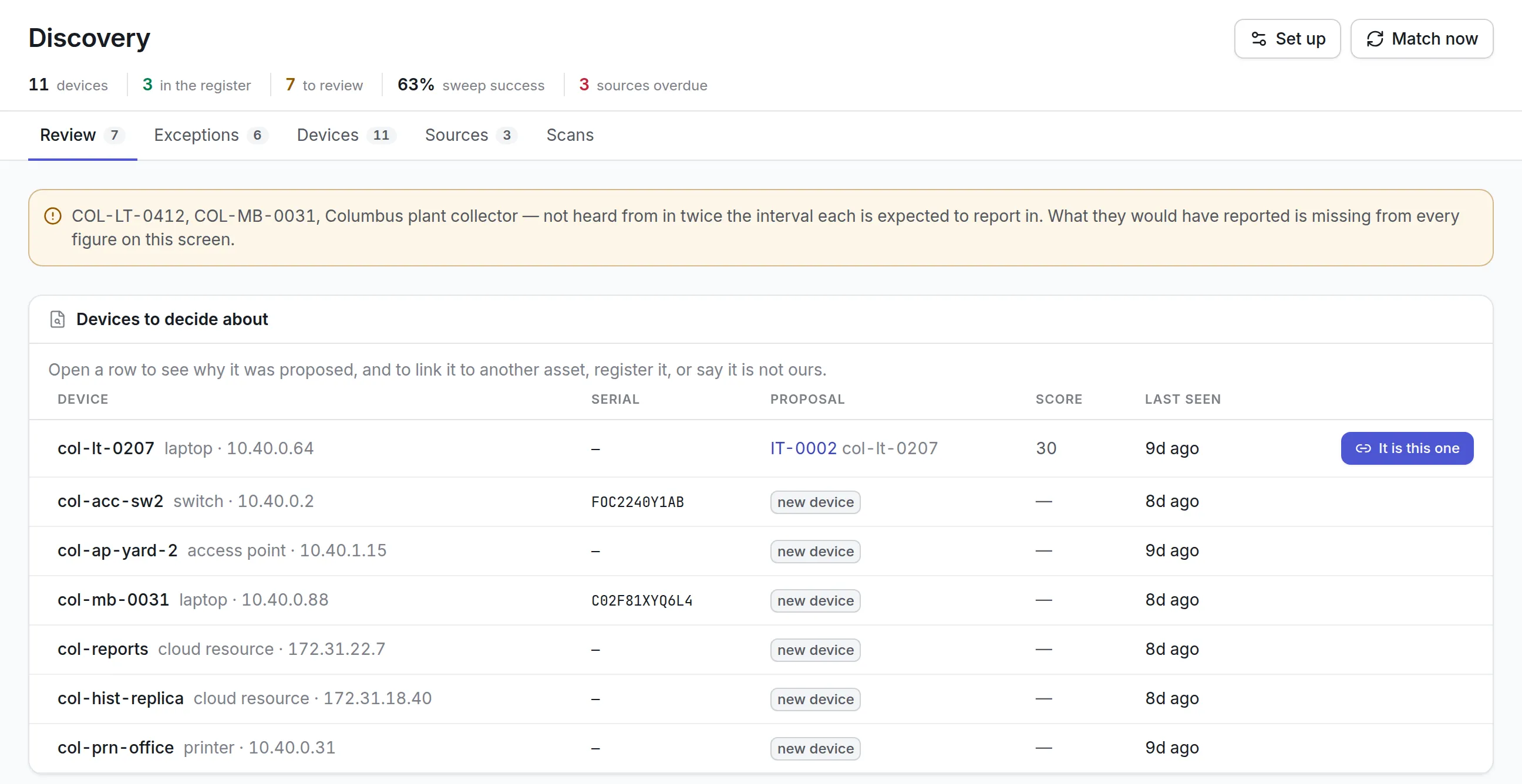
What asset management software looks like by team
A school district
Laptops and projectors move between classrooms and go home with staff. Custody, self-verification by email and an annual count matter most, along with a clear record of which devices were handed back at the end of the year. Discovery helps confirm the laptops that never come to the count, and a booking calendar keeps shared carts and cameras from being promised twice. See asset management for education.
A manufacturer
Machines need maintenance and depreciation as well as a location. A register that carries work orders and finance books avoids three separate lists, and gives the controller and the maintenance manager the same asset numbers. Meters and preventive plans sit on the same record the count confirms, so a machine found damaged at the count can have a repair job raised on the spot. See fixed asset management software.
An IT department
Discovery and license position matter more than labels, though labels still help at the annual count and at the door when equipment leaves the building. Look for automatic matching of discovered devices to existing records, so the register does not fill with duplicates, and for a license position that compares what is installed with what you bought. See IT asset management software.
Where to start with asset management software
Asset Infinity’s asset register starts at $130 a month for up to 500 assets with unlimited users; you can build a quote for your own count. Read more about our asset tracking software, asset tags and RFID asset tracking, or book a demo.