






Maintenance scheduling software that checks before it assigns
Maintenance scheduling software that shows what an assignment means before you make it. Drag a job onto a technician, crew or supplier, and skills, certificates, shift, workload, parts and the SLA are checked first.
What our maintenance scheduling software checks for you
Drag, check, then assign
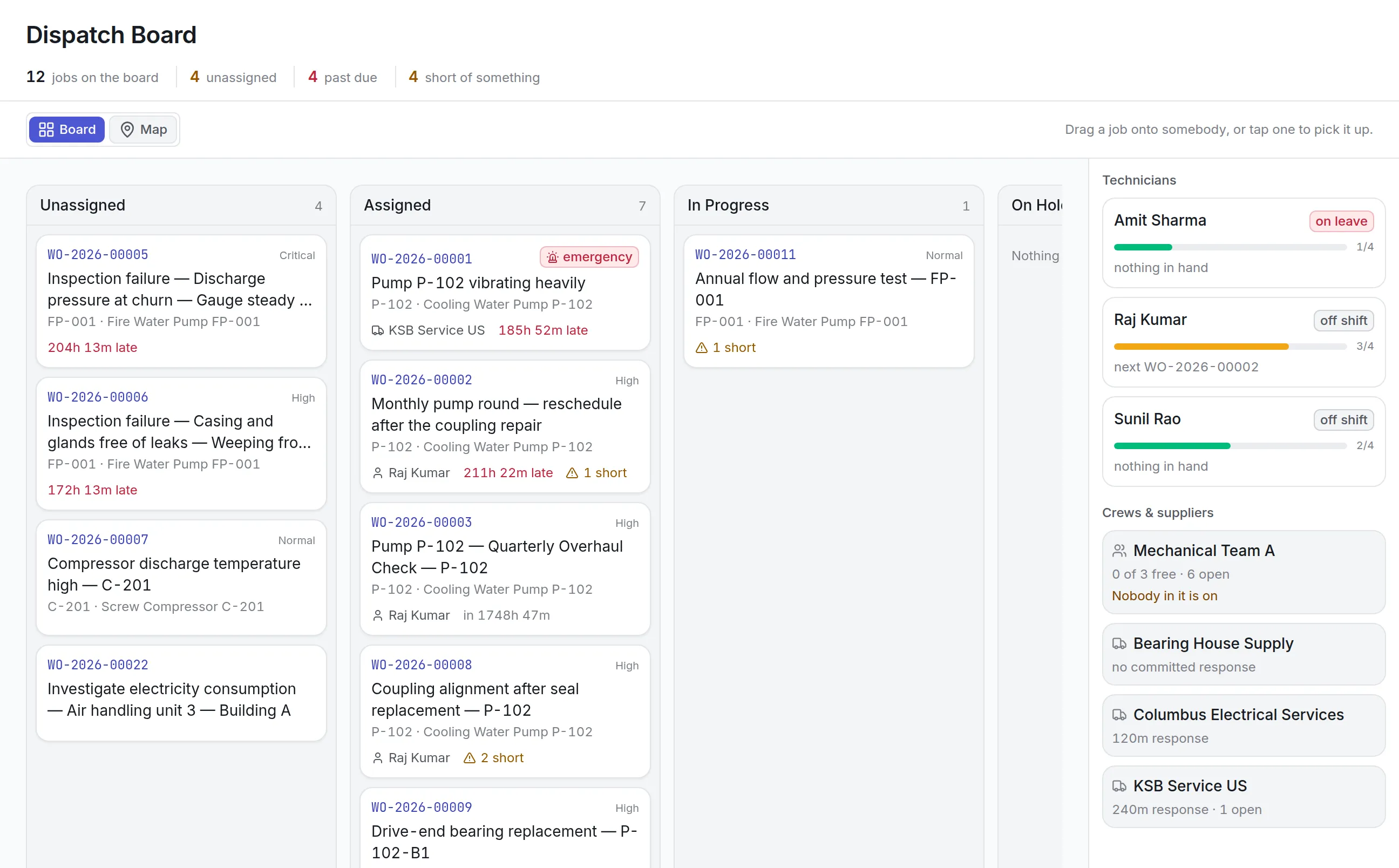
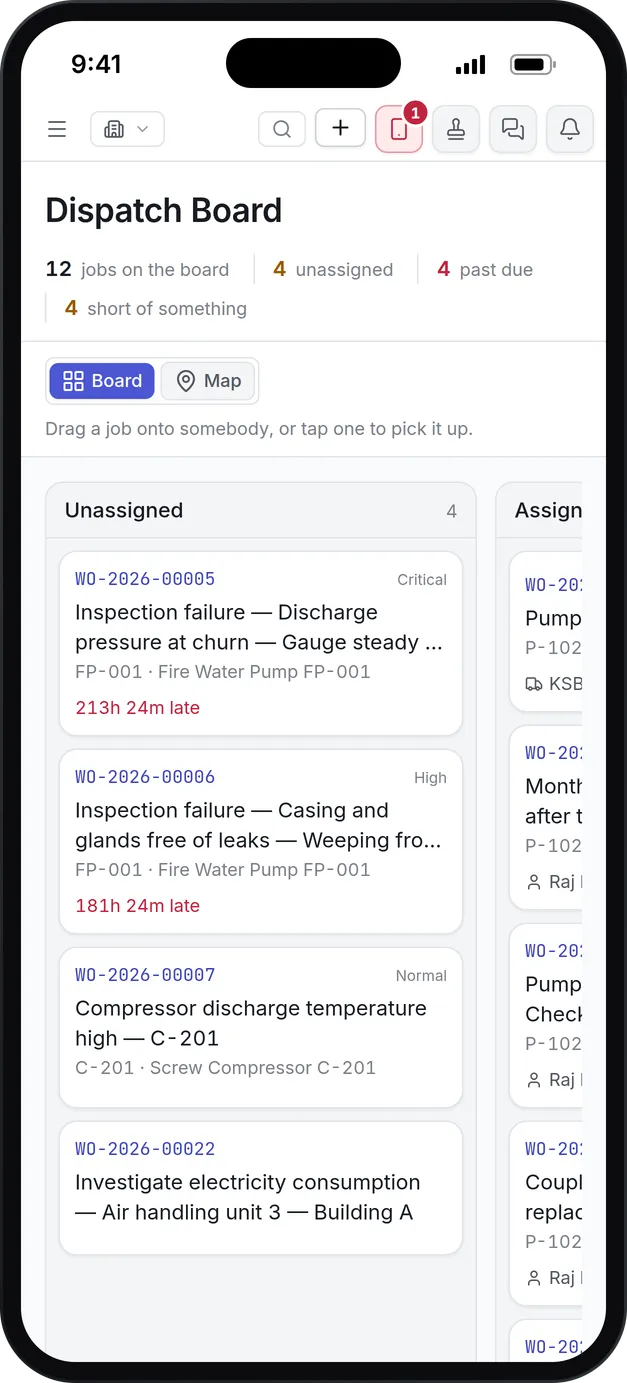
Dropping a job on a person shows the travel distance, both SLA promises, skills, certificates, parts, tools, double bookings, workload and the site calendar before it assigns.
Board or map
Switch the board to a map of where jobs and people are. Map pins accept a dropped job the same way.
People, crews and suppliers
Hand work to a technician, to a crew as a whole, or to an outside supplier with their committed response time.
Capacity against the roster
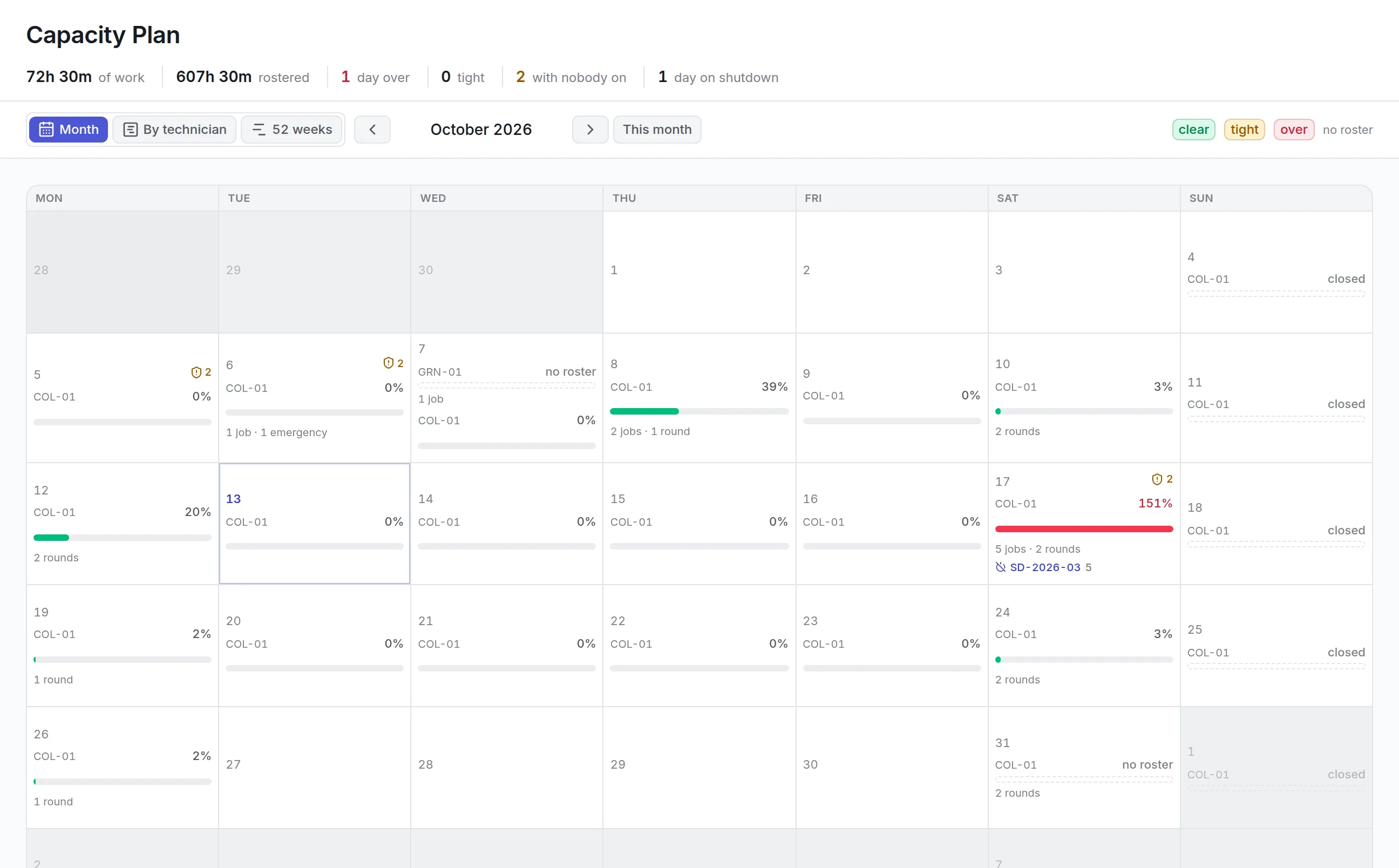
The capacity plan adds up the hours of work each day at each site against the hours rostered, and marks days as clear, tight or over.
Shutdowns in the calendar
Days when a site is closed or a planned shutdown is running show on the capacity plan, so work is not booked into time the plant is down.
Columns that match your workflow
The board's columns come from your own work order statuses, so a status you turn off disappears from the board too.
What is maintenance scheduling software?
Maintenance scheduling software decides who does each maintenance job and when, given the people, skills, parts and hours actually available. It matches work to technicians, crews and contractors, shows where a day or a week is overloaded, and keeps the schedule in step with the work orders behind it.
Teams buy it when the whiteboard stops working: when jobs are double-booked, when someone is sent without the certificate a job needs, or when a planned shutdown fills up without anyone noticing.
How scheduling works in Asset Infinity
Scheduling happens at two distances. The dispatch board handles today: who is on what right now. The capacity plan handles the weeks ahead: whether the days can absorb the work that is due. A Monday on the board at a plant looks like this.
- The board opens on the day’s jobs.Twelve jobs sit in columns by status: Unassigned, Assigned, In Progress, On Hold and Completed this week. The summary counts four unassigned, four past due and four short of something, such as a part not yet received.
- The rail shows who is free.Down the right, each technician shows whether they are available, off shift or on leave, how many open jobs they hold against their ceiling (3/4, for example) and their next job. Crews and suppliers sit below, with suppliers’ committed response times.
- The supervisor drags a job onto a technician.On a touchscreen, tap the job and then the person. Nothing is assigned yet.
- A preview lists every check.Travel distance and arrival time, both SLA promises, skills, certificates, parts at the right store, tools and their calibration, double bookings, workload and the site calendar, each with a tick, a warning or a stop.
- The supervisor decides.With nothing stopping it, Assign hands the job over and it appears in the technician’s app. When something is a stop, the assignment can still be made, but only with a typed reason recorded against the job.
The checks are advice, so a part arriving at ten does not block a job starting at eleven. What the board guarantees is that the planner was told.
Weeks ahead on the capacity plan
The dispatch board cannot tell you whether next Saturday is already full. The capacity plan answers that, counting in man-minutes against the roster: a four-hour job for two fitters is eight hours of the day.
More detail
Sites are never blended, because a technician rostered at one plant cannot absorb another plant’s load. Supplier work is counted apart, since it runs on somebody else’s roster.
Skills, certificates and rosters behind every assignment
Maintenance scheduling software is only as good as what it knows about your people. The checks on the board read the same records your workforce screens keep.
More detail
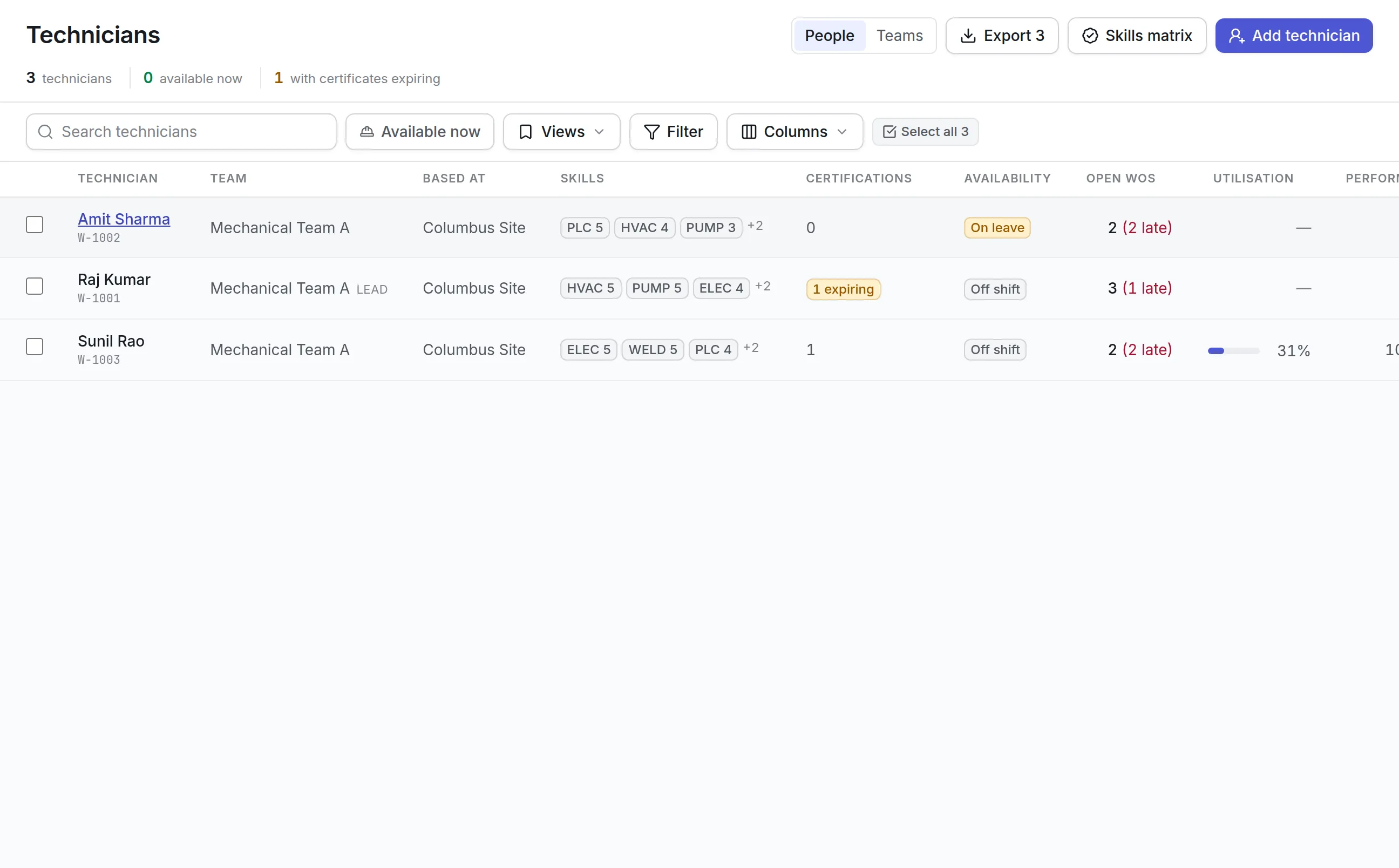
Each technician carries skills with a level, certifications with expiry dates, a home site, a travel radius, shifts, leave and a ceiling on open jobs. An expired certificate is a stop on the board. These records live in technician management, so keeping them current is what makes the schedule trustworthy.
What to look for in maintenance scheduling software
| Capability | Why it matters | In Asset Infinity |
|---|---|---|
| Checks before assignment | A wrong assignment costs a wasted trip or a safety breach | Skills, certificates, parts, tools, SLA, shift and workload previewed on drop |
| Reasons on overrides | Exceptions should be visible later | Assigning past a stop needs a typed reason |
| Capacity against the roster | Headcount hides who is actually on shift | Man-minutes against rostered hours, per site and day |
| Contractors on the same board | Outside work needs the same visibility | Suppliers on the rail with committed response times |
| Map view | Field teams care about distance | Board or map, with drop-to-assign on map pins |
| Shutdown awareness | Planned closures change what can be done | Shutdown days shown on the capacity plan |
| Long-range view | Heavy months should be seen early | 52-week projection of every plan |
| Job dependencies | Some work must wait for other work | Sequencing with finish-to-start and other links |
| Multi-site dispatch | Supervisors cover more than one plant | Site switcher ticks a whole region at once |
See it on your own assets, or price it in two minutes.
Scheduling for different teams
A manufacturing plant
The planner uses the capacity plan to keep the weekend shutdown inside its hours, and sequences jobs so a coupling realignment waits for the motor change. Jobs needing a permit show as short of something until the permit is live, which ties scheduling to lockout tagout software. More on maintenance in manufacturing.
A field service or utility crew
Technicians cover a region, so the map matters. The supervisor drops jobs on the nearest available person, reads the straight-line distance and arrival time, and checks travel radius before sending anyone outside their patch. Jobs and readings come back through the maintenance mobile app.
A facilities team with contractors
Much of the work goes to outside firms. Suppliers sit on the rail beside your own crews, each with its committed response time and open jobs, and a job handed to a supplier opens on their portal so they can see it, price it and invoice it.
A hospital engineering department
Critical clinical equipment carries short response times, so the preview matters most here. It shows whether a technician can still meet both SLA promises before they are given the job, and whether their certificates for that equipment are current. On-call staff are marked on each day’s roster, so a supervisor can see who to send to an out-of-hours breakdown.
Maintenance scheduling software and the rest of maintenance
Scheduling sits between the work that is raised and the people who do it. Jobs reach the board from work order software, and rounds from preventive maintenance software appear on the capacity plan before they are even raised.
More detail
When a day turns red on the capacity plan, a planner has four moves:
Every move is a real reschedule or assignment on the work order, recorded in its history with who made it and why, so the schedule and the jobs never disagree.
What maintenance scheduling software costs in Asset Infinity
The asset register starts at $130 a month for up to 500 assets, with unlimited users. The capacity plan comes with the Maintenance module at $25 per user per month, alongside work orders and preventive maintenance. The dispatch board is the job routing and dispatch add-on at $150 a month for the whole organization. Build a quote to price your team.
Getting started
More in Maintain
Common questions
What is maintenance scheduling software?
Maintenance scheduling software decides who does which maintenance job and when. It matches work to people with the right skills and available time, and shows where the schedule is overloaded.
Does the board assign a job as soon as I drop it?
No. Dropping a job shows a preview of every check, including skills, shift, parts and SLA. The planner confirms the assignment after reading it.
Can we schedule contractors on the same board?
Yes. Suppliers and crews sit on the board's rail beside your own technicians, and a supplier's work is tracked against its response time.
How does the capacity plan know how much time we have?
It reads each technician's roster and leave, adds the estimated hours of every scheduled job and round, and compares the two per site and per day. You can view it by month, by technician or across 52 weeks.
What is the difference between maintenance planning and scheduling?
Planning decides what a job needs, such as tasks, parts, tools, skills and time. Scheduling decides when it happens and who does it, given the hours actually available.
What is technician dispatch software?
Technician dispatch software hands the day's jobs to the right people as work comes in. In Asset Infinity the dispatch board shows open jobs beside technicians, crews and suppliers, on a board or a map.
See it with your own assets
A demo run on an example from your industry. Or start the trial and look around on your own.