






Maintenance request software that lets anyone report a problem
Maintenance request software for the people who notice a fault but do not fix it. They report it in a few taps, and your planners get one inbox to triage, merge and convert into work orders.
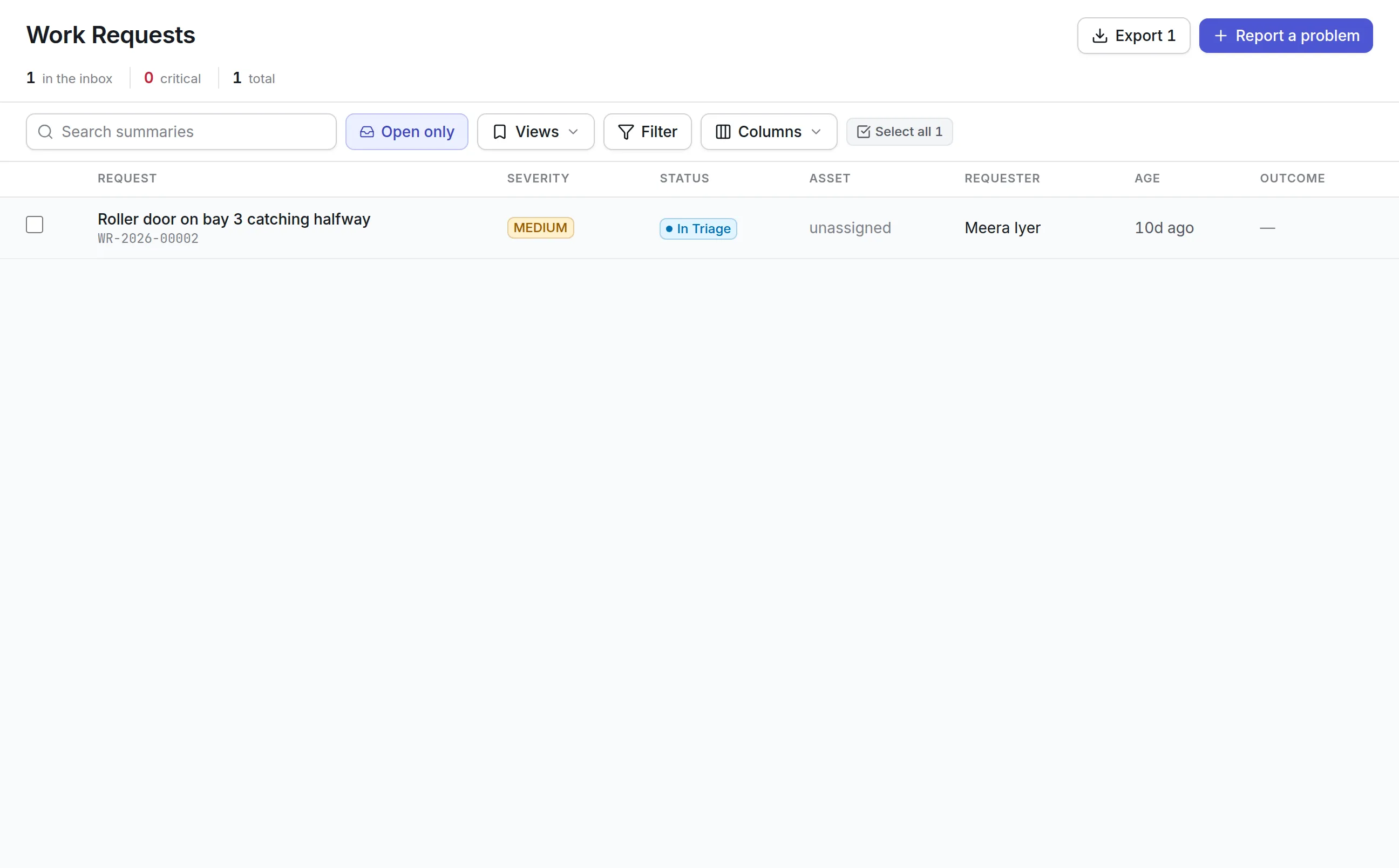
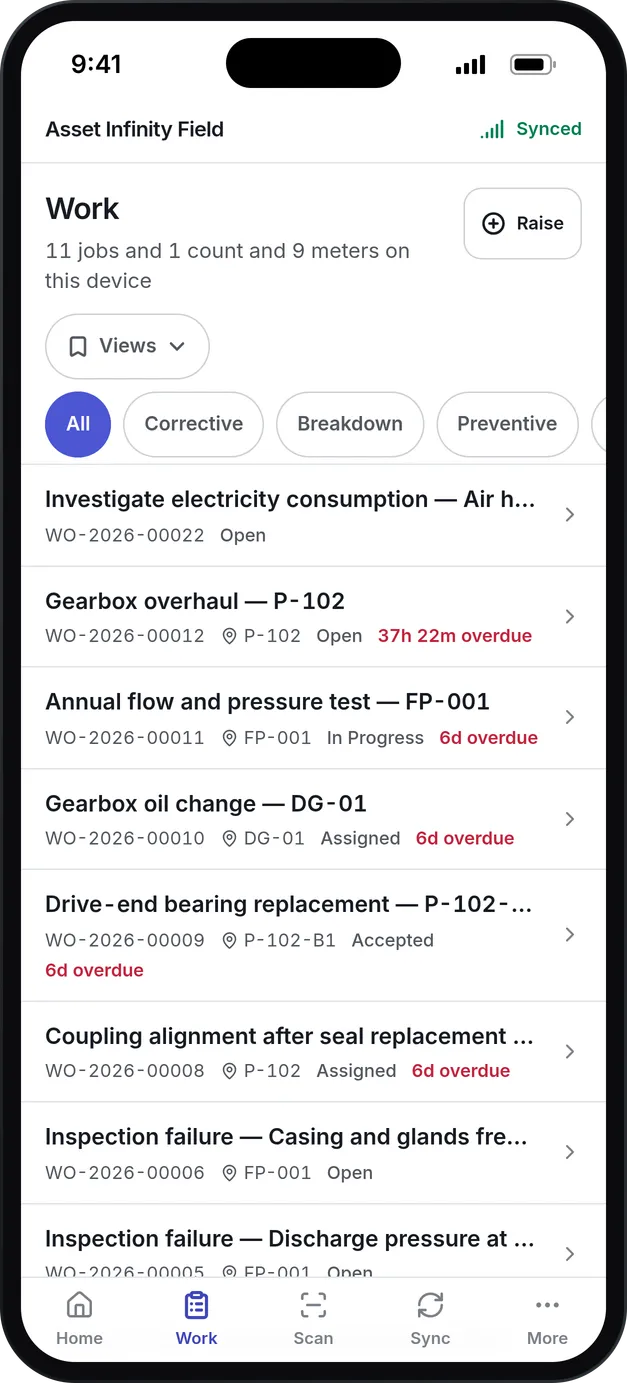
What our maintenance request software handles
Report from anywhere
Requests arrive from a browser on any device, a shared email address, a Telegram bot or WhatsApp, each marked with where it came from. Technicians on the mobile app can raise a job directly.
One triage inbox
Planners work through requests in a panel beside the list, without opening and closing pages for each one.
Convert in one step
Turn a request into a work order and it carries the asset, location and description across. Several requests can be converted together.
Duplicates folded together
Ten people reporting the same broken light become one request. The duplicates are merged into it and stay linked.
Rejected with a reason
A request that will not be done is rejected with a reason, and the inbox keeps the record of what was turned down and why.
Categories that set defaults
A request's category sets its default priority and work order type, and an approval step can be required before work begins.
What is maintenance request software?
Maintenance request software lets employees, tenants, operators and staff report a problem to the maintenance team, and gives planners one inbox to review those reports. Each request records what is wrong, where, how bad it is and who reported it, before anyone decides whether it becomes a work order.
Teams buy maintenance request software to stop faults arriving by hallway conversation, phone call and sticky note, where they are easy to lose and impossible to count.
How maintenance requests work in Asset Infinity
Over a weekend, a warehouse supervisor notices that the roller door on bay 3 catches halfway. Here is that report from the moment she makes it to the job on the board.
- The problem is reported.She opens the request form on her phone, writes “Roller door on bay 3 catches halfway”, scans the door’s label to pick the asset, sets how bad it is to Medium and adds a photo. Two colleagues email the same fault to the maintenance address and a forklift driver sends it by WhatsApp.
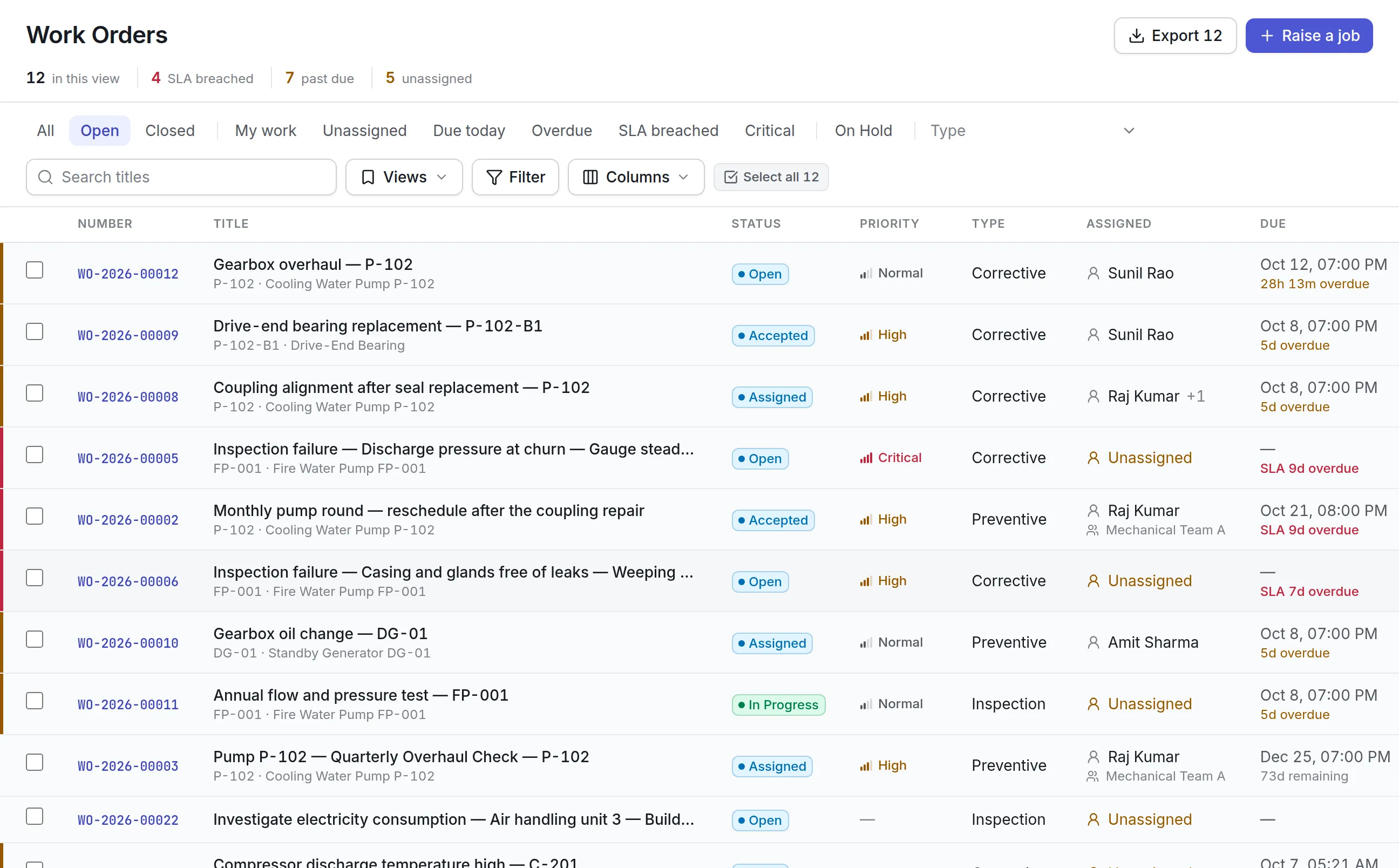
- The inbox sorts it.Requests are listed worst first, then oldest first, the order a queue is worked in. Critical reports have a red edge and high ones an amber edge.
- A planner triages it.On Monday the planner clicks the first report and it opens in a panel beside the list, so she never has to press Back. She classifies it as “Equipment not running”, and the panel says what converting it will raise.
- Duplicates are folded together.She ticks the four reports and merges them into one. Nothing is deleted: the other three are marked as duplicates and stay linked, because four people reporting one fault says something about how visible it is.
- It becomes a work order.Convert to work order raises the job against the same asset and place, with the photo and the reporter’s words. Type and priority come from the category and the severity, and the request is marked Converted to Work Order.
- The reporter is kept informed.Anyone copied on the request is copied on the job. Had the planner rejected it, the reason she typed would be what the reporter reads.
Where maintenance requests come from
Each request records its source, so you can tell later which channel a fault arrived through and whether self-service is catching on. Sources are a list you control, and each can be marked as typed in by a requester or raised by a system.
More detail
People with only the Requester role can report problems and follow their own requests without seeing the work orders behind them, which suits office staff, tenants and teachers.
Triage that leaves a record
A request is someone’s report. A work order is a commitment of time and parts. Keeping them separate means the backlog in work order software holds only work someone has checked, and a report that needs nothing can be closed with a reason instead of cluttering the job list.
More detail
The default request lifecycle has six states, and each can be renamed:
| Status | What it means | Moves from here |
|---|---|---|
| Submitted | Reported; nobody has looked yet | Begin triage, convert, reject, cancel |
| In Triage | Being assessed | Approve, convert, reject, cancel |
| Approved | Worth doing, not yet a work order | Convert to work order |
| Converted to Work Order | A job exists | Final |
| Rejected | Not worth doing, with a reason | Final |
| Cancelled | Overtaken, for example the fault cleared | Final |
An approval step can sit between triage and conversion where approving and converting are different people’s jobs. Bulk actions classify, convert, merge or reject many requests at once, and a request already converted is reported rather than converted twice.
Categories that suggest the right job
Request categories are written in the reporter’s words (“Water leaking”, “Noise or vibration”), and each carries a default work order type and priority. Severity has four answers (critical, high, medium and low), and settings show what each one is worth on your own priority ladder, such as critical meaning Critical with a one-hour response. Whoever triages can still choose a different type or priority when converting.
See it on your own assets, or price it in two minutes.
What to look for in maintenance request software
| Capability | Why it matters | In Asset Infinity |
|---|---|---|
| Many ways in | People report through whatever is in their hand | Browser, app, email, Telegram, WhatsApp, API |
| Requests kept apart from work orders | The backlog should hold only checked work | Separate inbox and lifecycle |
| Fast triage | A planner may clear twenty reports before 9 a.m. | Side panel beside the list, no page loads |
| Duplicate handling | One broken light can produce ten reports | Merge into one, with duplicates linked |
| Reasons on rejection | Reporters stop reporting if they hear nothing | Rejection reason the reporter reads |
| Sensible defaults | Planners should confirm, not type | Category sets type; severity suggests priority |
| Limited access for requesters | Staff should not see the whole system | Requester role sees only their own reports |
| Photos and asset scans | “It’s broken” needs context | Photos, files and label scans on the form |
Maintenance requests for different teams
A facilities team
Office staff report broken lights, leaking taps and HVAC complaints from a browser. Categories like “Too hot or too cold” carry their own default priority, and contractors pick up converted jobs. See facility management software for the wider setup.
A school district or campus
Teachers and front-office staff hold the Requester role, so they can report a fault and follow it without seeing the maintenance backlog. Reports from the same classroom are merged, and rejections explain why, such as work booked for the summer break. See maintenance for education.
A manufacturing plant
Operators report noises, leaks and trips from a shared handset on the line, scanning the machine’s label so the request lands on the right asset. A Critical report sorts to the top of the inbox and can be converted without stepping through triage first.
A hotel or residential building
Front-desk staff log guest complaints as requests with a photo and the room as the place. The planner merges repeats about the same room, rejects the ones housekeeping already fixed with a short reason, and converts the rest, so the engineering team works a clean queue and the front desk can see what happened to each report.
From request to scheduled job
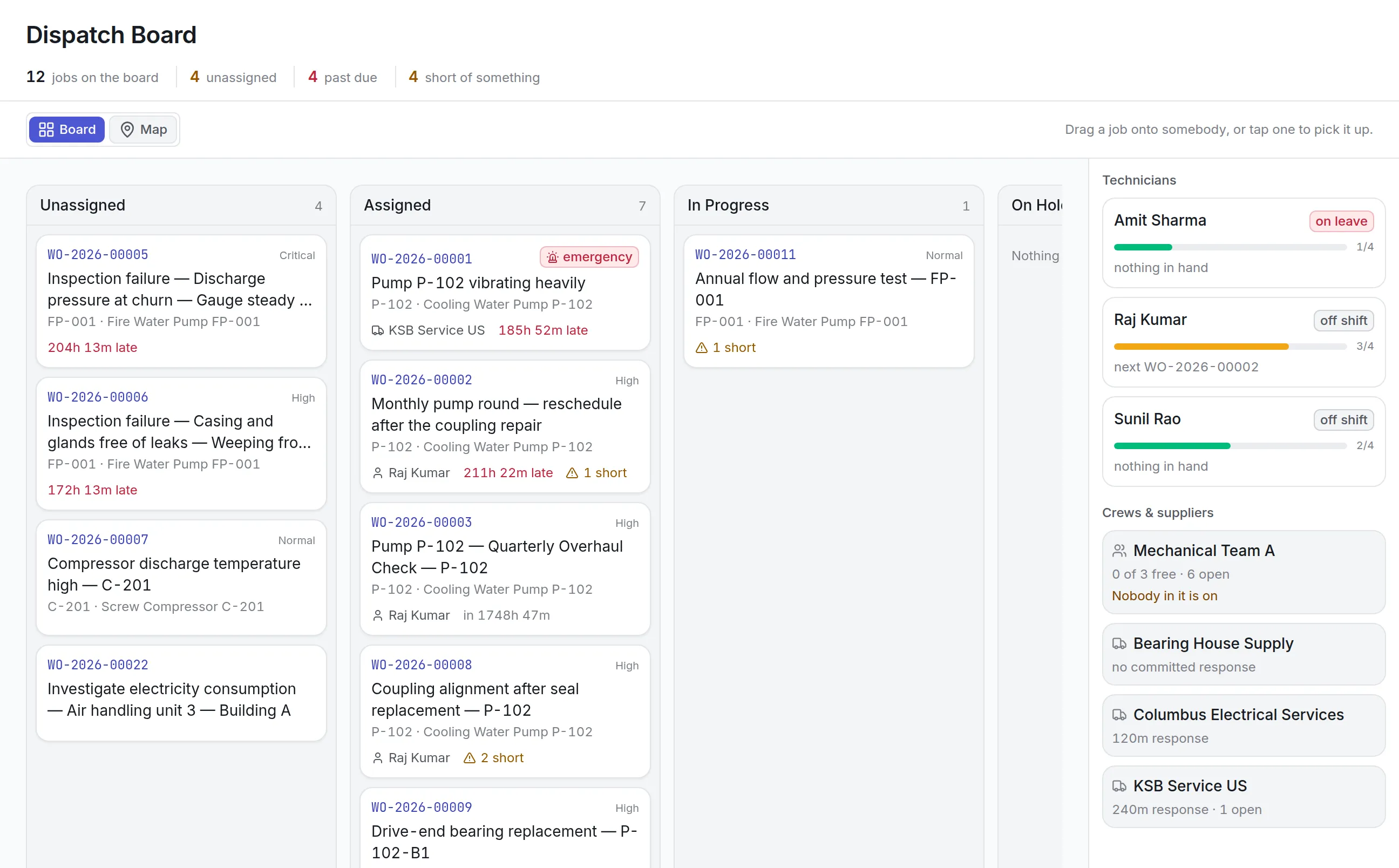
Once a request is converted, its work order lands in the site’s queue, or goes straight to the crew or supplier the reporter suggested.
More detail
The planner assigns it on the board in maintenance scheduling software, and the technician works it in the maintenance mobile app.
What maintenance request software costs in Asset Infinity
The asset register starts at $130 a month for up to 500 assets, with unlimited users. Work orders come with the Maintenance module at $25 per user per month. Maintenance requests are an add-on at $75 a month for the whole organization, and receiving requests by email is a further $50 a month. Build a quote to price your setup.
Getting started with maintenance request software
Setting up maintenance request software takes a few decisions, most of them made in an afternoon:
More in Maintain
Common questions
What is maintenance request software?
Maintenance request software lets employees, tenants or operators report a problem to the maintenance team. It collects the reports in one place so planners can decide which ones become work orders.
Do people need training to submit a request?
No. A request asks what is wrong, where and how bad it is, with an optional photo. Where your organization has set up email, Telegram or WhatsApp, people can report by sending a message.
How do employees submit a maintenance request?
They open the request form in a browser or the mobile app, describe the problem, pick or scan the asset if they know it, choose how bad it is and add a photo. People with the Requester role can follow their own requests without seeing the rest of the maintenance system.
Will the person who reported a problem hear what happened?
Yes. A rejected request carries a reason the reporter can read, and anyone copied on a request is copied on the work order it becomes.
Is a request the same as a work order?
No. A request is a report of a problem. A planner reviews it, then converts it into a work order, merges it with a duplicate or rejects it. Keeping them apart stops the work order backlog filling with unchecked reports.
How much does the request module cost?
Maintenance requests are a $75 per month add-on for the whole organization, on top of the Maintenance bundle. Receiving requests by email is a separate add-on.
See it with your own assets
A demo run on an example from your industry. Or start the trial and look around on your own.