







IT asset management (ITAM) is how an organization knows what hardware, software and cloud resources it owns, who uses each one, what it costs and when it needs replacing. Without it, IT teams buy laptops they already have in a cupboard, pay for software licenses nobody uses, and find out about an unpatched server from an auditor.
This guide covers what IT asset management is, the ITAM process from purchase to disposal, what an IT asset inventory should hold, how to track IT assets you cannot walk up to, the metrics that show whether it is working, and what to look for in IT asset management software.
What Is IT Asset Management?
IT asset management is the practice of tracking every IT asset (laptops, servers, network gear, phones, software licenses and cloud resources) through its whole life, from purchase to disposal. For each asset it keeps one record of what it is, where it is, who has it, what it cost, what is installed on it and what contracts cover it.
Teams take on IT asset management for three reasons. Cost: you stop buying what you already own and paying for licenses nobody uses. Security: you cannot patch or protect a device you do not know about. Compliance: software audits, financial audits and security frameworks such as SOC 2 and ISO 27001 all expect an accurate asset inventory.
What Counts as an IT Asset?
- End-user hardware: laptops, desktops, monitors, docking stations, phones and tablets.
- Infrastructure: servers, storage, switches, routers, firewalls and wireless access points.
- Software: installed applications and the license entitlements that cover them.
- Cloud resources: virtual machines and other resources in AWS, Azure or Google Cloud.
- Peripherals and accessories: printers, scanners, headsets and anything else issued to a person.
The IT Asset Management Process
The IT asset management process follows each asset through six stages. The record is created at the first stage and closed at the last, and everything in between adds to it.
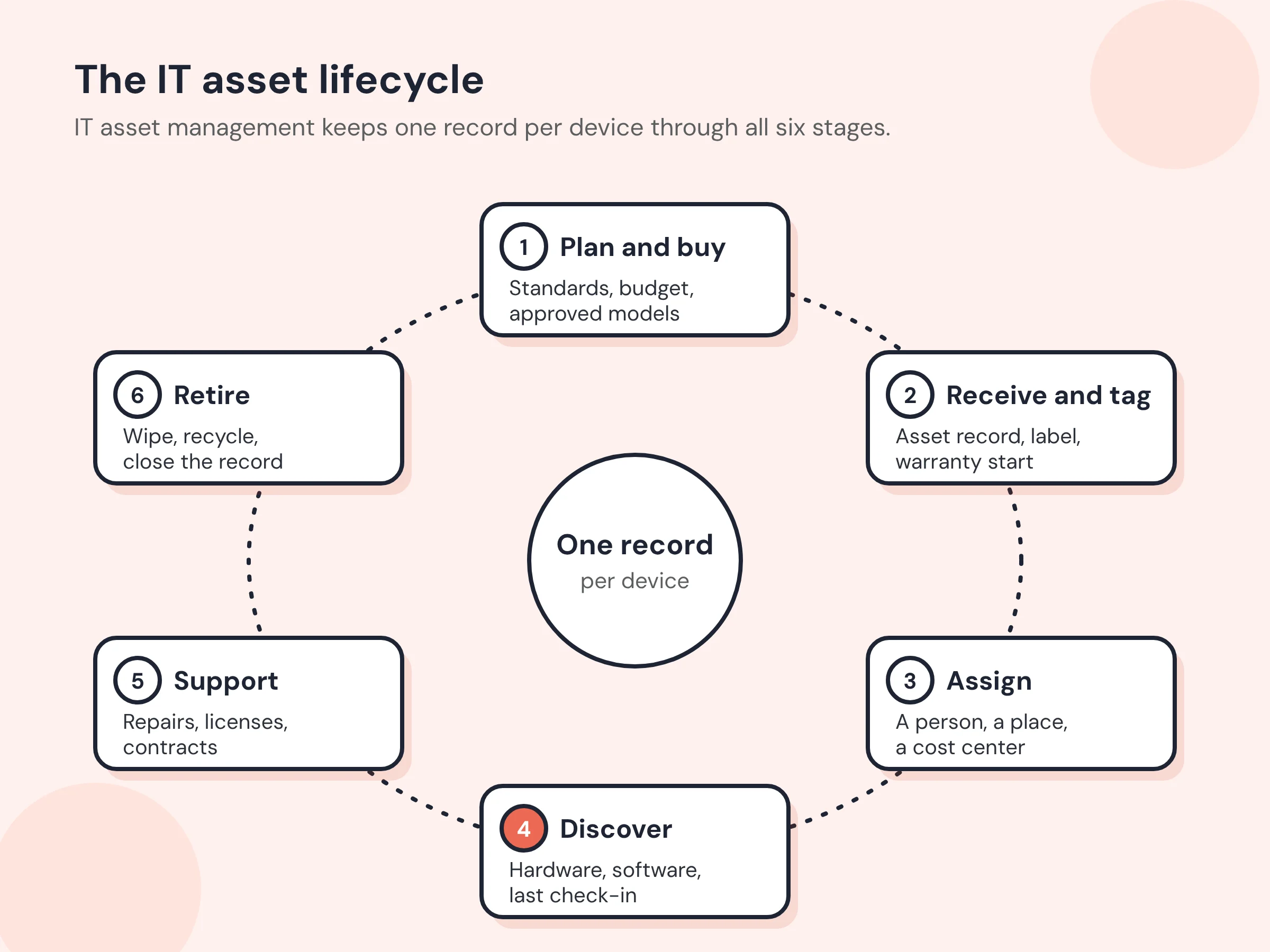
- Plan and buy. Set standard models for each role, check the inventory for spare stock before ordering, and buy against a budget. Planning from the inventory is where ITAM saves the most money.
- Receive and tag. When a device arrives, create its record with the serial number, model, cost, purchase date and warranty, and fix a barcode or QR label so it can be scanned later.
- Assign. Record who has the device, where it is and which cost center pays for it. When someone leaves or changes roles, the record shows exactly what they should hand back.
- Discover and monitor. Software agents and network scans report what is actually connected: hardware details, installed software and when each device last checked in. Discovery is how the record stays true after the day of purchase.
- Support and renew. Log repairs against the asset, track warranty and support contracts, and renew or retire licenses before they lapse.
- Retire and dispose. Recover the device, wipe its data, decide whether to redeploy, resell, donate or recycle it, record how it left, and remove its licenses so they can be reused. Our IT asset disposition (ITAD) guide covers this stage in detail.
What Belongs in an IT Asset Inventory
An IT asset inventory is the set of records the process keeps. These are the elements every record should hold:
| Element | Why it matters |
|---|---|
| Asset number and label | One ID that every ticket, contract and report refers to |
| Make, model and serial number | Warranty claims, recalls and replacement planning |
| Type and category | Laptop, server, switch, license, cloud resource |
| Assigned user and location | Accountability, and what to recover when someone leaves |
| Cost center or department | Who pays, and chargeback |
| Purchase date, cost and supplier | Budgeting, depreciation and audit |
| Warranty and support contract | Whether a repair is covered, and when coverage ends |
| Operating system and installed software | Patch status and license compliance |
| Last seen or last check-in | Whether the device is still in use or has gone missing |
| Status | On order, in stock, in use, under repair, retired, disposed |
| History | Every assignment, repair, move and change |
The “last seen” element is the one spreadsheets cannot provide. A device that has not checked in for 60 days is either in a drawer, with a former employee or lost, and each of those needs a different action.
How to Track IT Assets
Most IT assets can report on themselves, which is what makes IT asset management different from tracking furniture. Use the method that fits each kind of asset:
- Endpoint agents on Windows, macOS and Linux computers report hardware, installed software and each check-in.
- Network scans find devices that cannot run an agent, such as printers, switches and access points, using protocols like SNMP, SSH and WMI.
- Cloud and device-management connectors pull in virtual machines from AWS, Azure and Google Cloud, and devices enrolled in Microsoft Intune.
- Labels and scanning cover what never connects to the network: monitors, docks, spare stock in a storeroom and devices awaiting disposal.
Discovery only helps if someone reviews what it finds. Every new finding should either be linked to an existing record, added as a new asset, or dismissed with a reason (a personal device, something that is not an asset, something you are not permitted to scan). Our IT asset discovery page shows how that review works.
IT Asset Management Metrics
These IT asset management metrics show whether the inventory is accurate and whether it is saving money. Measure each one monthly and watch the trend.
| Metric | How to measure it | What it tells you |
|---|---|---|
| Inventory accuracy | Assets found as recorded in a count ÷ assets counted | Whether the records can be trusted |
| Discovery coverage | Discovered devices linked to a record ÷ all discovered devices | How much of the network is unaccounted for |
| Devices not checking in | Devices with no check-in for 30 or more days | Lost, idle or unmanaged hardware |
| Spare stock on hand | Unassigned, working devices in storage | Whether you can deploy instead of buying |
| License utilization | Installed or assigned licenses ÷ licenses owned | Shelfware to cut, or a shortfall to fix before an audit |
| Unlicensed installs | Installations with no matching entitlement | Audit exposure |
| Warranty expiring in 90 days | Devices whose coverage ends next quarter | Renewals and refresh planning |
| Time to provision | Days from request to a working device in a new hire’s hands | How well stock and process work together |
| Recovery rate at offboarding | Devices returned ÷ devices assigned to leavers | Loss and data exposure |
ITAM vs ITSM vs SAM
The three terms overlap, and teams often run them in the same tool.
| IT asset management (ITAM) | IT service management (ITSM) | Software asset management (SAM) | |
|---|---|---|---|
| Question it answers | What do we own, where is it, and what does it cost? | How do we deliver and support IT services? | Are we licensed for what we run, and are we paying for what we use? |
| Main records | Assets and their lifecycle | Tickets, incidents, changes and requests | Entitlements, installations and usage |
| Typical owner | IT asset manager, IT operations | Service desk | Procurement, IT asset manager |
| How they connect | ITSM tickets refer to ITAM assets | Uses the inventory to resolve tickets faster | A specialized part of ITAM |
For more on the software side, see the difference between ITAM and SAM.
Building an IT Asset Management Strategy
An ITAM strategy is the written plan that makes the process above stick: who owns it, which rules apply and how success is measured. Keep it short, and cover these areas:
| Area | What the strategy decides |
|---|---|
| Policy | Which assets are tracked, standard models, and who may buy or approve |
| Ownership | One owner for the program, and a custodian for every asset |
| Financial | Budgets, refresh cycles and how IT records reconcile with the fixed asset register |
| Compliance | License positions, security baselines and readiness for a software or financial audit |
| Disposal | How devices are wiped, recorded and removed from licenses and the inventory |
| Training | How staff learn the rules for receiving, assigning and returning devices |
IT Asset Management Best Practices
- Create the record at receipt, not at deployment. Devices that sit in stock unrecorded are the ones that go missing.
- Make discovery the source of truth for what is connected, and the record the source of truth for who is responsible. Reconcile the two every week.
- Tie offboarding to the inventory. HR’s leaver list should produce a list of devices to recover the same day.
- Standardize models. Fewer models mean simpler spares, imaging and repairs.
- Track warranties and contracts on the asset. A repair should start by checking coverage.
- Count what cannot be discovered. Monitors, docks and spare stock need a scan-and-count at least twice a year.
- Keep disposal records. For every retired device, record when it left, how and who handled it, and keep the data-wipe evidence.
What to Look for in IT Asset Management Software
| Capability | Why it matters | In Asset Infinity |
|---|---|---|
| Agent and network discovery | Finds devices without manual entry | Agents for Windows, macOS, Linux and Android; a collector that sweeps the network over ICMP, SNMP, SSH, WMI and WinRM |
| Cloud and MDM connectors | Covers resources no agent reaches | AWS, Azure, Google Cloud and Microsoft Intune |
| A review queue for findings | Keeps discovery from flooding the inventory | Each finding is linked, added or dismissed with a reason |
| Software and license tracking | Shows over- and under-licensing | Products marked allowed or blocked; licenses by device, user, concurrent, site or enterprise; reports such as installed but not entitled |
| Warranty lookup | Saves typing warranty dates | Looks up Dell, Lenovo, HP and Apple warranties by serial number |
| Assignment and check-out | Accountability for loaned devices | A custodian on every asset; check-out and check-in for shared equipment |
| Contracts | Coverage visible at repair time | Warranty, extended warranty, support, lease and rental contracts on the asset |
| Labels | Covers what never connects | Barcode, QR and RFID labels printed from the product |
| Single sign-on | Access control for the tool itself | SAML, OpenID Connect and LDAP, with user provisioning from Okta and Microsoft Entra |
| One inventory for IT and non-IT assets | Facilities, finance and IT work from one list | The same register holds furniture, vehicles and machinery |
Asset Infinity’s IT asset management software brings discovery, software license management, equipment check-out and maintenance contract management into the same asset register the rest of the business uses. See how an IT integrator tracks assets across many locations.
How to Get Started with IT Asset Management
- Week 1: Import what you have. Load your existing spreadsheet or purchase records, even if they are incomplete. A partial inventory is a starting point; waiting for a perfect one is not.
- Week 2: Turn on discovery. Deploy agents to computers and run a network scan. Review what it finds and link it to the imported records.
- Week 3: Label and count. Label everything discovery cannot reach, and count storerooms and offices.
- Week 4: Connect the processes. Make new purchases, new hires and leavers update the inventory as part of their normal steps, then start reporting on the metrics above.
For larger estates, book a demo and we’ll walk through discovery on your own network.
Frequently Asked Questions
What is the meaning of ITAM?
ITAM stands for IT asset management: tracking an organization’s hardware, software and cloud assets through their whole life so that IT knows what it owns, who has it, what it costs and when to replace it.
What does an IT asset management specialist do?
An IT asset manager keeps the inventory accurate, reconciles discovery with records, manages warranties, licenses and contracts, plans refreshes, runs counts and audits, and oversees disposal.
What is the difference between ITAM and ITSM?
ITAM manages the assets themselves; ITSM manages the services IT delivers, through tickets, incidents and changes. ITSM depends on ITAM, because a support ticket is resolved faster when the inventory says exactly what the user has.
How does IT asset management help cybersecurity?
Security controls start with knowing what exists. An accurate inventory shows unmanaged devices, unapproved software and machines that have stopped checking in, which are where attacks usually start.
What are IT asset management tools?
IT asset management tools are software that discovers devices, holds the asset inventory, tracks software licenses, warranties and contracts, and reports on the lifecycle. Many also handle labeling, check-out and audits.
How do I choose IT asset management software?
Start from the assets you have to cover. Check that the tool discovers your operating systems and cloud accounts, reviews findings before they reach the inventory, tracks licenses and contracts, handles assets that never connect, and fits the price to your asset count.