






IT asset management software that finds your devices and counts your licenses
Our IT asset management software uses agents and network sweeps to find the laptops, servers, switches and cloud machines you own. Installed software is counted against what you bought, so a shortfall shows before an audit does.
What our IT asset management software does for your IT team
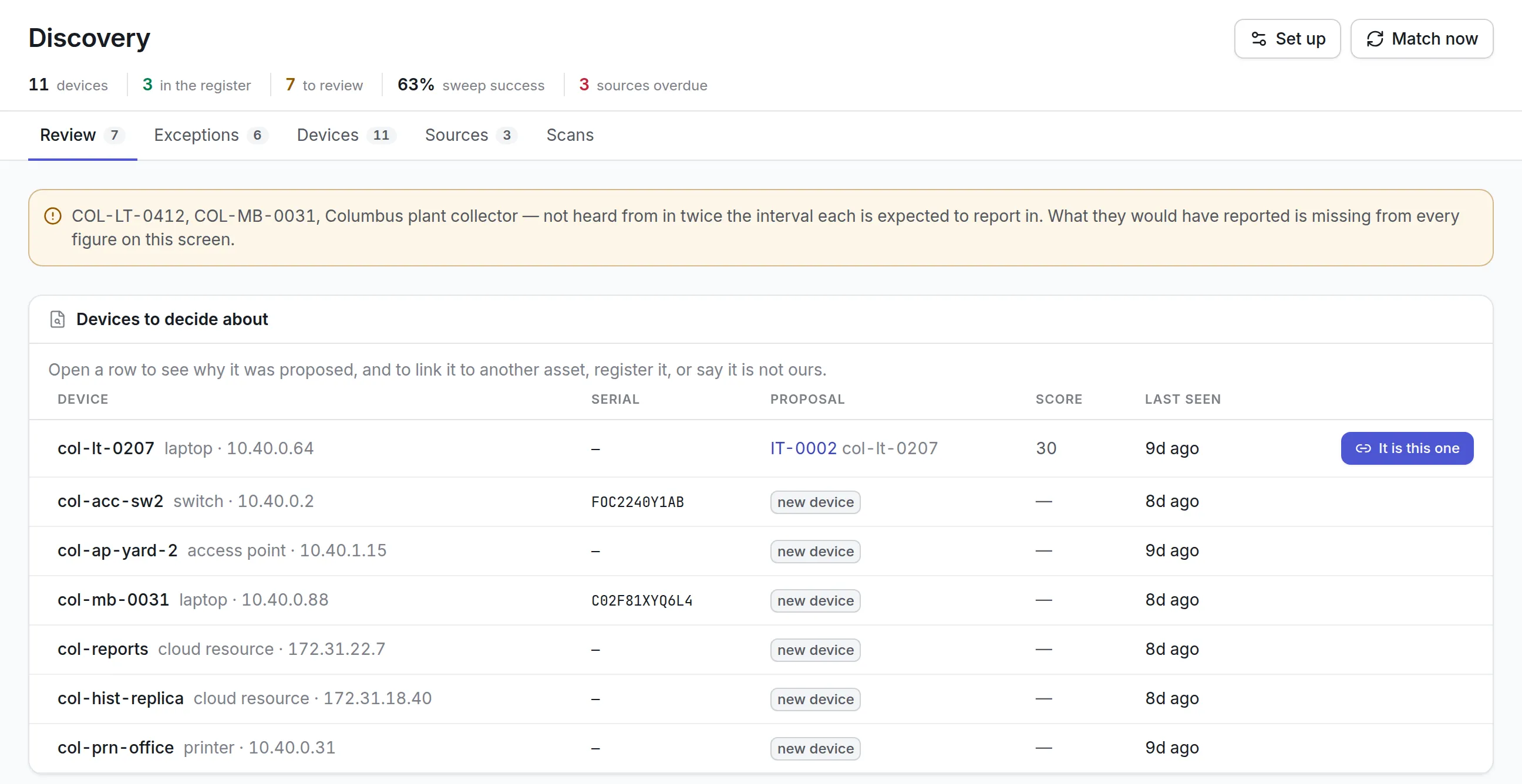
Discovery you review
Agents on Windows, macOS, Linux and Android, network sweeps over WMI, WinRM, SSH and SNMP, and connectors for AWS, Azure, Google Cloud and Intune report what they find. You decide what joins the register.
Software against licenses
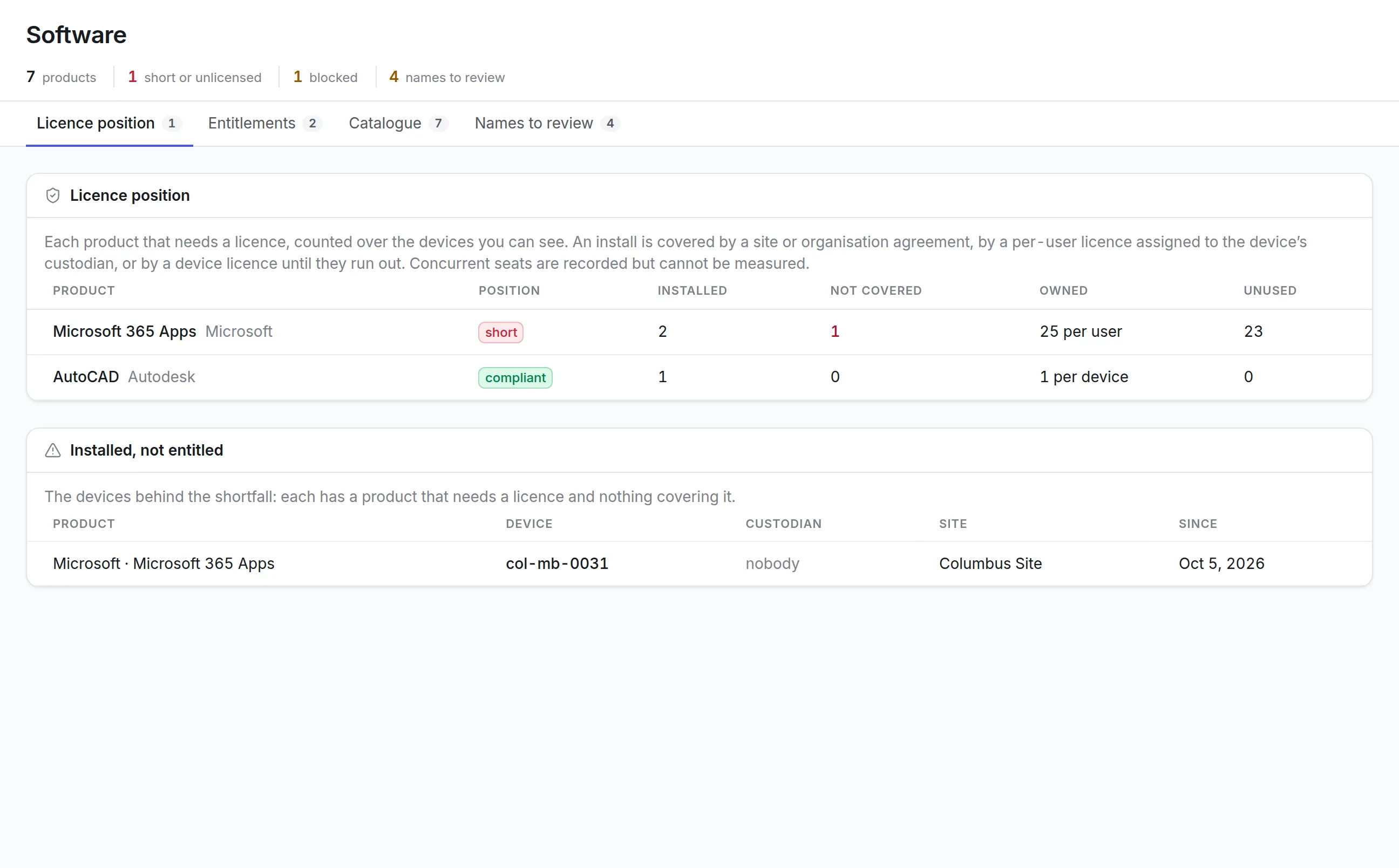
Installs are counted against site, per-user and per-device licenses, and every device behind a shortfall is listed with its custodian and site.
Products you block
Mark a product as not allowed, with a reason, and a rule can raise a work request when it turns up on a device.
The network, drawn
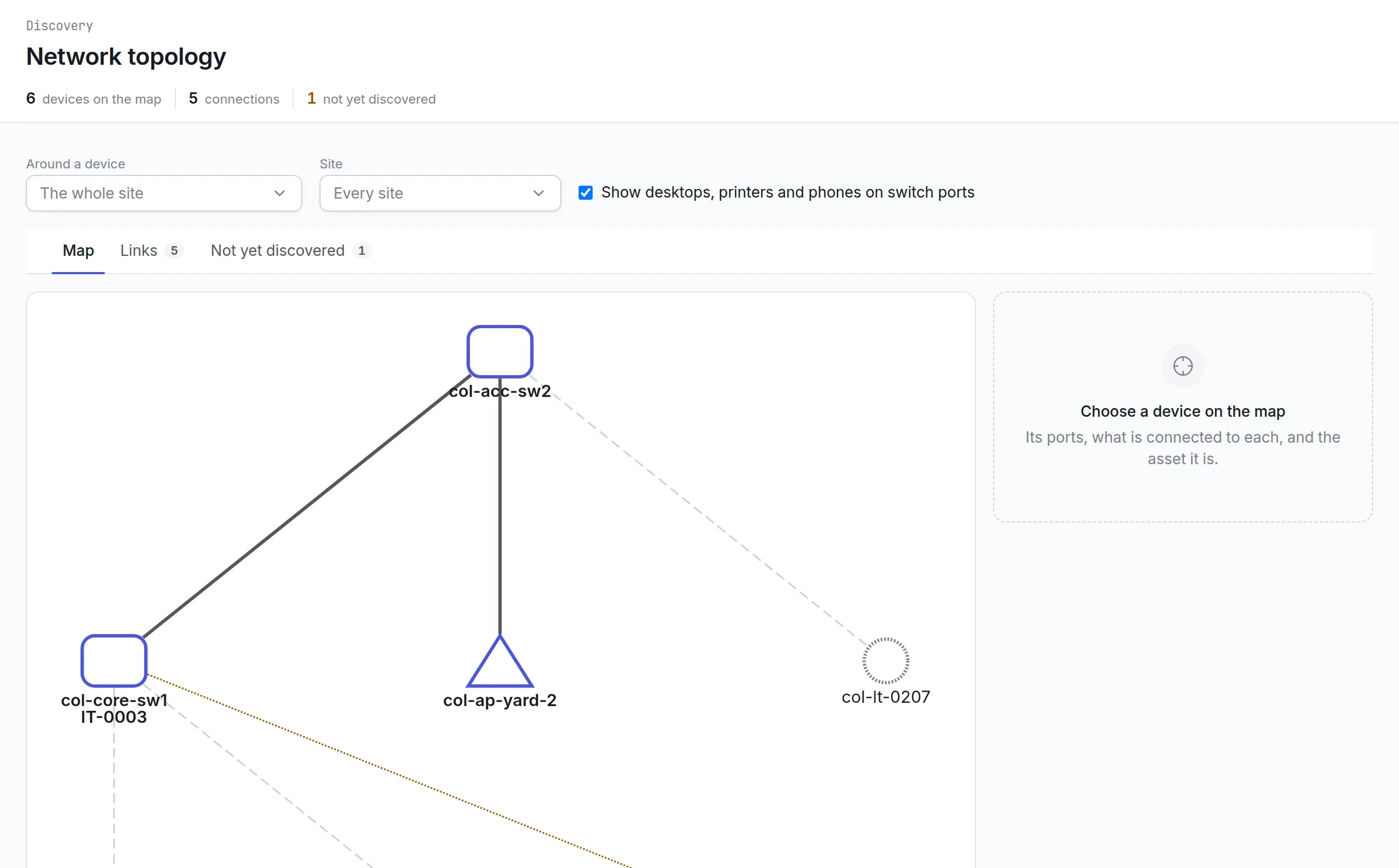
Switches announce their neighbors, and the topology map shows each device, its ports and the asset it is.
One register for everything
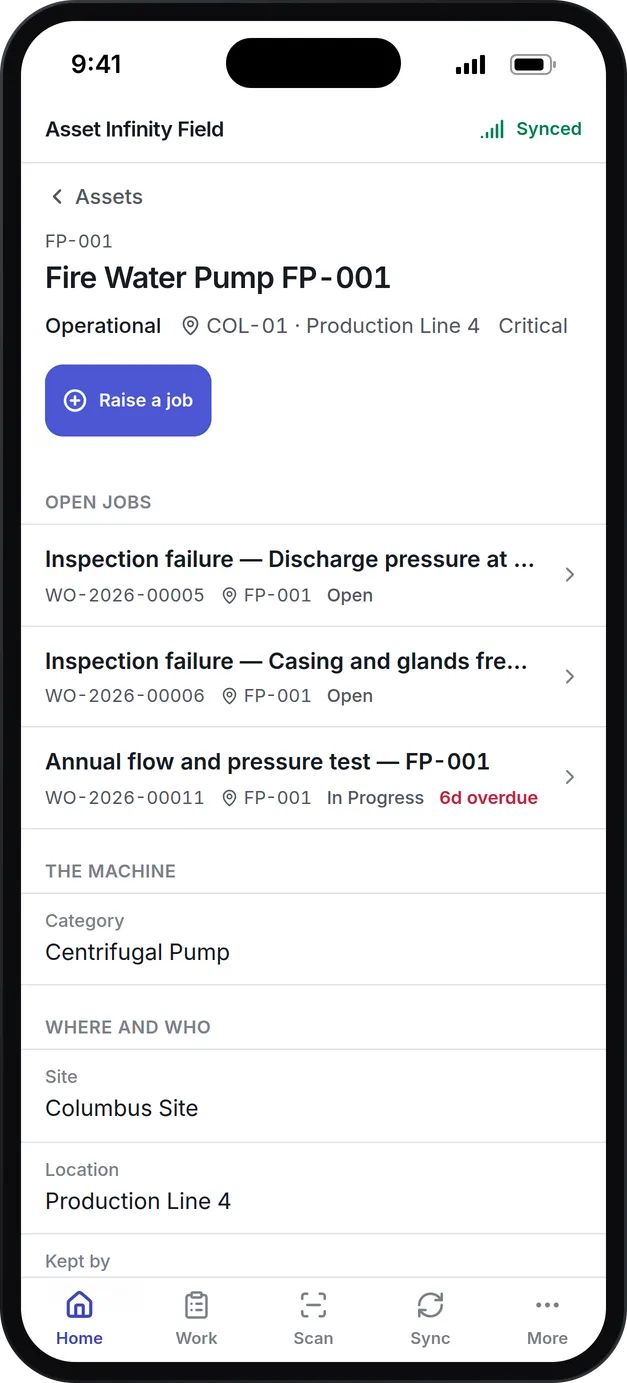
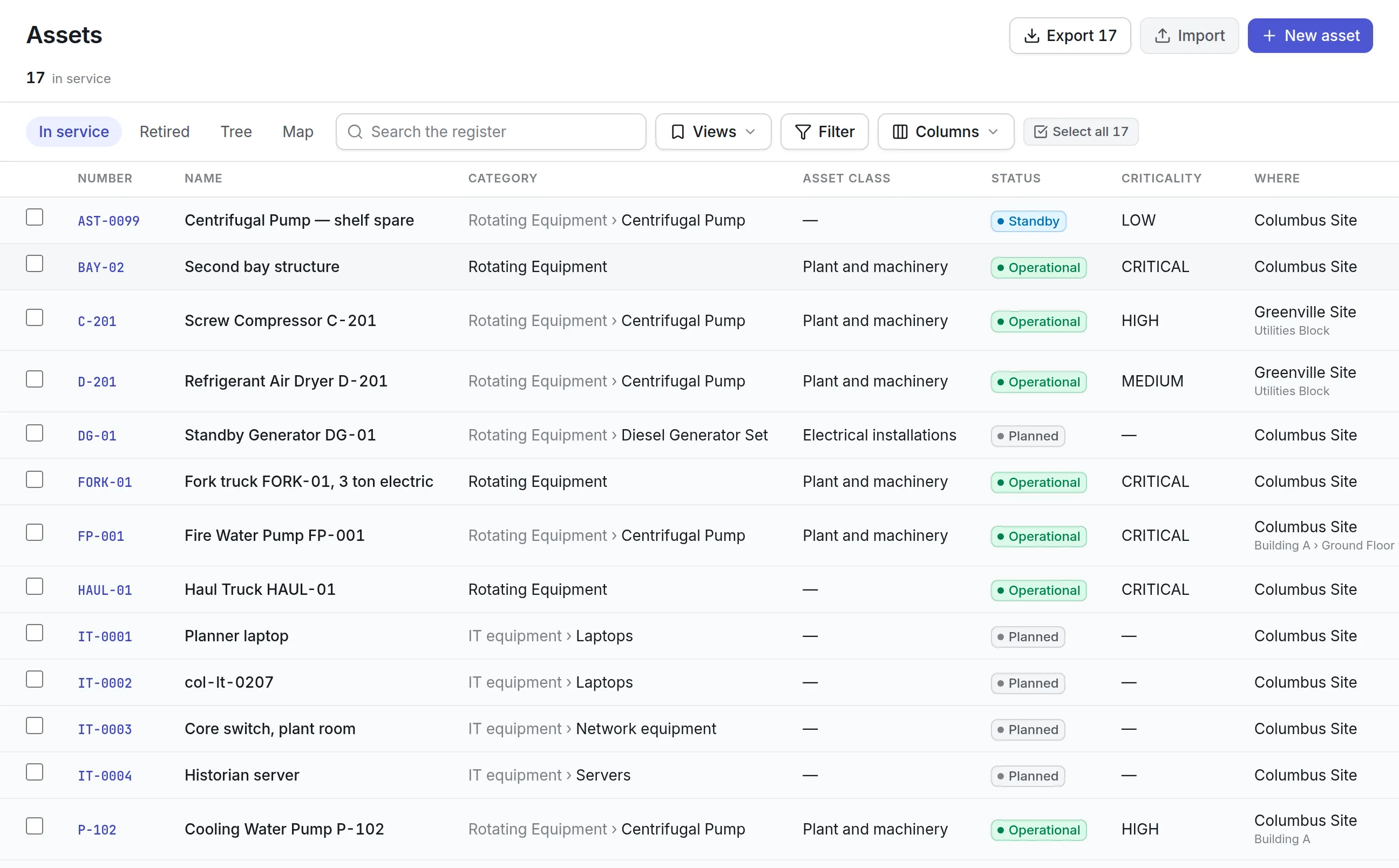
A laptop is an asset like a pump, with the same labels, history, costs, depreciation and disposal.
Devices held by people
Record who holds each device, hand equipment over from bookings, and let holders confirm what they have from an emailed link, with no login needed.
What is IT asset management software?
IT asset management software is a record of an organization’s computers, servers, network equipment, phones, cloud machines and software, kept current by discovery rather than by hand. It says who holds each device, where it is, what it cost, and whether the software installed on it is covered by a license the organization actually bought.
Teams usually buy ITAM software ahead of a software audit, after a security review that asked for a complete device list, or when laptops keep leaving with people who leave.
Why a spreadsheet and a help desk list fall short
Most IT teams start with a spreadsheet of serial numbers and a list of assets in the help desk tool. Both depend on someone typing every change, and both drift:
More detail
Discovery closes most of those gaps, and a review step keeps it from filling the register with guesses.
How IT asset management software works in Asset Infinity
Asset Infinity treats every finding as evidence about an asset, never as the asset itself. The register stays the record of what you own, and discovery proposes changes to it.
- Authorize what may be scanned.A scan authorization names the address ranges, the protocols and the authority it was granted on, such as a change ticket. Exclusions keep collectors away from equipment that does not tolerate polling. No network is swept until an authorization is granted.
- Let sources report.Agents on Windows, macOS, Linux and Android describe their own machine and its installed software. A collector inside your network sweeps authorized ranges over ICMP, SNMP, SSH, WMI or WinRM. Connectors read AWS, Azure, Google Cloud, Intune or an export from a network management system.
- Match against the register.A minute after a scan arrives, each device is scored against existing assets on serial number, MAC address, host name, hardware UUID and more. A certain match links on its own; anything less goes to Review with the evidence for and against.
- Decide what is yours.In Review, you accept the proposal, link the device to another asset with a reason, register it as a new asset with a suggested category and site, or dismiss it as not ours. The person last signed in is suggested as custodian.
- Work the exceptions.An hourly sweep raises what needs an answer: unknown, duplicate, stale, unmanaged, unauthorized and orphaned devices, and blocked software. Each goes to the person answerable for the asset, or to the IT asset team.
- Run the device’s life on the same record.Once registered, a laptop gets a label, a custodian, a place in the next verification count, repairs through work orders, depreciation and a recorded disposal.
The IT asset discovery page covers sources and matching in more detail.
Software license management that names the devices
Agents and device-management connectors report installed software. Each reported name is matched to a product and publisher in the catalogue, so two spellings of the same suite count as one product.
More detail
You declare each entitlement as the certificate states it, and attach the certificate as evidence. Licenses can be counted five ways:
More detail
Each product shows as compliant, short, unlicensed or assigned to more people than it allows, and the devices behind a shortfall are listed with their custodian and site. Blocking a product raises an exception on every device that has it. Read more about software license management.
The network, drawn from what it reports
The topology map is built from what network equipment announces about its neighbors over LLDP or CDP, and from the addresses each switch has learned on its ports. Nothing on it is drawn by hand.
More detail
Click a device to see its ports, what is plugged into each and which asset it is. A neighbor that announced itself but has not been discovered is outlined in amber, which is often the first sign of a switch or access point nobody registered.
Hardware, software and IT asset management compared
Buyers meet three overlapping terms. Hardware asset management tracks the physical devices; software asset management tracks installs and licenses; IT asset management covers both, plus custody and the device’s life from purchase to disposal.
| Question | Hardware asset management | Software asset management | IT asset management software |
|---|---|---|---|
| What it tracks | Laptops, servers, switches, phones | Installed products and entitlements | Both, on the same device record |
| Main question it answers | Where is it and who has it? | Are we covered? | What do we own, who holds it, and is it licensed? |
| Where the data comes from | Labels, counts, purchase records | Agents and device management | Discovery, counts, certificates and purchase records |
| What it misses alone | Software and license exposure | Devices with no agent | Little, when both feed one register |
See it on your own assets, or price it in two minutes.
What to look for when choosing IT asset management software
Most ITAM tools can find devices. The differences are in what happens next: whether findings are checked before they change your records, and whether the device list connects to licenses, custody and the rest of the organization’s assets.
| Capability | Why it matters | In Asset Infinity |
|---|---|---|
| Agent, agentless and cloud discovery | No single method sees every device | Agents for four platforms, credentialed and uncredentialed sweeps, and cloud and Intune connectors |
| Reviewed matching | Automatic matching on weak evidence creates duplicates | Scored matches with the evidence shown; only certain matches link without a person |
| Scan governance | Security teams need to know what is scanned and on whose authority | Granted authorizations, exclusions, and credentials that never leave your side |
| License position by device | A total of installs does not tell you what to fix | Every uncovered install listed with device, custodian and site |
| Exceptions routed to an owner | A dashboard of problems nobody owns is ignored | Hourly exceptions sent to the person answerable for the asset |
| Custody and verification | Devices walk out with people | Custodians on every device, and counts they can confirm from an email |
| One register with other assets | IT and facilities buy, tag and dispose of equipment the same way | Laptops and switches sit beside plant and furniture, with the same labels and counts |
| Full lifecycle | Disposal needs the same record as purchase | Repairs, depreciation and disposal on the device’s own asset record |
IT asset management examples by team
Corporate IT
An IT team with a few hundred laptops installs the agent on each one and links them to the register. Custodians are suggested from who signs in, licenses are declared from the certificates, and quarterly custody checks go out as self-verification emails that holders answer without an account. Disposal is recorded on the same record.
Plants and operational technology
Factories run historian servers, plant room switches and engineering laptops next to production equipment. Sweeps cover the office network, exclusions keep collectors away from controllers that should not be polled, and IT devices share labels and counts with the machines around them. The topology map shows which plant room switch each engineering laptop is plugged into.
Schools and campuses
Schools lend laptops and projectors to staff and students every term, and each device needs a named holder until it comes back. Devices are handed over from bookings and returned against them, and annual counts cover classrooms room by room. Staff confirm the devices they hold from an emailed link. See education and equipment checkout.
Cloud and hybrid estates
Teams with servers in AWS, Azure or Google Cloud add a connector per account. Cloud machines are matched to the register like any other device, and one that stops reporting is flagged as stale rather than quietly vanishing. Each connector reports on its own schedule, and one that stops reporting is named as overdue, so a gap never looks like a clean scan.
What IT asset management software costs here
Asset Infinity publishes its prices. Every IT device is an asset on the register, which starts at $130 a month for up to 500 assets, with unlimited users, and includes labels and verification counts. Bookings, for handing out and taking back equipment, is a flat monthly add-on. Build a quote for your device count, and our team confirms discovery and license tracking for your estate when it confirms the quote.
Getting started
A typical first month for an IT team looks like this:
Common questions
What is IT asset management software?
IT asset management (ITAM) software keeps a record of an organization's computers, network equipment, phones and software, who holds them, what they cost and whether the software on them is licensed.
How does Asset Infinity find devices?
A small agent on each Windows, macOS, Linux or Android device describes it, a collector inside your network sweeps the address ranges you authorize, and connectors read AWS, Azure, Google Cloud and Intune. Every finding waits for review before it becomes an asset unless the match is certain.
Does network discovery scan everything it can reach?
No. A sweep only covers the ranges and protocols a granted scan authorization allows, excluded addresses are never touched, and anything found outside an authorization is not kept. Scanning credentials stay on your side; the product only stores where the collector finds them.
What is the difference between ITAM and hardware asset management?
Hardware asset management covers the physical devices. IT asset management also covers the software installed on them and the licenses that pay for it. Asset Infinity does both on the same device record.
How does software license management work?
You declare each license as the certificate states it, per device, per named user, concurrent, site or organization. Installs that agents report are counted against those licenses, and every device without cover is listed by name.
Can IT and facilities share one system?
Yes. IT equipment sits in the same register as plant, vehicles and furniture, so one count, one set of labels and one disposal process cover all of it.
See it with your own assets
A demo run on an example from your industry. Or start the trial and look around on your own.