





Asset tracking software that knows what you own and where it is now
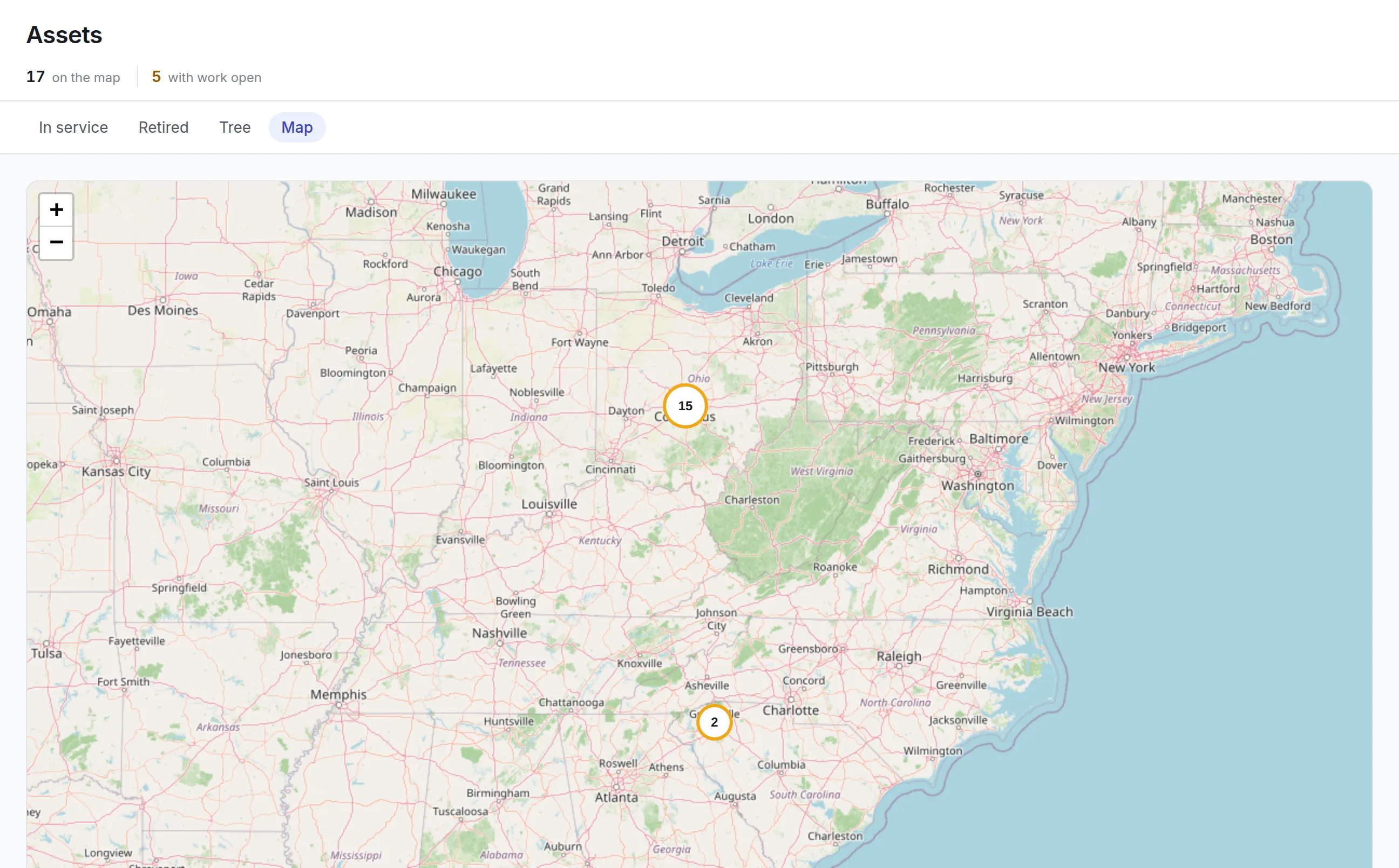
Our asset tracking software keeps every asset, tool and laptop in one register with its site, location and custodian. Labels, RFID readers, GPS trackers and network discovery keep it true without anyone retyping it.
What our asset tracking software keeps track of
One asset register
Every asset carries its category, status, criticality, site, location and parent. The same record serves maintenance, finance and IT.
Labels that scan
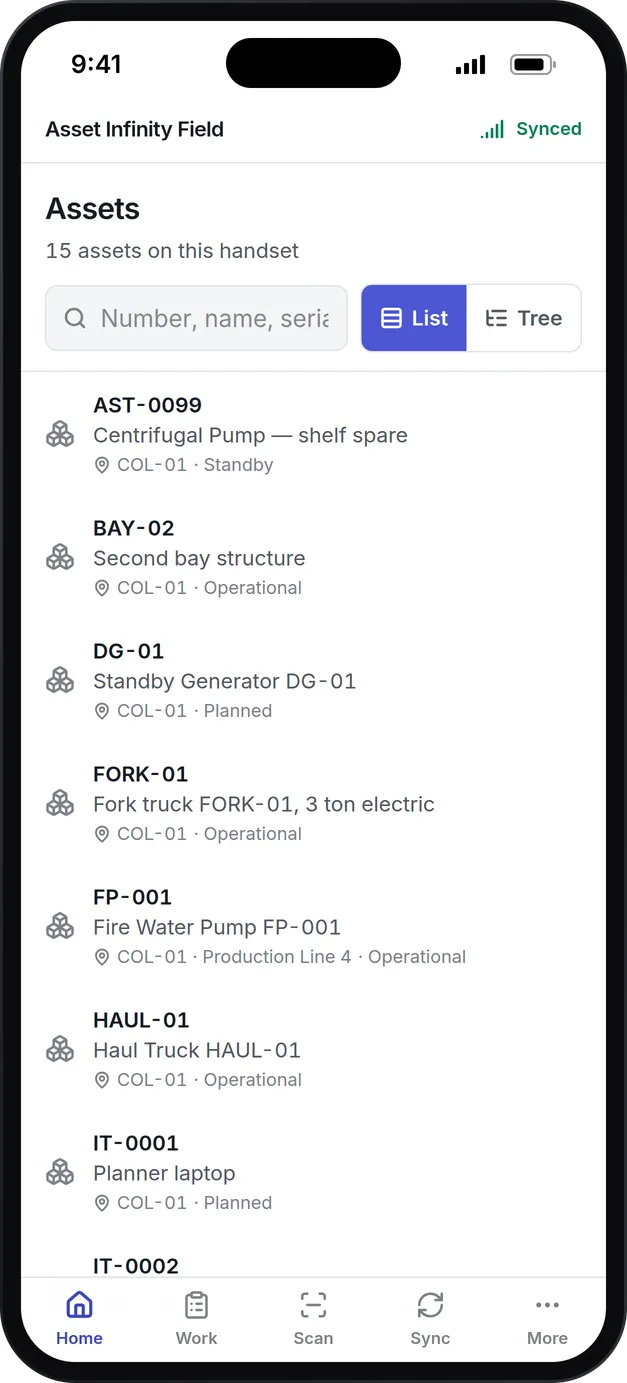
Design QR, barcode and RFID labels and print them from the register. A scan in the mobile app opens the asset it belongs to.
RFID and BLE readers
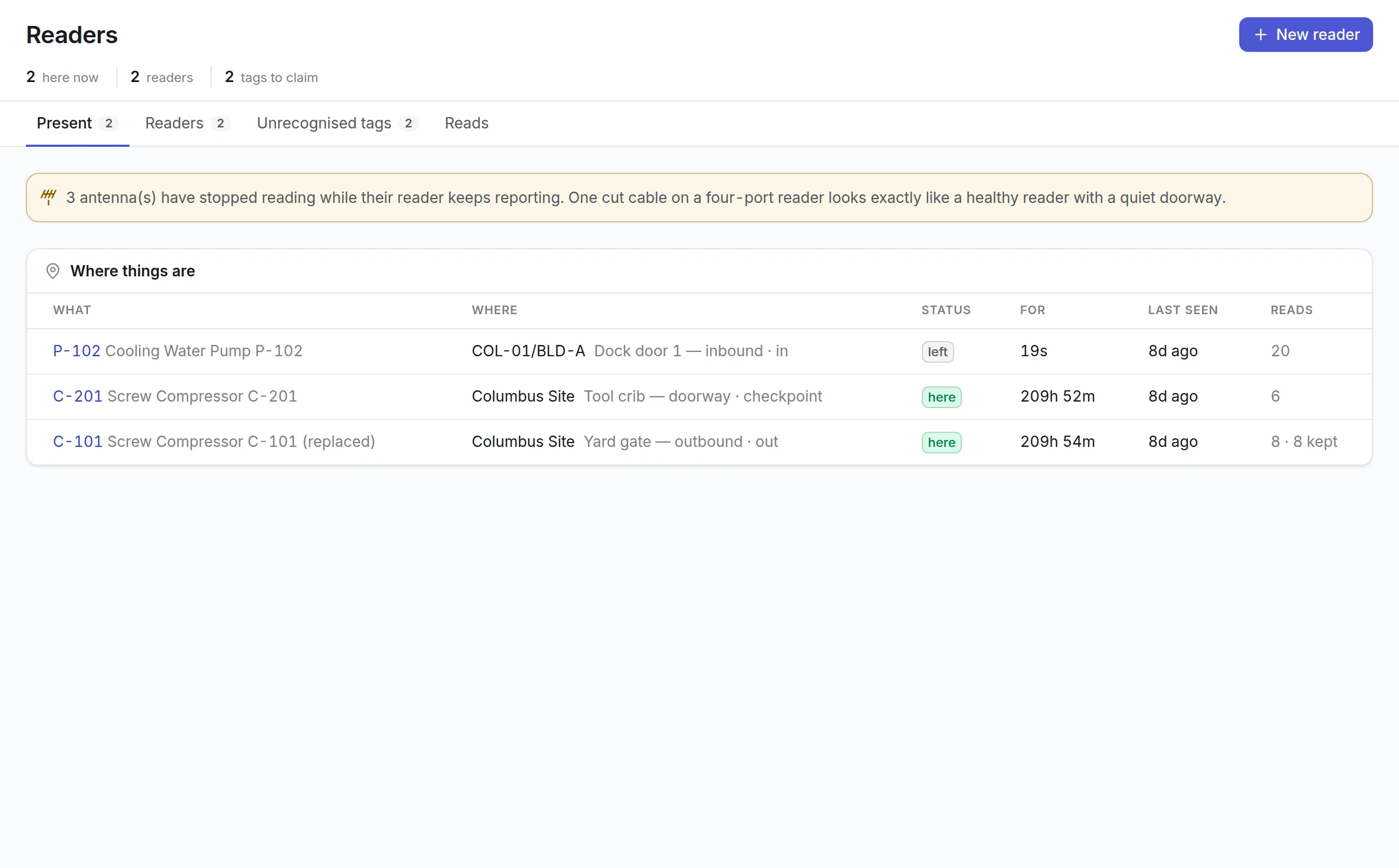
Fixed RFID readers and BLE gateways report when a tagged asset passes a doorway or sits on a floor plan.
GPS for what moves outdoors
Trackers on vehicles and plant report position, trips and odometer readings, and raise an alert when an asset leaves its area.
IT asset discovery
Network sweeps, device agents, cloud accounts and Intune report devices, and each one is matched to the register or put up for review.
Inventory counts
Counting rounds compare what people scan with what the register expects, and list everything missing, damaged or found in the wrong place.
What is asset tracking software?
Asset tracking software records what an organization owns, where each item is and who is responsible for it, and keeps that record current with labels, scanners, RFID readers, GPS trackers or network discovery. It replaces a spreadsheet that someone updates by memory with a register that the physical world updates as assets move.
Teams buy it after a count that could not find something expensive, or an audit that asked for a list nobody trusted.
Why the asset list goes out of date
Most asset lists go out of date the week after someone builds them, because every change depends on a person remembering to type it in. The symptoms are familiar:
More detail
Asset Infinity keeps one register and lets labels, readers, trackers and scans update it, so the record changes when the asset moves rather than when someone remembers.
How asset tracking software works in Asset Infinity
Each method below feeds the same asset record, the one that also holds the asset’s maintenance history, costs and contracts. Most teams start with steps one to three and add the rest only for the assets that need them.
- Build the register.Import assets from a spreadsheet or add them one at a time. Each carries its category, status, criticality, site, location, parent assembly and custodian, and an asset in service cannot be saved without someone answerable for it.
- Print labels from it.The label studio designs QR, barcode (Code 128, Code 39 or EAN-13) and RFID labels from the record’s own fields, and prints them singly or for a whole selection. Every printed QR code carries a short link, so any phone camera opens the asset. See asset tags.
- Scan in the field.The iOS and Android app scans labels with the camera and works offline. On Android, a handheld RFID reader from Zebra, TSL or Chainway can be paired to read tags, write an asset’s code onto a new tag, and walk toward a tag with a rising beep.
- Let fixed readers see movement.RFID readers at dock doors, tool cribs and yard gates record each visit of a tagged asset. An automation rule can move the asset to the reader’s location or notify someone when it leaves. See RFID asset tracking.
- Follow vehicles and plant outdoors.A GPS tracker fitted to an asset moves its pin on the map, keeps its trips, raises an alert when it leaves an area and feeds its odometer and engine-hour meters. See GPS asset tracking.
- Find assets indoors.BLE tags heard by ceiling gateways place an asset on a site’s floor plan, room by room, and its path can be replayed. In the app, a technician can walk toward a tag to find it.
- Discover IT devices.Agents, network sweeps and cloud connectors report computers and network equipment, and each is matched to the register or put up for review. See IT asset discovery.
Choosing the right tracking method for each asset
No single technology suits every asset. A label costs almost nothing and needs a person to scan it; a GPS tracker reports by itself but needs power. Match the method to what the asset is worth and how often it moves.

| Method | What it tells you | Best for | Needs |
|---|---|---|---|
| QR code or barcode label | Which record this is, when someone scans it | Almost everything: furniture, equipment, IT, spares | A printer and a phone |
| Handheld RFID | Many tags read at once, without line of sight | Fast counts of large, dense stock | An Android handset and a paired reader |
| Fixed RFID reader | That a tagged asset passed a doorway or gate | Assets that move between areas of a site | Readers and antennas at chokepoints |
| BLE tag | Where an asset is on a floor plan, indoors | Mobile equipment in large buildings | Tags and ceiling gateways |
| GPS tracker | Where an asset is outdoors, its trips and mileage | Vehicles, trailers, generators, plant | A tracker with power or battery |
| Network discovery | Which computers and devices are really on your networks | Laptops, servers, switches, cloud machines | An agent, a collector or a connector |
See it on your own assets, or price it in two minutes.
Proving the register with verification counts
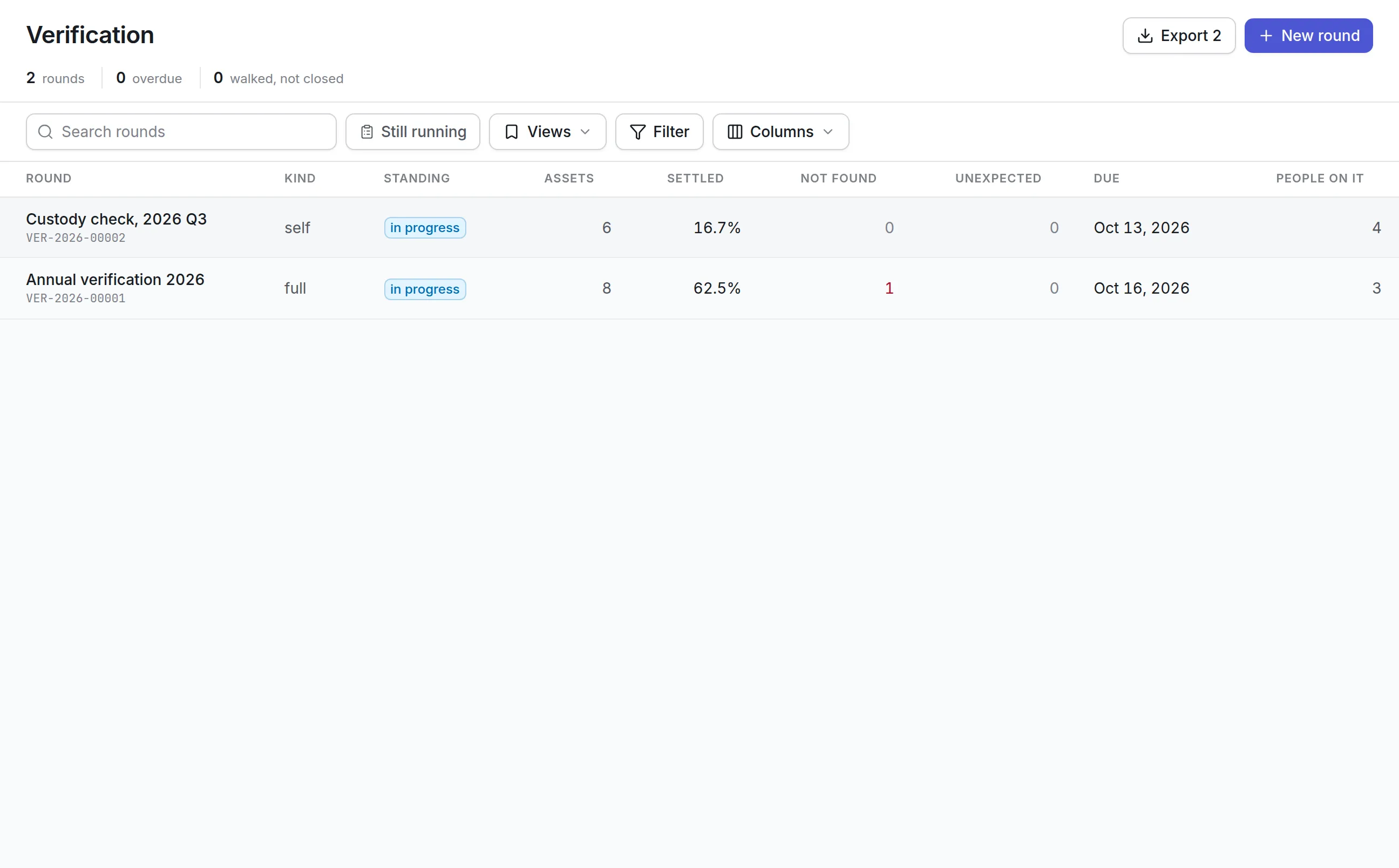
Tracking tells you where things should be. A verification count proves it. Asset Infinity’s asset inventory software runs counts as rounds: the list of assets is fixed when the round is published, so “not found” means missing from a list everyone agreed on.
More detail
A round can take four forms:
More detail
Auditors walk their share of the list on the mobile app, scanning each asset and recording it as found, moved, damaged or missing. Closing the round settles what was not reached, and the report lists every exception with who recorded it.
What to look for when choosing asset tracking software
Most asset tracking software can store a list and print a barcode. The gaps appear when assets move without anyone scanning them, when the count starts, and when maintenance or finance need the same record.
| Capability | Why it matters | In Asset Infinity |
|---|---|---|
| One register for all asset types | Separate lists for IT, plant and furniture never reconcile | Equipment, vehicles, IT and furniture in one register; tools in their own register with check-out and calibration |
| Label design and printing | Generic labels miss the fields your team looks for | A label studio for QR, barcode and RFID labels, using any field on the record |
| Offline mobile scanning | Warehouses, basements and yards have poor signal | iOS and Android app that scans and records offline |
| Automatic location updates | Manual updates stop the week after go-live | RFID readers, BLE tags and GPS trackers update the record without a scan |
| Verification counts | A register is only trusted after it has been proved | Full, sample, targeted and self-verification rounds with a fixed list and an exceptions report |
| Custody | Someone has to answer for each asset | Custodians recorded on each asset and confirmed by email link |
| Access by site | Sites should see their own assets only | Access granted by site and asset, following the hierarchy |
| Link to maintenance and finance | A tracked asset still needs servicing and depreciating | The same record carries work orders, costs, contracts and depreciation |
Asset tracking examples by team
Hospitals
Hospitals lose time looking for mobile medical equipment. BLE tags on the items that move most put them on each floor plan, so staff can see which room a device is in and replay where it went. Everything else carries a QR label, and annual counts are run as verification rounds. See healthcare.
Construction and field equipment
Generators, trailers and plant spend their lives on customers’ sites. GPS trackers show where each one is, which trips it took and when it left its area, and the odometer and engine hours they report drive the asset’s maintenance plans. Positions are kept only as long as you choose, because where a vehicle went is often personal data about its driver.
IT departments
IT teams track laptops, monitors and network gear that change hands constantly. Discovery finds devices nobody registered, custodians confirm what they hold by email, and the same QR labels and counts cover IT and facilities equipment alike. When a laptop fails, it is repaired through the same work order process as any other asset.
Tool cribs
Shared tools go missing between jobs. The tool register shows whether each tool can be issued, who has it and when its calibration is due, and an instrument past its calibration date is flagged before it is handed out. Tools carry their own QR labels, so a scan at the crib window opens the right record. See tool tracking software.
What asset tracking software costs here
Asset Infinity publishes its prices. The asset register starts at $130 a month for up to 500 assets, with unlimited users, and includes label printing and verification counts. Hardware-backed tracking is priced per device:
- Fixed RFID readers are $670 per reader per year, with the reader included.
- Indoor location is $1 per BLE tag per month.
- GPS tracking is priced with your tracker model in the formal quote.
- The tool register is a $75 monthly add-on.
Build a quote to see the total for your asset count.
Getting started
Most teams do not buy hardware on day one. A typical first month looks like this:
Everything in Track
Common questions
What is asset tracking software?
Asset tracking software records what an organization owns, where each item is and who is responsible for it. It uses labels, scanners, RFID, GPS or network discovery to keep those records current.
Can we track equipment, tools and IT in one system?
Yes. Equipment, IT devices and vehicles live in one asset register, and tools have a register of their own with check-out and calibration. Each type keeps its own fields and screens.
Do we need RFID or GPS hardware to start?
No. Most teams start with printed QR or barcode labels and the mobile app. RFID readers, BLE tags and GPS trackers can be added later for the assets that move.
How do we know the register is still correct?
Run inventory counts. A counting round lists every asset expected in scope, people scan what they find, and the report shows what is missing, damaged or somewhere else.
Can I use QR codes for asset tracking?
Yes. The label studio prints QR codes that carry a short link to the asset, so any phone camera opens its record after sign-in. The mobile app also scans them offline.
Who can see which assets?
Access is granted by site and by asset, and it follows the hierarchy. A person given a site sees the assets under it and nothing else.
See it with your own assets
A demo run on an example from your industry. Or start the trial and look around on your own.