







NFC asset tracking uses small near-field communication tags fixed to equipment, read by tapping a phone against them. The tap opens the asset’s record, so the person standing at a fire extinguisher, a laptop or a projector sees what it is, who has it and what is due on it. Most smartphones in use today can read NFC, which means a team can start without buying scanners.
NFC is one of several ways to identify an asset, and it is a good fit for some jobs and a poor fit for others. This guide explains how NFC works, which NFC tags to buy, how NFC compares with RFID, QR codes and Bluetooth Low Energy (BLE), where it helps most by team, and how to roll it out.
What is NFC asset tracking?
NFC asset tracking is a method of identifying physical assets with near-field communication tags. Each tag carries a unique ID that the asset management system links to one asset. A person taps the tag with an NFC-enabled phone or reader from a few centimeters away, and the system records the asset, the person, the time and any update made.
Teams choose NFC when they want a tag that works through dirt, paint and plastic covers, cannot be photocopied the way a printed code can, and proves someone was physically at the asset. It is a check-in technology. It tells you about an asset when someone taps it, and says nothing about where the asset is between taps.
How NFC works
NFC stands for near-field communication. It is a short-range form of high-frequency RFID that runs at 13.56 MHz, and it works by magnetic induction between two antennas held close together. The practical reading distance is about 4 cm (1.5 inches), which is why NFC feels like a tap.
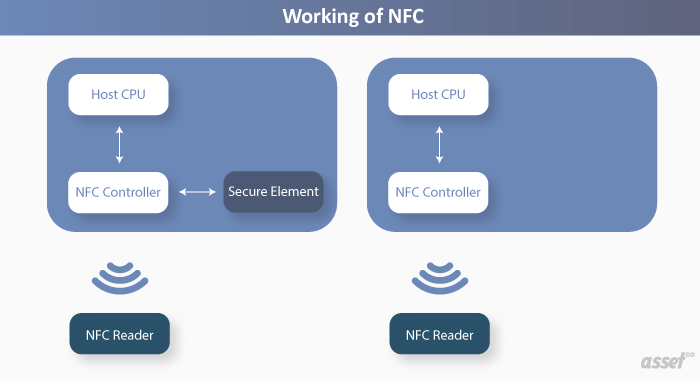
An NFC exchange always has two sides:
- The tag is passive. It has a tiny chip and an antenna, usually inside a sticker, a key fob or a hard plastic disc, and it has no battery. It powers up from the reader’s field for the moment it is read.
- The reader is active. A smartphone, a tablet or a USB desktop reader creates the field, reads the tag’s ID and data, and can write new data to it.
NFC devices work in three modes. Reader/writer mode is the one asset tracking uses: the phone reads or writes a tag. Card emulation mode lets a phone act as a contactless card, which is how tap-to-pay and many building access badges work. Peer-to-peer mode lets two phones exchange small amounts of data.
Because the tag needs no power and has no moving parts, a good NFC tag can last for the life of the asset. Data rates are low (106 to 424 kbit/s), which does not matter for asset tracking, because the tag only needs to carry an ID or a short link.
Choosing NFC tags for asset management
Not every NFC tag suits a piece of equipment. The surface, the environment and what you want the tag to hold all change the choice.
| What to look for | Why it matters | What to choose |
|---|---|---|
| Mounting surface | A standard tag on metal is detuned by the metal and often will not read | On-metal tags with a ferrite layer for machines, racks, cabinets and vehicles |
| Durability | Stickers peel in kitchens, workshops and outdoors | Epoxy or hard plastic tags, or tags with an industrial adhesive or screw holes |
| Chip and memory | You need room for the data you write | An ID alone needs nothing extra; a short web link fits in the smallest common chips |
| Write lock | Anyone with an NFC phone can rewrite a tag that has not been locked | Lock the tag after writing, or use a password-protected chip |
| A printed fallback | Not every phone or person will use NFC | Print the asset number and a QR code on the tag’s face |
| Size | Small items need small tags, but small antennas read at shorter range | Use the largest tag the asset allows |
The simplest setup stores nothing on the tag except its own factory ID. The asset management system holds the record, so the tag never goes out of date and can never leak data if someone reads it.
NFC vs RFID vs QR code vs BLE
NFC competes with three other technologies for the same job. The right answer depends on whether a person will walk up to each asset, or whether you need assets found without anyone touching them.
| Technology | Read range | Power in the tag | Read by | Best for |
|---|---|---|---|---|
| NFC | About 4 cm, one tag per tap | None | Most smartphones, desktop readers | Inspections, proof of presence, items people handle |
| QR code or barcode | Line of sight, usually under a meter with a phone | None | Any phone camera or scanner | Low-cost labels on almost everything |
| Passive UHF RFID | Several meters, hundreds of tags at once | None | Handheld or fixed RFID readers | Fast counts, doorways, dock doors and yards |
| BLE tag | Tens of meters | Battery | Gateways and phones | Finding mobile equipment indoors on a floor plan |
NFC vs RFID. NFC is a type of RFID, but the two behave very differently in practice. UHF RFID can count a room of tagged assets in seconds without line of sight, and fixed readers can record an asset passing a door. NFC reads one tag at a time by touch. Our article on RFID vs NFC for asset tracking goes deeper.
NFC vs QR code. A QR code costs almost nothing to print and every phone camera reads it. NFC tags cost more but still read when the label is dirty, painted over or behind a cover, and they cannot be copied with a photocopier. Many teams put a QR code on the face of the NFC tag and get both.
NFC vs BLE. A BLE tag broadcasts on its own and can be found from across a building, but it needs a battery and gateways. NFC needs neither and only answers when tapped. See BLE tags for asset tracking for the indoor-location side.
Pros and cons of NFC asset tracking
Advantages
- No dedicated hardware. Staff use the phones they already carry, on most current Android phones and iPhones.
- Proof of presence. A tap can only happen at the asset, which makes NFC a good record that an inspection or a security patrol really took place.
- Durable and maintenance-free. No battery to change, and the tag still reads when its face is scratched or dirty.
- Hard to copy. A printed code can be photographed and scanned from a desk. An NFC tag has to be touched.
- Quick to use. One tap opens the right record, with no aiming or focusing.
Disadvantages
- Very short range. One tag per tap makes NFC slow for a full stock count of hundreds of items.
- No location between taps. NFC cannot tell you where an asset is now, only where it was when last tapped.
- Metal needs special tags. Standard tags fail on metal surfaces, and on-metal tags cost more.
- Cost per tag. NFC tags cost more than a printed barcode or QR label.
- Open tags can be rewritten. Lock tags after encoding, or store only the ID.
How to set up NFC asset tracking
- Decide which assets get NFC. Use it where a person routinely visits the asset: extinguishers, safety equipment, shared laptops, AV kit, patrol points and equipment inspected on a schedule. Leave bulk counts to RFID and cheap items to QR labels.
- Build the asset register first. Every tag needs a record to point to, with a unique asset number, location and custodian.
- Pick tags for each surface. On-metal tags for machines and vehicles, durable stickers for IT and furniture, hard tags for outdoor or wash-down areas.
- Encode and link each tag. Read each tag’s ID with a phone and save it on the asset record, or write a short link to the record onto the tag. Lock the tag when you are done.
- Fix the tag where a phone can reach it. Choose a flat, visible spot that a hand can reach without moving the asset, and mark it with an NFC symbol so people know where to tap.
- Train for the tap. Show staff where the NFC antenna is on their phone, since it differs by model, and what to record after a tap.
- Audit and replace. Include tag condition in your physical counts, and re-link replacement tags to the same asset record.
NFC asset tracking by team
Government agencies
Public bodies must account for equipment bought with public money, often across many buildings. NFC tags on vehicles, radios, laptops and field equipment let staff confirm custody and condition with a tap, and the tap record gives auditors a trail of who checked what and when. Our case study on government asset management shows the wider register these checks feed.
Office asset management
Offices tag laptops, monitors, docking stations, printers and meeting room equipment. An NFC tag inside a laptop lid or under a monitor stand survives daily handling. Employees tap a shared device to check it out and tap it again to return it, and facilities can tap a printer to see its service history before calling the vendor.
Sports teams and venues
Clubs and stadiums manage kit, training equipment, AV gear and concession equipment that moves between storage, locker rooms and the field. Small NFC tags fit on helmets, balls and cases, and a tap at the equipment room records who took an item and when it came back. Venue staff can tap kiosks and point-of-sale equipment during pre-event checks.
Facilities and safety inspections
Fire extinguishers, eyewash stations, first aid kits and emergency lights all need regular checks. An NFC tag on each one turns the inspection into a tap and a short checklist, and the record shows the inspector was there. Security patrols use the same idea at checkpoints.
How Asset Infinity handles NFC and other asset tags
Asset Infinity keeps one record per asset in its asset register, and each record can carry several identifiers: QR code, barcode, NFC, RFID, BLE, plate and external IDs. Recording an NFC tag’s ID on the asset ties that tag to one record, beside whatever else is on the label.
- Labels from the register. The label designer prints QR codes and barcodes as ZPL to a thermal printer or as a PDF, and can encode RFID tags as they print. See asset tags.
- Scanning in the field. The iOS and Android mobile app reads QR codes and barcodes with the camera, works offline, and opens the asset with options to raise a job, move it or change its status.
- Counts that prove the register. Verification rounds (full, sample, targeted or self) record each asset as verified, moved, not found, damaged or skipped, with its condition. See asset inventory software.
- Other technologies where they fit. Fixed RFID readers record assets passing doorways, and BLE tags place mobile equipment on a floor plan. The asset tracking software page compares them.
- A full history. Every change to an asset is kept in its audit trail, including moves and status changes.
Frequently Asked Questions
Can my phone read NFC asset tags?
Most current Android phones and iPhones have NFC readers built in. On Android, NFC may need to be switched on in settings, and the antenna is usually in the middle or top of the back of the phone.
What is the range of an NFC tag?
In practice about 4 cm (1.5 inches). That short range is deliberate, so a reader only picks up the tag it is touching.
Is NFC better than RFID for asset tracking?
It depends on the job. NFC suits checks where a person visits each asset, while UHF RFID suits fast counts and automatic reads at doorways because it reads many tags at once from meters away.
Do NFC tags work on metal?
Standard NFC tags usually do not read on metal. Use on-metal tags, which have a ferrite layer between the antenna and the surface.
Are NFC tags secure?
The tag itself holds only an ID or a short link, so reading it reveals little. Lock tags after writing so nobody can change them, and keep the asset’s details in the asset management system, where access is controlled.