






Multi-location asset tracking is how a business with ten, twenty or fifty sites keeps one accurate record of what it owns, where each asset is and who is responsible for it. Equipment moves between plants, laptops follow people between offices, tools rotate across projects and vehicles cross regions every day. Each move is a chance for the record to drift.
Spreadsheets kept by each site and audits done once a year cannot keep up with that. This guide covers why tracking assets across multiple locations is hard, how to structure the register, how transfers and counts should work, the features to look for in software, and how Asset Infinity handles it.
What Is Multi-Location Asset Tracking?
Multi-location asset tracking is the practice of recording every asset an organization owns in one register, organized by site and location, so that its whereabouts, custodian, condition and history are visible from any site. Transfers between sites are recorded as they happen, each site counts its own assets, and head office sees the combined picture.
The point is one source of truth. When each branch keeps its own list, the same asset appears twice, transfers disappear between two spreadsheets, and nobody can answer basic questions:
- Where is this asset right now?
- Who is using it, and who answers for it?
- Is it under warranty or due for maintenance?
- Do we already own one at another site before we buy another?
Why Tracking Assets Across Multiple Locations Is Hard
Assets Move
Equipment is transferred between warehouses, offices, factories and job sites. If the sender and receiver both have to update their own list, one of them usually does not.
Records Fragment
Each location builds its own naming, categories and spreadsheets. When head office tries to combine them, nothing lines up.
Accountability Blurs
Without a recorded custodian and a recorded transfer, a missing asset belongs to nobody. Loss and theft go unnoticed until the year-end count.
Audits Slow Down
Auditors want to see where an asset was and when it moved. A count across many sites with paper lists takes weeks, and reconciling the results takes longer.
Methods That Work for Two Sites Break at Ten
A shared spreadsheet that one office manager keeps tidy does not survive ten sites, three time zones and fifty editors.
Traditional vs Centralized Asset Tracking
| Aspect | Site spreadsheets | Centralized multi-location asset tracking |
|---|---|---|
| Data updates | Typed in when someone remembers | Recorded by scan, transfer or reader |
| Visibility | Each site sees its own list | Every site in one register, filtered by access |
| Transfers | Removed from one list, maybe added to another | One recorded move from site to site |
| Accountability | Unclear | Custodian on every asset |
| Audit readiness | Weeks of reconciliation | History and counts ready by site |
| Growth | Breaks as sites are added | New site is a new branch in the same structure |
How to Set Up Multi-Location Asset Tracking
- Agree on one structure. Define sites, then locations inside each site (building, floor, room, yard). Decide whether regions or business units sit above sites for reporting.
- Standardize categories and numbering. Use one category list and one numbering series across the company, so an asset number never repeats and never encodes a location that will change.
- Import what each site has. Bring each site’s spreadsheet into the shared register, mapping its columns to the same fields, and fix duplicates before going live.
- Tag every asset. Put a barcode, QR or RFID label on each asset, printed from the register so the label and the record always match.
- Name a custodian and an owner. The owning department answers for an asset and carries its cost center. The custodian is whoever has it now.
- Record every move. Make a transfer between sites a recorded step, including bulk moves when a whole office relocates.
- Give each site access to its own assets. Site managers see and edit their sites; head office sees everything.
- Count by site on a schedule. Each site verifies its own assets, and the results roll up for finance.
Tracking Technologies for Distributed Sites
Different assets need different methods. Most distributed enterprises use more than one:
- Barcodes and QR codes for offices, IT equipment and furniture, read with any phone.
- RFID for warehouses, tool cribs and dock doors, where readers record movement without anyone scanning.
- BLE for finding mobile equipment inside large buildings such as hospitals.
- GPS for vehicles and plant that move between sites and job locations.
Our guide to asset tracking methods compares them in detail.
Key Features to Look For in Multi-Location Asset Tracking Software
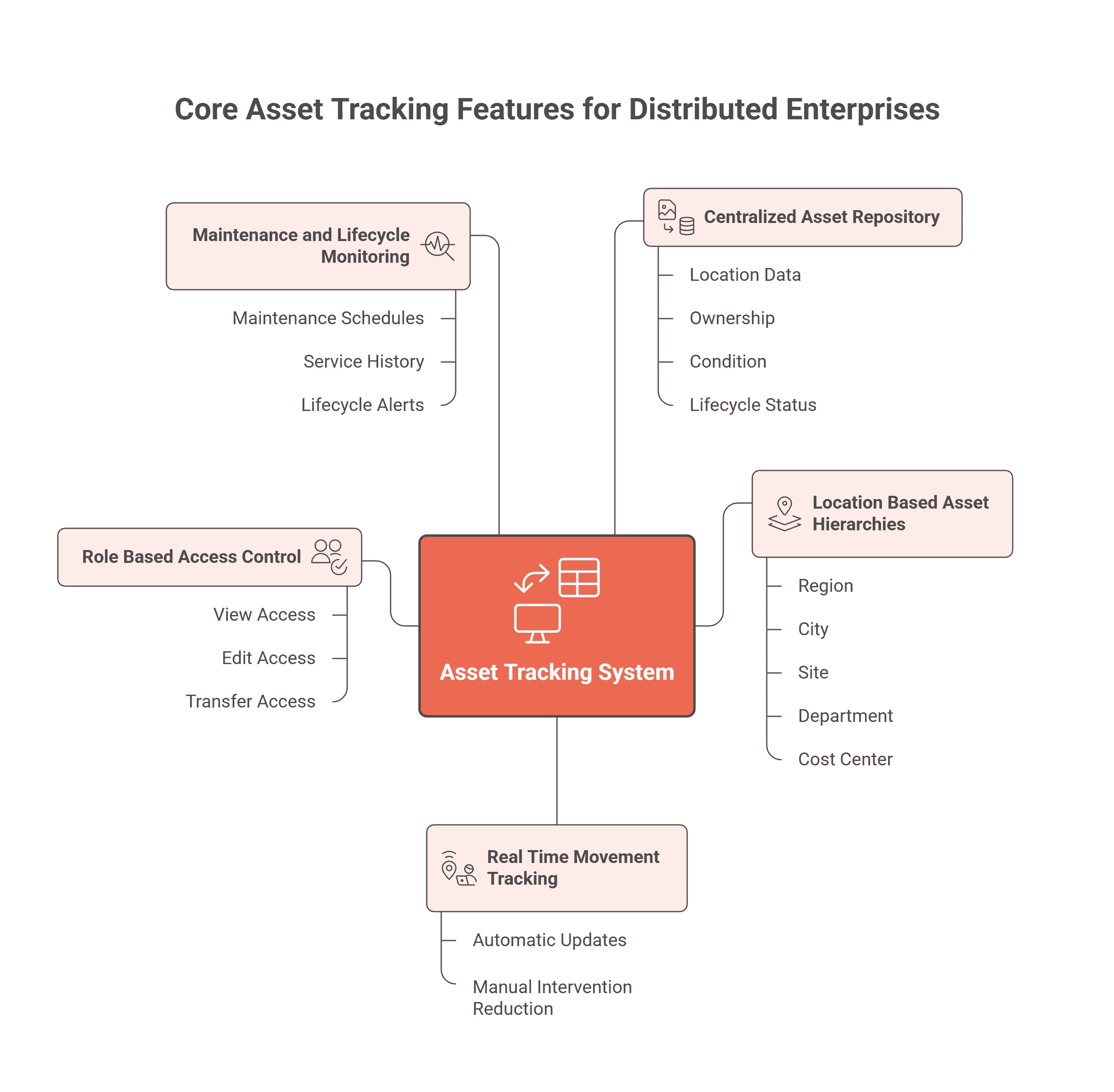
| Feature | Why it matters across many sites |
|---|---|
| One central register | One record per asset, with no duplicates between sites |
| Site and location hierarchy | Reports and counts by region, site, building and room |
| Recorded transfers, including bulk | A move leaves a history of when and why |
| Site-level access control | Each manager sees their own sites; head office sees all |
| Custodian on every asset | Someone answers for each item, even contractors without a login |
| Mobile scanning that works offline | Remote sites and basements often have no signal |
| Counts by site | Each site verifies its own assets on its own schedule |
| Maintenance on the same record | Service history and plans follow the asset when it moves |
| Several tracking technologies | Barcodes, RFID, BLE and GPS writing to one record |
| Integration with ERP and finance | Purchases and depreciation stay in step with the register |
Multi-Location Asset Management by Industry
Banks and Financial Services
Branches hold ATMs, IT equipment, furniture and security systems. Head office needs every branch’s assets in one register for audit and for depreciation.
Retail and Restaurant Chains
Every outlet has the same kinds of equipment, such as refrigeration, ovens and point-of-sale hardware. Comparing them across outlets shows which sites spend most on repairs.
Manufacturing
Plants share machines, tools and spare parts. A spare motor sitting idle at one plant can save a purchase at another, if someone can see it.
Healthcare
Hospitals and clinics move devices between buildings. Tracking them by site and room helps staff find equipment quickly.
IT and Corporate Offices
Laptops, monitors and network equipment follow people between offices and homes. A custodian on each device and a recorded handover keep them accounted for.
How Asset Infinity Tracks Assets Across Locations
Asset Infinity keeps one asset register for every site, organized the way your business is:
- Sites, locations and parents. Each asset sits under a site and location, can have components of its own, and records its owning department, cost center and custodian, including a named person without an account.
- Site access. Roles decide what a person can do, and site and asset grants decide how far they reach, across screens, reports, the API and the mobile app.
- Moves and transfers. Moving, retiring and disposing of an asset are recorded steps, including bulk transfers, and each record keeps an audit trail.
- Import. Each site’s spreadsheet comes in through the Import screen, with saved column mappings and a check of every row before anything is written.
- Tags and scanning. QR, barcode and RFID labels print from the register, and the mobile app scans them offline.
- Counts by site. Verification rounds can be scoped by site and assigned to people at each location, and the report breaks results down by site. See asset inventory software.
- Readers and trackers. RFID readers, BLE gateways and GPS trackers update the same records for assets that move.
For examples, read how an IT integrator tracks assets across many locations and how a bank manages assets across its branches. The asset tracking software page shows the full picture.
FAQs: Multi-Location Asset Tracking
What is the best way to track assets across multiple locations?
Use one central register organized by site and location, tag every asset, record every transfer, and have each site count its own assets on a schedule.
How do I stop the same asset being recorded at two sites?
Keep one numbering series for the whole company, import every site’s list into one register, and merge duplicates before going live. After that, a move changes the asset’s site instead of creating a new record.
Can each site manager see only their own assets?
In software with site-level access, yes. Managers see and edit their sites, while finance and head office see every site.
Is RFID suitable for multi-location enterprises?
Yes, for high-volume sites such as warehouses and plants. Smaller offices often use barcodes or QR codes, and both can write to the same register.
How does multi-location asset tracking help audits?
Every asset has a location history, a custodian and a record of each transfer, and counts are reported by site, so auditors can follow any asset without chasing spreadsheets.