






A barcode asset tracking system puts a unique barcode label on every asset and links it to a record in software, so one scan tells you what the item is, where it belongs, who has it and what work is open on it. Tools, machines, laptops, medical devices and furniture can all be tracked this way, with a phone or a handheld scanner.
Barcodes are the oldest and cheapest way to make asset tracking easy, and they are still the right starting point for most teams. This guide covers how a barcode tracking system works, how to choose and place asset tracking barcode labels, how barcodes compare with QR codes and RFID, tips for implementation, how manufacturers use it, and the features to look for in the software.
What is barcode asset tracking?
Barcode asset tracking is the practice of identifying and managing physical assets with machine-readable labels. Each asset gets a unique ID printed as a 1D barcode (such as Code 128 or Code 39) or a 2D symbol (such as a QR code or Data Matrix). Scanning it opens that asset’s record in the tracking software for review or update.
The scan replaces typing, which is where most errors in a spreadsheet register start. Because the ID never changes, every scan adds to the same history: who used the asset, where it went, when it was serviced and what changed. Labels are cheap and easy to print, and staff learn to scan in minutes, so adoption is quick.
How a barcode asset tracking system works
Every barcode tracking system follows the same loop: tag, scan, sync.
- Tag. Create the asset in the software, which gives it a unique number. Print a label with that number as a barcode, plus the number in plain text underneath, and fix it to the asset.
- Scan. Staff scan the label whenever something happens: the asset is received, checked out, moved, serviced or counted. A phone camera or a handheld scanner reads it.
- Sync. The software records the event with the time, the person and the location, and updates the asset’s record. Reports, due dates and alerts work from that record.
The loop works for one building or many sites. With a mobile app that works offline, it also works in basements and plant rooms where the signal drops.
Why barcodes beat manual tracking
Spreadsheets drift into conflicting versions, and paper checklists are out of date by the next shift. With barcodes, every hand-off (issuing a laptop, returning a drill, moving a monitor) produces a time-stamped record. The advantages that follow are practical:
- Fewer errors. Scanning removes mistyped asset and serial numbers.
- Speed. Scanning a label is much quicker than finding and typing a serial number, so counts move faster.
- Low cost. Printed labels cost far less than RFID tags, and any smartphone can scan them.
- Little training. Point the camera at the label. That is the whole lesson.
- Better decisions. Accurate data shows which assets sit idle, which are overbooked and which break down most.
- Easier audits. Each asset’s movement and service history is there to show an auditor.
Choosing asset tracking barcode labels
The label is where many programs fail. A barcode that peels off or wears away is worse than none, because the record still says the asset is tracked.
| Environment | Label to choose | Why |
|---|---|---|
| Offices, laptops and furniture | Laminated polyester | Resists cleaning products and daily handling |
| High-value or theft-prone items | Tamper-evident (destructible or void) labels | Shows when someone has tried to remove the label |
| Outdoor equipment and vehicles | Anodized aluminum or metal plates | Survives sun, rain and temperature changes |
| Plant floors and heavy machinery | Metalized polyester or metal plates | Stands up to oil, abrasion and heat |
| Small IT hardware | Small labels with a high-contrast print | Fits narrow surfaces and still scans |
| Assets that are cleaned often | Laminated or chemical-resistant labels | Detergents and solvents fade unprotected print |
A few placement rules keep scanning quick:
- Put the label in the same place on each kind of asset, on a flat surface away from hands and moving parts.
- Print the asset number in plain text under the barcode, so staff can type it if a scan fails.
- Keep the barcode short. Store details in the software, not in the code, so the label never needs reprinting when data changes.
- Avoid curved grips and surfaces that flex.
To try a label before ordering stock, the free barcode generator and QR code generator create codes you can print and test with your own scanner.
Barcode vs QR code vs RFID for asset tracking
All three identify an asset. They differ in how they are read and what they cost.
| Factor | 1D barcode | QR code | RFID |
|---|---|---|---|
| How it is read | Scanner or phone camera, in line of sight | Phone camera from any angle | Radio reader, no line of sight needed |
| Data it holds | A short ID | Much more data, such as an ID plus a web link | An ID, plus memory on some tags |
| Damage tolerance | Low; a scratch across the bars can stop a read | High; error correction rebuilds up to 30% of the code at the highest level | Not affected by surface dirt |
| Reads at once | One at a time | One at a time | Many tags in one sweep |
| Tag cost | Lowest | Lowest | Higher, and readers cost more |
| Best for | Sites with existing scanners, tool cribs | Equipment people walk up to with a phone | Counting rooms or racks quickly, seeing assets pass a door |
A QR code is a 2D barcode, so most barcode asset tracking systems read both. For most organizations, barcodes or QR codes give the best balance of cost and accuracy. RFID asset tracking earns its higher cost where many items must be counted fast or watched at a doorway. One label can carry a barcode, a QR code and an RFID chip together.
Tips for implementing a barcode tracking system
- Decide what each label is for. Theft-prone items need tamper-evident labels, and assets that move a lot need labels that survive handling.
- Keep your other systems. Choose barcode tracking software that imports your existing asset list and connects to your finance or maintenance systems instead of replacing them.
- Put the right information on the label. The asset number is essential. A logo, a short name and a “property of” line help. Location and cost belong in the software.
- Make every label easy to scan. Test a sample on each type of asset before printing hundreds.
- Count with it straight away. Run a verification round on one site once the labels are on, to prove every tag scans to the right record.
Barcode asset tracking in manufacturing
Manufacturers were early users of barcode asset tracking because plants hold so many movable items: machines, tools, molds, fixtures and spare parts.
- Machines. A plate on each machine opens its record, so a technician scans it to raise a job or see its maintenance history.
- Tools and gauges. Tools are checked out against a person or a job, which cuts the time spent searching and the repeat purchase of tools that are only misplaced.
- Spare parts. Bin labels let technicians scan the part they fit, which keeps stock counts right.
- Audits and compliance. Scanned records show when equipment was inspected and serviced.
See asset management for manufacturing for how a plant sets this up.
Features to look for in barcode asset tracking software
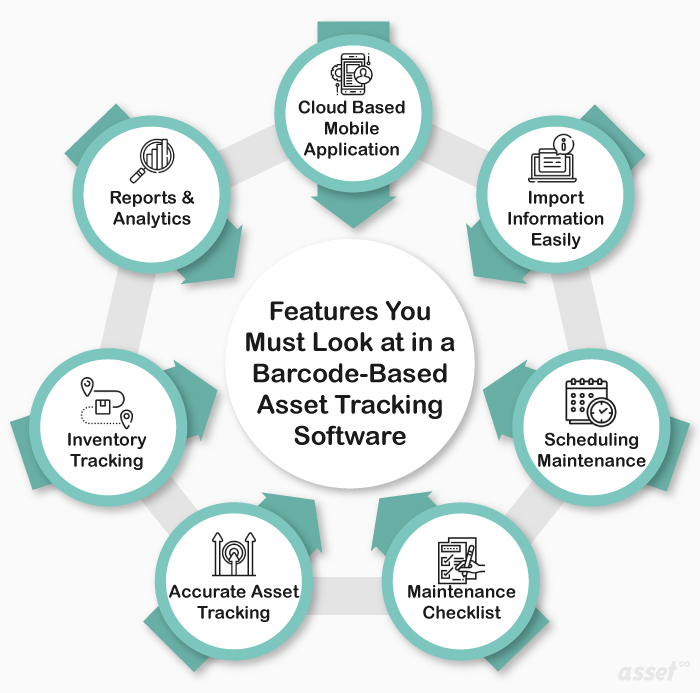
The labels are only half of the system. The software decides whether easy asset tracking stays easy after the first month.
| Feature | Why it matters |
|---|---|
| Mobile app with a camera scanner | Staff scan with phones they already carry, including offline |
| Label design and bulk printing | Labels come from the record, so numbers never get retyped |
| Import from Excel or CSV | The first load from spreadsheets is quick and checked |
| Maintenance scheduling and checklists | Scanning an asset opens its due work and the steps to follow |
| Check-out and check-in | Shared tools and devices always have a named holder |
| Verification rounds | Counts compare what was scanned with what should be there |
| Parts inventory | Scanning bins keeps spare part stock accurate |
| Reports and analytics | Shows idle assets, frequent breakdowns and missing items |
| Access control and audit trail | Each change is recorded with who made it |
How Asset Infinity runs barcode asset tracking
Asset Infinity’s asset tags are part of the asset register, so the labels and the records live in one place.
- Design the label. The label designer places text, barcodes, QR codes and logos on a real-size canvas, filled in from a real asset. Presets include a 50 x 25 mm asset tag.
- Print one or hundreds. Print a tag from any asset’s page, or select many in the register and print them in bulk, as ZPL to a thermal printer or as a PDF for sheet labels. Each print run is logged.
- Scan in the field. The mobile app reads QR codes and barcodes with the phone camera, works offline, and opens the asset with options to raise a job, move it or change its status. Wedge scanners work in any browser.
- Count. Verification rounds are walked by scanning each tag and recording it as verified, moved, damaged or not found. See asset inventory software.
- Add RFID later. The same design can encode an RFID tag as it prints, carrying the same number as the barcode.
Label design and printing come with the asset register, which starts at $130 a month for up to 500 assets with unlimited users. If you would rather not tag a site yourself, tagging and the first count can be done for you at $1 per asset. Build a quote for your sites.
Frequently Asked Questions
How does a barcode tracking system work?
Each asset carries a label with a unique barcode linked to its record in the software. Scanning the label opens or updates that record, so location, holder and condition stay current.
What is the difference between a barcode and a QR code?
A barcode stores a short ID in parallel bars read in one direction. A QR code is a 2D barcode that holds more data, can be read from any angle, and still reads when part of it is damaged.
What are the disadvantages of barcodes for asset tracking?
Barcodes need line of sight and are scanned one at a time, and a damaged label may not scan. RFID solves both at a higher cost per tag.
Can I move from spreadsheets to barcode asset tracking?
Yes. Import your existing asset list into the software, print labels in bulk from the records, and run a first count to confirm every label scans to the right asset.