






Choosing the best enterprise asset management software is becoming essential for organizations that manage large-scale operations, multiple facilities and many asset categories. Enterprises rely on these systems to monitor physical assets, infrastructure and operational equipment across departments and locations. The best enterprise asset management software lets a business improve visibility, reduce downtime, use its assets better and keep structured asset records.
This guide lists ten enterprise asset management (EAM) software vendors, says what each is broadly known for, and gives you the criteria, the comparison questions and the review-reading habits that separate a good shortlist from a long one. Treat the list as a starting point for demos, not a verdict: the best EAM software for a water utility is rarely the best one for a hospital.
What Is Enterprise Asset Management Software?
Enterprise asset management software is a single system of record for the physical assets an organization owns. It covers each asset’s whole life: planning and buying it, tracking where it is, maintaining it, stocking its spare parts and accounting for its value until it is disposed of. Operations, maintenance, stores and finance all work from the same asset record.
That last point is what separates EAM from its neighbors. A CMMS plans and records maintenance. A fixed asset register holds cost and depreciation. An asset tracking tool knows where things are. EAM software joins them, so the person deciding whether to repair or replace a machine sees both costs on one page. The EAM vs CMMS comparison goes into the difference in detail.
Why Enterprise Asset Management Software Demand Is Surging in 2026
Organizations look for enterprise asset management software when the number of assets, sites and teams outgrows the spreadsheets and single-purpose tools that served them before. The symptoms are familiar:
- The same pump exists in the maintenance system, a stores spreadsheet and the fixed asset register, and the three copies disagree.
- Purchasing buys a new machine while a spare sits idle at another site.
- Repairs are paid for that a vendor’s warranty should have covered.
- Disposed equipment keeps depreciating because nobody told finance it left.
- An auditor asks for a list of assets nobody can produce with confidence.
Growth adds a second pressure. A business that opens new sites or acquires another needs one way of numbering, tagging, maintaining and counting assets everywhere, and that is hard to impose with separate tools at each location.
Key Selection Criteria for Choosing the Right Enterprise Asset Management Software
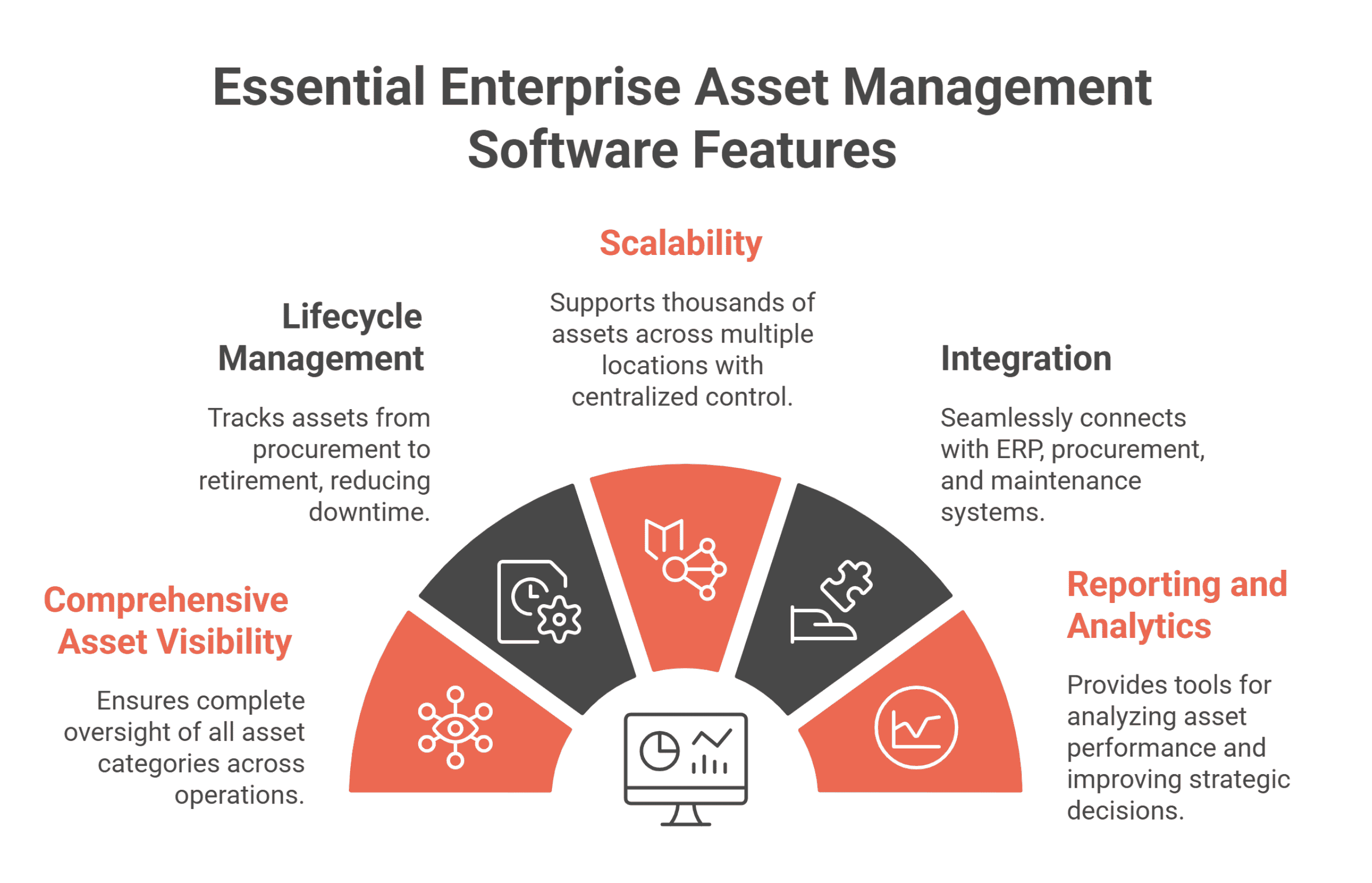
Before you compare vendors, agree on what the system has to do. These five criteria cover most enterprise requirements.
1. Comprehensive Asset Visibility Across Operations
The software should hold every asset class you own in one register: plant, vehicles, IT equipment, furniture and buildings. Each asset needs a location, a custodian and a status, and a way to prove the record is true, such as labels and periodic counts.
2. Lifecycle Management and Maintenance Tracking
Look for a record that follows the asset from purchase to disposal. Work orders, preventive maintenance plans, failures, contracts and costs should sit on the asset itself, so its history explains its condition.
3. Scalability for Multi-Location Enterprises
The system has to handle thousands of assets across many sites without slowing down, and it must let each site see its own assets while head office sees everything. An asset hierarchy (site, building, line, machine, component) is what makes cost and downtime roll up correctly.
4. Integration with Enterprise Systems
EAM data feeds the ERP, the general ledger and reporting tools. Ask how data gets in and out: imports, a documented API, webhooks for record events and journal exports.
5. Reporting, Analytics, and Decision Support
Standard reports should answer the questions your auditors and managers already ask. Reliability measures such as availability, mean time between failures and mean time to repair turn maintenance history into repair-or-replace decisions.
Leading Enterprise Asset Management Software Platforms Ranked for 2026
These are ten enterprise asset management software vendors buyers often shortlist. Descriptions say what each product is broadly known for. Check current features, deployment options and pricing with each vendor directly, because products change.
1. Asset Infinity
Asset Infinity is enterprise asset management software built around one asset record that operations, maintenance, stores and finance all use. The register holds plant, vehicles, IT and furniture, with QR, barcode, RFID and BLE tags, and verification counts that prove what is still there. On the same record sit work orders and preventive maintenance, spare parts and purchasing, contracts and warranties, and depreciation in several books.
Teams usually start with the asset register and add maintenance, inventory and purchasing, and finance as they need them. Technicians and auditors work from an iOS and Android app that works offline, and the product runs in Asset Infinity’s cloud or on your own servers.
2. IBM Maximo
IBM Maximo is one of the longest-established EAM products. It is broadly known for depth in maintenance and asset management for asset-intensive organizations such as utilities, energy and transportation, and for being chosen by large enterprises with complex requirements.
3. SAP EAM
SAP’s enterprise asset management capabilities sit within SAP’s ERP suite. They are most often chosen by organizations that already run SAP and want maintenance and asset data inside the same system as finance and procurement.
4. Oracle EAM
Oracle’s enterprise asset management offering is part of its ERP applications. It is typically considered by organizations already running Oracle for finance and supply chain.
5. Infor EAM
Infor EAM is an established enterprise asset management product used in asset-intensive industries. Buyers usually evaluate it alongside the other large EAM suites.
6. Asset Panda
Asset Panda is an asset tracking platform broadly known for configurable records and workflows and for mobile barcode scanning. It is often considered by teams whose first need is knowing what they own and where it is.
7. UpKeep
UpKeep is a CMMS broadly known for its mobile-first approach to maintenance work orders. It is often considered by maintenance teams that want technicians working from phones.
8. Fiix
Fiix is a cloud-based CMMS used by maintenance teams for work orders, preventive maintenance and maintenance reporting.
9. eMaint CMMS
eMaint is a CMMS used for maintenance management, scheduling and reporting.
10. ServiceNow Asset Management
ServiceNow’s asset management sits on the ServiceNow platform. It is most often chosen by IT teams that already use ServiceNow for IT service management and want hardware and software assets tracked alongside tickets and changes.
Enterprise Asset Management Software Comparison
An asset management software comparison is easier when you sort vendors by where they started, because a product’s origin still shapes what it does best.
| Vendor | Broadly known for | Starting point |
|---|---|---|
| Asset Infinity | One asset record across tracking, maintenance, stores and finance | Asset register, with modules added on the same record |
| IBM Maximo | Long-established EAM for asset-intensive industries | Enterprise asset management |
| SAP EAM | Asset management inside SAP’s ERP | ERP |
| Oracle EAM | Asset management inside Oracle’s ERP applications | ERP |
| Infor EAM | Established EAM for asset-intensive industries | Enterprise asset management |
| Asset Panda | Configurable asset tracking | Asset tracking |
| UpKeep | Mobile-first maintenance work orders | CMMS |
| Fiix | Cloud maintenance management | CMMS |
| eMaint CMMS | Maintenance management and scheduling | CMMS |
| ServiceNow Asset Management | IT assets alongside IT service management | IT service management |
A product that started as an ERP is strong where finance and procurement live, and you should test how comfortable it is for a technician on a phone. A product that started as a CMMS is strong on work orders, and you should test the register, the depreciation and the counts. A product that started as asset tracking should be tested on maintenance depth.
Core Capabilities That Define a Strong Enterprise Asset Management Software System
Use this table during demos. Ask each vendor to show the capability on a real asset rather than describe it.
| Capability | Why it matters | What to ask in the demo |
|---|---|---|
| One asset record across teams | Separate copies of an asset drift apart within months | Show maintenance, parts, contracts and book value on one asset |
| Configurable lifecycle | Your statuses and approvals are not the vendor’s | Rename a status and add an approval without breaking a report |
| Asset hierarchy | Cost and downtime need to roll up to the line and the site | Show a failure on a component rolling up to its site |
| Preventive maintenance triggers | Calendar-only plans over-service idle equipment | Set a plan on running hours as well as dates |
| Contract and warranty checks | Paying for repairs a vendor owes you is a steady loss | Raise a job on an asset under warranty |
| Depreciation books | Statutory and tax figures legitimately differ | Show two books on one asset and a posted period |
| Offline mobile app | Plant rooms, basements and remote sites lose signal | Close a job and count assets with the phone offline |
| Verification counts | A register is only trusted after it has been proved | Run a count and show the exceptions report |
| Integration | EAM data has to reach the ERP and BI tools | Show the API, webhooks and a journal export |
| Deployment choice | Some sites cannot use a public cloud | Ask whether the same product runs on your servers |
How to Read Enterprise Asset Management Software Reviews
Enterprise asset management software reviews on software review sites are useful, but they need reading with care. A few habits help:
- Filter by company size and industry. A five-person maintenance team and a national utility judge the same product differently.
- Read the middle ratings first. Three- and four-star reviews usually name the specific trade-offs that five-star and one-star reviews skip.
- Look for the job, not the adjective. “Our technicians close jobs offline in the basement” tells you more than “easy to use”.
- Note the date. A complaint from several years ago may describe a version that no longer exists.
- Check who wrote it. An administrator, a technician and a finance user each see a different product.
Then test what the reviews raised in your own demo, on your own data.
How Organizations Can Choose the Most Suitable Enterprise Asset Management Software
A structured process keeps a shortlist honest. This is the order most evaluation teams follow.
1. Identify Asset Categories and Business Requirements
List the asset classes you own, the sites they sit on and the teams that touch them. Write down the five decisions the system must support, such as repair or replace, what to buy next year and what is missing after a count.
2. Evaluate Scalability and Performance
Import a real sample of your register, a few thousand rows if you have them, into each trial. Check search speed, reports and how the import handles mistakes.
3. Assess Integration Capabilities
Map where asset data has to go: the ERP, the general ledger, single sign-on, reporting. Ask each vendor to show the integration rather than list it.
4. Compare Features and Vendor Capabilities
Follow one asset through each demo from purchase to disposal, and check that maintenance, stores and finance each see the same record. Then compare published pricing, deployment options and how the product is rolled out in stages.
Choosing Your Shortlist
Most buyers end with two or three products: one from the large EAM suites, one from their ERP vendor if they have one, and one that is quicker to roll out. The deciding question is usually the same. Does each team work on one shared asset record, or does data pass between modules that were built separately?
If one record matters to you, see how Asset Infinity’s enterprise asset management software follows an asset through its life, compare it with the CMMS software and fixed asset management software pages for the maintenance and finance sides, check pricing, or book a demo on your own data.
Frequently Asked Questions
What is enterprise asset management software?
Enterprise asset management software records every asset an organization owns and manages its whole life, from purchase and tracking through maintenance and spare parts to depreciation and disposal. It gives operations, maintenance, stores and finance one shared asset record.
What is the best EAM software?
The best EAM software is the one your teams will use on one shared record. Large enterprises on SAP or Oracle often look at their ERP vendor’s offering, asset-intensive industries often look at the established EAM suites, and teams that want a faster rollout look at products that start with the asset register and add modules.
Who are the main enterprise asset management software vendors?
Commonly shortlisted vendors include Asset Infinity, IBM Maximo, SAP, Oracle, Infor, Asset Panda, UpKeep, Fiix, eMaint and ServiceNow. They differ mainly in where they started: EAM, ERP, CMMS, asset tracking or IT service management.
What industries benefit from enterprise asset management software?
Any organization with many physical assets across several sites benefits, including manufacturing, utilities, oil and gas, healthcare, hospitality and education. See the guide to enterprise asset management for how it applies in each.
How do I choose the best enterprise asset management software?
Define your asset classes and decisions first, then follow one real asset through each vendor’s demo from purchase to disposal. Test the mobile app offline, the import, the integrations and the published pricing before you decide.