







Enterprise asset management software is one system of record for every physical asset an organization owns, from the day it is planned and bought to the day it is sold or scrapped. It holds where each asset is, how it is maintained, which spare parts it uses, what it cost and what it is worth now, so maintenance, stores, purchasing and finance all work from the same record.
Asset-heavy organizations buy it because the same pump otherwise lives in four places: a maintenance system, a stores spreadsheet, the fixed asset register and a purchasing tool. Each copy is right about something and wrong about the rest. This guide explains what EAM is, the features that matter, the types of assets it manages in different industries, how it compares with a CMMS, and how to choose an EAM system.
What is enterprise asset management?
Enterprise asset management (EAM) is the practice of managing an organization’s physical assets across their whole life cycle (planning, buying, operating, maintaining and disposing) to get the most value from them at the lowest total cost and risk. EAM software supports that practice by joining asset records, maintenance, inventory, purchasing and finance in one system.
The point of EAM is the repair-or-replace decision. When the person responsible for a machine can see what it has cost to maintain, how often it fails and what it is worth on the books on one page, the decision no longer needs three departments and a week of emails.
Core features of enterprise asset management software
An EAM system is a set of modules that share one asset record. These are the ones buyers should expect.
Asset register and life cycle
Every asset has a record with its number, category, location, custodian, cost and status, placed in a hierarchy of site, building, line, machine and component. Status moves through the asset’s life, from planned to in service to retired and disposed, and the history is kept.
Preventive and condition-based maintenance
Plans raise work on a calendar (every 90 days), on usage (every 2,000 running hours) or on a condition reading crossing a limit, whichever comes first. Planned work replaces the expensive breakdowns that interrupt production.
Work order management
Requests become work orders that are assigned, scheduled, worked on a phone and closed with parts, time, notes and failure codes. The history builds up against the asset.
Spare parts and purchasing
Each asset’s parts list says which spares it uses. Stock levels, reorder points and purchase orders keep the right parts on the shelf without tying up cash in overstock.
Financials and depreciation
Assets are capitalized into depreciation books for the accounts and for tax, each period’s charge is posted to the general ledger, and disposal records the gain or loss.
Mobile access and reporting
Technicians and auditors work on phones at the asset, including offline. Dashboards and reports show downtime, maintenance cost, backlog and asset health to managers.
How an EAM system works, step by step
- Register the asset. Record it with its details, place it in the hierarchy and label it with a barcode, QR or RFID tag.
- Plan its maintenance. Attach preventive plans by time, usage or condition.
- Monitor use and condition. Record meter readings and inspection results, by hand or from connected sensors.
- Raise work orders. Faults and due plans become jobs assigned to technicians.
- Check parts. The job reserves the spares it needs, and low stock triggers a purchase request.
- Complete and log. The technician closes the job with what was found and done, and the cost lands on the asset.
- Account for it. Depreciation runs each period, and the asset’s value stays in step with the books.
- Analyze and decide. Reports on cost, failures and health show which assets to keep, repair or replace.
Types of assets managed by enterprise asset management
Every industry runs EAM the same way, but the assets differ.
| Industry | Typical assets | What EAM does for them |
|---|---|---|
| Construction | Excavators, loaders, bulldozers, concrete mixers, hoists, pile drills, hand tools | Tracks costly equipment that moves between sites and keeps it serviced |
| Healthcare | Ultrasound, ECG, MRI and X-ray machines, ICU beds, surgical equipment, refrigerators | Shows where equipment is and that it is inspected and safe to use |
| Automotive and manufacturing | Production machines, compressors, lifts, wheel aligners, washers, battery chargers | Plans maintenance around production and analyzes breakdowns with MTBF and MTTR |
| Hotels and hospitality | Kitchen equipment, refrigerators, chillers, water heaters, generators, furniture | Replaces spreadsheets and plans replacement room by room |
| Utilities | Pumps, treatment plant, pipelines, networks | Holds long-lived assets in a hierarchy and plans capital replacement |
| Mixed estates with IT | Laptops, servers and network switches beside plant equipment | One register, one labeling and counting process for both |
Manufacturing
A plant needs maintenance, stores and finance to agree on what a line is worth and what it costs to keep running. See asset management for manufacturing.
Healthcare
Biomedical teams track devices across wards, keep inspection records and find equipment quickly when it is needed. See asset management for healthcare.
Hospitality
Hotels track furniture, fixtures and kitchen equipment property by property, and engineering and housekeeping report faults into one maintenance queue.
EAM vs CMMS vs fixed asset software
Buyers meet three overlapping categories. This table shows where each stops.
| Question | CMMS | Fixed asset software | Enterprise asset management software |
|---|---|---|---|
| Who uses it | Maintenance | Finance and accounting | Maintenance, stores, purchasing, finance and operations |
| What it records | Work orders, plans, failures | Cost, depreciation, disposal | All of these on one asset record |
| Spare parts and purchasing | Sometimes | No | Yes |
| Repair-or-replace decisions | Maintenance cost only | Book value only | Both, side by side |
A CMMS is often the right start for a maintenance team. EAM is the step up when finance, stores and purchasing need the same asset record.
Cloud vs on-premise EAM
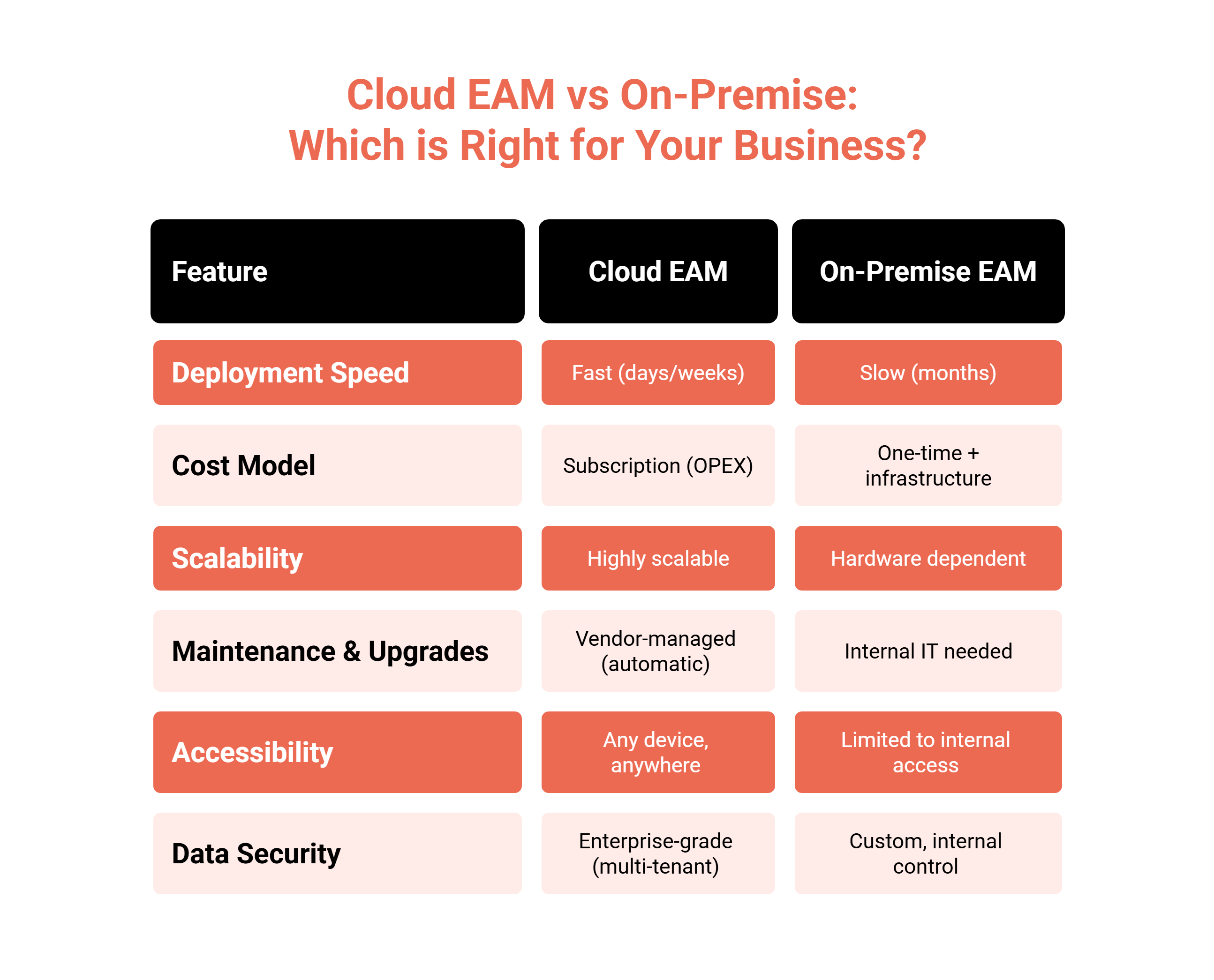
Cloud EAM is quicker to start, is paid by subscription and is upgraded by the vendor. On-premise EAM runs on your own servers, which suits sites where data may not leave the building or where the internet is unreliable, but your IT team owns upgrades and backups. Ask whether a vendor’s on-premise edition is the same product as its cloud edition.
How to choose enterprise asset management software
Many products call themselves EAM software. The test is whether teams share one record or pass data between modules built separately.
| Capability | Why it matters |
|---|---|
| One asset record across teams | Copies of an asset drift apart within months |
| Asset hierarchy | Cost and downtime need to roll up to the line and the site |
| Configurable statuses and approvals | Your process is not the vendor’s |
| Preventive and condition-based plans | Maintenance runs on time, usage and condition |
| Parts, stores and purchasing | Jobs are not held up waiting for spares |
| Depreciation in several books | Statutory and tax books disagree, legitimately |
| Mobile app that works offline | Audits and repairs happen where there is no signal |
| Modular adoption | Buying everything on day one slows the rollout |
| Cloud or on-premise | Some sites cannot use a public cloud |
| API and integrations | The EAM system has to feed the ERP and BI tools |
How Asset Infinity works as enterprise asset management software
Asset Infinity’s EAM software keeps maintenance, parts, contracts, costs, finance and history as tabs of one asset page.
- Plan and buy. A purchase request can be met from a spare in Standby at another site before anyone buys new. See capital planning software.
- Register and label. Assets move through seven default statuses (Planned, Standby, Operational, Under Maintenance, Breakdown, Retired and Disposed), which you can rename or extend. QR, barcode or RFID labels print from the register, and verification counts prove assets are still there.
- Maintain. Plans run on time or meter readings, and before a job is raised the product checks the contracts and warranties covering the asset. See preventive maintenance software.
- Stock parts. Reorder recommendations count what upcoming maintenance plans will use as well as past usage.
- Account. Depreciation runs in several books, using straight-line, declining balance, units of production or rate tables such as MACRS. Posted runs produce journals for the general ledger. See fixed asset management software.
- Decide and dispose. Every asset carries a health score out of 100, and the Reliability screen recommends replacement when maintenance cost approaches the purchase cost. On disposal, depreciation ends in every book with a gain or loss.
It runs in our cloud or on your own servers. The asset register starts at $130 a month for up to 500 assets with unlimited users, and other modules are added as you need them. Build a quote for your asset count.
Frequently Asked Questions
What is the difference between EAM and CMMS?
A CMMS manages maintenance: work orders, preventive plans and failures. EAM software covers the whole asset life cycle, adding spare parts, purchasing and financial records to the same asset.
Is EAM software suitable for small businesses?
Yes, if it can be adopted in stages. Many organizations start with the asset register and maintenance, then add stores, purchasing and finance later.
What types of assets does EAM manage?
Any physical asset with a cost and a maintenance need: production machines, vehicles, medical equipment, building systems such as HVAC and elevators, utility networks and IT equipment.
Which industries use enterprise asset management software most?
Manufacturing, utilities, oil and gas, healthcare, transportation, hospitality and facilities management, wherever equipment is costly and downtime is expensive.