







Asset monitoring software keeps a continuous watch on your assets: where they are, who has them, what condition they are in and whether they are running as they should. It collects that information from tag scans, GPS trackers and sensors, records it against each asset, and warns someone when a reading or a location looks wrong.
Organizations with assets spread across departments and sites cannot do this by hand. Equipment goes missing, staff waste time looking for it, someone buys a replacement for something that was only misplaced, and machines run until they break. This guide explains what asset monitoring systems do, their benefits, the features to look for, and how Asset Infinity monitors location and condition.
What is asset monitoring software?
Asset monitoring software is a system that tracks the location, status and condition of physical assets in real time or near real time, using barcode, RFID, GPS or sensor data. It keeps a history for each asset and raises alerts when an asset leaves an area, misses an inspection or reports a reading outside its normal range.
There are two kinds of asset monitoring, and most organizations need both:
- Location monitoring answers where an asset is and who has it, using tag scans, RFID readers at doorways, Bluetooth tags or GPS trackers.
- Condition monitoring answers how the asset is doing, using meter readings, inspections and sensors that measure vibration, temperature, pressure or runtime.
Benefits of asset monitoring software
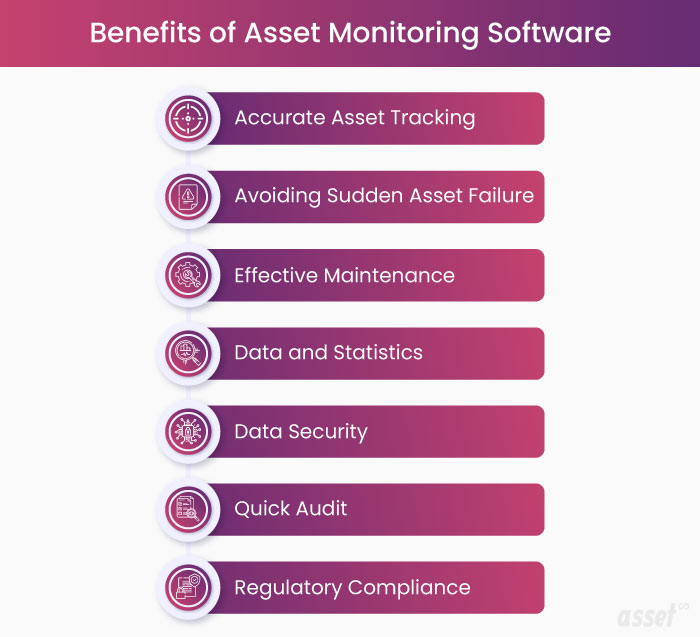
Fewer lost and stolen assets
When every asset has a known location and custodian, a missing item is noticed quickly instead of at the next annual count. Alerts can tell a manager when an asset leaves its site or stops reporting.
Less time spent searching
Employees stop hunting for tools, carts and equipment, and the organization stops buying duplicates of things it already owns.
Better use of what you own
Knowing where every asset is and how much it is used shows which assets sit idle. Idle equipment can be moved to where it is needed instead of buying more.
Fewer sudden failures
Breakdown repairs cost more than planned maintenance and stop operations without warning. Condition readings and usage data let you service an asset before it fails, and plans can fall due on real running hours instead of guesses.
Longer asset life
Equipment that is serviced on time, at the right intervals, lasts longer and performs better through its life.
Data for decisions
A history of location, use, readings and repairs shows which assets cost the most, which fail most often and how much spare stock maintenance will need in the coming months.
Quicker audits and fewer ghost assets
Ghost assets are recorded on the books but no longer exist, because they were lost or stolen. Phantom inventory is stock the system shows that is not on the shelf. Monitoring and regular scan counts find both, so audits are shorter and the books are right.
Easier compliance
Inspection records, maintenance history and documents kept against each asset show regulators and auditors that equipment was checked when it should have been.
How asset monitoring systems collect data
Each tracking method suits a different job. Most asset monitoring systems combine several.
| Method | What it monitors | Best for |
|---|---|---|
| Barcode and QR labels | Location and custodian at each scan | Most indoor assets, counts and check-outs |
| RFID tags and readers | Assets passing a door, and fast counts without line of sight | Warehouses, tool cribs, high-value items |
| Bluetooth (BLE) tags | Nearby assets, found by signal strength | Finding equipment within a building |
| GPS trackers | Live position, trips, mileage and engine hours | Vehicles, generators and mobile plant outdoors |
| Sensors (IoT) | Vibration, temperature, pressure, runtime and more | Critical rotating equipment and utilities |
| Meter readings and inspections | Usage and condition recorded by people | Any asset, including where sensors are not worth fitting |
In short: GPS for outdoor tracking, BLE for indoor finding, RFID to read many items at once, and barcodes or QR codes where cost matters most.
Asset monitoring software features to look for
The features that matter most turn data into action. Use this table to compare products.
| Feature | Why it matters |
|---|---|
| Real-time location and custody | Shows where each asset is and who is responsible for it |
| Alerts and notifications | Warns when an asset leaves an area, a tracker goes silent or a reading crosses a limit |
| Condition monitoring and failure warning | Spots wear before it becomes a breakdown |
| Maintenance that follows the data | Raises work orders from alerts and brings plans due from real runtime |
| Maintenance history | Shows when an asset was last serviced, what was wrong and how it performed |
| Spare parts with reorder levels | Parts are on the shelf when monitoring says a repair is due |
| Mobile app with scanning | Staff confirm location and condition at the asset |
| Physical verification | Counts compare what is found with what the register says |
| Reports and analytics | Highlight problem assets, idle equipment and cost trends |
| Security and access control | Only the right people see and change asset records |
Asset monitoring examples by industry
Manufacturing
A plant fits vibration and temperature sensors to the pumps, motors and compressors that would stop a line, and uses scheduled meter readings and inspections for everything else. See asset management for manufacturing.
Hospitals
Biomedical teams tag infusion pumps, monitors and wheelchairs so staff can find them on any ward, and keep inspection records against each device.
Construction and fleets
GPS trackers on excavators, generators and vans show which site each one is on, how far it has traveled and how many engine hours it has run, which sets its next service.
How to set up asset monitoring
- Build a clean register. Every asset needs a unique number, a location and a custodian before monitoring means anything.
- Tag what moves. Put barcode, QR or RFID labels on movable assets and GPS trackers on vehicles and mobile plant.
- Pick the critical assets for condition monitoring. Fit sensors to the machines whose failure would stop operations, and use meter readings and inspections for the rest.
- Set limits and alerts. Decide what reading or event should warn someone, and who that person is.
- Connect alerts to work. Make sure an alert leads to a work order, not just an email.
- Review the reports. Each month, look at failures, idle assets and missing items, and adjust plans and limits.
How Asset Infinity monitors assets
Asset Infinity monitors location and condition against the same asset record, so an alert, a work order and the asset’s cost history sit together.
- Scans and counts. QR, barcode, NFC, RFID and BLE tags identify assets. The mobile app scans labels offline, and verification rounds mark each asset verified, moved, damaged or not found. See asset tracking software.
- RFID at the doorway. Fixed readers at doorways record when a tagged asset passes. See RFID asset tracking.
- GPS for vehicles and plant. GPS asset tracking registers trackers against assets, groups positions into trips, feeds odometer and engine hours into meters, moves an asset to a site automatically when it enters a mapped area, and alerts supervisors to power cuts, unplugging, a low backup battery, the SOS button or a tracker that stops calling.
- Sensors and condition limits. In predictive maintenance software, sensors measure temperature, vibration, pressure, current, flow, runtime and more. A limit can be set above, below, outside or inside a band, and a reading that crosses it opens an alert and can raise a work order itself. A gateway that stops reporting is flagged, so silence is not mistaken for health.
- Plans from real runtime. Runtime sensors and meter readings bring preventive maintenance plans due from actual running time.
- Reports. MTBF, MTTR and availability are worked out from closed work and status history, and dashboards and scheduled reports are covered on the dashboards and reports page.
The asset register starts at $130 a month for up to 500 assets with unlimited users. Build a quote for the modules you need.
Frequently Asked Questions
What is the difference between asset monitoring and asset tracking?
Asset tracking records where an asset is and who has it. Asset monitoring adds a continuous watch on its condition and use, with alerts when something goes wrong.
What are asset monitoring systems used for?
To prevent loss and theft, find equipment quickly, use assets more fully, plan maintenance before failures, pass audits and keep compliance records.
Do I need sensors for asset monitoring?
Not for every asset. Tag scans, meter readings and inspections cover most assets. Sensors pay off on critical machines where a failure would stop operations.
What are ghost assets and phantom inventory?
Ghost assets are on the books but no longer physically exist, usually because they were lost or stolen. Phantom inventory is stock the system shows that is not actually available.