






Preventive maintenance software that raises the work before it is due
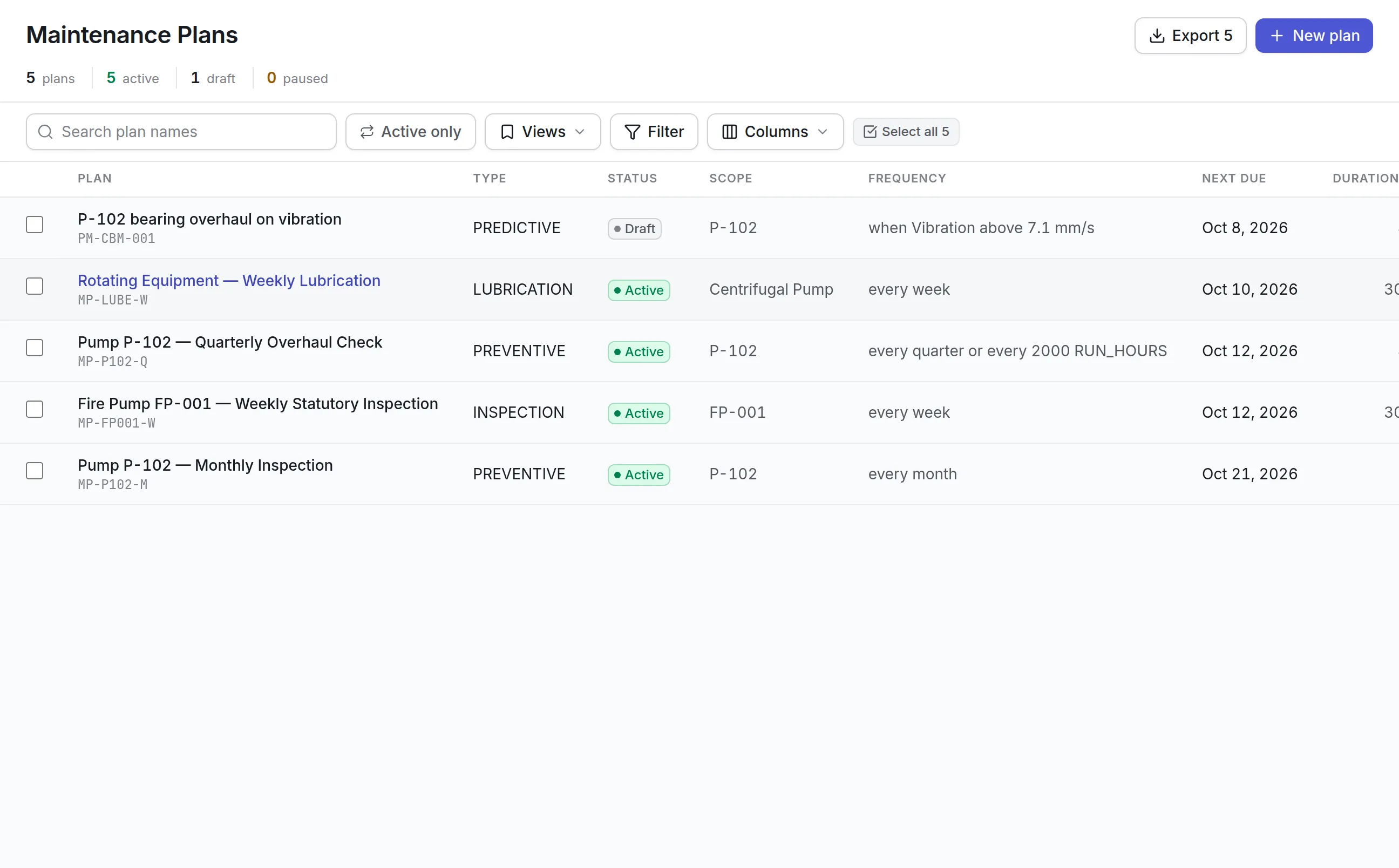
Our preventive maintenance software lets you write a plan once for an asset or a whole class of assets. It falls due by date, meter, runtime or condition, and becomes a work order with its checklist days ahead.
What our preventive maintenance software does
Calendar, meter or condition
Trigger a plan by days, weeks or months, by a meter interval, by a sensor condition or by a date on the asset such as warranty expiry. Combine them as whichever comes first or all at once.
Fixed or floating
A fixed plan stays on the 1st of the month even when last month ran late. A floating plan counts from when the work was actually done.
Raised ahead of time
Each plan sets a lead time, so its work order is raised days before the due date with its task list, and flagged when the job needs a permit.
Annual replaces monthly
Let a yearly service stand down the monthly round that falls near it, so the same asset is not visited twice in one week.
Skip, defer or suspend
Skip one round, defer it or suspend a plan for an asset that is out of service, with the reason kept on record.
See what is coming
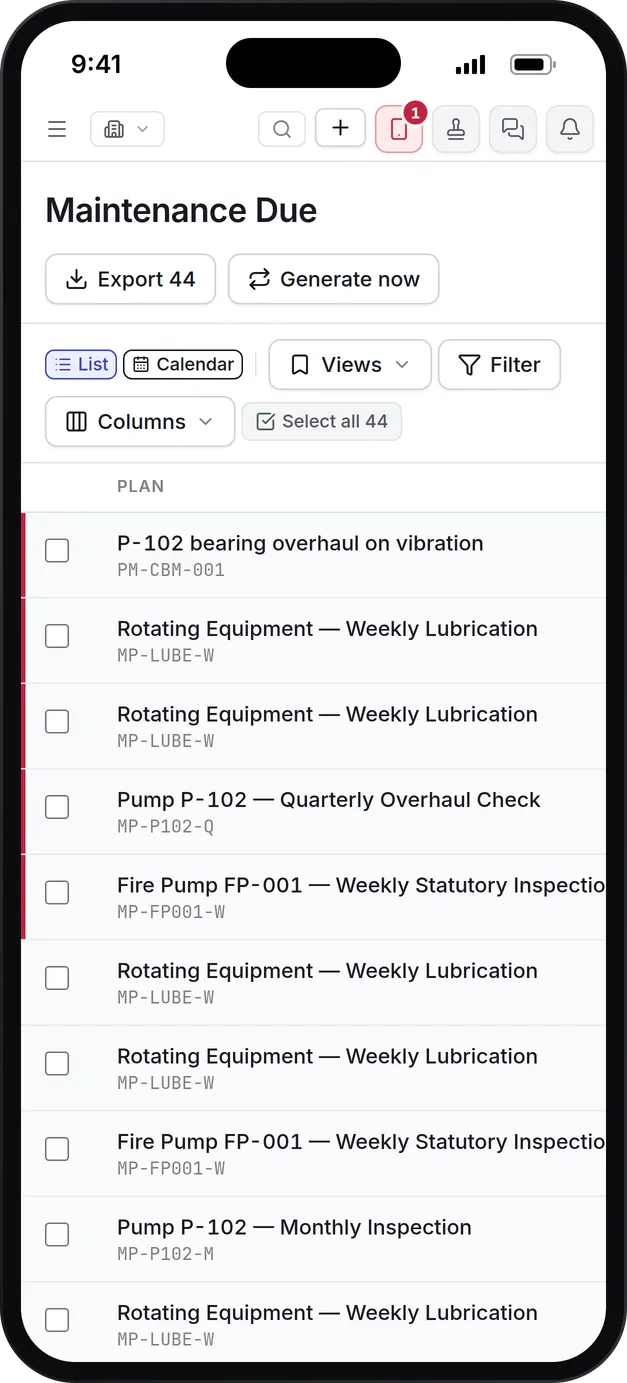
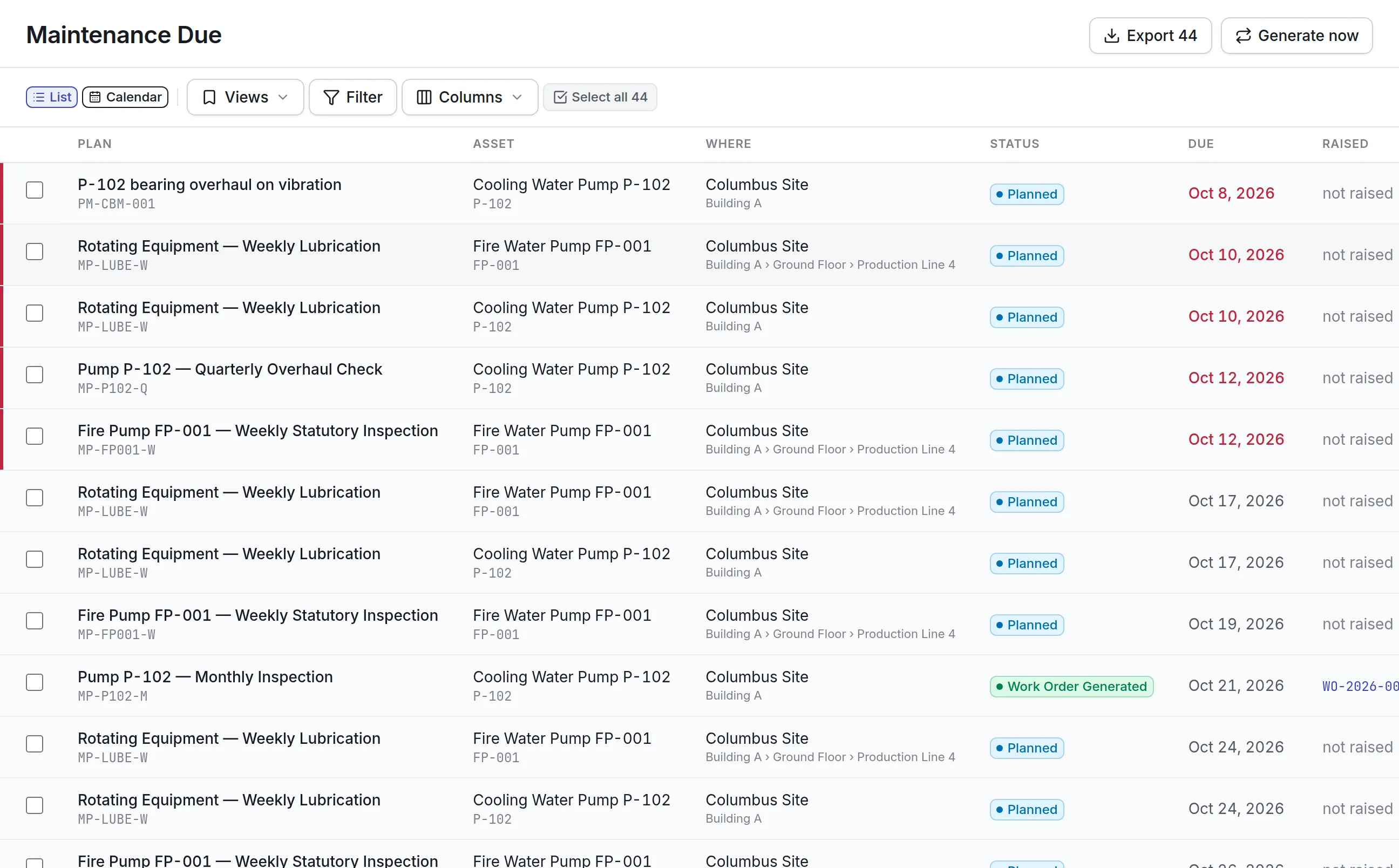
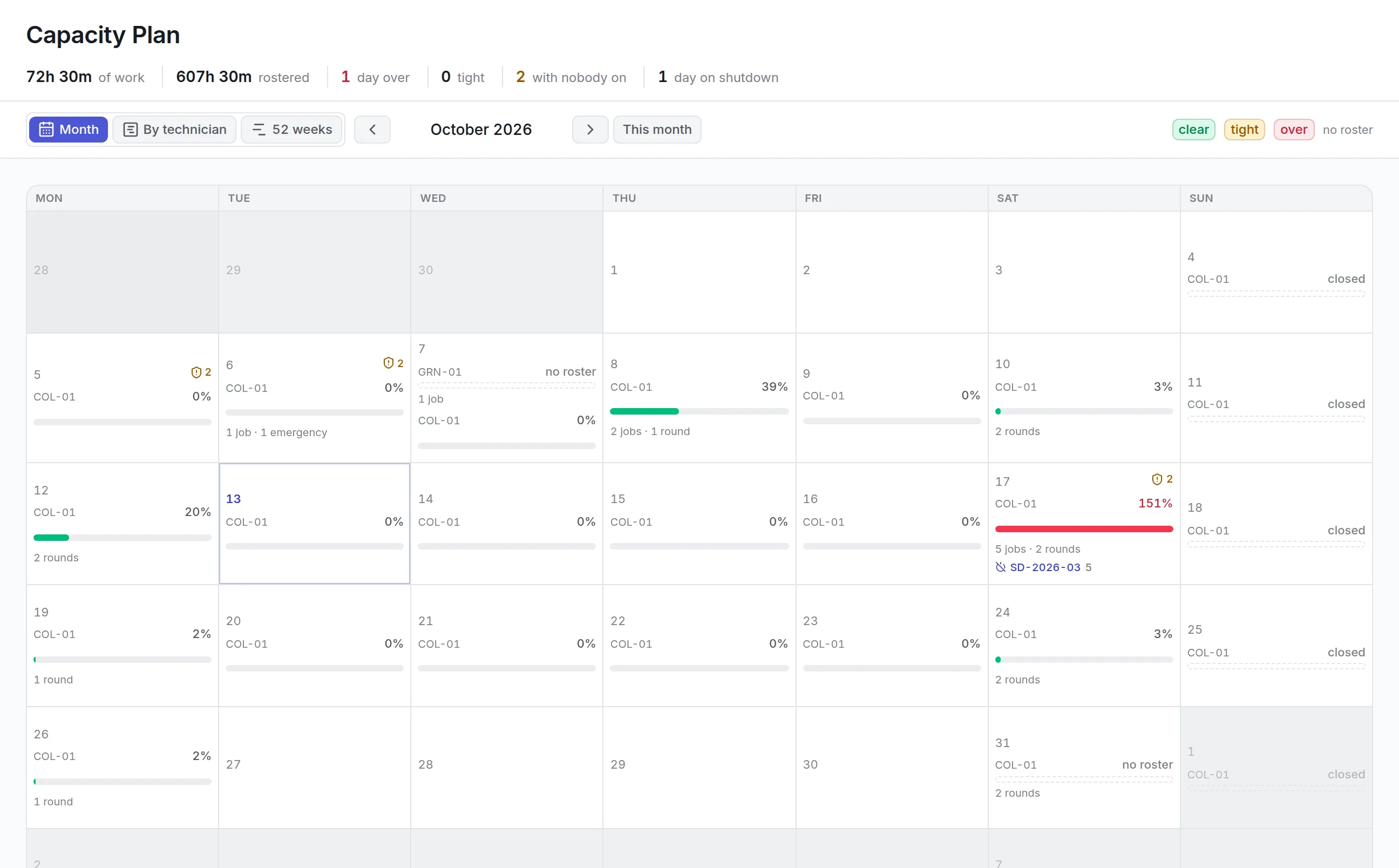
The maintenance due list and calendar show every upcoming round, and the capacity plan weighs them against the hours you have rostered.
What is preventive maintenance software?
Preventive maintenance software schedules routine maintenance before equipment fails. It holds each plan’s interval or usage trigger, its checklist and the parts it needs, raises a work order when the work falls due, and records whether it was done on time. It replaces the wall calendar and the spreadsheet of due dates.
Teams buy it because breakdowns cost more than planned work, and because an auditor, insurer or regulator will ask for proof that a statutory check was done when it was due.
How preventive maintenance software works in Asset Infinity
Take a plant with a dozen centrifugal pumps. The maintenance planner wants every pump lubricated weekly and each one overhauled every quarter or every 2,000 running hours, whichever comes first.
- Write the plan once.Give it a name, a work order type such as Preventive or Lubrication, and a priority. Plans are built step by step in a plan builder and saved as a draft, which raises nothing until it is activated.
- Choose what it covers.Name individual assets, a whole asset category, or places such as a building for fire doors and emergency lighting. A category in scope picks up pumps you add later, so nobody has to remember to add them.
- Say what makes it fall due.Add one or more triggers: a calendar interval, a meter interval, a condition or a date on the asset. Combine them as “any of them” (whichever comes first) or “all of them”.
- Build the checklist and its needs.Add steps from a versioned checklist library or type them in. Each step can demand a reading with an acceptable range, a photo or a signature. List the parts, tools, skills and preferred vendor each round needs, and flag work that needs a permit or a shutdown.
- Set the lead time and tolerance.Lead time is how many days ahead the work order appears. Tolerance is how late a round can be and still count as on time.
- Activate it.A preview step lists anything that would stop the plan working, such as an empty scope or no trigger. Activating publishes version 1 and builds the schedule.
From then on, each round becomes a work order one lead time before it is due, carrying the checklist, the requirements, the priority and the crew or technician the plan names. The job then runs like any other in our work order software.
A plan, a round and a work order
Asset Infinity keeps three things apart that most spreadsheets blur together.
| Term | What it is | Example |
|---|---|---|
| Plan | The rule: what to do, to which assets, and what makes it fall due | Lubricate every centrifugal pump weekly |
| Round | One scheduled visit to one asset on one date | Pump P-102, Tuesday October 20 |
| Work order | The job a round becomes, with its checklist and parts | WO-2026-00021, assigned to the mechanical crew |
Calendar rounds are placed across a planning horizon (90 days unless you change it), so the schedule shows what is coming without filling the backlog with months of open jobs.
Preventive maintenance triggers by date, meter, condition or asset date
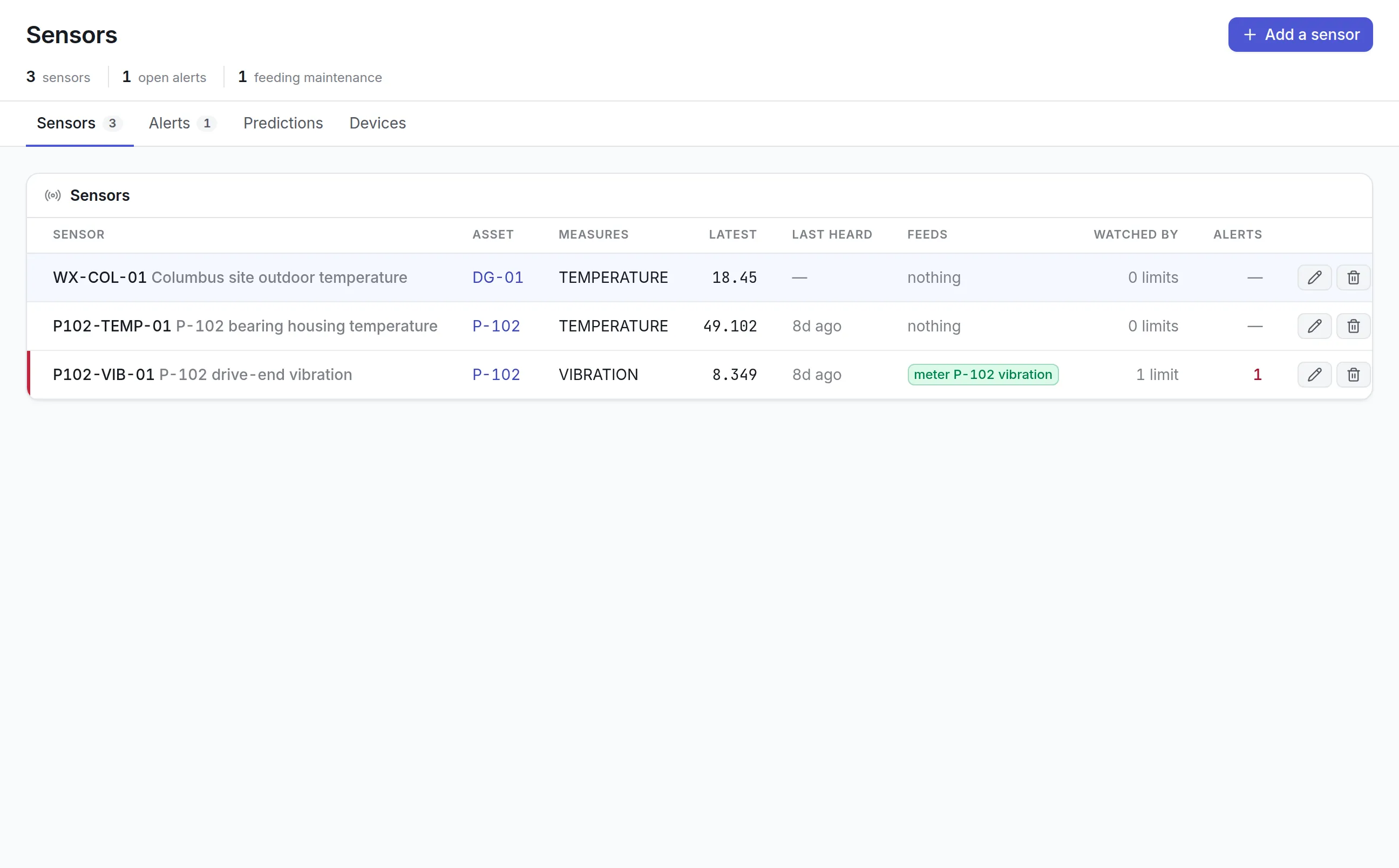
Calendar plans suit statutory checks, but most equipment wears with use. Each plan can mix triggers so it falls due the way the asset actually ages.
More detail
Condition plans sit in the same list as weekly rounds, which is where preventive work meets predictive maintenance software.
Keeping the preventive maintenance schedule honest
Maintenance Due lists every round in date order, as a list or a month calendar, and overdue rounds carry a red edge. Overdue preventive work is the number worth watching, because it is maintenance you decided to do and then did not.
More detail
Every decision about a round is recorded with a reason, so the compliance figure means something:
More detail
PM compliance (rounds done within tolerance) appears on the Today screen, the dashboards and the reliability screen. Each round also records the plan version it was raised under, so an auditor can see which checklist applied on the day.
Seeing whether the preventive maintenance schedule fits
A due list says what is due. It cannot say whether Tuesday has the hours to do it, so Asset Infinity answers that on a separate screen, the capacity plan.
More detail
It weighs the estimated hours of every job and round against the hours each technician is rostered, per site, and marks each day clear, tight or over. The 52-week view projects calendar and meter-based rounds across the year, so a planner can see a heavy month before it arrives and move work inside its tolerance. Assigning and moving that work is covered in maintenance scheduling software.
Preventive maintenance on the technician’s phone
A plan is only as good as the round a technician actually completes. In the iOS and Android field app, the round’s work order arrives with its checklist already in order, section by section, and it works with no signal in a plant room or a basement.
More detail
This is where preventive maintenance software earns its keep: the evidence is captured at the asset, at the time, by the person who did the work.
What to look for in preventive maintenance software
| Capability | Why it matters | In Asset Infinity |
|---|---|---|
| Usage-based triggers | Equipment wears with hours and miles, not dates | Meter triggers per asset, by meter type |
| Whichever comes first | Most OEM schedules say “or” | Any-of or all-of trigger rules |
| Fixed or floating dates | Statutory checks stay on date; others follow the last service | Fixed calendar or count from completion |
| One plan for many assets | Writing 40 identical plans invites drift | Scope by category, named assets or places |
| Lead time | Parts and people need warning | Work orders raised a set number of days ahead |
| Tolerance and compliance | “On time” needs a definition | Tolerance per plan; skips count, cancellations do not |
| Nested services | An annual service should replace the monthly visit | Stand-down between plans |
| Capacity check | A full due list can still be undoable | Capacity plan by day, technician and 52 weeks |
| Evidence on each step | Inspectors want readings and photos | Ranges, photos and signatures per checklist step |
See it on your own assets, or price it in two minutes.
Preventive maintenance by industry
A manufacturing plant
Pumps, compressors and conveyors are scoped by category and triggered by running hours with a calendar backstop. The overhaul plan stands down the monthly check in the month it runs, and work that needs the line stopped is flagged for a shutdown so it can be grouped into one closure. Readings outside their range raise a corrective job on the spot.
A hospital or care facility
Statutory and life-safety checks run on fixed calendar dates with a tight tolerance, so a late round shows as late. Places in scope cover fire doors and emergency lighting by building. Each step can require a photo or signature, and the plan version on each round shows which checklist applied when a surveyor asks.
A fleet
Vehicles and mobile plant fall due by miles or engine hours, whichever comes first against a calendar interval. Drivers or technicians record readings in the field app. Pair it with fleet maintenance software for the rest of the vehicle’s record.
A campus or facilities team
Rooftop units, boilers and elevators run on quarterly and annual plans, often done by contractors. Name a preferred vendor on the plan and each round goes to them. Inspection-only plans raise a graded checklist round instead of a work order, which suits inspection management software.
What preventive maintenance software costs in Asset Infinity
The asset register starts at $130 a month for up to 500 assets, with unlimited users. Preventive maintenance is part of the Maintenance module at $25 per user per month, together with work orders, inspections and the workforce, and the capacity plan comes with it. Connected sensors for condition triggers are $5 per sensor per month. Build a quote for your sites.
Getting started
A typical first week with preventive maintenance software in Asset Infinity looks like this:
The CMMS overview shows how preventive maintenance fits with work orders, inventory and reporting.
Common questions
What is preventive maintenance software?
Preventive maintenance software schedules routine maintenance before equipment fails. It holds each plan's interval and checklist, raises the work when it falls due and records whether it was done on time.
Can a plan be based on runtime hours?
Yes. A plan can fall due every so many running hours, miles or cycles of a meter type, and every asset in scope is watched separately. Readings come from the mobile app, connected sensors, the API or a spreadsheet import.
What is a preventive maintenance schedule?
A preventive maintenance schedule is the list of routine tasks each asset needs and when each falls due, by date or by usage. In Asset Infinity the schedule is built from your plans and shown on the Maintenance Due list and calendar.
What should a preventive maintenance checklist include?
Each step should say what to do, whether it is mandatory, and what it must produce, such as a reading with its acceptable range, a photo or a signature. Steps whose failure should raise a repair can be marked to do so.
Can one plan cover many assets?
Yes. A plan can cover one asset or every asset of a type, and each asset gets its own rounds and work orders.
Can we import our current PM schedule from a spreadsheet?
Yes. Maintenance plans, their triggers and their checklists can be loaded from a spreadsheet through the import screen, which checks each row before anything is written.
See it with your own assets
A demo run on an example from your industry. Or start the trial and look around on your own.