





What is the right time to move off an asset tracking spreadsheet?
An asset tracking spreadsheet works until several people edit it, maintenance lives somewhere else, or a yearly count takes weeks to reconcile. At that point asset management software adds what a sheet cannot: scannable labels, a history of every change, counts on a phone, maintenance on the same record and depreciation. Moving takes three steps: import, tag, count.
We make Asset Infinity, so we are not neutral. This guide is about the spreadsheet you have, and it is useful whichever product you move to.
What a good asset tracking spreadsheet contains
Whether you stay on a sheet or plan to move, the columns are the same. A clean template now is what makes a later import quick.
| Column | What goes in it | Why it matters |
|---|---|---|
| Asset ID | One unique code per asset, printed on its label | Every other system matches on this |
| Description | What it is, in plain words | Lets someone find it without the ID |
| Category | Laptop, pump, forklift, chair | Drives reports and maintenance plans |
| Site and location | Building, floor, room, spelled the same every time | Inconsistent spelling creates duplicate places |
| Custodian or department | The person or team responsible | Unowned assets are the ones that go missing |
| Manufacturer, model, serial number | From the nameplate | Needed for warranty claims and parts |
| Purchase date and cost | From the invoice | Needed for depreciation and insurance |
| Warranty end | A date, not “3 years” | Lets you claim repairs before paying for them |
| Condition and status | In use, in store, under repair, disposed | Shows what is available |
A few habits keep the sheet importable later:
- One row per asset, and one sheet per list (sites, assets, parts).
- No merged cells, and no colors that carry meaning only a person can see.
- Nothing but the ID in the ID column; notes go in a column of their own.
- Spare parts on their own sheet, with a quantity column instead of one row per item.
See it on your own assets, or price it in two minutes.
Signs your asset tracking spreadsheet has stopped being enough
Spreadsheets are flexible and everybody can use one. The trouble starts when the list becomes something the organization relies on:
More detail
If two or three of these sound familiar, the spreadsheet has done its job and it is time to move.
Spreadsheet vs asset management software, feature by feature
This compares a typical shared spreadsheet with what asset management software, Asset Infinity included, does. Partial means a sheet can do it with manual effort or add-ons; Not available means it cannot.
| Capability | Spreadsheet | Asset management software |
|---|---|---|
| One list of assets with your own columns | Yes | Yes |
| History of who changed what and when | Partial (version history, hard to read per row) | Yes, per record |
| Scan a label to open the record | Not available | Yes, by phone camera or scanner |
| Work offline on a phone at the asset | Partial | Yes |
| Physical counts with found, moved and missing | Partial (manual reconciliation) | Yes |
| Check-out and custody | Partial | Yes |
| Work orders and preventive maintenance | Not available | Yes |
| Spare parts with reorder points | Partial | Yes |
| Depreciation in several books | Partial (formulas you maintain) | Yes |
| Access limited by site or role | Partial | Yes |
| Reminders before a warranty ends | Not available | Yes |
Step 1: Import your asset tracking spreadsheet
Do a little tidying before you import, not a rewrite. Make sure every asset has an ID, one row per asset, and that sites and locations are spelled the same way throughout. Keep the columns you have; you can map them during the import.
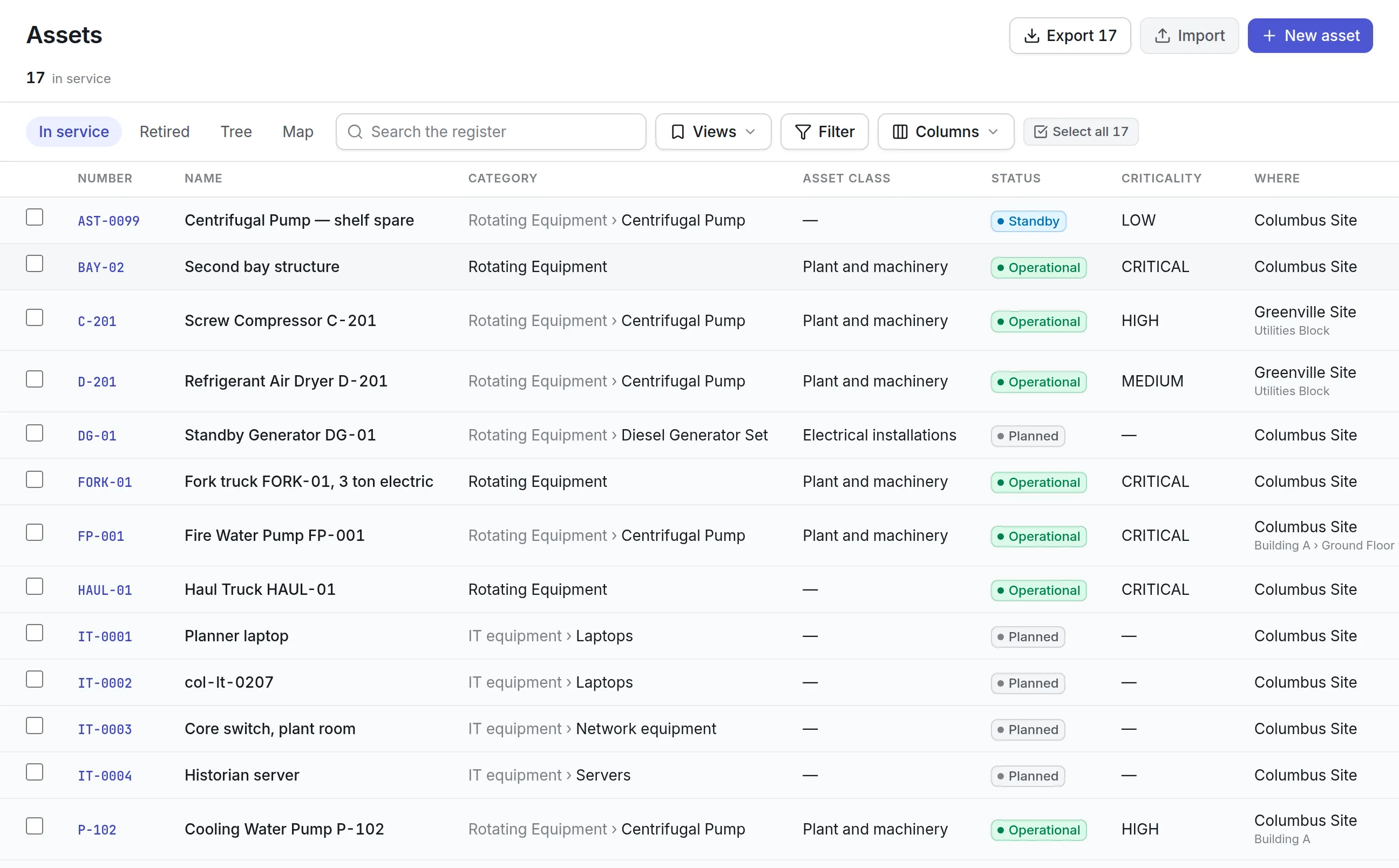
Importing one list or a whole workbook
In Asset Infinity you can import a single list or a whole workbook at once, in three steps: Upload, Review, Import. Put each list on its own tab named after what it holds, such as Sites, Assets and Parts. The tabs are matched to what they hold, checked against each other and written in order, so an asset row that names “Site 2” finds the site the Sites tab is about to create.
Fixing problem rows before anything is saved
Before anything is saved, you see how each column was read, how many rows will be created or updated, and which rows have problems. If a value names something the system does not recognize, such as a manufacturer spelled slightly differently, you pick from near matches instead of getting duplicates. If the result is still wrong after you commit, undo the whole import as one step.
Step 2: Tag the assets
A tag connects the physical asset to its record. Design labels in the browser, with your logo, the asset’s name and ID, and a QR code, a Code 128 barcode or an RFID (EPC) encoding, then print them for the assets you choose.
You do not have to re-label everything, because an asset can carry more than one label and existing barcodes keep working. Tag in this order:
More detail
- Assets with no label. Or labels that are worn and unreadable.
- High-value items. The ones an auditor will ask about first.
- Things that move. Tools, laptops and loaner equipment.
Once a label is on, anyone with access can scan it with the iOS or Android app, even offline, to open the asset, record a reading or raise a request.
Step 3: Run a first count
The import tells you what the spreadsheet said. The first count tells you what is there. Start a verification round for one site: a full count, a sample, or a targeted count of one category or area.
More detail
People walk the site with the app, scan each asset, and mark it as found, somewhere else, missing, damaged or unreachable, with its condition. When the round closes you have a clean baseline: what was confirmed, what has moved and what is missing, each with a name and a date against it. You can also email each custodian to confirm the items in their care, which suits laptops and equipment issued to people.

What to move next
Once the register is right, add what the spreadsheet never held well:
More detail
Asset Infinity’s asset register starts at $130 a month for up to 500 assets with unlimited users; build a quote for your own count. Read more about our asset tracking software, asset inventory software, asset tags and preventive maintenance software, or start a free trial and import your own sheet.