






An asset management mobile app puts your asset register, tags and maintenance work on the phone of the person standing next to the asset. Scan a label and the asset’s record opens: what it is, where it belongs, who has it, when it was last serviced and what work is open on it. Move it, count it, raise a repair or close a job from the same screen.
Desk software alone leaves a gap. Assets live on plant floors, in classrooms, in vans and in basements, and records typed up later from memory drift away from the truth. This guide covers what mobile asset management means, the features that matter, how different teams use an asset tracking app, tips for getting the most from one, and how Asset Infinity’s app works.
What is an asset management mobile app?
An asset management mobile app is the phone and tablet side of an asset management system. Staff use it to scan asset tags, look up and update asset records, move and check out equipment, walk physical counts and complete maintenance work at the asset, with every change flowing back to the same central register the office uses.
It differs from a web page on a phone in one important way. A good app keeps the work on the device, so it keeps working where the signal drops, and it uses the phone’s camera as a scanner, so nobody needs to type an asset number.
Why mobile asset management beats desk-only software
Mobile asset management closes the gap between the asset and the record. The practical gains are easy to see:
- Records updated at the asset. A move, a repair or a new asset is recorded when it happens, by the person who did it.
- No separate scanner needed. The phone camera reads barcodes and QR codes, so every employee with a phone can take part.
- Faster audits. Counting a site is a walk with a phone instead of a printout and a pen.
- Fewer lost assets. Every hand-off creates a record of who has what.
- Fewer ghost assets. Assets still on the books but long gone show up as not found during a scan count, so finance can write them off and stop insuring them.
- Quicker repairs. Anyone can scan a broken machine and raise a request with a photo, and the technician gets the job on their phone.
Asset management mobile app features to look for
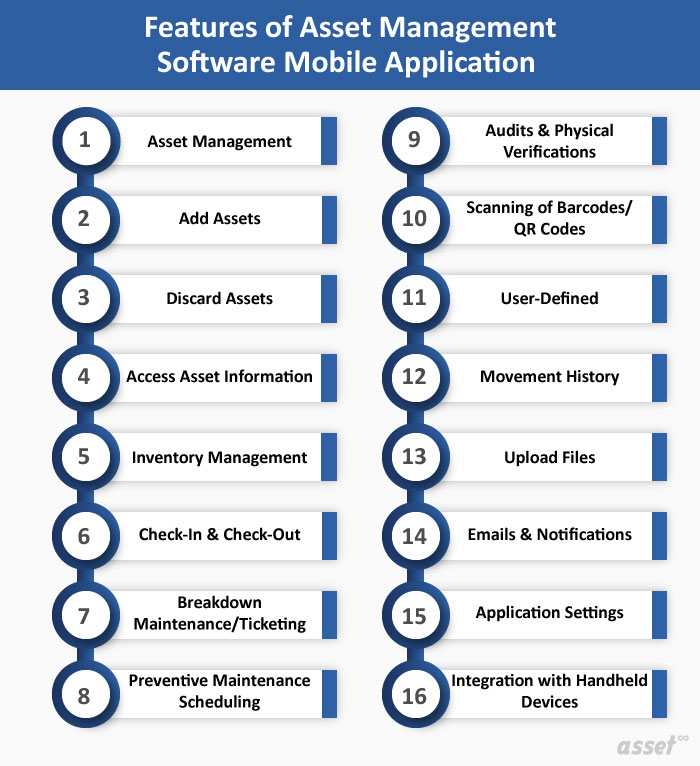
Not every asset tracking app does the same job. Use this table to compare them.
| Feature | What it does | Why it matters |
|---|---|---|
| Offline working | Keeps assigned work, assets and forms on the phone | Basements, plants and remote sites have weak signal |
| Camera scanning | Reads barcodes and QR codes | Removes typing errors and the cost of separate scanners |
| RFID and BLE support | Pairs with handheld readers and finds Bluetooth tags | Counts many items quickly and finds what is out of sight |
| Add assets in the field | Registers a new asset with photos and location | New equipment enters the register on day one |
| Moves and check-out | Records transfers and who holds a shared item | Every asset has a known location and holder |
| Physical verification | Walks a count and marks each asset found, moved or missing | Counts are quicker and leave a record for auditors |
| Work orders and checklists | Receives, starts and closes jobs with photos and signatures | Maintenance is recorded at the asset |
| Meter readings | Records hours, distance or usage | Feeds maintenance plans that fall due on use |
| Notifications | Alerts users to new jobs and approvals | Work does not wait for someone to check a desk |
| Roles and security | Limits who can see and edit what, encrypts phone data | Lost phones and wrong edits are contained |
How teams use an asset tracking app
The same app serves different people in different ways.
Facilities and maintenance teams
Technicians receive work orders on the phone, scan the asset to confirm they are at the right one, follow the checklist, record the parts used and close the job with notes and photos. Planners see each change in the office.
Finance and audit teams
Auditors walk a verification count site by site, scanning each tag. Assets that turn up in the wrong room are marked as moved, and assets that cannot be found are listed for follow-up before year end.
IT teams
IT staff scan laptops and monitors as they are issued, returned or moved between offices, so the register always shows who holds each device.
Operations and tool cribs
Shared tools and equipment are checked out to a person and checked back in with their condition, so nobody has to search for the last holder.
Tips for getting the most from an asset management app
Buying an app is the easy part. These tips decide whether people use it.
- Start from your requirements. List the asset types you manage, who will use the app and the jobs they need to do in the field. Choose an app that scales with your assets and users.
- Clean and centralize your data first. Gather serial numbers, purchase dates, warranties and locations into one spreadsheet, remove duplicates, then bulk import it instead of keying records one by one.
- Set up categories and locations before you go live. A clear structure of sites, buildings, rooms and asset categories makes search and filtering useful from the first day.
- Tag every asset. Give each asset a unique barcode, QR or RFID label linked to its record, so the app can find it with one scan.
- Use search, filters and saved views. Filter by location, status, category or custom fields, and save the views people use every week.
- Use the reports. Track utilization, maintenance cost, downtime and assets near the end of their life, and schedule reports to the people who need them.
- Connect it to your other systems. Linking the asset system with finance, procurement or the service desk removes double entry and keeps asset data consistent.
- Give people the right roles. Let the people who maintain records edit them, and let everyone else view only what they need.
How Asset Infinity’s asset management mobile app works
Asset Infinity Field is an installed app for iOS and Android phones and tablets, from the App Store or Google Play, or as a direct install file for rugged Android devices. People at a desk use the web app; the field app is built for work at the asset. Here is what it does, based on our CMMS mobile app page.
- Works offline. The app keeps an encrypted copy of each person’s work, assets, meters, stock and forms. Changes are saved at once and sent in order when the signal returns. Each record shows Pending, Synced, Failed or Conflict. In a conflict nothing is overwritten, and the office resolves it with both versions side by side.
- Scan to find. The camera reads barcode and QR asset tags, offline. On Android, a paired Zebra, TSL or Chainway handheld reads, writes and locates RFID tags, and the app can find a Bluetooth tag by following the phone’s beep.
- Add and move assets. Register a new asset from its nameplate with photos and map coordinates, and move assets between locations.
- Walk verification counts. Counts set up in asset inventory software appear under Verification, and each asset is recorded as here, somewhere else, damaged or not found.
- Run work orders. Accept, start, pause and complete jobs from the work order software, answer checklists with readings, photos and signatures, and record the parts fitted from stock.
- Read meters and handle stock. Read hour, distance and utility meters with a photo of the dial, check van stock, count a shelf and receive a delivery.
- Protect the phone. Data is opened with a passcode or fingerprint. A lost phone is revoked from the web app, which ends its access and tells it to erase its copy.
Approvals need a connection, and so do the AI copilot’s Say it and Fill from a document actions, where switched on. The field app works with the modules you buy: the asset register starts at $130 a month for up to 500 assets with unlimited users, and maintenance is $25 per user per month. Build a quote for your team, or see how the app fits into asset tracking software.
Frequently Asked Questions
What is mobile asset tracking?
Mobile asset tracking means recording and checking assets with a phone or tablet instead of a desk computer. Staff scan tags to look up, move, count and maintain assets wherever they are.
Does an asset management mobile app need internet?
A good one does not. It keeps the work and asset data on the phone, lets people scan and update records offline, and syncs when the signal returns.
Do I need a barcode scanner to use an asset tracking app?
No. The phone camera reads barcodes and QR codes. Handheld RFID readers are only needed if you use RFID tags.
What happens if a phone with the app is lost?
In Asset Infinity the data on the phone is encrypted and locked with a passcode. The owner revokes the phone from the web app, which ends its access at once and tells it to erase its copy.