






A fixed asset register is the list of every long-term asset a business owns, with what it cost, where it is, who has it and what it is worth today. Machinery, vehicles, furniture and IT equipment all belong in it. Your auditors check the balance sheet against it, your accountant runs depreciation from it, and your operations team uses it to find things.
This guide shows how to prepare a fixed asset register from scratch: the fields to record, an example register you can copy, how to number and tag assets, how a depreciation schedule works, and the routine that keeps the register accurate after the first count.
What is a Fixed Asset Register?
A fixed asset register is a record of each tangible asset a business expects to use for more than a year. For every asset it holds an identifier, description, category, location, custodian, acquisition date and cost, useful life, depreciation method and current net book value, plus its history of moves, repairs and disposal.
It answers four questions an owner, an auditor or a lender will ask:
- What assets do we own?
- Where are they, and who is responsible for each one?
- What did they cost, and what are they worth now?
- Which ones are fully depreciated, idle or due for replacement?
The register is also the bridge between finance and operations. The general ledger says the business owns $2.4 million of equipment; the register says which 1,180 items make up that figure. When the two don’t agree, the register is where you find out why.
Asset Register vs Fixed Asset Register: What Each One Is For
People use “asset register” and “fixed asset register” for the same document, and most of the time that is fine. The difference is scope. An asset register can list anything the business wants to keep track of, including items below the capitalization threshold such as monitors, radios and hand tools. A fixed asset register holds only capitalized assets, because its job is to support the balance sheet. Many teams keep both in one system, with a field that marks which records are capitalized.
Either way, the register does five jobs:
- Proof of what you own. It is the evidence behind the balance sheet, a loan covenant or a due-diligence request.
- Accountability. Every asset has a custodian, so a missing laptop has a name next to it, and loss or theft shows up at the next count.
- Correct insurance. Insurers price cover on declared values. A register that still lists equipment scrapped years ago means paying premiums on things you no longer have, and one that misses new purchases leaves them uninsured.
- Correct tax. Depreciation deductions are claimed from it, and many US states tax business personal property based on what it lists. Assets disposed of but never removed keep being taxed.
- Better spending decisions. Age, repair history and idle time show what to replace and what to move to another site before buying new.
An IT asset register applies the same idea to hardware and software. It adds fields such as hostname, operating system, assigned user, warranty end and installed software, and is usually fed by discovery tools. The IT asset management guide covers it in detail.
Key Components of a Fixed Asset Register
Every register needs the same core fields. Some are fixed at purchase, some change over the asset’s life, and some are calculated.
| Field | What it holds | Example |
|---|---|---|
| Asset number | A unique ID that never changes or gets reused | IT-LAP-0042 |
| Description | What the asset is, with make and model | Dell Latitude 7450 laptop |
| Serial number | The manufacturer’s serial, for warranty and theft reports | 7H2KQ54 |
| Category | The asset class, which sets the useful life and depreciation rules | Computer equipment |
| Location | Site, building and room | Chicago HQ, floor 3 |
| Custodian | The person or department responsible for it | Finance department |
| Acquisition details | Purchase date, supplier, invoice number and cost | Mar 4, 2026, $1,640 |
| In-service date | When depreciation starts | Mar 11, 2026 |
| Useful life and salvage value | How long it will be used and what it will be worth at the end | 4 years, $100 |
| Depreciation method | How cost is spread over the useful life | Straight-line |
| Accumulated depreciation and net book value | Calculated each period | Updated monthly |
| Status | Where it is in its life | In use, under repair, retired, disposed |
| Warranty | Expiry date and provider | Mar 3, 2029 |
| History | Transfers, repairs, counts and disposal | Moved to Denver, Aug 2026 |
Two fields cause most of the trouble later. The asset number must be unique and permanent, because every other record refers to it. The category decides useful life and depreciation, so a laptop filed as furniture is depreciated over the wrong number of years until someone notices.
Fixed Asset Register Example
Here is what a small fixed asset register looks like in practice. Whether you keep it in a spreadsheet or in software, the format is a table with one row per asset and one column per field.
| Asset no. | Description | Location and custodian | In service | Cost | Life and method |
|---|---|---|---|---|---|
| IT-LAP-0042 | Dell Latitude 7450 laptop | Chicago HQ, floor 3; Finance | Mar 2026 | $1,640 | 4 yrs, straight-line |
| MC-CNC-0007 | Haas ST-20 CNC lathe | Plant 2, bay 4; Production | Jun 2024 | $86,500 | 10 yrs, straight-line |
| VH-TRK-0012 | Ford Transit 250 van | Denver depot; Field service | Jan 2025 | $48,900 | 5 yrs, declining balance |
| FF-DSK-0310 | Sit-stand desk | Chicago HQ, floor 3; Facilities | Sep 2023 | $720 | 7 yrs, straight-line |
In a full register each row also carries the category, serial number, status and warranty from the table above. Add accumulated depreciation and net book value columns once depreciation is running, and a disposal date, method and proceeds when an asset leaves.
Steps to Prepare a Fixed Asset Register
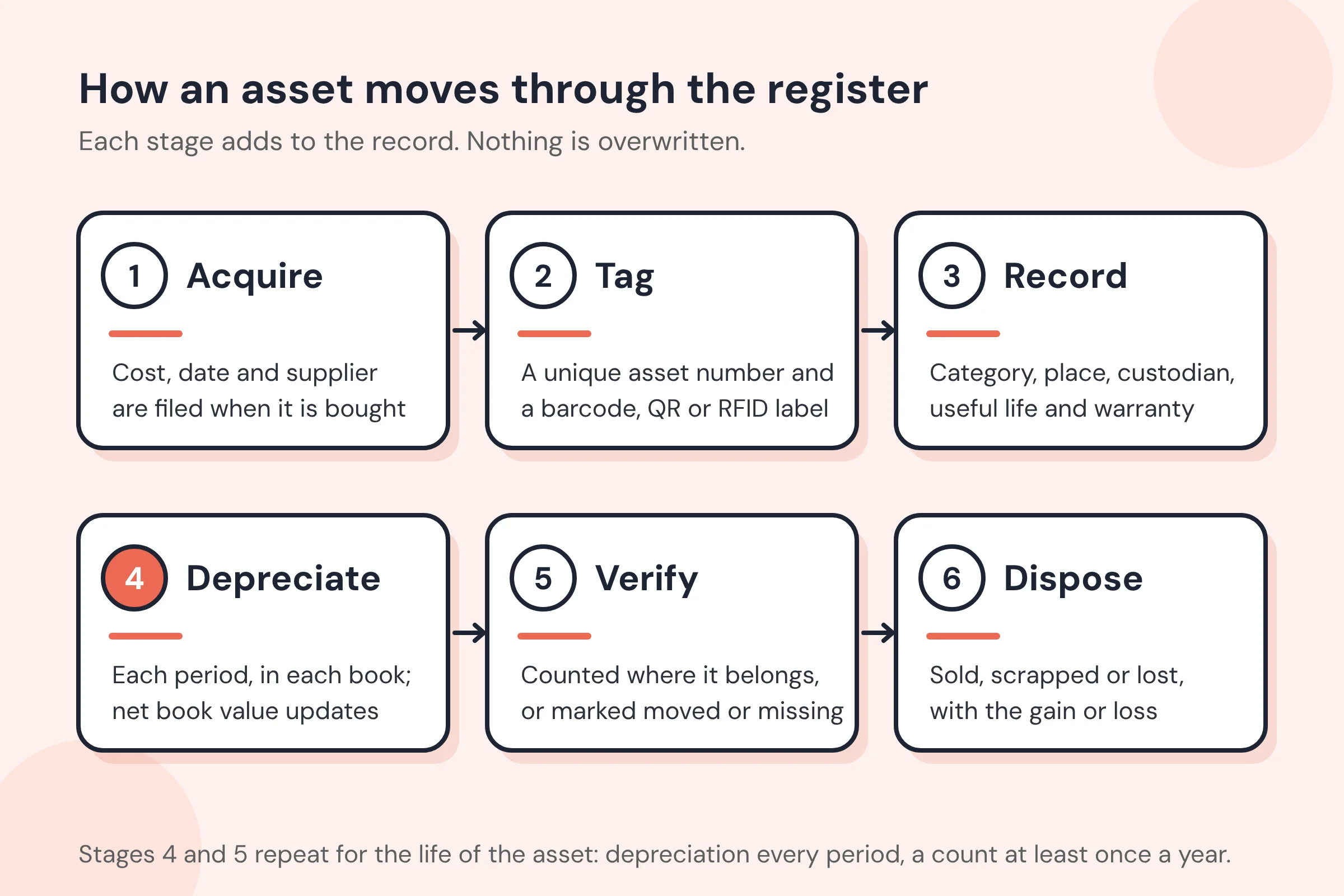
Preparing a fixed asset register takes six steps. The first three build the list; the last three keep it true.
Step 1: Identify and Classify Fixed Assets
Start with what the business owns, not what the ledger says it owns. Walk each site, and pull the purchase history for the last few years so you catch items bought but never recorded.
Only items that meet your capitalization policy go in the register. A policy sets a dollar threshold (many small and mid-size US companies use $2,500, the IRS de minimis safe harbor for businesses without audited financial statements) and a minimum useful life of more than a year. Inventory held for sale and consumables stay out.
Then give each asset a category. Categories should match the asset classes in your chart of accounts, such as land, buildings, machinery, vehicles, computer equipment, and furniture and fixtures, because each class carries its own useful life and depreciation rules.
Step 2: Assign Unique Asset Identifiers
Every asset gets a number that is never reused, even after the asset is gone. A good asset coding scheme is short and readable:
- A category prefix, so the number tells you what the asset is: IT, MC, VH, FF.
- A type code where it helps: LAP for laptops, CNC for machine tools.
- A running number padded to a fixed width: 0042.
Avoid putting location or department in the number, because assets move and the number would then be wrong. Location belongs in its own field.
Print the number on a label and fix it to the asset. A barcode or QR code label lets anyone scan the asset with a phone during a count. RFID tags let a reader count a room without line of sight, which matters for large or hard-to-reach items. See asset tags for how the label types compare.
Step 3: Record Asset Details in the Register
Enter every field from the components table for each asset. For assets you already own, the purchase invoice gives you cost, date and supplier; where it is missing, record the best estimate and note how you got it, so an auditor can follow the reasoning.
A spreadsheet works for a few dozen assets in one location. Past that, it starts to fail in predictable ways: two people edit different copies, depreciation formulas get overwritten, and nobody can say who moved an asset or when. That is the point to move to fixed asset management software, which keeps one record per asset and a history of every change.
Step 4: Calculate Depreciation for Each Asset
Depreciation spreads an asset’s cost over the years it is used. The register needs the depreciation method, useful life and salvage value for each asset, and it records the expense every period.
The common methods are:
- Straight-line: the same amount each year. (Cost minus salvage value) ÷ useful life.
- Declining balance: a fixed percentage of the remaining book value each year, so more expense early. Double-declining balance uses twice the straight-line rate.
- Units of production: expense follows use, such as machine hours or miles, rather than time.
- MACRS: the US tax system, where the IRS sets the recovery period and the rate for each year. Our MACRS depreciation calculator shows the schedule for any asset class.
Many businesses keep two sets of figures: book depreciation for the financial statements and tax depreciation for the return. A register that holds both avoids rebuilding the tax schedule in a separate spreadsheet each year.
Step 5: Establish a Maintenance and Review Schedule
An asset’s repair history belongs with its register record. It explains why one van costs twice as much to run as another, supports insurance claims, and tells you when replacing an asset is cheaper than repairing it. Record warranty expiry dates too, so repairs under warranty are not paid for twice.
Schedule a physical count at least once a year, and quarterly for portable, high-value items such as laptops and tools. A count compares what the register says with what is actually there, and every difference needs an explanation: the asset moved, it was disposed of without being recorded, or it is missing.
Step 6: Ensure Compliance with Financial Regulations
The register must support the fixed asset figures in the financial statements under US GAAP or IFRS. In practice that means:
- The total cost and accumulated depreciation in the register equal the general ledger balances, and you reconcile them every month or quarter.
- Every addition has a purchase document attached or referenced.
- Every disposal records the date, the method (sold, scrapped, donated, lost) and any proceeds, and the gain or loss is posted.
- Changes leave an audit trail: who changed what, and when.
Auditors usually test the register in both directions. They pick assets from the register and ask to see them, and they pick assets on the floor and ask to see them in the register.
What Is a Depreciation Schedule?
A depreciation schedule is a table that shows, for one asset or a group of assets, the depreciation expense for each period, the running total of accumulated depreciation, and the net book value left at the end of each period. The fixed asset register holds the inputs; the schedule is what those inputs produce.
Here is the schedule for a machine bought for $12,000, with a salvage value of $2,000 and a useful life of five years, depreciated straight-line at $2,000 a year:
| Year | Opening book value | Depreciation | Accumulated depreciation | Closing book value |
|---|---|---|---|---|
| 1 | $12,000 | $2,000 | $2,000 | $10,000 |
| 2 | $10,000 | $2,000 | $4,000 | $8,000 |
| 3 | $8,000 | $2,000 | $6,000 | $6,000 |
| 4 | $6,000 | $2,000 | $8,000 | $4,000 |
| 5 | $4,000 | $2,000 | $10,000 | $2,000 |
Under double-declining balance the same machine would take $4,800 in year one, $2,880 in year two and $1,728 in year three, then only the $592 needed to reach its $2,000 salvage value in year four. The total is the same; the timing is not. Accumulated depreciation sits on the balance sheet as a reduction of the asset’s cost, which is why it confuses people: see is accumulated depreciation an asset or a liability?
How to Maintain a Fixed Asset Register
Preparing the register is a project. Maintaining it is a routine, and most registers go wrong because the routine stops. Build these into your month and year:
- On every purchase: add the asset when the invoice is approved, not when someone remembers, and tag it before it goes into service.
- On every move: update the location and custodian when an asset changes hands or sites.
- Every month: run depreciation, post it, and reconcile the register totals to the general ledger.
- On every disposal: record the date, method and proceeds, and post the gain or loss in the same period.
- Every quarter: review assets that are fully depreciated but still in use, and assets with no activity that may be idle.
- Every year: count everything, investigate every difference, and adjust the register with a note explaining each change.
The most useful single habit is the monthly reconciliation. A difference found in the month it happened takes minutes to explain. The same difference found at year-end takes days.
Spreadsheet or Software?
| Spreadsheet | Fixed asset register software | |
|---|---|---|
| Setup | Free and immediate | An import of your existing list |
| Depreciation | Formulas you build and protect | Methods and books built in, run each period |
| Counts | Printouts and manual ticking | Scan tags with a phone; differences listed automatically |
| History | Overwritten unless you keep versions | Every change kept, with who and when |
| Several people editing | Conflicting copies | One record per asset, with permissions |
| Best for | Under about 100 assets in one place | More assets, more sites, or an audit to pass |
Building the Register in Asset Infinity
Asset Infinity’s asset register is built for the steps above:
- Import what you have. The Import screen takes your spreadsheet as a CSV or Excel file, lets you map its columns to the register’s fields, and checks every row before anything is written, so mistakes surface as a list of rows to fix rather than as bad records.
- Number and tag. Each asset gets a number from a series you control, such as AST-0099, and you can print barcode, QR or RFID labels from the label designer.
- Depreciate in more than one book. An asset can carry a book for the financial statements and another for tax, each with its own method: straight-line, declining balance, units of production driven by meter readings, or a rate table such as MACRS. Each period’s run is calculated, checked and then posted, and can be reversed.
- Count with a phone. A verification round lists what should be at each location; scanning marks each asset verified, moved, damaged or not found, and the results feed straight back into the register.
- Report. The asset register, depreciation register, assets acquired by month, book value by asset class and disposals by reason are standard reports.
If you are replacing a spreadsheet, the asset inventory page shows how teams run their first full count, and pricing shows what the register costs for your number of assets.
Frequently Asked Questions
What is the difference between a fixed asset register and an asset list?
An asset list says what you have. A fixed asset register adds the financial record of each asset (cost, depreciation and net book value) so it can support the balance sheet and pass an audit.
Is a stock register the same as a fixed asset register?
No. A stock register records inventory held for sale or for use in production, such as raw materials and finished goods, and it changes every day. A fixed asset register records the long-term assets the business uses and depreciates.
Who is responsible for the fixed asset register?
Finance usually owns the register because it supports the financial statements, while operations or facilities keep locations and custodians current. The register works when both update it as part of their normal work.
How often should a fixed asset register be updated?
Additions, moves and disposals should be recorded when they happen, depreciation should run every month, and the whole register should be checked against a physical count at least once a year.
Can I use Excel for a fixed asset register?
Yes, for a small number of assets in one place. Use one row per asset, lock the formula columns, keep a change log, and reconcile to the ledger monthly. Move to software when several people need to edit it or the count takes more than a day.