







Many organizations still do not have asset tracking software. They believe buying it is an unnecessary expense. However, asset tracking software features can save a lot of money and can also help a business grow.
Traditionally, organizations use Excel sheets to maintain, manage and monitor their assets. These methods have proved to waste time, producing reports based on assumptions and inaccurate spreadsheets that give the wrong picture of financial performance.
Effective asset tracking software can remove these problems. It keeps organizations informed about their assets in terms of location, usage and maintenance, saving valuable time and money. You may be wondering how asset tracking software features save time and money. We will come to that, but first, let’s look at the basic concept of asset tracking software.
What Is Asset Tracking Software?
Asset tracking software holds records of every asset and gives you regular updates, such as which activity needs to be performed on which asset. All the information is stored in the software, from when the asset was purchased through to disposal, covering the complete asset lifecycle.
The main aim of the software is to optimize asset performance and efficiency while minimizing expenses. Another objective is identifying assets that are unused or unproductive, so you can act on them.
Many organizations do not know exactly what they own, where their assets are, or who is using them. Others track assets only project by project, for example during a licensing audit, without ever analyzing the data as a whole.
What Issues Face the Organization When Asset Tracking Software Is Not Implemented?
An organization without asset tracking software faces several issues:
A. Unreliable Data
As mentioned above, the spreadsheet is a traditional method that is prone to inaccuracy, so the data it produces is often wrong.
B. Inaccurate Decisions
Decisions based on spreadsheet data will be wrong too.
C. Asset Theft
When assets are not protected with asset tracking management software, the chance of asset theft increases.
D. Human Error
When data is entered manually, wrong asset information can end up in the system.
E. Maintenance Issues
One of the biggest common asset tracking issues for an organization is asset maintenance. An organization has many assets, and keeping track of every one of them by hand is almost impossible.
These are some of the major problems. There are others too, such as compliance and audit issues.
What Are the Main Asset Tracking Software Features?
These are the main asset tracking software features to look for:
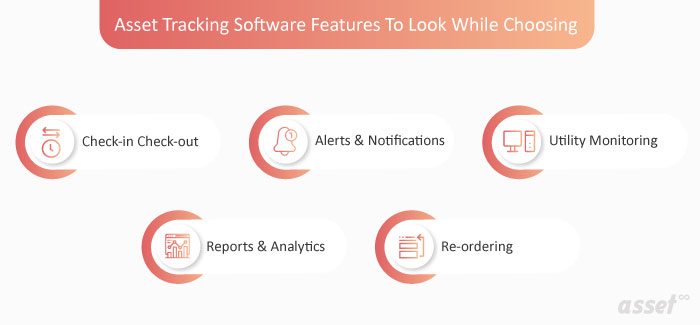
1. Check-In Check-Out
This feature helps protect your assets from theft or misplacement. It improves accuracy and reduces the time spent handing out and receiving assets. With search, you can find an asset by its name, tag, serial number or the person holding it.
This feature is especially useful for organizations with many assets, such as construction companies and warehouses. Good systems let you check several assets in or out at once.
2. Alerts & Notifications
Alerts and notifications are very handy for asset maintenance. They remove the need to track asset maintenance by hand. With a large number of assets, tracking maintenance manually would be a daunting task.
This is one of the most valued features of an asset management system. Users do not have to worry about missed maintenance or manual record keeping, because asset management software takes care of it.
3. Utility Monitoring
A company monitors many kinds of equipment to keep things running smoothly. Some equipment can consume too much, so companies watch for overconsumption.
Utility monitoring collects detailed consumption information for selected utilities and flags supply points that use more than expected, so the responsible person can act.
4. Reports and Analytics
Asset tracking software helps firms reduce the burden of paperwork. Paper records let organizations capture only limited data about their assets.
Asset tracking software provides deep analytics and reports that give you wider knowledge of all your organization’s assets. Companies can then improve performance by fixing problems and identifying areas for improvement.
5. Re-ordering
Re-ordering matters most for stock. Stock has to be maintained for continued operations, especially at manufacturing units.
For this purpose, the user sets a reorder level, a specific stock quantity. When stock reaches that level, the software flags it for reordering, so nobody has to check stock manually.
Features That Pay for Themselves
These are some of the most basic and essential asset tracking software features to look for. They will help you save precious time and money.
Also Read: How Important is NFC Asset Tracking System for the Sports Industry?
With asset tracking, you will know exactly how many assets your organization has, how many need maintenance and what condition each is in. You can see whether every asset is contributing to productivity, and if one is not, you can remove it from the organization.
Frequently Asked Questions (FAQs)
1. How Do You Track an Asset?
To track an asset, a tag or label with a unique identifier is attached to it, and the asset is tracked through that identifier. Several techniques are available, such as barcodes, QR codes, RFID, NFC and GPS.
2. What Is the Difference Between Enterprise Asset Management & Asset Management Software?
Enterprise asset management is used to manage the asset lifecycle from procurement to disposal. It plays a crucial role in maintaining assets and in decision-making, and it gives an organization a complete view of its assets.
Asset management software provides current asset information. It centralizes the data so everyone is aware of the assets.
3. How to Choose the Best Asset Management Software?
To choose the best asset management software, first understand what asset management software is. Next, work out exactly what your organization requires. Only then will you be able to choose the right software.